
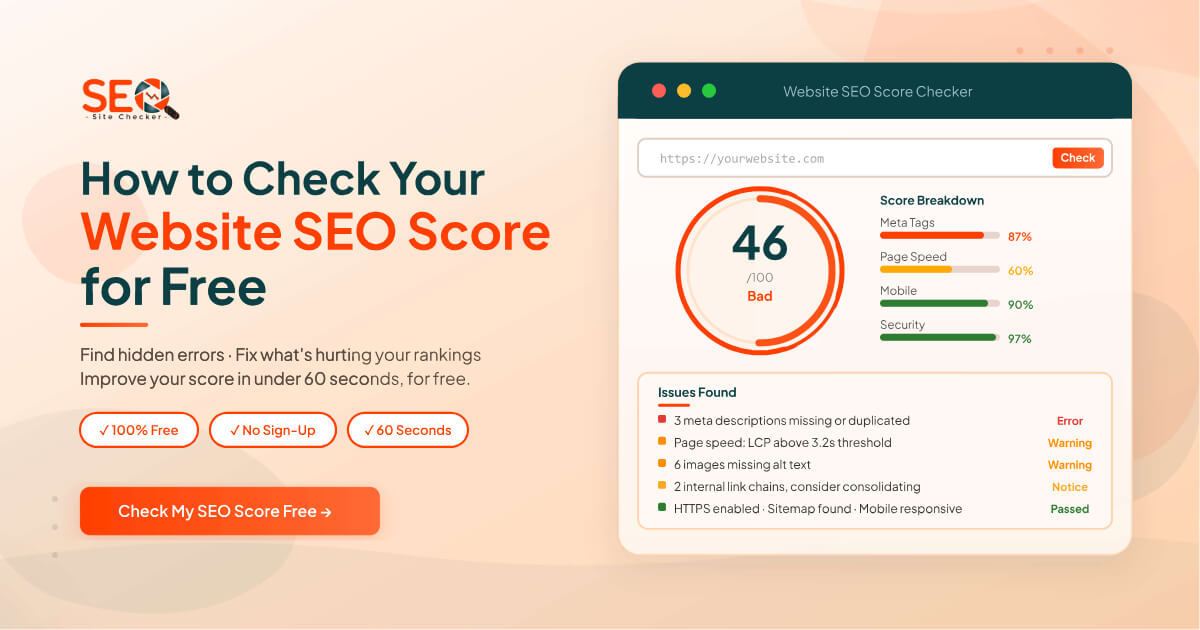
You've published blog posts, built out your service pages, and spent real time on your website. But traffic stays flat, your pages don't rank, and you can't figure out why. More often than not, the answer isn't your content, it's what's happening underneath it. Hidden technical errors, missing metadata, and slow load times silently block search engines from properly reading and ranking your site. The fastest way to surface those issues is to check your website SEO score for free and it takes under a minute.
This guide covers everything you need to know: what an SEO score is and what it actually measures, how to check yours for free right now, what a good score looks like across different industries, and a clear step-by-step plan to improve your number. Whether you're a total beginner or an experienced website owner who's never run a proper audit, this is the right starting point.
What Is a Website SEO Score?
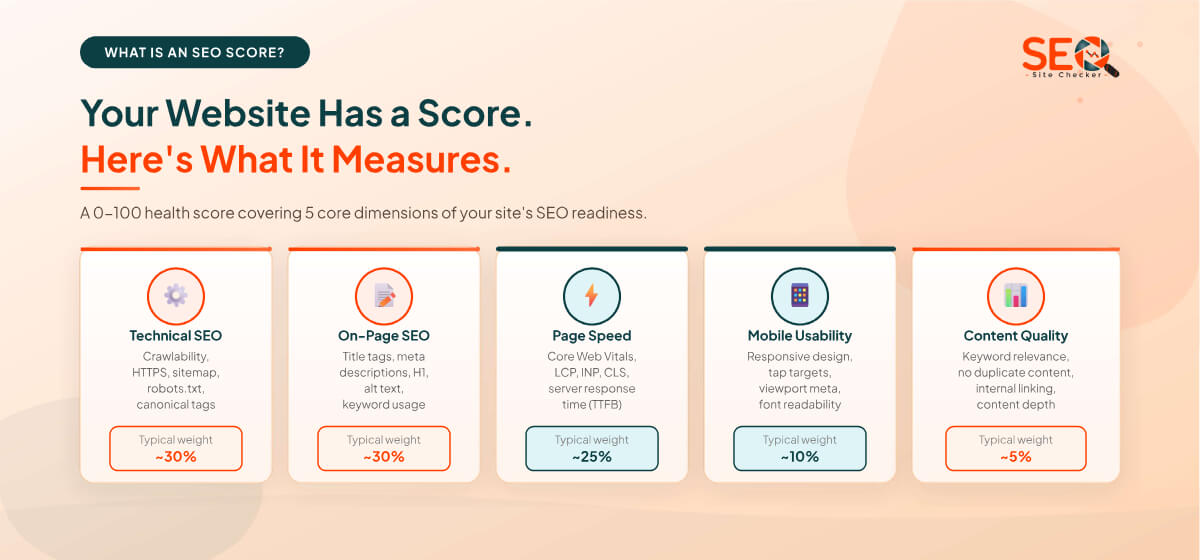
A website SEO score is a numerical measurement typically on a scale of 0 to 100 that represents how well your site is optimised for search engines. It's calculated by auditing the technical health of your pages, the quality of your on-page elements (like title tags, meta descriptions, and heading structure), your page speed, and your mobile usability. Some tools also factor in off-page signals like domain authority and backlink quality.
Think of it as a health check for your website. Just as a doctor's report tells you where your body is working well and where it needs attention, an SEO score tells you where your site is helping your rankings and where it's holding them back. A score near 100 means your site is technically clean, well-structured, and properly readable by search engines. A score below 50 usually means there are critical issues that need to be addressed before your content can compete.
What Does the SEO Score Actually Measure?
SEO scores are composite numbers built from dozens of individual checks. The five core categories that most tools assess are:
- Technical SEO health: Whether Google can access, crawl, and index your pages, robots.txt, XML sitemap, HTTPS, canonical tags, and redirect errors.
- On-page optimisation: The quality and presence of your title tags, meta descriptions, H1 headings, alt text, and keyword usage across each page.
- Page performance: Loading speed and Core Web Vitals. How fast your page loads, how stable the layout is, and how quickly it responds to interaction.
- Mobile usability: Whether your site displays and functions correctly on phones and tablets, a mandatory factor since Google moved to mobile-first indexing.
- Content quality signals: Appropriate keyword density, absence of duplicate content, sufficient content depth, and logical internal linking structure.
Is the SEO Score the Same Across All Tools?
No. Different SEO checkers use different methodologies, weight factors differently, and include different checks. You might score 78 on one tool and 84 on another for the same website, both can be correct within their own framework. What matters is not the exact number but the pattern of issues each tool surfaces and how that score changes over time as you make improvements. Use the same tool consistently so your measurements are comparable.
Why Should You Check Your Website SEO Score?
Running an SEO check is not just for large businesses or professional SEO agencies. Any website, a blog, a local service business, an e-commerce store or a personal portfolio benefits from knowing its baseline score. Here's why it matters:
- Find hidden issues that block your rankings. Many SEO problems are invisible to the naked eye. A missing canonical tag, a slow server response time, or a noindex tag accidentally left on a page can cost you rankings without you ever noticing. An SEO score check surfaces these immediately.
- Know what to fix first. Rather than guessing what needs improving, a scored audit prioritises your issues by severity, so you can focus your time on fixes that will move the needle most.
- Benchmark against competitors. You can run a free SEO check on any public website, not just your own. Checking a competitor's score shows you exactly where their weaknesses are and where you can outperform them.
- Track improvements over time. After making changes, re-running the check shows you whether your fixes worked and how much your score has moved. It turns SEO from guesswork into a measurable process.
- Catch regressions after site updates. A new WordPress theme, a plugin update, or a site migration can silently break things that were previously working. Checking your score after any major change helps you catch problems before they affect your traffic.
How Often Should You Check Your SEO Score?
At a minimum, run a free SEO check once a month on your key pages. You should also check immediately after any of the following:
- Publishing new content or adding new pages to your site
- Changing your website theme, template, or design
- Installing or updating plugins or modules
- Migrating to a new domain or hosting provider
- Running a Google algorithm update through your analytics and noticing a traffic drop
💡 Quick Rule: If your organic traffic drops unexpectedly, the first thing to do is run a fresh SEO score check. Technical issues are often the cause and they're the fastest category to fix.
How to Check Your Website SEO Score for Free
You can get a complete, detailed SEO score for your website in under 60 seconds with no account, no sign-up, and no cost. Here's how to do it using our free Website SEO Score Checker:
Step-by-Step: Using the SEO Site Checker
Step 1: Go to the Website SEO Score Checker
Open Website SEO Score Checker in your browser. No account is required, the tool is open and ready to use immediately.
Step 2: Enter your website URL
Type or paste the full URL of the page you want to check into the input field. Always include the full address with https:// at the start. You can check any page on your site, your homepage, a blog post, a product page, or a landing page.
Step 3: Click "Check SEO Score"
Hit the button and wait a few seconds. The tool scans the page, runs checks across dozens of SEO factors, and returns a full audit report.
Step 4: Read your overall score
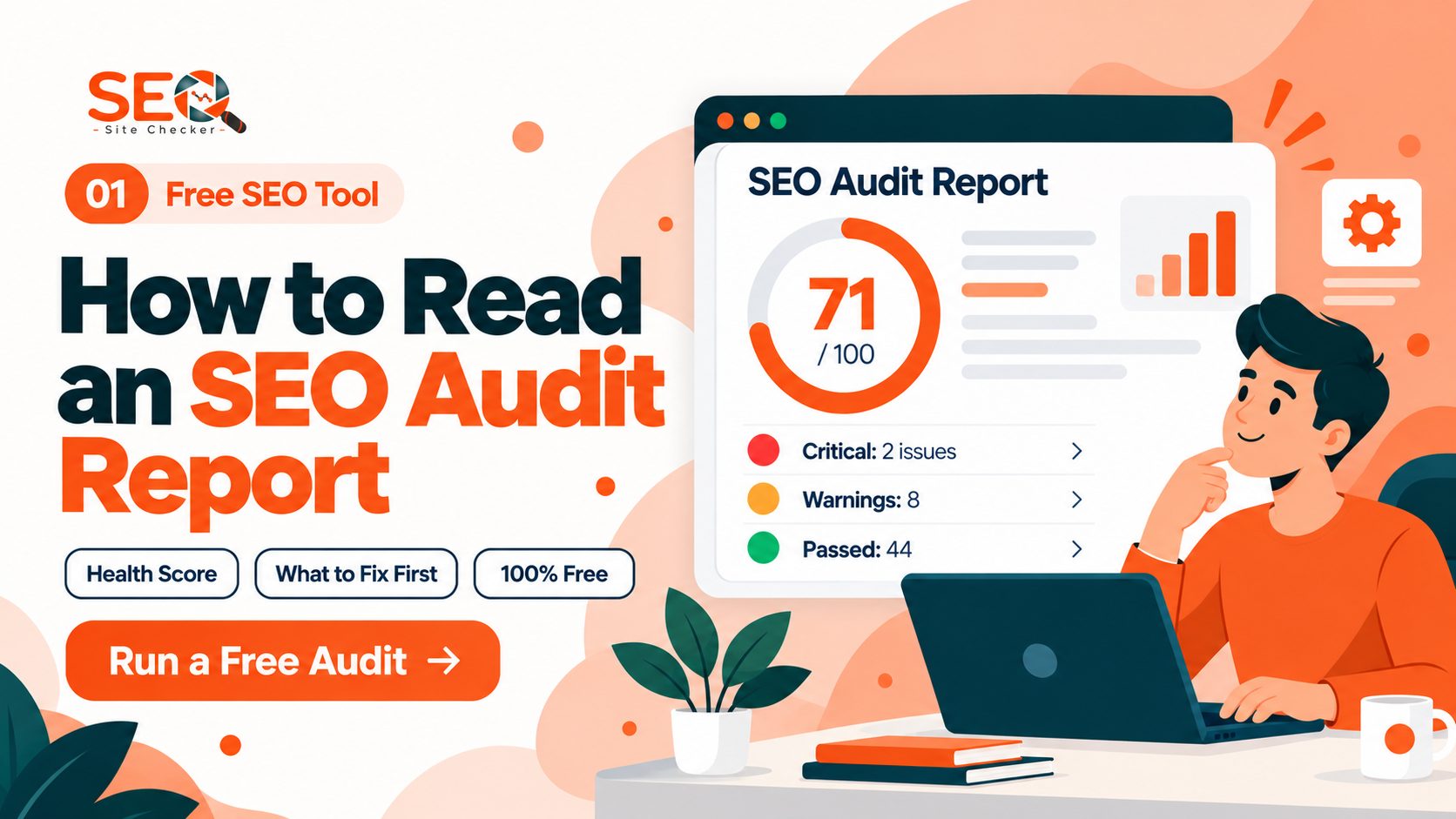
Your score appears at the top of the report on a 0-100 scale. The colour coding tells you at a glance where you stand:
🟢 70 and above: Your site is well-optimised. Keep monitoring for regressions.
🟡 50 to 69: There are noticeable issues worth addressing. Fixes here will likely improve rankings.
🔴 Below 50: Critical errors are present. These need immediate attention and are actively limiting your visibility.
Step 5: Review the detailed breakdown by category
Below your overall score, the report breaks down your performance by category: meta tags, page speed, mobile, security, headings, and more. Each issue is labelled by severity, Errors (critical, fix immediately), Warnings (important, fix soon), and Notices (optional improvements). Start with the Errors, fixing even 2 or 3 critical issues can move your score significantly.
Step 6: Export or save your results
Once you've reviewed your report, copy the key issues to a working document or use the export option to save your results. This gives you a reference point to track improvement over time. When a client or teammate needs the findings too, a client-ready SEO report you can download as a PDF saves you from retyping them.
📌 No account needed. No credit card. No limits.
Enter any public URL and get your full SEO report quickly for free.
You can also check a competitor's website by entering their URL.
What the Results Show You
The report you receive covers:
- Overall SEO score (0-100) with a pass/fail summary
- Section-by-section scores for meta tags, headings, speed, mobile, security, and links
- A prioritised issue list showing exactly what's wrong and why it matters
- Passed checks so you can see what's already working well, not just what's broken
What Is a Good SEO Score?
A good SEO score is generally considered to be 70 or above on a 0-100 scale. A score in the 90s places your site in the top tier of technically optimised websites. Scores below 50 indicate significant problems that are actively limiting your ability to rank and should be treated as urgent priorities rather than background tasks.
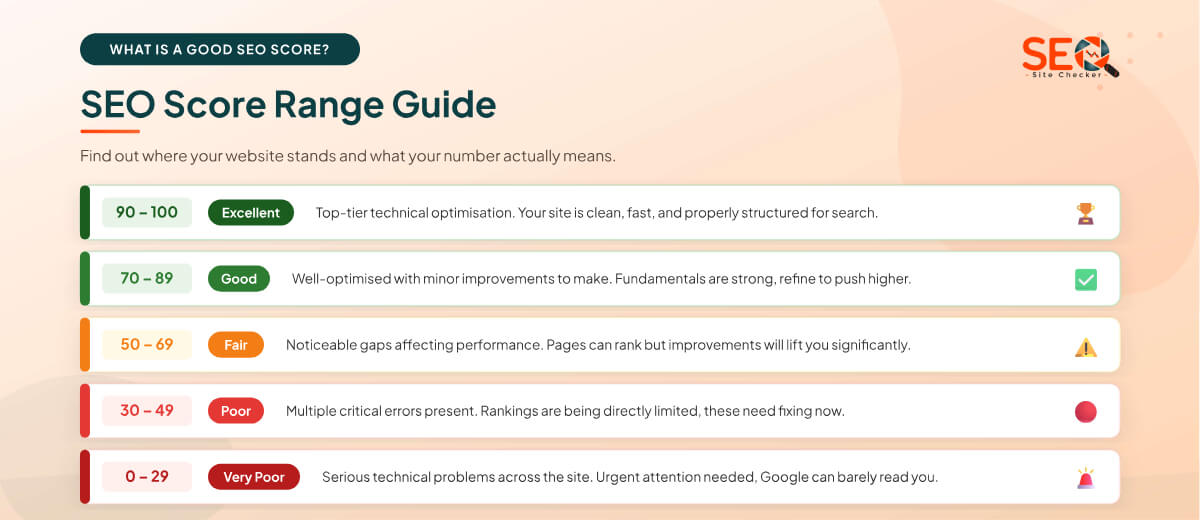
| Score Range | Rating | What It Means |
| 90 - 100 | Excellent | Top-tier optimisation. Only marginal improvements possible. |
| 70 - 89 | Good | Well-optimised. Minor issues to address but fundamentals are strong. |
| 50 - 69 | Fair | Noticeable gaps. Pages can rank but improvements will lift performance. |
| 30 - 49 | Poor | Multiple critical errors. Rankings are being directly limited. |
| 0 - 29 | Very Poor | Serious technical problems. Urgent attention needed across the site. |
Does Google Use an SEO Score?
No. Google does not publish, calculate, or use any third-party SEO score metric. The scores you see in tools like SEO Site Checker, SEMrush, or Ahrefs are each tool's own representation of how well your site aligns with known ranking factors. Google uses its own internal signals and machine learning algorithms, but consistently improving your SEO score means you're consistently improving alignment with those signals.
The practical implication: don't obsess over hitting a specific number. A site with a score of 82 that is improving month over month will almost always outperform a site with a static score of 90 that hasn't been touched in a year. Trajectory matters more than the absolute number.
What Factors Affect Your Website SEO Score?
SEO scores are built from dozens of individual checks. Understanding what's being measured helps you prioritise fixes intelligently. Here are the three main categories:
On-Page SEO Factors
These are the elements within your page's HTML that communicate its content and purpose to search engines:
- Title tag: Every page must have a unique title tag under 60 characters that includes the page's target keyword. Missing or duplicate titles are one of the most common score-killers.
- Meta description: A compelling 150-160 character summary that encourages clicks from search results. Not a direct ranking factor, but it affects your click-through rate, which indirectly signals relevance to Google.
- H1 tag: Every page should have exactly one H1 heading that clearly states the page's topic and includes its primary keyword. Multiple H1s or missing H1s both depress your score.
- Heading structure (H2-H6): A logical hierarchy of subheadings that helps both users and crawlers understand your content's structure.
- Image alt text: Descriptive text for every image, required for accessibility and for telling search engines what your images show.
- Keyword usage: Natural, appropriate keyword density throughout your content, present enough for relevance, but never stuffed.
- Internal links: Links between your own pages distribute authority and help Google discover all your content. Pages with no internal links pointing to them are often missed entirely during crawling.
Technical SEO Factors
These are the behind-the-scenes elements that determine whether search engines can access, read, and properly process your site:
- HTTPS / SSL: Google confirmed HTTPS as a ranking signal in 2014. An insecure (http://) site scores lower and receives a "Not Secure" warning in most browsers, which reduces user trust.
- Crawlability: Your robots.txt file controls what search engines are allowed to crawl. Misconfigured robots.txt files can accidentally block Google from your most important pages.
- XML sitemap: A properly formatted and submitted sitemap tells search engines where all your important pages are, helping them get indexed faster.
- Canonical tags: Tell search engines which version of a URL is the "official" one, essential for preventing duplicate content penalties.
- Page speed: Core Web Vitals: LCP, INP, and CLS are part of Google's Page Experience signal. Slow pages score lower and rank lower, especially on mobile.
- Mobile-friendliness: Google indexes the mobile version of your site first (mobile-first indexing). A site that doesn't work well on phones is at a significant disadvantage.
- Broken links: Internal 404 errors waste your crawl budget and create a poor user experience both of which negatively affect your score.
Off-Page and Authority Signals
Some tools incorporate these metrics into an extended score or separate authority section:
- Domain authority / trust score: A representation of your site's overall reputation based on the quality and quantity of websites linking to it.
- Backlink profile: The number, quality, and diversity of external websites pointing to yours.
- Toxic link detection: Identifying spammy or harmful backlinks that could be triggering a manual or algorithmic penalty.
📌 The most important thing to understand: on-page and technical factors are entirely within your direct control. You can improve them today. Off-page authority takes time and ongoing effort but it starts with a technically clean site.
How Page Speed Affects Your SEO Score
Page speed is one of the most impactful and most overlooked components of an SEO score. Google officially confirmed page speed as a ranking factor for desktop in 2010 and for mobile in 2018. Since the Page Experience update in 2021, Core Web Vitals became a formal part of how Google evaluates page quality.
The three Core Web Vitals Google measures are:
- LCP: Largest Contentful Paint: How long it takes for the main visible content of a page (your hero image or largest text block) to fully load. Google's target is under 2.5 seconds.
- INP: Interaction to Next Paint: How quickly the page responds after a user clicks, taps, or types. A good INP score is under 200 milliseconds.
- CLS: Cumulative Layout Shift: How much the page's layout unexpectedly shifts while loading for example, buttons jumping around before the page fully renders. A good CLS score is under 0.1.
A site can score impressively on content and metadata but lose significant points on technical SEO because of speed. When your Core Web Vitals are poor, it's often not your images or your code that's the root cause, it's your hosting infrastructure.
Why Your Hosting Provider Matters for SEO
Server response time also called TTFB (Time to First Byte) is how long a browser has to wait before it receives the first byte of data from your server. A high TTFB directly inflates your LCP time, which drags down both your Core Web Vitals scores and your overall SEO score.
Shared hosting environments (where your website shares server resources with hundreds of other sites) consistently produce higher TTFB values than dedicated or cloud hosting, especially during traffic spikes. If your SEO score is being held back by speed metrics and you've already optimised your images and code, your hosting plan may be the limiting factor. We've written a detailed guide on how your hosting speed affects Google rankings and a direct comparison of cloud vs. shared hosting for SEO if you'd like to explore that further.
The practical takeaway: before spending hours trying to manually compress JavaScript files or configure caching, run your free SEO score check first. If speed is flagged as a critical issue and your TTFB is above 600ms, upgrading your hosting tier will deliver more improvement per pound/dollar than any code change.
⚡ Speed Fix Priority Order:
1. Compress and convert images to WebP format
2. Enable GZIP compression on your server
3. Enable browser caching
4. Minimise render-blocking scripts
5. If TTFB is above 600ms, evaluate your hosting plan
How to Improve Your Website SEO Score: Step by Step
Running the check is the easy part. The real value comes from acting on what it tells you. Here's a structured approach to improving your score, starting with the fixes that have the highest impact and working down through the layers.
Start With the Errors, Not the Warnings
Your report will classify issues into three levels of severity: Errors (critical), Warnings (important but not urgent), and Notices (optional improvements). The natural instinct is to address everything at once, resist it. Start exclusively with red Errors. These are the issues most likely to be directly limiting your rankings, and fixing them first gives you the fastest measurable improvement in your score.
Step 1: Fix crawling and indexing errors
Before any content can rank, Google needs to be able to find and read it. Check your robots.txt file to make sure it's not accidentally blocking Googlebot from key pages. Verify your XML sitemap is correctly formatted and has been submitted through Google Search Console. Check for any pages that have a noindex tag that shouldn't, this is a surprisingly common mistake after WordPress theme changes or plugin updates.
Step 2: Optimise every page's title tag and meta description
Missing or duplicate title tags are among the most frequently flagged Errors in SEO audits. Every page on your site needs a unique title tag under 60 characters that includes the page's primary keyword. Every page also needs a meta description between 150 and 160 characters that gives users a compelling reason to click. Pages without these are leaving both rankings and click-through rates on the table.
Step 3: Fix broken internal links and redirect chains
Broken internal links (links that lead to 404 pages) waste your crawl budget, meaning Google stops exploring your site earlier than it should. Redirect chains (where page A redirects to B which redirects to C) slow down your page load time and dilute link equity. Both issues appear in your SEO report as Errors. Fix 404s by updating the link destination, and clean up chains by pointing links directly to the final destination URL.
Step 4: Improve page speed and Core Web Vitals
If speed is flagged as a critical issue, prioritise these fixes in order:
- Compress images: Use WebP format where possible. Unoptimised images are the single biggest cause of slow LCP scores.
- Enable GZIP or Brotli compression: Reduces the size of files transferred between your server and the browser.
- Enable browser caching: Allows returning visitors' browsers to load your page without re-downloading static assets.
- Defer render-blocking JavaScript: Scripts that load in the delay page rendering. Defer or async-load where possible.
- Review your hosting: If your TTFB is above 600ms after the above fixes, your server response time is the bottleneck and hosting is the cause. See our guide on how hosting speed affects Google rankings for the full breakdown.
Step 5: Confirm your site is mobile-friendly
Google indexes the mobile version of your site first, so mobile issues directly affect your desktop rankings too. Use Google's Mobile-Friendly Test to confirm your pages render correctly on small screens, tap targets are appropriately sized, text isn't too small to read, and content doesn't overflow horizontally. Fix any issues flagged and re-run your SEO score check.
Step 6: Add alt text to all images
Alt text is the descriptive text applied to images via the alt="..." HTML attribute. It serves two purposes: it tells screen readers what an image shows (accessibility), and it tells search engines what the image is about (SEO). Any image without alt text is a missed opportunity and a flagged warning in most audits. Add descriptive, keyword-relevant alt text to every image on your site.
Step 7: Strengthen your internal linking structure
Pages with no internal links pointing to them, sometimes called “orphan pages” are difficult for Google to discover and rank. After an audit, identify your most important pages and make sure they're linked to from at least 2-3 other pages on your site. Use descriptive anchor text (the clickable words in the link) that reflects what the linked page is about.
Step 8: Re-check your score after every round of fixes
After completing a set of fixes, run a fresh free website SEO score check to see how much your score has moved. This closes the feedback loop and shows you exactly which fixes had the most impact. Aim to repeat this monthly as an ongoing maintenance practice, not a one-off task.
📈 Realistic Timeline: Fixing meta tags, broken links, and alt text can lift your score within hours.
Speed improvements take 1-7 days to implement. Ranking impact from score improvements
typically appears in Google's results within 4-12 weeks depending on competition and crawl frequency.
Free Tools to Check Your Website SEO Score
There are several free options available for checking your SEO score and running a site audit. Each tool has a slightly different focus, knowing which does what helps you use them as a complementary set rather than picking just one.
| Tool | Free? | Checks / Limits | Account Needed | Primary Focus |
| SEO Site Checker | ✅ Yes | Unlimited | No | On-page + Technical SEO |
| Semrush Site Audit | ✅ Yes | 3 pages/day free | Optional | On-page + Technical |
| Seobility | ✅ Yes | 1 full crawl free | No | Full site crawl |
| Google PageSpeed | ✅ Yes | Unlimited | No | Speed / Core Web Vitals |
| Google Search Console | ✅ Free | Unlimited | Yes (your site) | Coverage + Rankings |
| Ahrefs Webmaster Tools | ✅ Free | Your sites only | Yes | Backlinks + Technical |
For the most complete picture, combine three tools: a free on-page checker for SEO score (like ours), Google PageSpeed Insights for granular speed data, and Google Search Console for indexing coverage and actual search performance data. Each fills a blind spot the others don't cover.
Our Website SEO Score Checker covers all major on-page and technical factors in a single scan with no account, no daily limits, and no credit card. It's the simplest and fastest starting point for a complete free SEO check on any public URL.
SEO Score vs. Domain Authority vs. Domain Rating: What's the Difference?
These three metrics are often confused because they're all presented as scores on a 0-100 scale and they all relate to SEO. But they measure completely different things, and mixing them up leads to poorly prioritised work.
SEO Score (0-100): What our checker measures. It reflects the on-page and technical health of a specific page or your site as a whole. Factors include title tags, meta descriptions, page speed, mobile-friendliness, and crawlability. It is entirely within your direct control and can be improved immediately.
Domain Authority: DA (Moz, 1-100): A metric created by Moz that predicts how likely a domain is to rank in search results based on the quality and quantity of websites linking to it. High DA = strong backlink profile. It has no direct connection to on-page quality and cannot be improved quickly.
Domain Rating: DR (Ahrefs, 0-100): Ahrefs' equivalent of Domain Authority. Also backlink-based. A site with DR 70 has an impressive external link profile built over time. Like DA, it can't be manufactured quickly.
📌 Key Takeaway:
SEO Score = on-page and technical health → fix it today
Domain Authority / Domain Rating = backlink strength → build it over time
A site with a great SEO score and low DA can still outrank a high-DA competitor
on specific keywords, especially long-tail and local queries.
How to Read and Understand Your SEO Score Report
Getting a score is one thing knowing what to do with the report is another. Here's how to read it without getting overwhelmed.
The overall score is a summary, not the full story. A score of 65 doesn't tell you whether you have one severe error or a dozen minor ones. Always read the detailed breakdown below the headline number to understand what's driving it down.
Each sub-score tells a separate story. A site can score 90 on meta tags but 40 on page speed, producing a middling overall score. Knowing which category is weakest tells you exactly where to focus. Meta tag issues are quick wins. Speed issues take more effort but often have larger ranking impact.
The four report categories to focus on:
- 🔴 Errors: Fix these immediately. They are confirmed problems that are actively preventing your site from performing as well as it should.
- 🟠 Warnings: Fix these in your next maintenance window. They're not emergencies but they're meaningful.
- 🟡 Notices: Optional improvements. Address these once Errors and Warnings are resolved.
- 🟢 Passed: What's already working. Keep these maintained and don't accidentally break them during site updates.
As a practical rule: even if your overall score seems reasonable, always scroll through the full Errors list. A single critical error, like all your pages being accidentally set to noindex, can be catastrophic for rankings while barely showing in the overall score.
How Long Does It Take to Improve Your SEO Score?
This is one of the most common questions and the honest answer is that it depends on which issues you're fixing and how frequently Google crawls your site. Here's a realistic breakdown:
| Fix Type | Time to Implement | Time to Show in SEO Score | Time to Affect Rankings |
| Meta tags (titles, descriptions) | Minutes to hours | Immediately on next check | 2-6 weeks |
| Alt text on images | Hours | Immediately on next check | 2-4 weeks |
| Broken link fixes | Hours | Immediately on next check | 2-6 weeks |
| Crawl / indexing errors | Hours | After Google recrawls (days-weeks) | 4-8 weeks |
| Image compression / speed | 1-2 days | After Google recrawls | 4-10 weeks |
| Hosting upgrade (TTFB) | 1 day | After Google recrawls | 4-12 weeks |
| Mobile-friendliness | 1-5 days | After Google recrawls | 4-12 weeks |
| Building internal links | Ongoing | Gradually over weeks | 8-16 weeks |
The key principle: your SEO score updates immediately when you re-run the check after fixing something. Google's rankings take longer because Googlebot needs to re-crawl your updated pages and re-evaluate them against competitors. Don't get discouraged if you don't see ranking movement in the first two weeks after major fixes, the groundwork is being laid.
The most important habit: make your free SEO score check a monthly routine. Track your score in a simple spreadsheet with the date and your overall score. Over 6 months, the trend line will tell you more than any individual data point.
Start Checking Your SEO Score for Free Today
Your website's SEO score gives you something most website owners never have: a clear, measurable, prioritised view of exactly what's working and what's holding your rankings back. It removes the guesswork from SEO and replaces it with a specific list of things to fix, ranked by their impact on your visibility in search results.
Whether your score comes back at 88 or 42, the process is the same: read the report, address the Errors first, work through the Warnings, and re-check. Small consistent improvements compound. A site that goes from 52 to 70 over three months doesn't just have a better score. It has more indexed pages, faster load times, cleaner metadata, and a measurably better shot at ranking for every keyword it targets.
The check itself takes under 60 seconds and costs nothing. There's no reason to delay.
→ Check Your Website SEO Score Free Now - No account. No credit card. No limits.
Frequently Asked Questions
Frequently Asked Questions (FAQs) is a list of common questions and answers provided to quickly address common concerns or inquiries.
What is a website SEO score?
A website SEO score is a 0-100 numerical measurement of how well your site is optimised for search engines. It analyses factors including title tags, meta descriptions, page speed, mobile-friendliness, crawlability, and internal linking. A higher score indicates better technical and on-page optimisation, which generally supports stronger rankings in Google and other search engines.
How do I check my website SEO score for free?
Go to our free Website SEO Score Checker, enter your website URL, and click "Check SEO Score." The tool scans your page and returns a full audit report in seconds, no account, no sign-up, no credit card required. You can check your homepage, any blog post, or any public URL including competitor websites.
What is a good SEO score?
A good SEO score is generally 70 or above on a 0-100 scale. Scores of 90 or higher indicate top-tier technical optimisation. Scores below 50 signal significant issues likely holding your rankings back. Rather than targeting a specific number, focus on consistent improvement, a rising score month over month is a strong indicator that your SEO health is improving.
Does Google have an SEO score?
No. Google does not publish or use any third-party SEO score metric. SEO scores are generated by tools to represent how well your site aligns with known ranking factors. Google uses its own internal algorithms, but improving your SEO score means improving alignment with the signals Google is known to reward, so the two correlate well in practice even if they're not directly linked.
How do I improve my website's SEO score?
Start by fixing critical Errors first crawl issues, missing title tags, and broken links have the highest impact per fix. Then address Warnings: page speed, missing alt text, and mobile usability. After completing each round of fixes, re-run the free check to measure progress. Consistent monthly checks with incremental improvements will compound into significant score gains over time.
How does page speed affect my SEO score?
Page speed is a confirmed Google ranking factor and a major component of most SEO scores. Slow sites score lower due to poor Core Web Vitals - LCP (loading speed), INP (interactivity), and CLS (layout stability). The most common causes are unoptimised images, render-blocking scripts, and slow server response times (TTFB). Hosting quality is often the root cause of persistently high TTFB scores. We cover this in detail in our guide on how hosting speed affects Google rankings.
Can I check a competitor's SEO score?
Yes. Our free SEO checker accepts any public URL, not just your own site. Checking a competitor's score helps you identify technical and on-page weaknesses they haven't addressed, and lets you benchmark your own performance against sites that are currently outranking you. Enter any competitor's URL at Website SEO Score Checker to get their full report.