Meta Tag Analyzer: Improve Your On-Page SEO in Minutes
 Kendall Chris
Mar 08 /
6 months ago
Kendall Chris
Mar 08 /
6 months ago

Introduction
You've spent hours crafting the perfect blog post or web page. The content is great, the images look sharp, and you've done your keyword research. But here's the thing, if your meta tags are missing, too long, or poorly written, Google might never show that page to anyone.
Most website owners don't realise their meta tags are broken until it's already costing them traffic. There's no error message on the page, no visible sign that anything's wrong. The damage happens silently, in the background, every time a search engine crawls your site and finds incomplete or misconfigured tags.
That's exactly the gap a meta tag analyzer fills. In a matter of seconds, it scans any web page and gives you a clear, plain-English breakdown of what's right, what's wrong, and what needs to be fixed. No coding knowledge required. No digging through source code. Just enter a URL and get your answers.
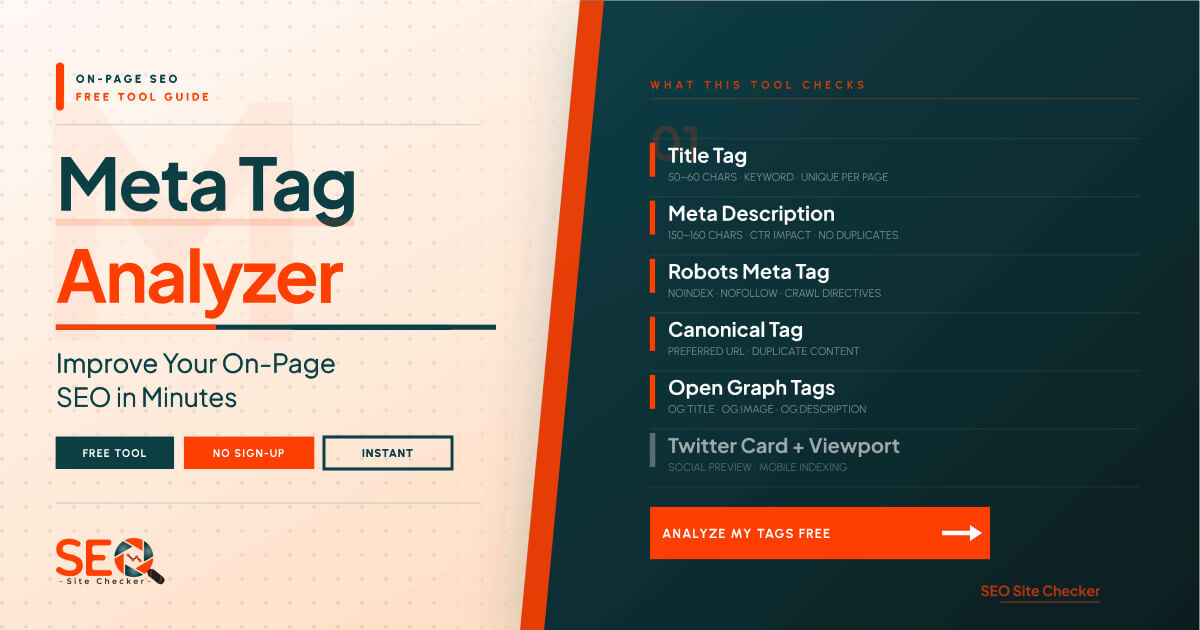
In this guide, we're going to cover everything you need to know what meta tags are, why they still matter enormously for SEO in 2026, what a meta tag analyzer actually checks, how to use one step by step, and how to avoid the most common errors that are quietly killing rankings for thousands of websites every day.
Ready to find out what's really going on with your meta tags? Start with our free Meta Tag Analyzer tool, no sign-up needed, completely free, results in seconds.
What Is a Meta Tag Analyzer?
A meta tag analyzer is a free online tool that scans any web page and audits its meta tags including the title tag, meta description, robots tag, canonical tag, and social media tags to identify SEO errors and optimization opportunities. Think of it as a fast, automated quality check for one of the most important but most overlooked parts of your website.
Here's what happens when you run a meta tag analysis:
- The tool reads the HTML source code of the URL you enter
- It extracts all meta tag data sitting inside the section of the page
- It evaluates each tag against current SEO best practices
- It flags issues like missing tags, text that's too long or too short, duplicate tags, and misconfigured robots settings
- It displays everything in a clean, easy-to-read format, no HTML knowledge needed
A meta tag analyzer is useful for virtually anyone with a website. Bloggers can use it to make sure their posts are properly optimized before publishing. Small business owners can check whether their homepage is set up for search visibility. Web developers can run quick audits after a site build or migration. SEO professionals use it as part of routine on-page checks.
It fits into your broader SEO workflow as part of on-page optimization, the process of making individual web pages as easy as possible for search engines to understand and rank. You can explore a full suite of on-page tools in our free SEO tools collection, all completely free.
💡 Pro tip: Run a meta tag analysis on your most important pages first, homepage, top-traffic blog posts, and main service/product pages. These are where errors have the biggest impact.
Why Meta Tags Still Matter for SEO in 2026
Some people have heard that meta tags are outdated, a relic from early SEO days that modern search engines don't care about anymore. That's only partially true, and believing it fully is a mistake that can genuinely cost you rankings and traffic.
The reality is more nuanced. Some meta tags have indeed become irrelevant, the old meta keywords tag being the clearest example. But others remain central to how search engines crawl, index, rank, and display your pages. Here's why they still matter:
Meta Tags Speak to Two Different Audiences
Every meta tag you write serves two audiences simultaneously: the search engine crawlers that read your page's code, and the human users who see your page listed in search results.
For search engines, meta tags answer critical questions: What is this page about? Should it be indexed? Which version of this URL is canonical? Can it be cached? These answers directly influence how the page gets treated in the index.
For users, your title tag and meta description form the entire 'advertisement' for your page in Google's search results. It's the headline and summary that a searcher reads before deciding whether to click. That's a lot of SEO weight sitting in just a few lines of code.
Higher CTR: Without Changing Your Ranking
Here's a metric that often gets overlooked: click-through rate (CTR). Even if you rank in position #3 or #4 for a keyword, a well-crafted title tag and meta description can pull in more clicks than the result sitting above you.
Think about your own search behavior. When you scan results, you read the title and the description. If one of them is clearly more relevant, more compelling, or more trustworthy than the others, you click it, regardless of its exact position on the page. Optimizing your meta tags is one of the fastest ways to increase traffic without changing your ranking at all.
According to Google's official guidance on meta descriptions, while meta descriptions aren't a direct ranking factor, they can strongly influence whether a user clicks your result, making them one of the highest-leverage elements of on-page SEO.
The Tags That Still Carry Real Weight
Here's a quick rundown of the key meta tags and their current relevance:
- Title tag: A confirmed direct ranking factor. One of the most important on-page SEO elements.
- Meta description: Not a ranking signal, but directly impacts CTR and therefore traffic volume.
- Robots meta tag: Controls whether Google crawls and indexes the page. Getting this wrong is catastrophic.
- Canonical tag: Prevents duplicate content penalties. Essential for e-commerce and large content sites.
- Open Graph / Twitter Card tags: Control how pages appear when shared on social media, affecting click rates from social traffic.
- Viewport meta tag: Required for mobile responsiveness, which is a confirmed Google ranking factor.
The 7 Key Meta Tags a Meta Tag Analyzer Checks
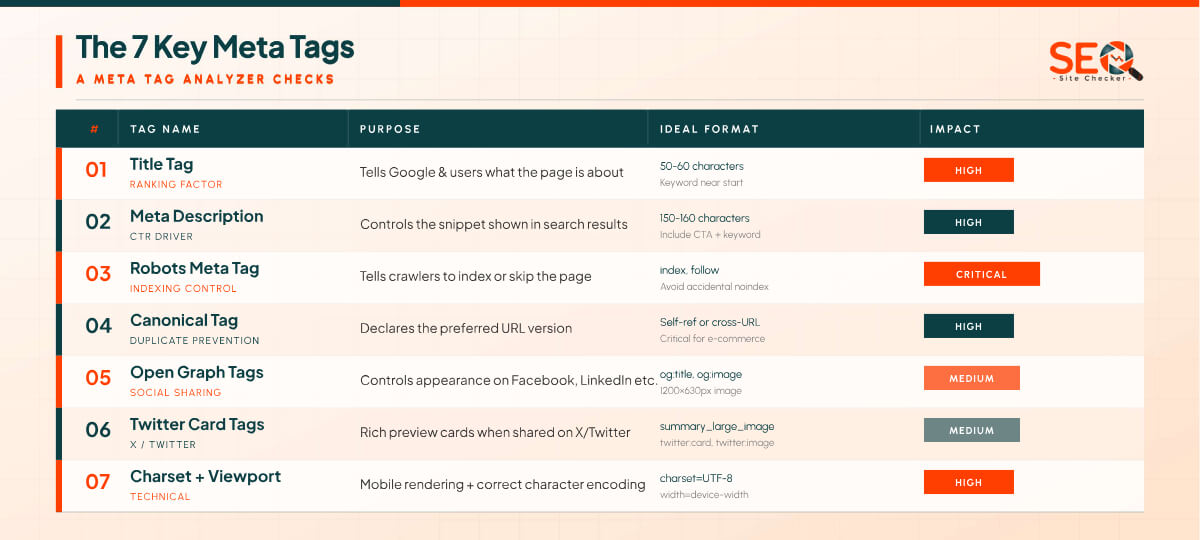
A good meta tag analyzer doesn't just check one or two tags, it audits your entire set of page-level meta elements in one scan. Here's a breakdown of the seven key tags it examines and exactly what it looks for in each one.
1. Title Tag
The title tag is the single most important meta element on any web page from an SEO standpoint. It's the blue, clickable headline that appears in Google's search results and in the browser tab when someone opens your page. It's also one of the strongest on-page ranking signals Google uses to understand what your page is about.
According to Moz's guide to title tags, your title tag should ideally be between 50-60 characters. Anything longer gets truncated in search results, the user sees an incomplete title that ends with an ellipsis, which can hurt credibility and reduce click-throughs.
When a meta tag analyzer scans your title tag, it checks for:
- Title missing entirely (surprisingly common, especially after CMS migrations)
- Title exceeding 60 characters (gets cut off in SERPs)
- Title under 30 characters (too short to be descriptive or keyword-rich)
- Duplicate title tags found on multiple pages of the same site
- Target keyword absent from the title
💡 SEO tip: Place your primary keyword as close to the beginning of the title tag as possible. Searchers and search engines both give more weight to words that appear early.
2. Meta Description
The meta description is the short paragraph that appears beneath your title in search results. While it's not a direct ranking factor, it is one of the biggest levers you have for improving click-through rates and a higher CTR can indirectly improve your ranking over time through better engagement signals.
Best practice is to keep meta descriptions between 150-160 characters. Google typically truncates anything beyond this length in desktop results. Your description should summarize the page clearly, include your target keyword naturally, and end with a soft call to action that gives the reader a reason to click.
Common issues a meta tag analyzer flags for descriptions:
- Missing description: Google auto-generates a snippet, which is often a poor representation of the page
- Too short (under 70 characters): doesn't give searchers enough context
- Too long (over 160 characters): gets cut off mid-sentence in SERPs
- No target keyword included
- Duplicate descriptions shared across multiple pages
If you need to create a brand-new meta description from scratch, our Meta Tag Generator makes it easy to build perfectly formatted, SEO-ready tags without any coding knowledge.
3. Robots Meta Tag
The robots meta tag controls whether search engines are allowed to crawl and index a specific page. It sits quietly in the code invisible on the page itself, but it's one of the most powerful tags on your site. Set it wrong and you can accidentally hide an entire page from Google.
The most common values are:
- index, follow: Default. Search engines can index the page and follow its links. Fine for most pages.
- noindex: Tells Google not to include this page in search results. Should be intentional.
- nofollow: Tells crawlers not to follow the links on this page.
- noarchive: Prevents Google from showing a cached version of the page.
A meta tag analyzer specifically flags any page with a noindex value, because this is one of the most damaging mistakes a website owner can make. During development or testing, noindex is often added intentionally. The problem is it gets forgotten and stays on live production pages, silently removing them from Google's index.
4. Canonical Tag
The canonical tag tells search engines which version of a URL is the 'official' one, the page you actually want ranked. It's most important on sites where the same content can be accessed through multiple different URLs, which is far more common than most people realise.
For example, these four URLs might all serve identical content on an e-commerce site:
- https://example.com/product-page
- https://example.com/product-page?ref=homepage
- https://example.com/product-page?color=red
- https://www.example.com/product-page
Without a canonical tag pointing to the preferred URL, search engines might split the ranking authority across all four versions or flag the pages as duplicate content and penalize them. A meta tag analyzer checks whether a canonical tag exists, and whether it's pointing to the correct target URL rather than an incorrect or missing destination.
5. Open Graph Tags (og:title, og:description, og:image)
Open Graph tags are meta elements that control how your pages appear when shared on Facebook, LinkedIn, Pinterest, and other social platforms. Without them, these platforms pull whatever content they can find from the page, which often results in a random image, a truncated title, or no preview at all.
The key Open Graph tags to have in place are:
- og:title: The title displayed in the social share card (can differ from your SEO title tag)
- og:description: A short description shown in the card (up to ~200 characters)
- og:image: The image displayed in the card (1200×630px is the recommended size)
- og:url: The canonical URL being shared
- og:type: The content type (website, article, product, etc.)
A meta tag analyzer checks whether all of these are present and correctly formatted. Missing OG tags are particularly impactful for content marketing, a blog post with a compelling OG image and description can generate significantly more social engagement than one without.
6. Twitter Card Tags
Twitter Card tags are similar to Open Graph tags but are specifically designed for how your content appears when shared on Twitter/X. Without them, shared links show up as plain text URLs, no image, no description, no visual context.
The most common Twitter Card type is the 'summary_large_image' card, which displays a large hero image alongside your title and description. These cards consistently outperform plain text links in terms of engagement, clicks and reshares.
A meta tag analyzer checks for the presence of 'twitter:card', 'twitter:title', 'twitter:description', and ‘twitter:image’, flagging any that are missing or incomplete. Since these tags don't affect Google rankings directly, they're easy to overlook, but they can significantly impact your social media traffic.
7. Meta Charset and Viewport Tags
These two tags are often described as ‘technical’ but their SEO impact is very real, especially the viewport tag.
The charset tag () ensures that your page's text renders correctly across all browsers and for all languages and character sets. Without it, special characters and non-Latin text can display as garbled symbols.
The viewport tag () ensures your page scales correctly on mobile devices. This is directly tied to Google's mobile-first indexing. the system by which Google predominantly uses the mobile version of your site for ranking. A missing viewport tag means poor mobile experience, which means lower rankings.
A meta tag analyzer checks for both of these and flags their absence. They're small tags with an outsized impact on technical SEO performance.
Common Meta Tag Errors And How to Fix Them
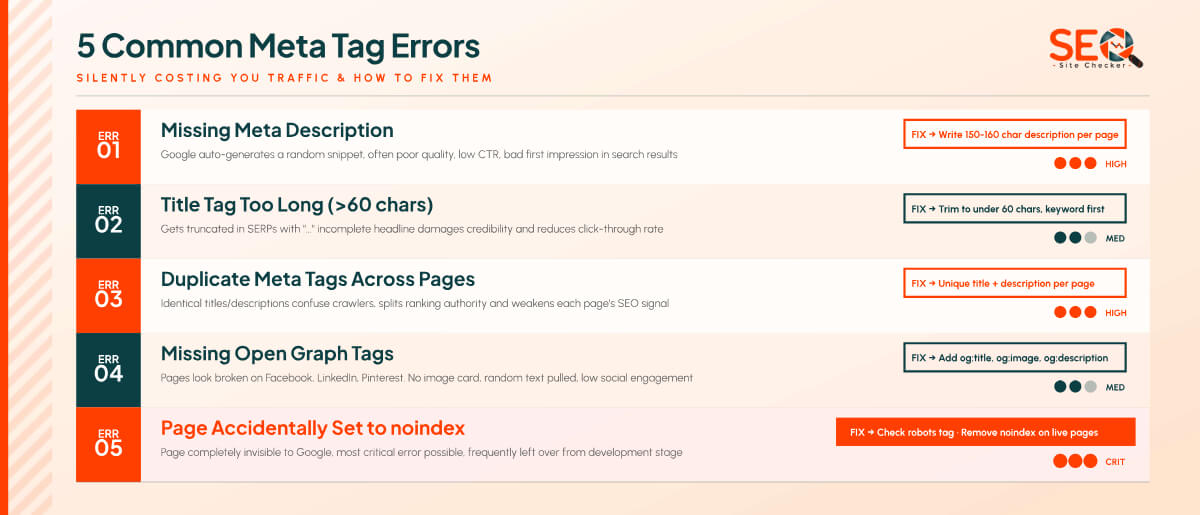
Understanding what a meta tag analyzer checks is one thing. Knowing what to do when it flags a problem is where the real value is. Here are the five most common meta tag errors found during audits and exactly how to fix each one.
Error #1: Missing Meta Description
This is the most frequently found issue across all types of websites, from brand-new blogs to established e-commerce stores. It's especially common on older sites that were built before SEO was a priority, and on pages created quickly in a CMS without filling in the SEO fields.
When a meta description is missing, Google doesn't leave the snippet blank. Instead, it auto-generates a snippet by pulling a random chunk of text from the page, usually the first paragraph, a navigation menu, or sometimes even a footer element. The result is often disconnected from the page's actual purpose and fails to drive clicks.
Fix: Write a custom meta description of 150–160 characters for every key page. Include your primary keyword naturally and give the reader a clear reason to click. If you're starting from scratch, our Meta Tag Generator can help you write perfectly formatted descriptions in seconds.
Error #2: Title Tag Too Long
When a title tag exceeds roughly 600 pixels in width (approximately 60 characters for standard text), Google truncates it in search results. The user sees a title that ends mid-sentence with “...” which looks unprofessional and can significantly reduce click-through rates. The beginning of the title, which never gets cut off, is where your keyword should always live.
Fix: Keep all title tags under 60 characters. Review your most important pages first homepage, top blog posts, product pages. Trim any titles that are running long by removing filler words and moving the brand name to the end (e.g., "Free Meta Tag Analyzer | SEO Site Checker" rather than "SEO Site Checker's Free Online Meta Tag Analyzer Tool").
Error #3: Duplicate Meta Tags Across Pages
Having multiple pages with identical title tags or meta descriptions is a surprisingly common problem, especially on sites built from templates or with programmatically generated pages. Search engines may treat duplicate titles as a signal that the pages serve the same purpose, which can reduce the authority of both.
This is particularly common on e-commerce sites where similar product variations (same product, different color or size) share the same title and description. A meta tag analyzer run across key pages of your site will surface any duplicates quickly.
Fix: Ensure every page on your site has a unique title tag and meta description. For programmatic pages, use dynamic variables (product name, category, location) to automatically generate unique meta content.
Error #4: Missing Open Graph Tags
Pages without Open Graph tags look broken or generic when shared on social platforms. Instead of a polished card with an image, title, and description, the platform either shows a plain URL or guesses at what to display, often choosing the wrong image or pulling irrelevant text.
Fix: Add og:title, og:description, og:image, og:url, and og:type to every page you want to perform well on social media. This is especially important for blog posts, product pages, and any content you actively promote through social channels.
Error #5: Page Accidentally Set to noindex
This is the most damaging error on this list and the most insidious, because the page looks completely normal to any human visitor. The noindex tag only speaks to search engine crawlers, and when they see it, they simply remove the page from the index.
This happens most often during website development, when noindex is intentionally added to prevent a staging site from being indexed. When the site goes live, the tag gets forgotten. It can also be accidentally introduced via a CMS setting or plugin.
Fix: Any time a page stops appearing in Google Search Console or drops completely from search results, run it through a meta tag analyzer immediately and check the robots tag. If you find an unintentional noindex, remove it and request reindexing in Google Search Console.
You can find the Meta Tag Analyzer alongside our full collection of on-page SEO tools in our Tags Tools collection.
How to Use a Meta Tag Analyzer: Step by Step
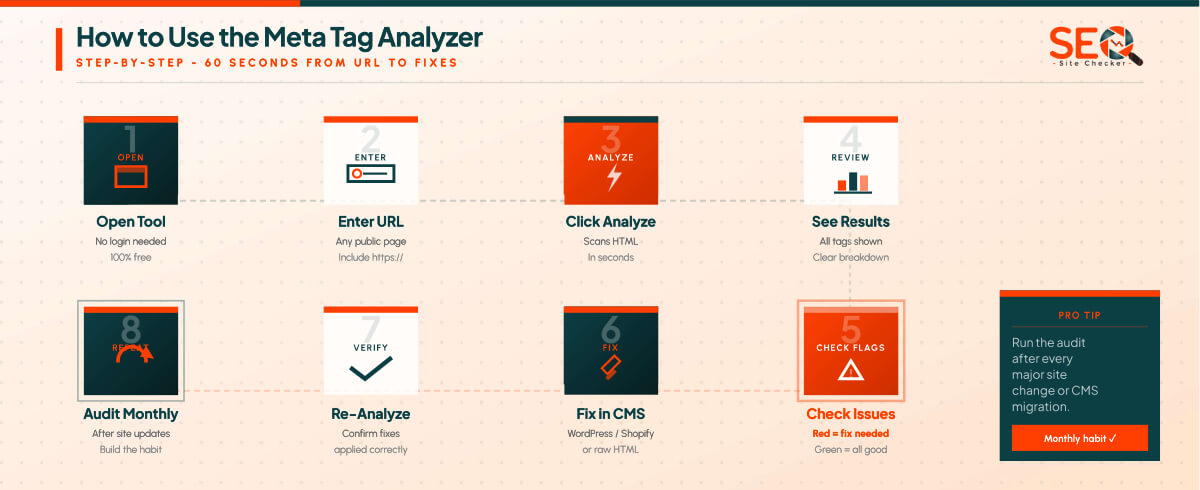
Using a meta tag analyzer takes less than a minute. Here's the exact process from start to fix:
- Go to the tool. Open the Meta Tag Analyzer tool on SEO Site Checker. No account, no sign-up, no payment required.
- Enter your URL. Type or paste the full URL of the page you want to analyze including the https://. This can be your homepage, a blog post, a product page, or any public URL.
- Click Analyze. The tool fetches the page's HTML source code and scans all meta tag data in the head section.
- Review your results. You'll see a complete breakdown of every detected meta tag, title tag, meta description, robots tag, canonical, Open Graph, Twitter Cards, charset, and viewport.
- Check flagged issues. Any tag with a problem will be clearly highlighted. Look for missing tags, character limit violations, duplicate content warnings, and noindex flags.
- Fix the issues. Go into your CMS (WordPress, Shopify, Wix, etc.) and update the relevant fields. If you're editing raw HTML, update the corresponding tags in the head section.
- Re-analyze. Run the tool again on the same URL to confirm your changes have been saved and are being read correctly.
- Audit all key pages. Don't stop at your homepage. Run the analyzer on your top blog posts, main service pages, product pages, and any page you actively want to rank.
💡 Pro tip: Run a full meta tag audit at least once a month, and always after a major site update, theme change, or CMS migration. These events can accidentally strip or overwrite meta tags without any visible indication on the front end of the site.
Meta Tag Best Practices: Quick Reference Guide
Getting your meta tags right is part art, part formula. Below is a practical reference guide you can bookmark and return to whenever you're creating or optimizing pages. Use it alongside the Meta Tag Analyzer tool to verify your implementation each time.
Title Tag Best Practices
- Keep title tags between 50-60 characters, anything longer gets truncated in Google results
- Place the primary keyword as early as possible in the title, search engines and users both give more weight to words at the beginning
- Use this proven formula: Primary Keyword - Secondary Keyword | Brand Name
- Every page on your site must have a unique title tag, duplicates dilute your SEO signal
- Write for the human reader first, a title that reads naturally tends to drive better CTR than one stuffed with keywords
- Avoid wrapping your title in excessive punctuation or ALL CAPS, both reduce click-through rates
For a thorough breakdown of what makes a great title tag, Moz's guide to title tags is one of the best resources available.
Meta Description Best Practices
- Target 150-160 characters, enough to be descriptive, short enough to display in full
- Always include your primary keyword naturally, Google will bold it in the snippet when it matches the search query
- Answer the reader's implicit question: "Why should I click this result?"
- Add a subtle call to action: 'Learn more', 'Try it free', 'See how it works', or 'Read the full guide'
- Every page needs a unique description, identical descriptions across pages are flagged as an issue
- Remember: Google may rewrite your meta description if it thinks a different snippet better matches a particular search query, well-written descriptions reduce how often this happens
For more guidance on how Google uses snippets, the Google Search Central page on how Google reads page titles is the authoritative reference.
Open Graph Tag Best Practices
- Always include og:title, og:description, og:image, og:url, and og:type on every page
- OG images should be 1200×630px for optimal display across all platforms
- Your OG description can be up to 200 characters, slightly more generous than a meta description
- Keep the og:title close to your SEO title, but feel free to make it slightly more social/clickbait-friendly
- Test how your pages appear using Facebook's sharing debugger tool after making changes
Robots Tag Best Practices
- The default index, follow is correct for most pages, you don't need to explicitly add it unless you're changing it
- Use noindex intentionally on: thank-you pages, login/account pages, internal search results, and duplicate staging versions
- Always audit your live site after a launch or migration to confirm no noindex tags have been left in place from development
- For paginated pages, handle canonicalization carefully to avoid accidental indexing of page 2, 3, etc.
Meta Tag Analyzer vs. Manually Checking Source Code
When you know the keyboard shortcut Ctrl+U (or Cmd+Option+U on Mac), you can view the raw HTML source of any web page instantly. So a fair question is: why use a meta tag analyzer at all when you can just check the code yourself?
The honest answer is that manual source code checking works, but only in limited circumstances. Here's how the two approaches compare:
| Feature | Manual (View Source) | Meta Tag Analyzer Tool |
| Speed | Slow | Instant |
| Accuracy | Requires interpretation | Auto-flagged issues |
| Multi-page | Not practical | Fast, repeatable |
| Char count | Manual counting | Automatic |
| OG / Twitter | Buried in code | Clearly displayed |
| Skill needed | HTML knowledge | Zero, just enter a URL |
For a developer who's comfortable reading HTML and checking a single page occasionally, manual source code review is fine. But for anyone who wants to audit multiple pages, catch issues instantly without parsing code, or verify meta tag character counts without counting manually, the tool is simply faster, more reliable, and accessible to everyone regardless of technical skill.
There's also the issue of errors. It's very easy to misread a long HTML head section, especially when it contains dozens of script tags, style tags, and meta elements all jumbled together. A meta tag analyzer strips all of that away and shows you only what matters, clearly organized and flagged for action.
💡 Quick check: Try right-clicking any web page and selecting 'View Page Source' Find the section and try to locate the meta description manually, you'll quickly see why an automated tool saves time.
How Meta Tags Impact Your CTR and Google Rankings
Let's connect the dots between fixing your meta tags and the real-world SEO results you're actually after: more organic traffic, better rankings, and higher visibility in search.
Your Meta Tags Are Your Ad in Google Search Results
Every time your page appears in Google's search results, the title tag and meta description form a mini-advertisement for your content. You've got roughly 60 characters for the headline and 160 characters for the body copy. In those two fields, you need to convince a real human being, who's scanning through multiple results in under five seconds, that your page is worth clicking.
That's a significant content challenge. And it means that even if you're ranking #3 for a competitive keyword, a more compelling title and description can generate more clicks than the results sitting above you. In paid advertising, we'd call this your Quality Score. In organic SEO, it manifests as click-through rate and CTR matters.
CTR as a Ranking Signal
There's ongoing debate in the SEO community about how much Google uses CTR data as a direct ranking signal. What most SEO professionals agree on is that consistently high engagement, users clicking your result and spending time on your page, sends positive signals about the relevance and quality of your content. Over time, this can contribute to ranking improvements.
More concretely: if your page is getting a much lower CTR than other pages at a similar rank position for the same keyword, Google may gradually deprioritize it in favor of results that better serve searcher intent. Well-crafted meta tags are your first defense against this.
The Indirect Impact of Social Meta Tags
Open Graph and Twitter Card tags affect your social media traffic, which in turn affects organic SEO signals. Pages that are frequently shared, clicked on, and engaged with on social platforms build brand authority and generate backlinks, both of which feed back into Google's ranking model.
A page without OG tags that looks broken or generic on social media simply gets fewer shares and fewer clicks. The cost isn't just social, it compounds over time into fewer backlinks and lower domain authority. Fixing your social meta tags is genuinely part of your broader SEO strategy, not just a cosmetic concern.
The Fastest SEO Win Available
Improving meta tags is one of the highest-return, lowest-effort SEO activities available to most website owners. You don't need to build new content, earn backlinks, or make technical changes to your server. You just need to write better tags and implement them. For many websites, fixing missing meta descriptions and over-length title tags alone can produce a noticeable CTR improvement within a few weeks of the next crawl.
Does Google Still Use the Meta Keywords Tag?
This is one of the most frequently asked beginner SEO questions, and the answer is clear: No. Google officially stopped using the meta keywords tag in 2009 and has confirmed multiple times since then that it plays zero role in Google's ranking algorithm.
The reason is historical. In the late 1990s and early 2000s, the meta keywords tag was heavily abused. Website owners would stuff it with dozens or hundreds of keywords, many completely irrelevant to the page's content in order to manipulate search rankings. Search engines responded by simply ignoring it entirely.
Bing has stated that it considers meta keywords tags to a very minor degree, but the impact is negligible and not worth investing time in for most SEO strategies.
What this means practically:
- If you already have a meta keywords tag on your pages, it won't hurt you, but it also won't help you
- There's no SEO reason to add meta keywords to new pages
- Don't waste time filling in meta keywords fields in your CMS or SEO plugin
- Spend that time on the meta tags that do matter: title, description, canonical, and Open Graph
What Google does care about is your keyword in context meaning: is the target keyword in your title tag? In your meta description? Naturally present in your headings and body content? That's where keyword optimization still has a real impact.
Meta Tags for WordPress: Quick Tips
If your website runs on WordPress which powers over 40% of all websites on the internet, you don't need to manually write meta tag HTML code. WordPress SEO plugins handle the technical implementation for you. All you need to do is fill in the fields.
Recommended WordPress SEO Plugins
- Yoast SEO: The most widely used SEO plugin for WordPress. It adds a meta box to every post and page where you can write your SEO title and meta description, see a real-time SERP preview, and get a character count as you type. The free version covers everything most sites need.
- Rank Math: A powerful alternative to Yoast with a clean interface and a generous free tier. It also provides Open Graph controls, Twitter Card settings, and basic schema markup from the free version.
- All in One SEO (AIOSEO): Another solid option, particularly popular with beginners for its user-friendly setup wizard and straightforward interface.
The Key Workflow
The process is the same regardless of which plugin you use:
- Install and activate the SEO plugin of your choice
- Open any post or page in your WordPress editor
- Scroll down to find the plugin's SEO settings panel
- Fill in the 'SEO Title' and 'Meta Description' fields
- Check the character count indicator, keep the title under 60 characters and the description under 160
- Save or publish the page
The plugin automatically converts what you enter into properly formatted HTML meta tags that get placed in the head section of the page.
Why You Still Need a Meta Tag Analyzer Even With a Plugin
Here's something many WordPress users don't realise: having an SEO plugin installed does not guarantee your meta tags are being output correctly. Theme changes, plugin conflicts, major WordPress updates, or site migrations can all silently break or overwrite meta tag output, even with a well-configured plugin.
Running your pages through a meta tag analyzer periodically, especially after any site update is the only reliable way to confirm that what you've entered in your plugin is actually appearing in the page's HTML as intended. Think of the analyzer as your QA check, and the plugin as your editor. You need both.
Check out our full suite of free SEO tools including the Meta Tag Analyzer, Meta Tag Generator, and more, all completely free with no account required.
Conclusion
Meta tags are small, just a few lines of code tucked into the invisible head section of your web pages. But their impact on your SEO performance, your click-through rates, and your search visibility is anything but small.
A properly optimized title tag and meta description mean more clicks from the users who see your result. A correctly configured robots tag means your pages actually get indexed. A well-implemented canonical tag means your ranking authority isn't being split across duplicate URLs. And complete Open Graph tags mean your content looks polished and professional every time someone shares it on social media.
None of this requires you to be an SEO expert. It doesn't require coding skills. It doesn't require a paid subscription to any platform. All it requires is a few minutes with the right tool and the willingness to act on what it finds.
The most common meta tag errors, missing descriptions, over-length titles, accidental noindex settings are all completely fixable once you know they exist. And building a habit of running a quick meta tag audit once a month, or after any major site change, is one of the simplest and highest-return SEO habits you can develop.
Start with your most important pages today. Run them through the free Meta Tag Analyzer tool and see what comes back. You might be surprised by what you find and the fixes are usually faster than you'd expect.
Every tool on SEO Site Checker is 100% free. No account needed. No hidden limits. Just the tools you need to make your website perform better in search, one page at a time.
Frequently Asked Questions
Frequently Asked Questions (FAQs) is a list of common questions and answers provided to quickly address common concerns or inquiries.
What does a meta tag analyzer do?
A meta tag analyzer scans the HTML of any web page and audits all its meta tags, including the title tag, meta description, robots tag, canonical tag, Open Graph tags, Twitter Card tags, and technical tags like charset and viewport. It checks each one against current SEO best practices and clearly flags any issues: missing tags, text that exceeds character limits, duplicate content, and misconfigured directives. The result is a clean, actionable report that tells you exactly what needs to be fixed on any given page without requiring any HTML knowledge.
How do I check the meta tags of a website?
The easiest way is to use a free meta tag analyzer tool. Simply visit the Meta Tag Analyzer, enter the full URL of the page you want to check, and click Analyze. The tool will instantly display all detected meta tag data along with any issues. Alternatively, you can manually check by right-clicking any web page in your browser and selecting 'View Page Source' then search for the head section and look for tags beginning with meta. The manual method works for a quick check, but a dedicated tool is far faster and more thorough for regular audits.
What is the ideal length for a meta description?
Google typically displays meta descriptions up to approximately 155-160 characters on desktop and slightly fewer on mobile. Anything longer gets truncated with an ellipsis in search results. The practical recommendation is to write meta descriptions between 140-160 characters long enough to be genuinely descriptive, short enough to display in full across all devices. Always include your target keyword naturally within the description, and end with a clear value proposition or call to action that gives the searcher a reason to click your result over the others.
Does fixing meta tags improve SEO rankings?
Yes, but the mechanism depends on which tags you fix. Correcting critical errors like an accidentally set noindex tag or a completely missing title tag can have an immediate and direct impact on whether a page gets indexed and ranked at all. Fixing and optimizing title tags and meta descriptions may not directly change your ranking position, but they can significantly improve your click-through rate in search results. A consistently higher CTR, more users choosing your result over others at the same ranking sends positive engagement signals to Google that can contribute to ranking improvements over time. For most websites, meta tag fixes represent one of the fastest and most accessible SEO wins available.
Are meta tags still important for SEO in 2026?
Absolutely. Several meta tags remain highly important for SEO in 2026. The title tag is a confirmed direct ranking factor and one of the strongest on-page SEO signals available. The meta description is not a ranking factor but has a substantial impact on click-through rates from search results. The robots tag directly controls crawling and indexing, making it critical for technical SEO. The canonical tag prevents duplicate content issues. Open Graph and Twitter Card tags affect how your pages appear on social media, influencing social traffic and indirect SEO signals. The viewport tag is tied directly to mobile responsiveness, which is a confirmed Google ranking factor under mobile-first indexing.
What is the difference between a meta tag analyzer and a meta tag generator?
A meta tag analyzer and a meta tag generator serve complementary but opposite functions. A meta tag analyzer reads an existing web page and audits the meta tags already present in its HTML code, identifying what's missing, what's incorrect and what's over or under the recommended character limits. A meta tag generator, by contrast, helps you create new, properly formatted meta tags from scratch. The ideal workflow uses both: generate well-optimized tags with the generator, implement them in your CMS, and then verify they're correctly in place using the analyzer. You can access both tools and many more, in our Tags Tools collection.