WhoIs Lookup: How to Find Out Who Owns Any Domain
 Kendall Chris
Mar 18 /
6 months ago
Kendall Chris
Mar 18 /
6 months ago

You've come across a domain name you want to buy but someone already owns it. Or you've landed on a website that looks suspicious and you want to know who's behind it. Maybe you're a developer chasing down the right nameservers, or a business owner researching when a competitor's domain is due to expire. In every one of those situations, a WhoIs lookup is the fastest and most reliable answer available.
WhoIs is the internet's public domain registration database, a system that has been tracking who owns what domain since the early days of the internet. In this guide, you'll learn exactly what WhoIs reveals (and what it hides post-GDPR), how to run a free WhoIs lookup in under 30 seconds, how to read every field in the results, and what to do when the owner's details are redacted. No sign-up required at any step.
What Is WhoIs? The Internet's Domain Registration Directory
WhoIs (pronounced "who is") is a public protocol and database system that stores registration information about every domain name on the internet. When someone purchases a domain name, the registrar, the company that sells the domain is required by ICANN (the Internet Corporation for Assigned Names and Numbers) to collect the registrant's contact information and make it publicly accessible. WhoIs is the query system that retrieves this data.
Think of WhoIs as the land registry of the internet. Just as a property record tells you who owns a piece of land and when they bought it, a WhoIs record tells you who registered a domain, when they registered it, when it's due to expire, and which company manages it. The system was never designed to be hidden, it was built to be transparent.
A Brief History of WhoIs
WhoIs dates to 1982, making it one of the oldest protocols still in use on the modern internet. It was originally developed for ARPANET, the predecessor to the internet to help network administrators track users and host machines. As the internet expanded exponentially through the 1990s and 2000s, ICANN took over governance of the WhoIs system and standardised it across domain registrars worldwide.
For most of the internet's history, a WhoIs search would return the full name, email address, phone number, and physical address of whoever registered a domain. That changed fundamentally in 2018, and again in 2025, both of which we'll cover shortly.
WhoIs vs. RDAP: The 2025 Protocol Transition
In January 2025, ICANN officially completed the transition from WhoIs to RDAP, the Registration Data Access Protocol as the new global standard for domain registration queries. RDAP is more structured, more secure (it uses HTTPS), and built with GDPR compliance in mind. If you've noticed lookup tools returning cleaner or differently formatted results in 2025, RDAP is why.
For everyday use, this transition is invisible. Our free WhoIs tool queries RDAP under the hood and presents the data in the same readable format you'd expect. The term "WhoIs lookup" still refers to the concept, the underlying protocol is simply more modern and reliable than the original 1982 system.
📌 Important: The two terms are interchangeable in practice.
"WhoIs lookup" and "RDAP lookup" both refer to the same task: querying the public domain
registration database to find out who registered a domain and when.
What Information Does a WhoIs Lookup Reveal?
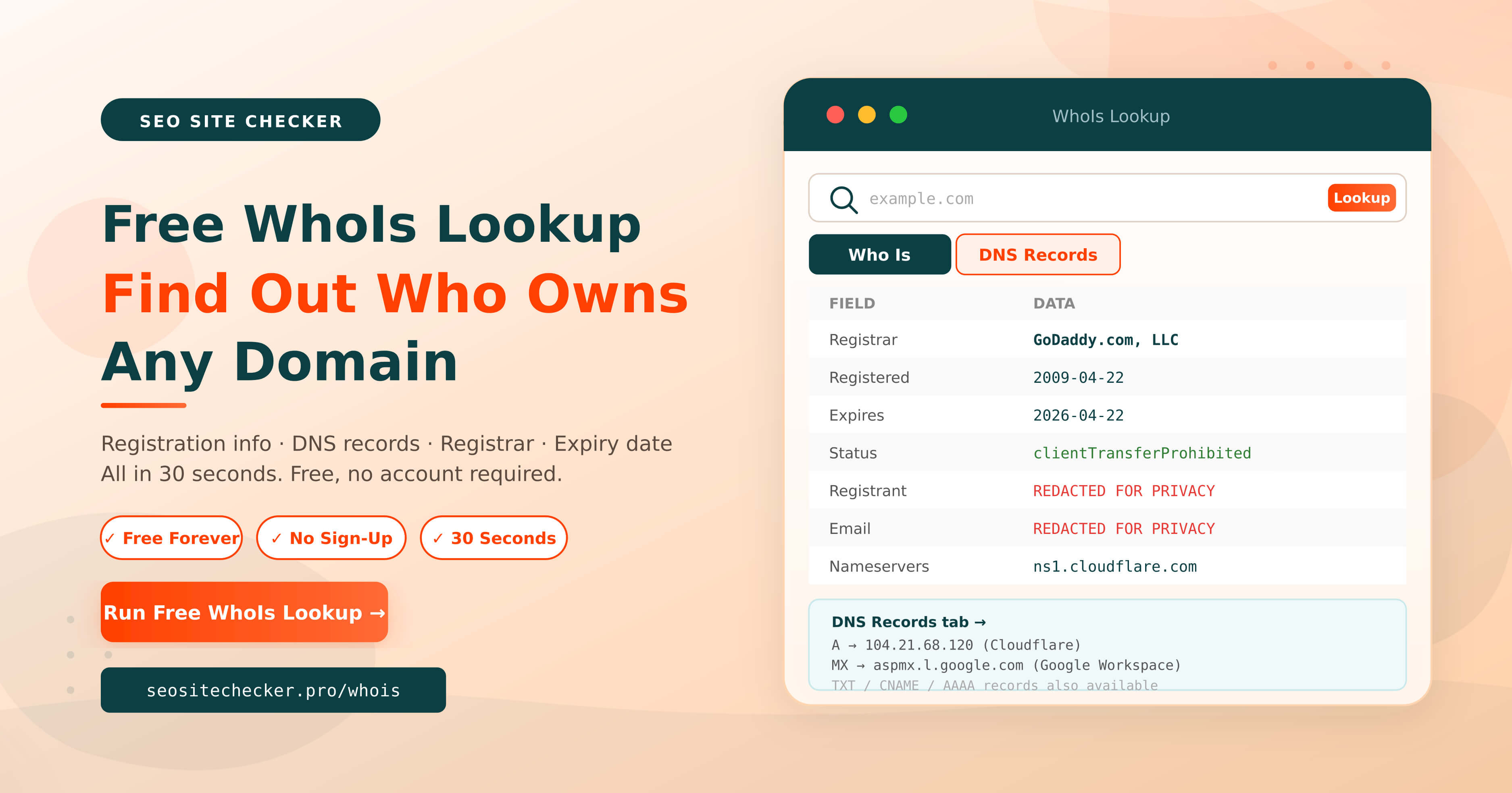
The information returned by a WhoIs search depends on three things: the domain's top-level domain (TLD), the registrar's privacy policies, and whether the domain owner has enabled privacy protection. Our free tool displays all publicly available data in two tabs: the Who Is tab for registration details, and the DNS Records tab for technical nameserver and DNS configuration data.
The "Who Is" Tab: Registration Data
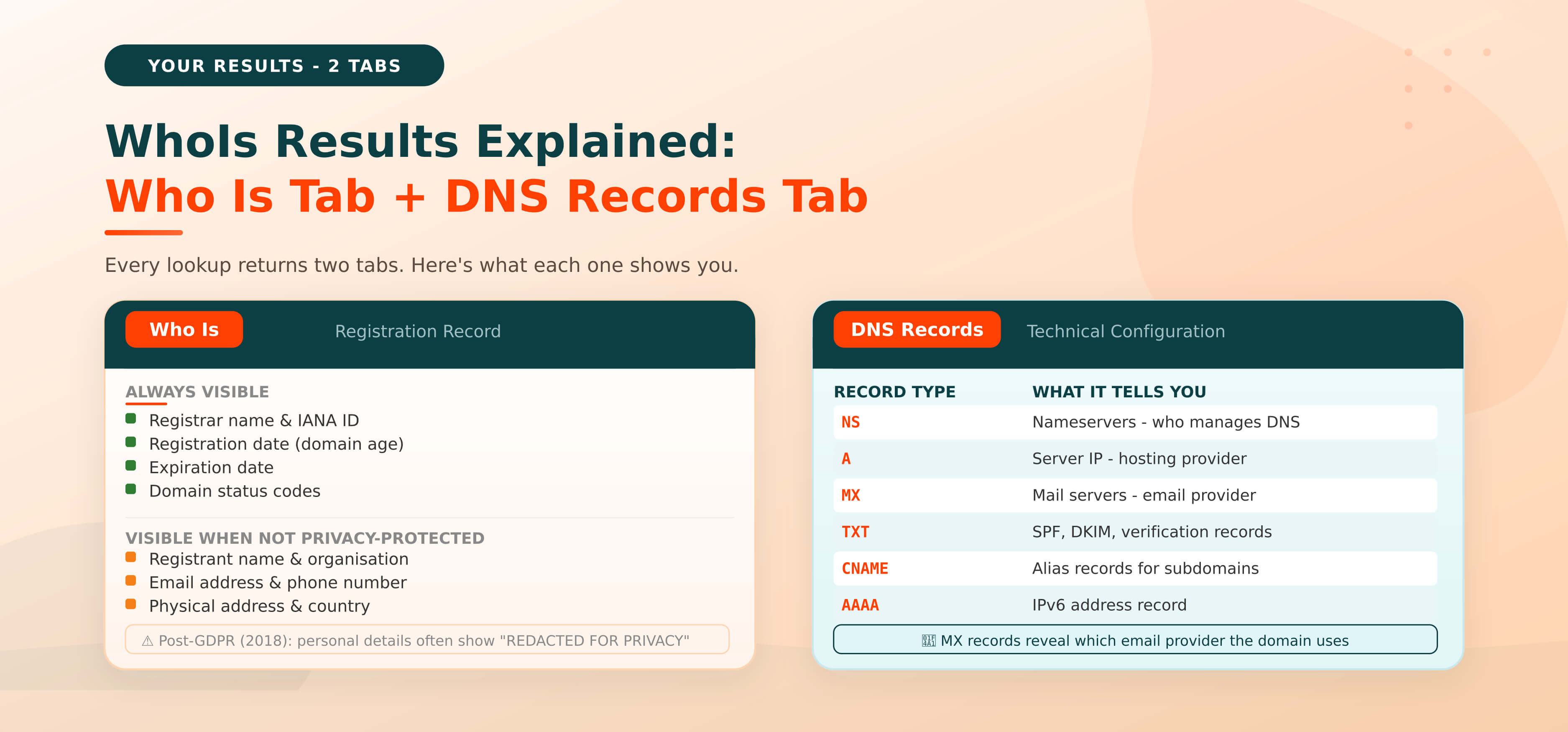
The Who Is tab contains the domain's official registration record. Here's what it includes, split by what's always visible versus what depends on privacy settings:
Always visible: even with privacy protection:
- Registrar name and IANA ID: The company that sold and manages the domain registration (e.g., GoDaddy, Namecheap, Google Domains).
- Domain registration date: The exact date the domain was first registered, useful for assessing domain age and trust.
- Domain expiration date: When the registration is due for renewal. After this date, the domain becomes available for anyone to register.
- Last updated date: The most recent date the WhoIs record was modified.
- Domain status codes: Lock and transfer status (e.g., clientTransferProhibited, clientUpdateProhibited). These tell you whether the domain can currently be transferred.
Visible only when the owner has NOT enabled privacy protection:
- Registrant name: The individual or business name that registered the domain.
- Registrant email address: The contact email on file with the registrar.
- Registrant phone number: The contact phone number associated with the registration.
- Registrant physical address: Country, state, city, and postal code of the registered owner.
- Admin and technical contacts: Sometimes differ from the registrant, relevant for larger organisations.
The "DNS Records" Tab: Technical Configuration
The DNS Records tab shows a different layer of information: the technical DNS configuration that controls how the domain actually functions on the internet. This includes:
- Nameservers (NS records): The authoritative DNS servers that manage the domain's routing for example, ns1.cloudflare.com. These tell you who hosts the DNS for the domain.
- A records: Maps the domain to an IPv4 address, the web server's IP address where the site is hosted.
- AAAA records: Maps the domain to an IPv6 address.
- MX records: Mail exchange records, which servers handle incoming email for the domain. Reveals which email provider the domain uses (e.g., Google Workspace, Microsoft 365).
- TXT records: Verification and configuration entries like SPF, DKIM and DMARC records used to authenticate email and prevent spoofing.
- CNAME records: Alias records that point one subdomain to another domain or service.
💡 Pro tip: The DNS Records tab is especially useful for technical tasks, finding
a site's hosting provider, verifying email authentication setup, or troubleshooting
domain propagation issues. The Who Is tab answers “who owns it” the DNS Records
tab answers "how is it configured."
What "Redacted for Privacy" Means
When you see the phrase "REDACTED FOR PRIVACY" in the Who Is tab, it means the domain owner has enabled privacy protection through their registrar. Their personal details name, email, phone and address, have been replaced with proxy contact information. The domain is still actively registered and owned; you simply can't see the owner's personal information.
How to Do a Free WhoIs Lookup in 30 Seconds
Looking up ownership details for any domain takes less than 30 seconds using our free WhoIs Lookup tool. No account. No sign-up. Just enter a domain and get the full record instantly.
Step-by-Step Instructions
Step 1: Open the WhoIs Lookup tool
Go to seositechecker.pro/whois in your browser. The tool is open and ready to use immediately, no login or registration required.
Step 2: Enter the domain name
Type the domain name you want to look up into the input field for example, example.com. You don't need to include https:// or www just the domain name and its extension (e.g., .com, .net, .org, .uk).
Step 3: Click "Lookup" and wait for your results
Hit the Lookup button. The tool queries the RDAP database in real time and returns the full domain record within a few seconds.
Step 4: Read the "Who Is" tab
Your results appear in two tabs. Start with the Who Is tab this shows the complete registration record: registrar name, registration date, expiration date, domain status codes, and any visible registrant contact information. If the owner has privacy protection enabled, personal details will show as "REDACTED FOR PRIVACY."
Step 5: Switch to the "DNS Records" tab
Click the DNS Records tab to see the domain's technical DNS configuration: nameservers, A records, MX records, TXT records, and CNAME entries. This tab is particularly useful for identifying the domain's hosting provider, email platform, and DNS management setup.
📌 No account needed. No credit card. No daily limits.
You can also look up any competitor's domain, not just your own.
Enter their domain to see their registrar, expiration date, and DNS setup.
Can I Do a WhoIs Lookup for an IP Address?
Yes. An IP WhoIs lookup works differently from a domain lookup, instead of querying the domain registration database, it queries the Regional Internet Registry (RIR) responsible for that IP block. The result shows who controls the range of IP addresses, typically an internet service provider or a hosting company rather than the individual site owner. This is useful when you need to identify the hosting infrastructure behind a suspicious website or trace the source of network abuse.
Why People Use WhoIs Lookup: 7 Real-World Use Cases
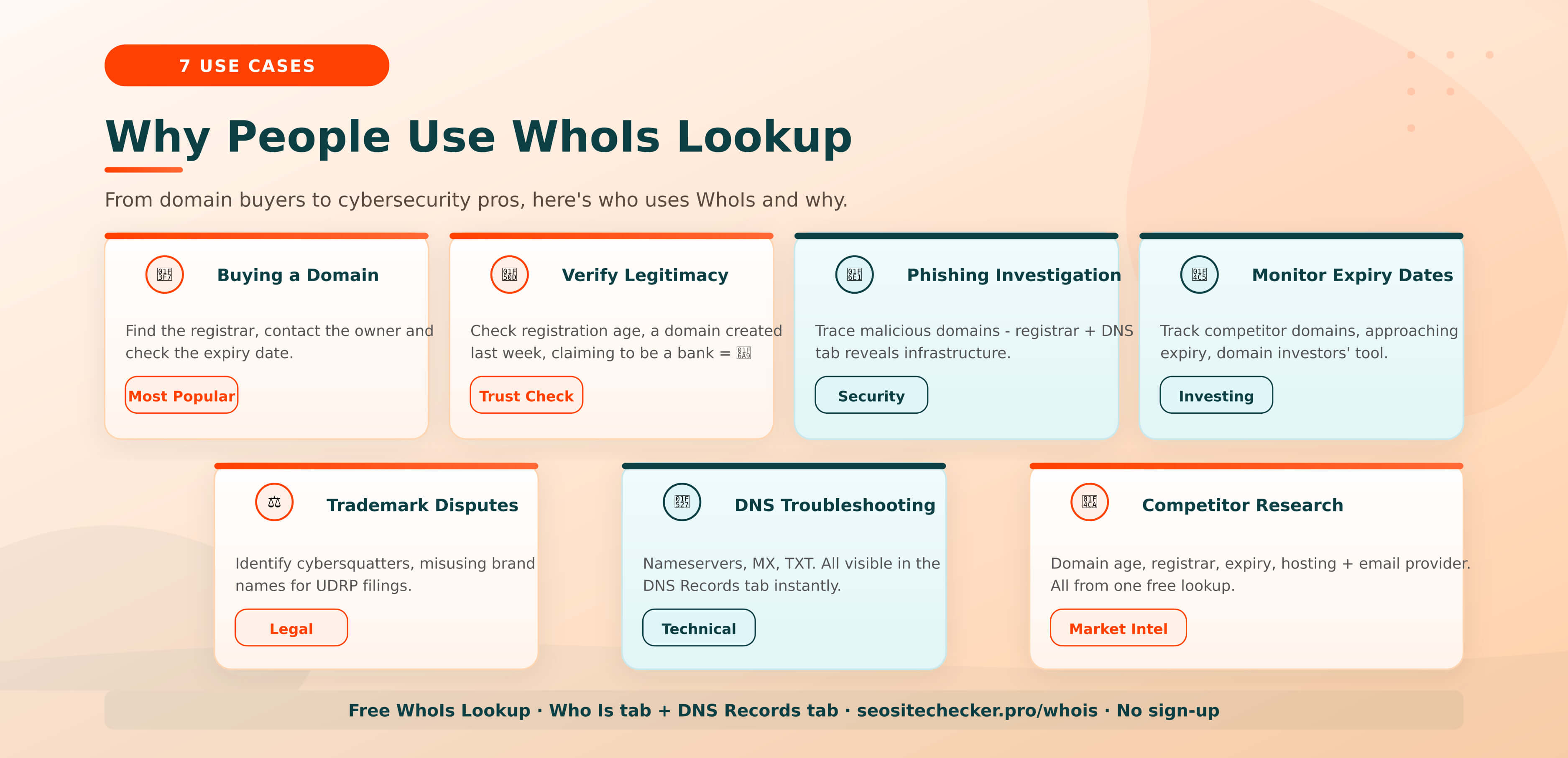
WhoIs lookup serves a wide range of users from startup founders buying their first domain to cybersecurity analysts investigating phishing networks. Here are the seven most common real-world scenarios where a WhoIs search is the right starting point.
1. Buying a Domain That's Already Registered
If the domain you want is already taken, a WhoIs search is step one in the acquisition process. The Who Is tab reveals the registrar managing the domain, you can contact the registrar directly to ask about brokering a purchase, or reach out through the registrar's proxy email forwarding if the owner's contact is redacted. The expiration date tells you whether the domain is coming up for renewal, which is another path to acquisition if the current owner lets it lapse.
2. Verifying a Website's Legitimacy Before Trusting It
A domain registered yesterday claiming to be a major bank or government agency is an immediate red flag. The registration date in the Who Is tab is one of the fastest ways to spot a fraudulent site. Legitimate businesses almost always have domains registered years or decades before a scam site. When in doubt, WhoIs first.
3. Investigating Phishing, Scam, or Malicious Domains
Law enforcement agencies, brand protection teams, and cybersecurity researchers use WhoIs data as a primary investigative tool. The registrar information, nameservers, and any visible contact details help build a picture of who operates a malicious site and through which infrastructure. Even when registrant details are redacted, the DNS Records tab often reveals the hosting provider and email service, both actionable for abuse reporting.
4. Monitoring Domains Before They Expire
Domain investors and brand owners monitor competitor or category-relevant domains for expiry signals. If a high-value domain shows an expiration date approaching and the WhoIs record hasn't been updated recently, it may be heading for drop, the point at which it becomes available for new registration. The expiration date in the Who Is tab is the key data point for this strategy.
5. Trademark and Intellectual Property Disputes
Legal teams use WhoIs data to identify cybersquatters, individuals who register domain names incorporating brand trademarks to extract payment or misdirect customers. WhoIs records support UDRP (Uniform Domain-Name Dispute-Resolution Policy) filings with ICANN by providing documented evidence of who registered the infringing domain and when.
6. Troubleshooting DNS and Hosting Configuration
When a domain isn't resolving, emails aren't delivering, or a site has gone offline unexpectedly, the DNS Records tab is where you start. Nameserver entries show which DNS provider is authoritative for the domain. MX records confirm which mail servers are configured. If either has changed unexpectedly, for example after a hosting migration, the DNS Records tab makes the problem immediately visible.
7. Competitor and Market Research
Knowing when a competitor's domain was first registered, which registrar they use, and when their registration is due to expire is legitimate market intelligence. A domain registered in 2005 has 20 years of accumulated trust signals, very different from a competitor who registered theirs last year. Combine this with domain authority research to build a complete picture of a competitor's web presence.
Why Is WhoIs Information Hidden? GDPR, Privacy Protection and What Changed
Before May 2018, a WhoIs search almost always returned the full registrant record, name, email address, phone number, and physical address for the overwhelming majority of registered domains. That changed permanently when the General Data Protection Regulation (GDPR) came into effect in the European Union.
What Is GDPR and Why Did It Change WhoIs?
The GDPR is the EU's comprehensive data privacy law, which requires that personal data cannot be publicly exposed without explicit legal basis or the individual's consent. WhoIs records contained exactly the kind of personal data GDPR protects: names, email addresses, phone numbers, and home or business addresses. ICANN and domain registrars worldwide faced an immediate conflict between their historical obligation to publish WhoIs data publicly and their new legal obligation to protect registrant privacy.
The resolution was swift and permanent: registrars began redacting personal contact information by default, replacing it with proxy data. Overnight, millions of WhoIs records that previously showed full owner details were replaced with "REDACTED FOR PRIVACY" entries. The structural registration data, registrar, dates, status, nameservers, remained public. The personal contact layer became private by default.
What Is Domain Privacy Protection?
Domain privacy protection (also marketed as WhoIs Privacy, WHOIS Guard, or Private Registration) is a service offered by domain registrars that replaces your personal registration details in the public WhoIs database with proxy contact information managed by the registrar. When someone searches for your domain in a WhoIs tool, they see the registrar's proxy details instead of your name, email, address, and phone number.
You still own and control the domain fully. The privacy layer simply acts as a buffer between your identity and the public record. Most major registrars now include domain privacy protection free with every domain purchase, it's enabled by default in many cases.
Does Privacy Protection Apply to All Domain Extensions?
Not uniformly. For generic TLDs like .com, .net, and .org, privacy protection is widely available and heavily used since 2018. Country-code TLDs (ccTLDs) have their own registries and their own rules. The UK's .uk registry (Nominet) often shows more registrant data than .com domains. German .de domains follow strict German data protection laws and typically show minimal personal information. Newer gTLDs like .io, .xyz, and .app vary considerably, always run a fresh lookup rather than assuming behaviour will match a .com record.
📌 Quick rule: if you want to know whether YOUR domain's personal information is
publicly visible, run a WhoIs lookup on your own domain right now using our free tool.
The Who Is tab shows exactly what anyone searching for your domain will see.
WhoIs vs. RDAP: What Changed in January 2025
The term "WhoIs lookup" has been used for over 40 years, but the underlying protocol has just been replaced. In January 2025, ICANN officially completed the transition from the original WhoIs protocol to RDAP, the Registration Data Access Protocol, as the global standard for domain registration queries. If you've been using a WhoIs tool and noticed cleaner, more structured results in early 2025, this is the reason.
Feature | WhoIs (Original) | RDAP (Current Standard - 2025) |
Data format | Plain text - unstructured | Structured JSON - machine-readable |
Security | No encryption - plain HTTP | HTTPS encrypted by default |
GDPR handling | Manual redaction by each registrar | Built-in privacy controls and access tiers |
Output quality | Varies by registrar format | Standardised across all registrars |
Status | Deprecated - January 2025 | ✅ Current global standard |
For a typical user running a one-off domain lookup, the practical difference between WhoIs and RDAP is nearly invisible. You enter a domain, you get a result. What has changed is reliability, security, and the consistency of the data format across different registrars. Our free tool queries RDAP in real time and presents results in the familiar Who Is and DNS Records tab format, you get the benefits of the new standard without any technical friction.
If you want to query RDAP directly, ICANN's official RDAP lookup tool is the authoritative reference, but for most use cases, our free tool delivers the same data in a more readable format.
WhoIs Says “Redacted for Privacy”: What Can You Do?
This is the most common frustration for anyone using a WhoIs lookup tool in 2025. You run a search, and the Who Is tab returns a record full of "REDACTED FOR PRIVACY" entries where you expected to see an owner's name and email. The domain is clearly registered, it's just that the owner's personal details are shielded. Here are five legitimate routes forward.
1. Use the Registrar's Proxy Email Forwarding
Even when a domain owner's email address is redacted, the registrar typically provides a forwarding contact address, usually something like abuse@registrar.com or a unique proxy address specific to that domain. Sending a message to this address results in the registrar forwarding it to the actual domain owner, who can then choose whether to respond. This is the most straightforward and most commonly used method for reaching a domain owner through privacy protection.
2. Cross-Check with ICANN's RDAP Tool
Different lookup tools sometimes surface different data depending on which registrar's RDAP endpoint they query. Before concluding that all personal data is redacted, try querying ICANN's official RDAP lookup tool directly. Some fields visible in the RDAP standard are not exposed by third-party tools. The registrant country, for example, is sometimes visible even when name and email are redacted, useful context for establishing jurisdiction.
3. Look for Historical WhoIs Records
Privacy protection has only been the default since 2018. Many domains that now show fully redacted records were registered before GDPR and their historical registration data may still be accessible through archival services that captured WhoIs records before redaction became standard. DomainTools is the most established service for historical WhoIs data, though accessing full historical records requires a paid subscription. For a freely visible domain, check the DNS Records tab, nameservers and hosting providers often remain consistent across years and can identify the infrastructure operator.
4. Use the DNS Records Tab for Clues
When the Who Is tab returns minimal information due to privacy protection, the DNS Records tab often tells a different story. The MX records reveal which email provider the domain owner uses (Google Workspace, Microsoft 365, Zoho, Protonmail, each has a distinct MX pattern). The A record shows the hosting provider's IP address, which you can cross-reference to identify the web host. The TXT records sometimes contain verification codes for services like Google Search Console or Mailchimp, which can help narrow down who manages the site. None of this reveals personal identity directly, but it builds a detailed picture of the infrastructure behind the domain.
5. Contact the Registrar Directly with Legal Justification
For trademark disputes, legal proceedings, abuse investigations, or law enforcement requests, domain registrars are required under ICANN policy to disclose registrant information when presented with a legitimate legal basis. This is a formal process, typically involving a written request, documentation of your legal standing, and sometimes a court order depending on jurisdiction. ICANN's policy framework governs how registrars must respond to these requests, and most major registrars have dedicated abuse or legal contact channels.
📌 Quick assessment before trying methods 3-5:
First run the domain through the DNS Records tab, the hosting provider, email service,
and any TXT verification strings can often tell you more about the operator than you
might expect. This costs nothing and takes 10 seconds.
If you're investigating a domain as part of evaluating a website purchase or assessing a competitor, combining WhoIs data with a broader technical audit is useful. Our guide on how to check your website's SEO score covers the on-page and technical checks that complement domain ownership research.
How to Read a WhoIs Record: What Every Field Means
A raw WhoIs or RDAP record contains more fields than most users expect, and the terminology isn't always self-explanatory. Here's what every field in the Who Is tab means, so you can extract exactly the information you need without guesswork.
Field Name | What It Means |
Domain Name | The registered domain you searched. e.g., example.com |
Registrar | The company that sold and manages this domain registration (e.g., GoDaddy, Namecheap) |
Registrar IANA ID | The registrar's unique identifier assigned by ICANN. Use this to verify the registrar is ICANN-accredited. |
Registration Date | The exact date the domain was first registered. Useful for establishing domain age and trust history. |
Expiry / Expiration | When the current registration period ends. After this date the domain is available for re-registration. |
Updated Date | The most recent date any WhoIs field for this domain was changed, a useful indicator of recent activity. |
Domain Status | Lock and transfer codes. "clientTransferProhibited" means the domain cannot be transferred without owner action. |
Nameservers | The authoritative DNS servers managing the domain's routing, also shown in the DNS Records tab. |
Registrant Name | The individual or business name that registered the domain. Often "REDACTED FOR PRIVACY" post-GDPR. |
Registrant Email | The contact email on file. Often replaced with a proxy forwarding address under privacy protection. |
Registrant Org | Organisation name: visible for business registrations more often than personal ones. |
Registrant Country | Country of the registrant. Sometimes visible even when other personal details are redacted. |
Admin Contact | Administrative contact: manages registration renewals and account changes. May differ from registrant. |
Tech Contact | Technical contact: responsible for DNS and hosting configuration. Often identical to the registrant. |
The most consistently reliable fields in any WhoIs record are the registrar name, registration date, expiration date, and nameservers, these are almost never redacted and provide actionable data regardless of privacy protection. Personal contact fields should always be treated as potentially incomplete or proxy-managed in the post-GDPR environment.
Does WhoIs Work for All Domain Extensions?
WhoIs and RDAP lookups work across the vast majority of domain extensions worldwide, but the depth of information returned varies considerably depending on which type of domain extension you're searching.
Generic TLDs (.com, .net, .org)
Generic top-level domains managed under ICANN's standard policy framework provide the most consistent WhoIs coverage. Post-GDPR, personal contact details are largely redacted, but registrar name, registration and expiration dates, domain status, and nameservers are always available. Privacy protection is widely used and simple to enable.
Country-Code TLDs (ccTLDs)
Country-code TLDs each have their own registry with their own data policies. The UK's .uk domains (managed by Nominet) often display more registrant information than equivalent .com records. German .de domains follow strict German data protection laws (Bundesdatenschutzgesetz) and typically show minimal personal information by default. French .fr, Dutch .nl, and Australian .com.au domains all follow different national frameworks. Always run a fresh lookup rather than assuming the result will mirror a .com record.
New Generic TLDs (.io, .xyz, .shop, .app)
The newer generic TLD extensions like .io, .xyz, .shop, .app, .co, .tech, and dozens of others, vary widely in their data disclosure policies. Some new registries have strict data-sharing limitations, while others closely follow the ICANN standard. A .io domain, for example, is technically the ccTLD for the British Indian Ocean Territory but is widely used as a generic extension and typically returns standard RDAP data with privacy protection applied where enabled.
Extension | Registry | Typical WhoIs Data Depth |
.com | Verisign / ICANN standard | Full record: personal data redacted post-GDPR |
.net | Verisign / ICANN standard | Full record: personal data redacted post-GDPR |
.org | PIR / ICANN standard | Full record: personal data redacted post-GDPR |
.uk | Nominet (UK) | Often shows more owner data than .com |
.de | DENIC (Germany) | Strict data laws: typically minimal personal data |
.fr | AFNIC (France) | GDPR-compliant: personal data largely redacted |
.io | ICANN (ccTLD for BIOT) | Varies: registrar and dates usually visible |
.co | Colombia / ICANN-style | Similar to .com: varies by registrar |
Is WhoIs Lookup Really Free? (Free vs. Paid Tools Compared)
For individual domain lookups, looking up one domain at a time to see who registered it, WhoIs lookup is completely free across all major tools. Cost only enters the picture when you need bulk lookups of thousands of domains simultaneously, historical WhoIs records from before privacy protection was enabled, or API integration for automated queries at scale.
Tool | Free? | Limits | Account Required | Best For |
SEO Site Checker WhoIs | ✅ Yes | Unlimited | No | Individual lookups - Who Is + DNS Records tabs |
ICANN RDAP Tool | ✅ Yes | Unlimited | No | Authoritative RDAP queries |
GoDaddy WhoIs | ✅ Yes | Unlimited | No | General domain lookups |
Whois.com | ✅ Yes | Unlimited | No | General domain lookups |
WhoisFreaks | ⚠️ Partial | Manual free only | No (API = paid) | API and bulk queries |
DomainTools | ❌ Paid | Paid subscription | Yes | Historical WhoIs + reverse lookup |
For the overwhelming majority of use cases, verifying domain ownership, checking registration dates, reviewing DNS configuration, our free WhoIs Lookup tool gives you everything you need at no cost, with no account required and no daily limit on how many domains you can check.
Is WhoIs Lookup Legal?
Yes, completely. WhoIs and RDAP databases are public by design and by law. ICANN's mandate explicitly requires that domain registration data be publicly accessible. Using any WhoIs or RDAP tool to look up domain registration information is legal in every jurisdiction worldwide, for any publicly registered domain.
You can legally run a WhoIs lookup on your own domain, a competitor's domain, a domain you're considering buying, a suspicious website you want to investigate, or any other publicly registered domain. The ICANN-accredited registrar framework that governs domain registration explicitly preserves the public's right to query registration data, the RDAP standard maintains this openness while adding GDPR-compliant privacy controls.
Where Legal Boundaries Apply
Looking up WhoIs data is legal. How you use that data is where restrictions apply. Using registrant contact information for spam, commercial marketing without consent, harassment, or stalking violates ICANN's Registrar Accreditation Agreement, the CAN-SPAM Act (USA), GDPR (EU), and various national data protection laws. The data is public for legitimate purposes, accountability, domain verification, and security research, not for unsolicited outreach.
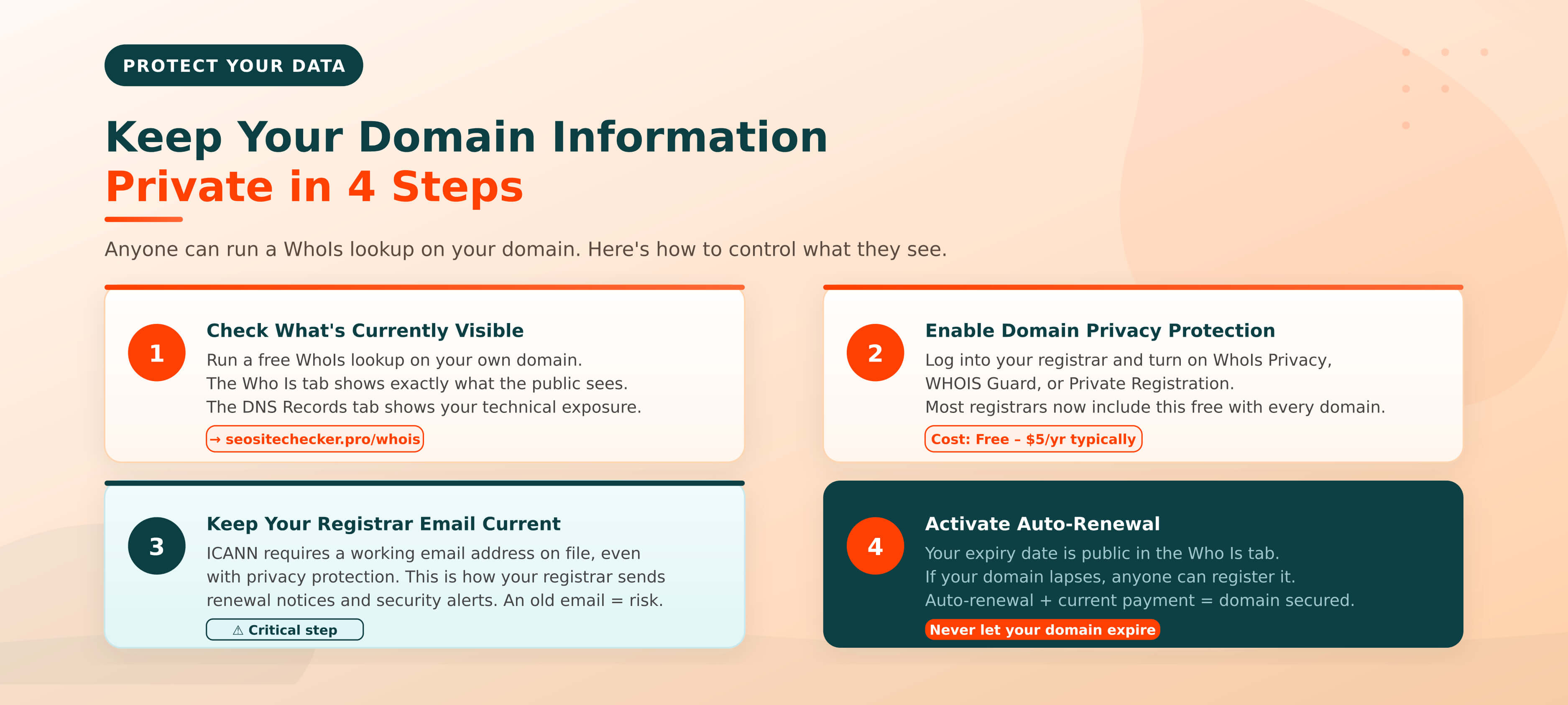
How to Keep Your Own Domain Information Private
If reading this article has made you wonder what someone looking up your domain would find, here's exactly how to check and protect your registration data.
Step 1: Check what's currently visible
Run a free WhoIs lookup on your own domain right now. Review both the Who Is tab (registration data) and the DNS Records tab (your nameservers, hosting IP, and email provider setup). The Who Is tab will show exactly what anyone searching for your domain can see. If your name, email, or address is visible there, privacy protection is not currently active.
Step 2: Enable domain privacy protection
Log into your domain registrar account and enable privacy protection (variously called WhoIs Privacy, WHOIS Guard, or Private Registration depending on the registrar). Most major registrars like GoDaddy, Namecheap, Google Domains, Cloudflare Registrar, now include privacy protection free with every domain purchase. If your registrar charges for it, the typical cost is $1-$5 per year per domain, making it one of the highest value-per-cost features available.
Step 3: Keep your registrar contact email current
ICANN requires that every registered domain have an accurate and working registrant email address on file with the registrar, even when privacy protection is enabled. Your registrar uses this email for critical communications: renewal notices, transfer authorisation requests, and account security alerts. An outdated or inaccessible registrar email is one of the most common reasons people lose control of their domains unexpectedly.
Step 4: Activate auto-renewal
Your domain's expiration date is publicly visible in the Who Is tab, anyone can see exactly when your registration is due to lapse. If a domain investor or competitor is watching that date and you accidentally let your registration expire, your domain becomes available for immediate re-registration by anyone. Auto-renewal is the simplest protection. Keep it active and make sure your payment method on file is current.
📌 The simplest privacy checklist for domain owners:
1. Run a WhoIs lookup on your own domain, see exactly what's public
2. Enable privacy protection if your personal details are visible
3. Verify your registrar contact email is current and accessible
4. Confirm auto-renewal is active and your payment details are up to date
Run Your Free WhoIs Lookup Now
WhoIs lookup gives you instant, verifiable insight into any domain on the internet. Who registered it, when it was created, when it expires, which company manages it and how its DNS is configured. Whether you're tracking down a domain owner, investigating a suspicious website, researching a competitor's web presence, or simply checking that your own registration data is properly protected, a WhoIs search is always the fastest first step.
Our free tool returns results in two tabs: the Who Is tab for the complete registration record, and the DNS Records tab for the technical DNS configuration. Both tabs together give you a complete picture of any domain, the ownership layer and the infrastructure layer, in a single query. No account, no sign-up, no limit on how many domains you can check.
Enter any domain below and get your full WhoIs report in seconds.
→ Run Your Free WhoIs Lookup Now - No account. No credit card. No limits.
Frequently Asked Questions
Frequently Asked Questions (FAQs) is a list of common questions and answers provided to quickly address common concerns or inquiries.
What is a WhoIs lookup?
A WhoIs lookup is a free query against the internet's public domain registration database. It reveals who registered a domain name, when it was first created, when it expires, which registrar manages it, and the domain's nameservers and DNS configuration. Most modern tools display results in two sections: registration data (the Who Is tab) and technical DNS records (the DNS Records tab). Since GDPR, owner contact details are often redacted, but registrar and date information are always visible.
Is WhoIs lookup really free?
Yes. Basic WhoIs lookup is free for individual domain queries across all major tools, including our free WhoIs tool, ICANN's official RDAP lookup, GoDaddy WhoIs, and Whois.com. all with no account or sign-up required. Cost only applies to specialist services requiring bulk lookups of thousands of domains simultaneously, access to historical pre-GDPR WhoIs records, or API integration for automated queries.
Why is WhoIs information hidden or redacted?
WhoIs records are redacted because of the GDPR (General Data Protection Regulation), which came into effect in May 2018 and required that personal data cannot be publicly exposed without a legal basis or consent. WhoIs records contained names, email addresses, phone numbers, and physical addresses, all directly covered by GDPR. Registrars responded by replacing personal registrant details with "REDACTED FOR PRIVACY" entries, while keeping structural data (registrar name, dates, nameservers) publicly accessible.
How do I find out who owns a domain if WhoIs is private?
When the Who Is tab shows "REDACTED FOR PRIVACY," try these methods in order: send a contact request through the registrar's proxy email forwarding service (most registrars provide this even when data is redacted); cross-check with ICANN's official RDAP tool at lookup.icann.org for any additional visible fields; check the DNS Records tab, MX records and TXT records often reveal the email provider and services used, which can help identify the operator. For legal disputes or abuse investigations, registrars are required under ICANN policy to disclose registrant information when presented with a documented legal basis.
What is the difference between WhoIs and RDAP?
WhoIs is the original domain registration query protocol dating to 1982. RDAP, the Registration Data Access Protocol, is its modern replacement, officially adopted by ICANN in January 2025. RDAP delivers structured JSON output, uses HTTPS for security, and has built-in GDPR-compatible privacy controls. For everyday users, the practical difference is invisible: you enter a domain, you get a result. Most WhoIs tools now query RDAP under the hood. The term "WhoIs lookup" remains the common way to describe the process regardless of the underlying protocol.
Can I do a WhoIs lookup for an IP address?
Yes. An IP WhoIs lookup queries the Regional Internet Registry (RIR), such as ARIN for North America or RIPE for Europe, rather than the domain registration database. The result shows who controls the IP address block, typically an internet service provider or hosting company. This is useful for identifying the hosting infrastructure behind a suspicious website or tracing the network operator responsible for abusive traffic. IP WhoIs does not reveal the individual website owner, only the organisation controlling that IP range.
Is WhoIs lookup legal?
Yes, completely. WhoIs and RDAP databases are public by ICANN's mandate. Querying them for any publicly registered domain is legal everywhere in the world, your own domain, a competitor's domain, a domain you're evaluating for purchase, or a suspicious site you're investigating. The legal restrictions apply to how you use the data after retrieval: using registrant contact information for spam, unsolicited marketing, or harassment violates ICANN policy, CAN-SPAM, GDPR, and various national data protection laws.
How do I hide my own domain information from WhoIs?
Enable domain privacy protection through your domain registrar, it's called WhoIs Privacy, WHOIS Guard, or Private Registration depending on the provider. Once enabled, your personal details (name, email, address, phone) are replaced with proxy contact information in the public Who Is record. Most major registrars include this free with every domain purchase. To verify it's working, run a free WhoIs lookup on your own domain after enabling it, the Who Is tab will confirm what's visible to the public.