
Common SEO Issues in Real Site Checks: The Short Answer
Quick answer: The most common SEO issues in our audits are small, fixable SEO problems, not penalties. When we re-audited real sites in November 2026, our free report flagged image alt text most often among the ten issues below (59 percent of sites), then meta descriptions (42 percent) and slow loading (29 percent). Most fixes are markup, status code and speed changes, and a flagged row is a to-do item from our rules, not a verdict from Google.
Every issue below follows the same four beats: what the report row tests, how often our rule flagged it, what Google Search Central documentation says and the smallest fix. To see which of the ten apply to you, run the free report on your own page. It audits one page per run, needs no account and usually finishes in well under a minute.
These findings come from sites checked with our tool, not from a sample of the web, and the next section shows how the common SEO issues were counted.
How We Counted: One Audit of Each Site on November 16, 2026
On that day we ran our own SEO audit, the same report the free checker gives a visitor, against 347 addresses, one site check at a time, under the rules of that day. The report has about 68 scored checks per page, plus ten AI readiness checks not counted here. Of the 347 addresses, 276 produced a score, 62 gave no result, mostly unreachable sites (50 no longer resolve, one returned a server error, 11 failed for other reasons), and nine showed a bot protection page the report cannot grade.
The addresses are stored reports of sites that visitors or our own team checked with the free tool, so this is a sample of sites, not a random sample of the web, and not a picture of large sites. Only aggregate counts are used, and nothing here describes a single site.
- Flagged means a row ended Failed or Warning, and a site counts once per issue.
- Failed means Failed only. A few rows, such as Image Alt Text, can only warn.
- Left out are rows that always pass: Nofollow Attribute is informational and always passes, and so do the three keyword tables.
The audit read one page per site, the address as given. Speed rows are lab data from one headless Chromium load, so they move between runs and two audits of one site can differ. A flagged row follows our rule, stricter than Google's in a few places, and each issue says where. A one page audit cannot see duplicate content across URLs, thin content, keyword use, search intent, backlinks or real mobile usability, so those need Google Search Console or a person. For issue severity and reading each row, see how to read a report.
An earlier run of the same addresses, on October 31, 2026, gave a median score of 71.0 and this run gives 72.1. Our website SEO score guide reports that run, so the totals differ slightly and neither replaces the other.
The Ten Issues in One Table
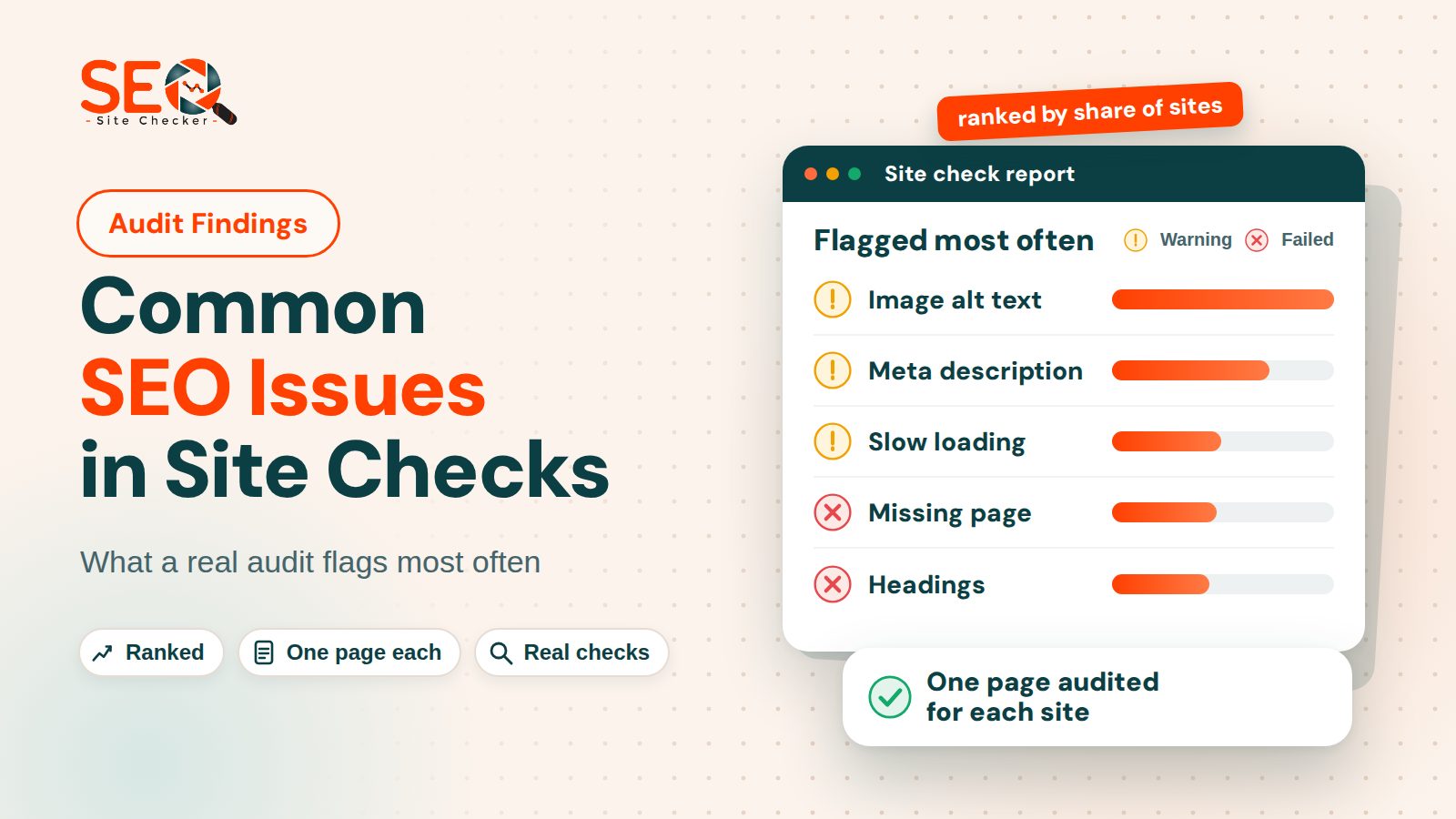
The table ranks the ten common SEO issues by the share of sites on which at least one of the issue's rows was flagged, Failed or Warning, highest first.
| Rank | Issue | Report row | Flagged (failed) |
|---|---|---|---|
| 1 | Image alt text | Image Alt Text | 59% (0% failed) |
| 2 | Meta descriptions | Meta Description | 42% (19% failed) |
| 3 | Slow loading | Largest Contentful Paint Test, Load time | 29% (13% failed) |
| 4 | Soft 404 pages | Custom 404 Error Pages | 28% (25% failed) |
| 5 | Headings | Headings | 26% (26% failed) |
| 6 | Titles | Title | 25% (1% failed) |
| 7 | Missing robots.txt or sitemap | robots.txt, Sitemaps | 24% (23% failed) |
| 8 | Structured data | Structured Data | 24% (24% failed) |
| 9 | Canonical tag | Meta Canonical, URL Canonicalization | 20% (18% failed) |
| 10 | Favicon | Favicon | 11% (11% failed) |
Shares of 276 sites audited on November 16, 2026; one page per site; one site can appear in many rows.
The table covers ten issues that Google's documentation speaks to, not every row. Where our rule is stricter than Google's, the issue sections say so: the Headings row wants exactly one H1, and the Title and Meta Description rows use length bands (10 to 70 and 50 to 160 characters) that Google does not set. We left out In-page Links (29 percent flagged) because it sends one quick request to each of only the first 30 links on a page, which measures how those links answered, not a Google rule.
Titles, Descriptions and Headings
These three on-page SEO issues sit in the page head and the first screen of text, and fixing them costs almost nothing.
Meta descriptions that are missing, doubled or the wrong length
Meta descriptions came second, flagged on 42 percent of sites, 19 percent as fails. The Meta Description row fails when a page has no description tag, two or more, or empty content. It passes at 50 to 160 characters, warns outside that band and looks only for a tag named description in lower case, so Description reads as missing.
Google's page on writing meta descriptions says snippets are built from the page content, that Google may use the description when it sums up the page better than the text does, and that repeating the same or a similar description on every page does not help. The 50 to 160 band is ours, not Google's. The smallest fix is one specific description per page, starting with pages that already earn impressions in Google Search Console: see meta description length and fixes.
Headings: no H1 or more than one
Headings were flagged on 26 percent of sites, and every flag was a fail. The Headings row passes with exactly one H1 tag, fails with none or with two or more, and ignores H2 to H6. That is our rule, and it is stricter than Google's.
Google's SEO starter guide says to break up long content with sections and headings that help people navigate, and adds that for Google Search the order of headings does not matter and there is no ideal number of them. We keep one H1 because it is the plainest way to name the page, so two H1s fail our row without breaking any Google rule we could find. The smallest fix is one H1 that names the page and H2s for the rest of the heading structure: how to fix H1 errors.
Titles that are too short, too long or doubled
Titles were flagged on 25 percent of sites, but 66 of the 68 flags are warnings, and only 2 sites had no title or an empty one. The Title row fails with no title element or an empty one, warns with two or more, passes at 10 to 70 characters and warns on any other page title length. It counts every title element, including one inside an inline SVG icon, so a clean head can still read Warning.
Google's title link guidance says to give every page a title, to write descriptive and concise text, to avoid vague descriptors such as "Home" and to avoid repeated text and boilerplate titles. It puts no cap on the length of a title element, so 70 is our row's limit, not Google's. Our row reads one page, so it cannot spot duplicate titles across fifty pages. The smallest fix is a unique, descriptive title on every page: check yours with the Meta Tag Analyzer and see how to write a meta title.
Soft 404 Pages, Missing robots.txt or Sitemap Files, and Canonical Tags
These common technical SEO issues share one theme: telling crawlers such as Googlebot which addresses are real, which are not and where the helper files are.
Missing pages that answer 200 instead of 404
The Custom 404 Error Pages row was flagged on 28 percent of sites and failed on 25 percent. It asks the site for /this-page-should-not-exist-12345 using a plain HTTP client, not a browser, with a 3 second timeout and redirects followed. A 404 whose text contains 404 or not found passes, a 404 without those words warns, and anything else fails: a 200 page, a redirect to the home page, a 403, a server error or a timeout.
Google's documentation on HTTP status codes says that when a page answers 2xx but its content suggests an error or is empty, Search Console shows a soft 404 error. Its page on troubleshooting crawl errors adds that a removed page with no replacement should return an HTTP 404 status or a 410, and a 301 fits where the content has a clear replacement. Our run stored only the row status, so the 25 percent mixes true soft 404 pages with 403s from firewalls, server errors and timeouts, and you should check the real status in your browser before changing anything. See how to build a custom 404 page that passes the check.
A missing robots.txt or sitemap.xml
Either the robots.txt row or the Sitemaps row was flagged on 24 percent of sites (Sitemaps 22 percent, robots.txt 12). Each asks for /robots.txt or /sitemap.xml at the site root with a 3 second timeout: HTTP 200 passes, 401 or 403 warns and anything else fails. The rows do not read the file, and they test only the exact path sitemap.xml, so an XML sitemap kept elsewhere and declared in robots.txt reads as failed, while any page that answers 200 there reads as passed.
Google's robots.txt introduction says the file mainly manages crawler traffic, warns against using it to hide a page from Google Search results and points to noindex or a password for that. Its sitemap overview says a small site of about 500 pages or fewer that is well linked internally may not need one, though in most cases a site benefits from having one. So a missing file is a flag from our rule, not an error by itself. The smallest fix is a plain robots.txt that blocks nothing you want found plus a sitemap of indexable canonical URLs, named in it: robots.txt rules and fixes and what a sitemap should hold.
No canonical tag, or two
The two canonical rows, Meta Canonical and URL Canonicalization, run one test: one rel=canonical link passes, none fails and two or more warn. So one missing tag shows as two failed rows, and this post counts each site once. The row does not check that the address is live or the right one, and our report has no duplicate content check, so a pass does not prove your content is unique.
Google's canonical URL documentation says "it's generally not critical to specify a canonical preference" and then gives reasons to set one, the first being to name the URL that should show in search results. The smallest fix is one self referencing canonical on each indexable page, as an absolute https address: how to add a canonical tag.
Markup and Media Problems: Image Alt Text, Structured Data and Favicons
Images with no alt text
Image Alt Text was the most flagged of the ten, on 59 percent of sites, and every flag was a warning because the row never fails. It counts an image with no alt attribute, an empty one or a blank one as missing, and the report lists the image addresses. Read that list before editing: the W3C guidance on decorative images says a purely decorative image should carry an empty alt, and our row still counts it.
Google's image documentation calls alt text the most important attribute for image metadata and says it also helps accessibility for people who cannot see the image, including screen readers. The smallest fix is a few plain words about what the picture shows, such as "Technician replacing a cracked phone screen". See how to write image alt text.
No structured data
Structured Data was flagged on 24 percent of sites, and nearly all of those were fails. The row passes when JSON-LD or microdata is present and every JSON-LD block is valid JSON, warns when some blocks are broken and fails when none can be read. It does not check that the properties suit the schema.org markup type or that Google would show a rich result: valid JSON with no type at all still passes.
Google's introduction to structured data calls it a standardized format that gives explicit clues about what a page means, and says it can enable rich results. The smallest fix is JSON-LD that describes what the page really is, such as Organization on a home page or Article on a post, then a check: the structured data markup guide explains the format and our Schema Markup Validator checks the properties of each type.
No favicon link
The Favicon row was flagged on 11 percent of sites, and every flag was a fail. It passes when the page has a link element whose rel contains the word icon, which includes apple-touch-icon, and fails otherwise. It never warns and does not request the icon file, check its size or format, or look for /favicon.ico.
Google's favicon documentation asks for a link element in the head of the home page and a square image of at least 8 by 8 pixels, with larger than 48 by 48 pixels recommended. The smallest fix is one link with rel="icon" pointing at a square image larger than 48 pixels, then a check that the file answers 200. The icon can appear beside your result in Google Search: how to add a favicon.
Slow Loading: Largest Contentful Paint and Page Load Time
These rows come from one headless Chromium load, on one machine, on one day.
Slow loading was flagged on 29 percent of sites, 13 percent as fails, counting a site once if either the Largest Contentful Paint Test or the Load time row was flagged. The LCP row passes at 2.5 seconds or less, warns up to 4 seconds and fails above that. Load time passes at 3 seconds or less, warns up to 5 and fails above that.
The LCP pass line is the 2.5 seconds that web.dev calls a good value, but the two are not the same measurement: web.dev applies it to the 75th percentile of page loads, while our row reads one lab load on one day. Google's Core Web Vitals documentation says the vitals measure real-world user experience and that it highly recommends good values. Our report measures lab data for Largest Contentful Paint, Cumulative Layout Shift, First Contentful Paint and Total Blocking Time, but not Interaction to Next Paint, and it has no field data. It covers Core Web Vitals only partly and never says whether a page passes them.
The smallest fix is to find the largest element on screen, usually a hero image or a heading, and load it first: size and compress the image, skip lazy loading for it and trim what blocks rendering. See how to check and fix LCP.
Two checks that sound serious barely fired in this run. A TLS certificate problem or a failed Mixed Content (HTTP over HTTPS) row showed up on 16 sites, 6 percent, and a missing text compression header on 3 sites, 1 percent. Lighthouse tests every text response, but our HTML Compression/GZIP row reads only the page's own Content-Encoding.
Common Failures That Are Not Search Problems
Several of the rows our reports flag most often have nothing to do with Google Search, so a long red list can overstate the common SEO mistakes on a site. They are in the report because site owners ask for them, and a flagged row here is a decision, not a defect.
- Social Media Meta Tags (96 percent flagged) wants 11 Open Graph and Twitter tags, so only 10 sites passed. It is about how a shared link looks, which our Open Graph Validator can preview.
- Server Signature (96 percent) warns whenever the server sends a Server header.
- ads.txt (83 percent) lists who may sell your ad space, so it is meant for sites that run ads.
- Google Site Verification (71 percent) looks for one meta tag, but Search Console accepts several ways to prove ownership.
- HSTS (68 percent) passes only when the Strict-Transport-Security header is present, which tells browsers to use HTTPS only.
The speed hygiene rows, Inline CSS (95 percent), Defer Javascript (93), Render Blocking Resources Test (83) and CSS Minification (75), fire on most pages and matter only as far as they slow a page down. A page with no external scripts passes the JavaScript rows.
What to Fix First
Start with anything that keeps a page out of search, such as a noindex tag or a robots.txt rule that blocks a page you want found. These are rarer than the common SEO issues above, since the NoIndex Tag row failed on 2 percent of sites, but they cost the most when they happen. Next come titles, descriptions, canonical tags and the 404 answer. Speed comes last, because a lab number moves between runs.
For the order of fixes and how the score moves as rows turn green, read what to fix first and how the score moves. A re-scan replaces the stored report, so write down the number and the date first. Then recheck after fixing, and compare rows, not only the total.
Frequently Asked Questions
Frequently Asked Questions (FAQs) is a list of common questions and answers provided to quickly address common concerns or inquiries.
What is the most common SEO issue?
In our November 2026 audit, image alt text was the most flagged of the ten common SEO issues in this post, on 59 percent of sites, all as warnings because that row cannot fail. Headings (26 percent) and soft 404 pages (25 percent) failed most often. These sites were checked with our tool, not drawn from the web.
How do I find SEO issues on my website?
Run a one page report and read the rows marked Failed and Warning. A page report finds markup, status code and speed issues, but not what Google indexed or which queries lost clicks. For that, use Google Search Console: ranking problems do not show up in a one page audit, so use both.
How do I fix SEO issues?
Fix anything that keeps a page out of search first, then titles, descriptions, canonical tags and 404 answers, then speed. Change one group, run the report again and compare rows, not only the total, because speed rows move between runs.
Why is duplicate content an issue for SEO?
When several URLs show the same or very similar content, Google has to pick one to show, and it may not pick the one you prefer. A redirect or a canonical tag is a strong signal of your preference, and sitemap inclusion a weak one. Our report has no duplicate content check, so a canonical pass says nothing about uniqueness.
What is a canonical issue in SEO?
A canonical issue is when one page can be reached at more than one URL, such as http and https, with and without www, or with tracking parameters, and the site gives no canonical signal or conflicting ones. Our two canonical rows fail with no rel canonical tag and warn with two or more. The fix is one self referencing canonical per page.
Do failed checks in an SEO report hurt my rankings?
Not by themselves: a failed row is a flag from our rules, not a penalty or a prediction. Some rows follow Google's guidance, such as having a title, a canonical tag and honest 404 answers. Others are stricter, such as exactly one H1 and the length bands for titles and descriptions, and a few, like the ads.txt row, are not about search.
How often should I run an SEO check?
Google gives no schedule, so run a check after anything that changes templates, titles, redirects, hosting or plugins, and now and then on the pages that matter most. A re-scan replaces the stored report, so note the numbers and the date first. Speed rows differ between runs, so compare failed and warning rows, not the total.