

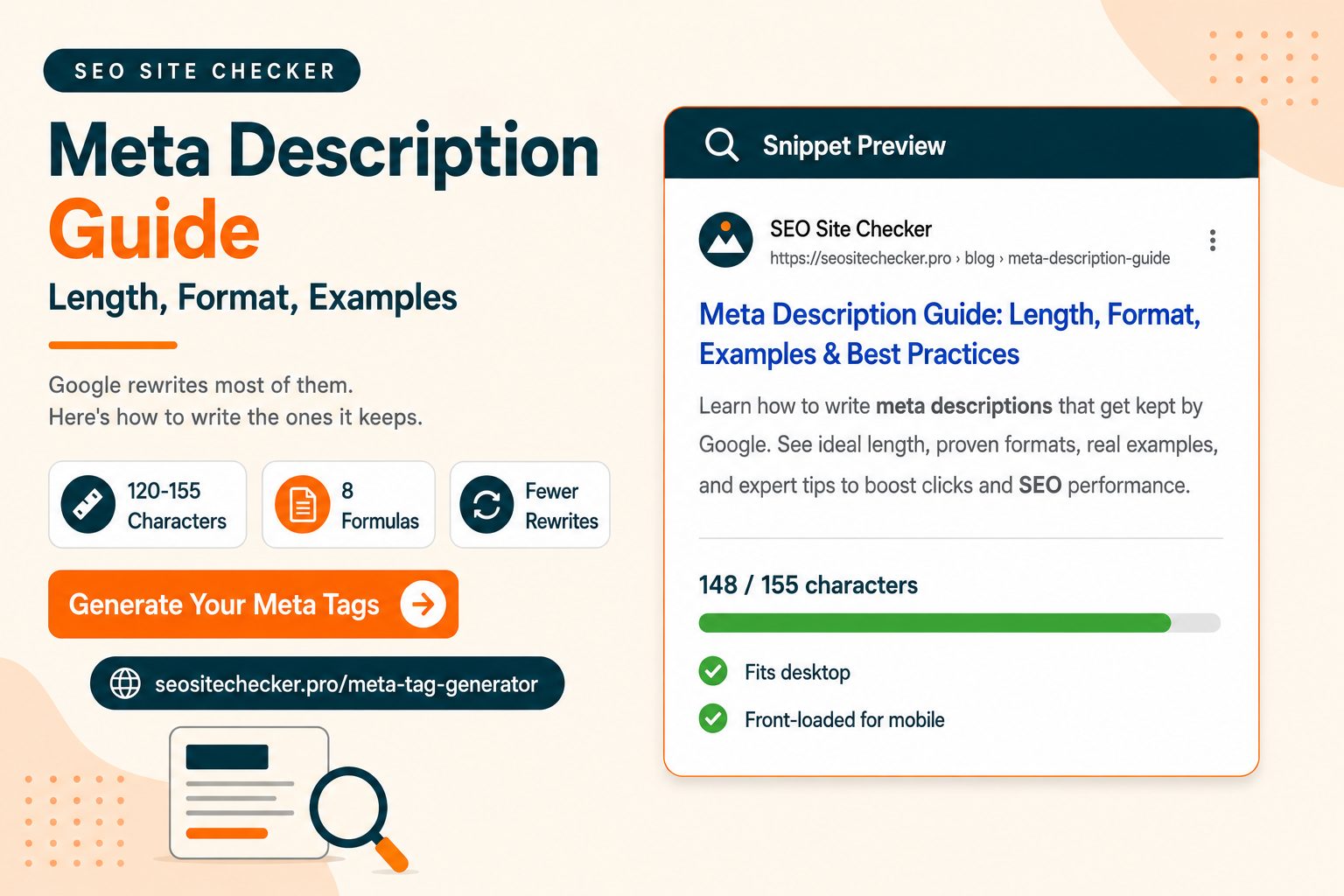
Here is the awkward truth about meta descriptions. They are not a ranking factor, Google confirmed that back in 2009, and independent studies suggest Google rewrites somewhere between 62 and 71 percent of the ones you write anyway.
So why bother?
Because the third Google keeps is not a random third. It tends to keep your description on the queries you actually optimized for, and replace it on the odd long-tail searches you never planned around. The ones it keeps are the ones that matter most.
This meta description guide covers what the tag is, the correct length and the pixel rule behind it, how to write descriptions that earn clicks, why rewrites happen and what reduces them, and the pages where writing one is honestly not worth your time.
What Is a Meta Description? Guide and Best Practices
A meta description is an HTML meta tag that summarizes what a page contains. Search engines may use it as the grey snippet text that sits under your title in search results.
It looks like this:
html
<meta name="description" content="Your page summary goes here." />One syntax detail worth noticing. It uses the name attribute. Open Graph tags use property instead, and the title is its own element with no attribute at all. Those three fields sit next to each other in the head section and all look vaguely similar, which is why people hand-editing HTML mix them up. MDN's reference on the HTML meta element has the formal spec if you want it.
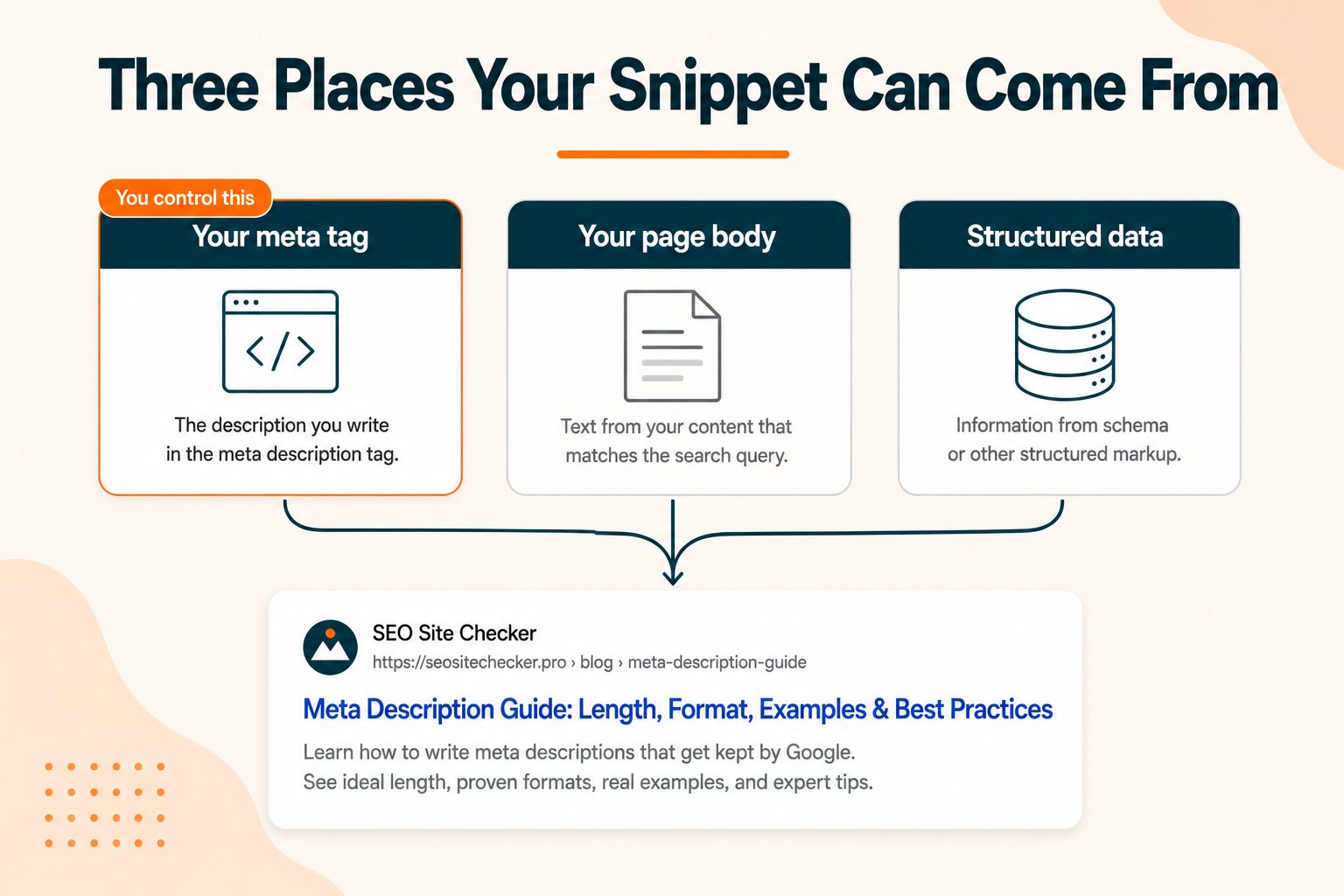
The description text a searcher actually sees can come from three places:
Your meta description tag. The version you wrote.
Text pulled from your page body. Google's own extraction, chosen to match the specific query.
Structured data. In some result types, review text or product details fill the space instead.
You only control the first one. That distinction is the foundation for everything in the rewrite section further down, so it is worth holding onto.
The useful way to think about a meta description: it is ad copy for a free ad slot you already earned by ranking.
Do Meta Descriptions Actually Help SEO?
This is the first question most people have, and a lot of articles hedge on it. Here is the direct answer.
No, it is not a ranking factor. Google stated in 2009 that the description meta tag does not feed the ranking algorithm, and that has not changed since. Writing a better description will not move you from position seven to position three.
Yes, it affects the number that matters. Click-through rate. Two results sitting at the same position can pull very different traffic depending on what their snippets say. You already did the hard work of ranking. The description decides how many of those impressions turn into visits.
There is also an indirect argument worth being careful with. More clicks means more traffic, and stronger engagement signals may support your position over time. That link between CTR and rankings is debated among SEOs rather than confirmed, so treat it as plausible rather than proven. The direct CTR benefit is real on its own and does not need the extra claim propping it up.
The practical framing: on any site with existing impressions, rewriting descriptions is one of the cheapest traffic gains available. No links, no development work, no waiting.
Meta Description Length: Characters vs Pixels
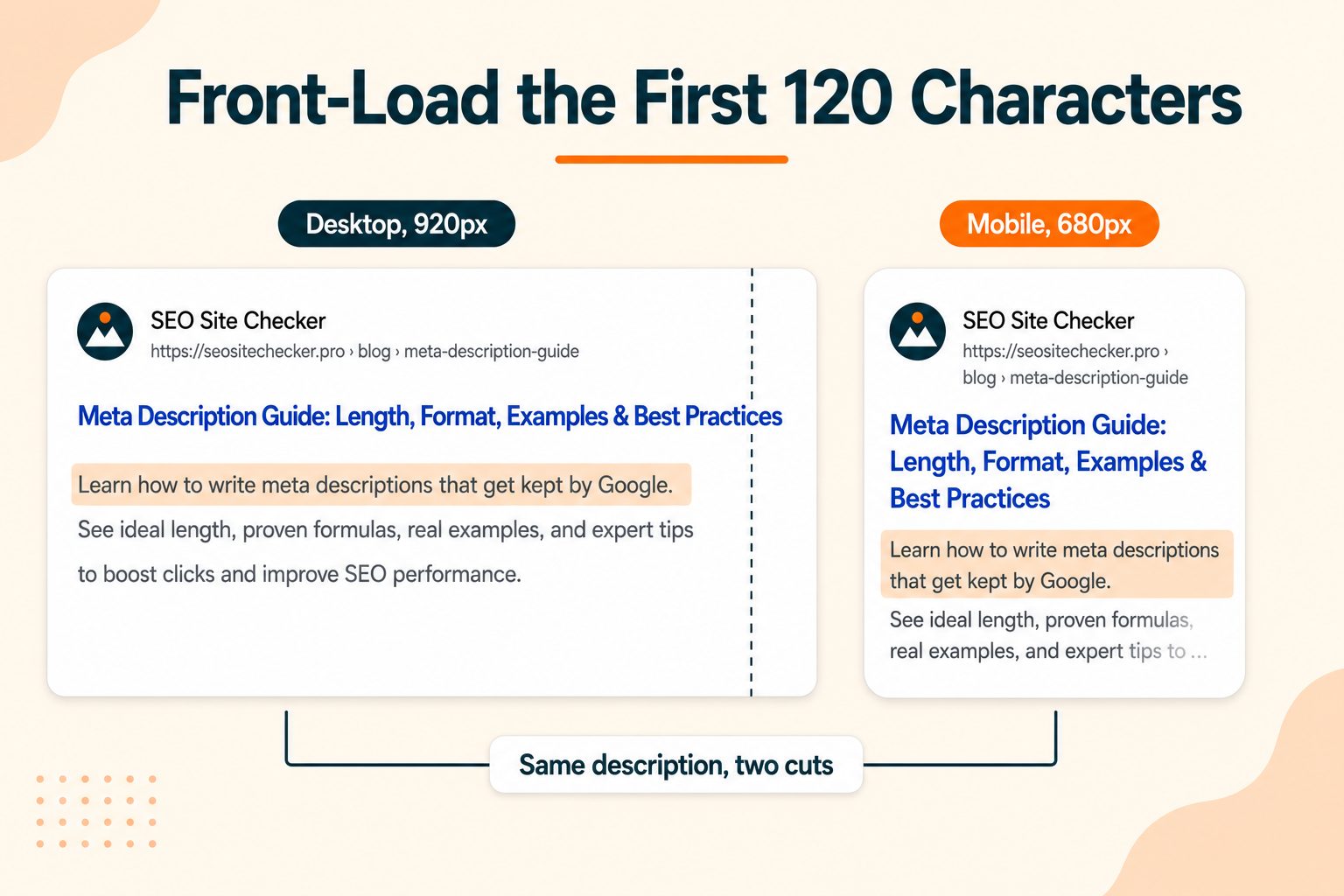
The number you came for is 150 to 160 characters on desktop, and 110 to 120 on mobile.
Now the part most guides skip. Google has never published a character limit for meta descriptions. It truncates based on pixel width, roughly 920 pixels on desktop and around 680 on mobile. The character counts everyone quotes are a proxy that happens to work for average English text.
That distinction has a real consequence. Characters are not the same width. A capital W takes roughly three times the space of a lowercase i. So a description packed with wide letters can get cut at 140 characters, while one built mostly from narrow letters might display past 165. Same count, different result.
Here is what happens across the range:
| Length | What to expect |
|---|---|
| Under 70 characters | Wastes the available space and often triggers a rewrite |
| 70 to 120 characters | Safe on both devices, but can look thin next to competitors |
| 120 to 155 characters | The working target. Displays fully on desktop |
| 155 to 160 characters | Fits desktop, cut on mobile |
| Over 160 characters | Truncated on desktop. Past roughly 250, expect a full rewrite |
The rule that comes out of all this: front-load the first 120 characters. Put your main point and your keyword there. Then even when mobile cuts the tail, what remains still reads as a complete thought. One description serves both layouts and you never have to write two.
Worth noting that going too short carries its own risk. A 40-character description leaves visible empty space under your result where searchers expect context, and Google frequently replaces very short descriptions with its own snippet. Brevity is not automatically better here.
Where Meta Descriptions Go and How to Add Them
The tag always lives in the same place. How you get it there depends on your setup.
In the HTML
Inside the <head> element, anywhere before the closing tag. In context it sits alongside your title:
html
<head>
          <title>What Is a Meta Description? Guide and Best Practices</title>
          <meta name="description" content="Learn the correct meta description length, how to write one that earns clicks, and why Google rewrites most of them." />
        </head>
WordPress
Every major SEO plugin gives you a description field on each post and page, plus template defaults for category and archive pages. Fill the field, save, and the plugin writes the tag.
One warning. Do not run two plugins that both output a description tag. Duplicate tags produce unpredictable results and you lose control of what shows.
Shopify, Wix, and Squarespace
Each has a search listing or SEO panel per page where you set the description. Check the field for a character counter before you paste anything in, because some platforms impose no limit at all in the admin. People routinely paste 400 characters, see it save without complaint, and never learn it was truncated in search.
Custom and framework-built sites
Set a sensible template default, allow per-page overrides from your content data, and render the tag server-side. If the description is injected by JavaScript after page load, crawlers may never see it. If you are not sure what your server is actually sending, the Online HTML Viewer shows you the raw source rather than the rendered version.
10 Meta Description Best Practices
1. Keep it between 120 and 155 characters
The working range. Long enough to say something useful, short enough to survive desktop truncation.
2. Front-load your primary keyword
Google bolds words matching the query inside the snippet, which makes your result visually heavier on the page. Early placement also protects the keyword from mobile truncation.
3. Write a unique description for every page
Duplicates hand Google a reason to write its own, and they make your pages harder to tell apart in results.
4. Match the search intent, not just the topic
Someone searching a how-to wants the promise of steps. Someone searching a product wants specifics and a price signal. The description should make clear which kind of page this is.
5. Lead with the value, not the subject
"Cut image file sizes by up to 70 percent, free and with no signup" works harder than "This page covers image compression techniques."
6. Use active voice
It is shorter and it reads with more confidence. When you have 155 characters, every wasted word costs you.
7. Add a light call to action where it fits
"Try it free," "See the checklist," "Compare both." Not on every page, and never at the expense of actually summarizing the content.
8. Deliver what you promise
A description that oversells wins the click and loses the visitor within seconds. That trade works against you, not for you.
9. Avoid double quotation marks
Google can cut a description at a double quote. Use single quotes or restructure the sentence around them.
10. Do not stuff keywords
Repeating your term three times reads as spam to a human and raises the odds Google discards your version entirely.
How to Write a Meta Description That Gets Clicks
Everything above gets you a correct description. This section is about writing one that wins.
The reframe that matters: your description is competing on screen with nine others, and most of those are also technically correct. Correctness is the floor. It is not the goal.
Answer the query, do not describe the page. Most descriptions summarize what a page contains. The ones that pull clicks state the answer, or promise it clearly. Compare "A guide to meta description length and formatting" against "Meta descriptions should run 120 to 155 characters. Here's why the pixel limit matters more than the count." The second one has already been useful.
Be specific with numbers and concrete nouns. "17 free tools" beats "a range of tools." Specificity signals that something definite is waiting on the other side. Vagueness asks the reader to gamble.
Mirror the searcher's language. Use the words people actually type rather than your internal vocabulary. This also increases how much of your snippet gets bolded, which is a free visual advantage.
Name the format. Checklist, template, calculator, comparison, step-by-step. Readers want to know the shape of what they are clicking into.
Read the other nine results before you write. Search your keyword and look at the descriptions already there. If eight of them open with "Learn everything about," yours should not. Standing out on a results page is partly just being different from your immediate neighbors.
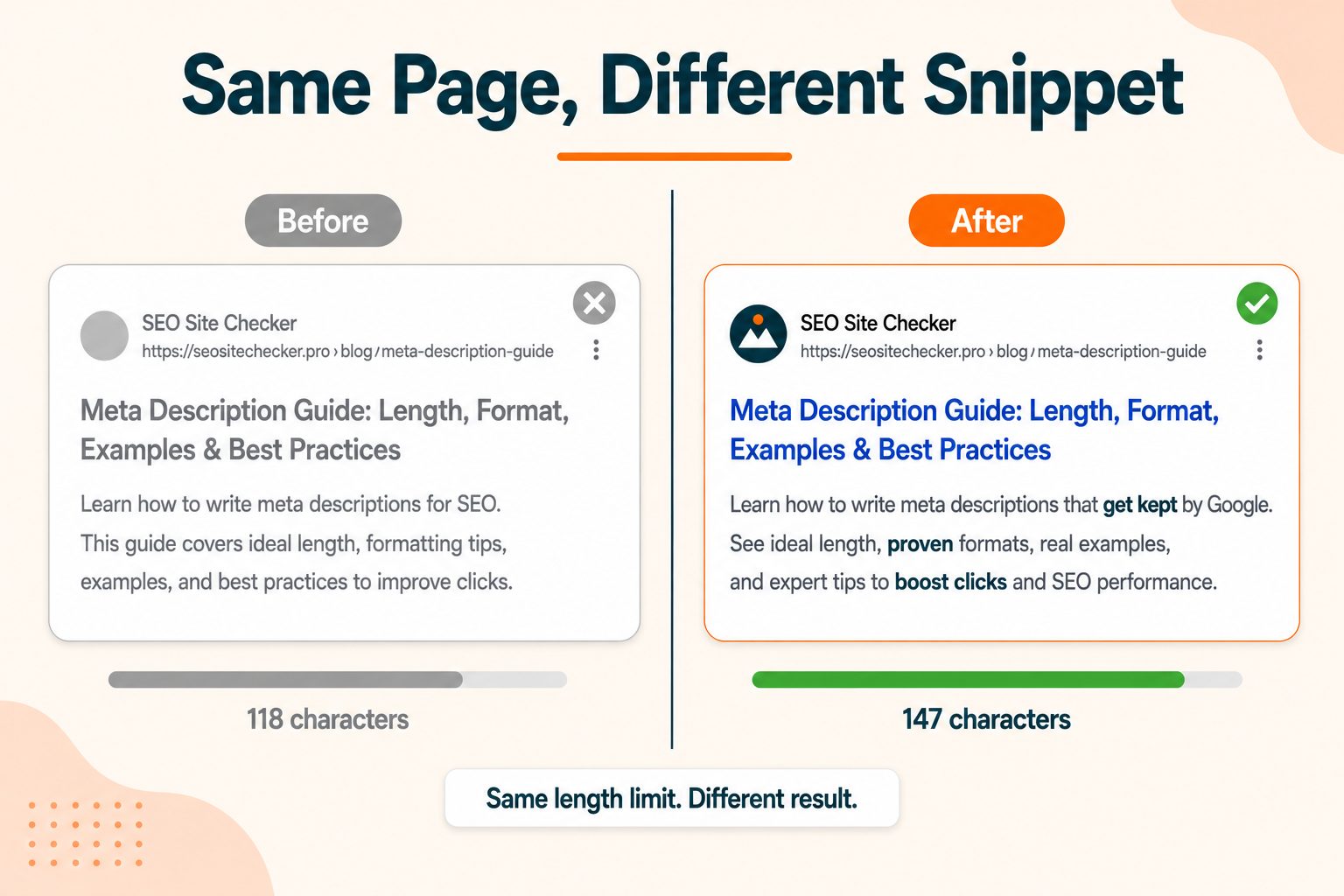
Here is a before and after:
Before (118 characters): "Our comprehensive guide to image compression covers everything you need to know about optimizing your images."
After (147 characters): "Compress images to under 100KB without visible quality loss. Free tool, no signup, works with PNG, JPEG and WebP. See the settings that matter."
Same page. The second one names a target, states the constraint, lists the formats, and removes the signup objection. It also front-loads so the mobile cut still lands after a complete idea.
Once the wording is settled, the free Meta Tag Generator builds the tag block for you to paste into your head section, which removes the risk of a syntax typo silently breaking it.
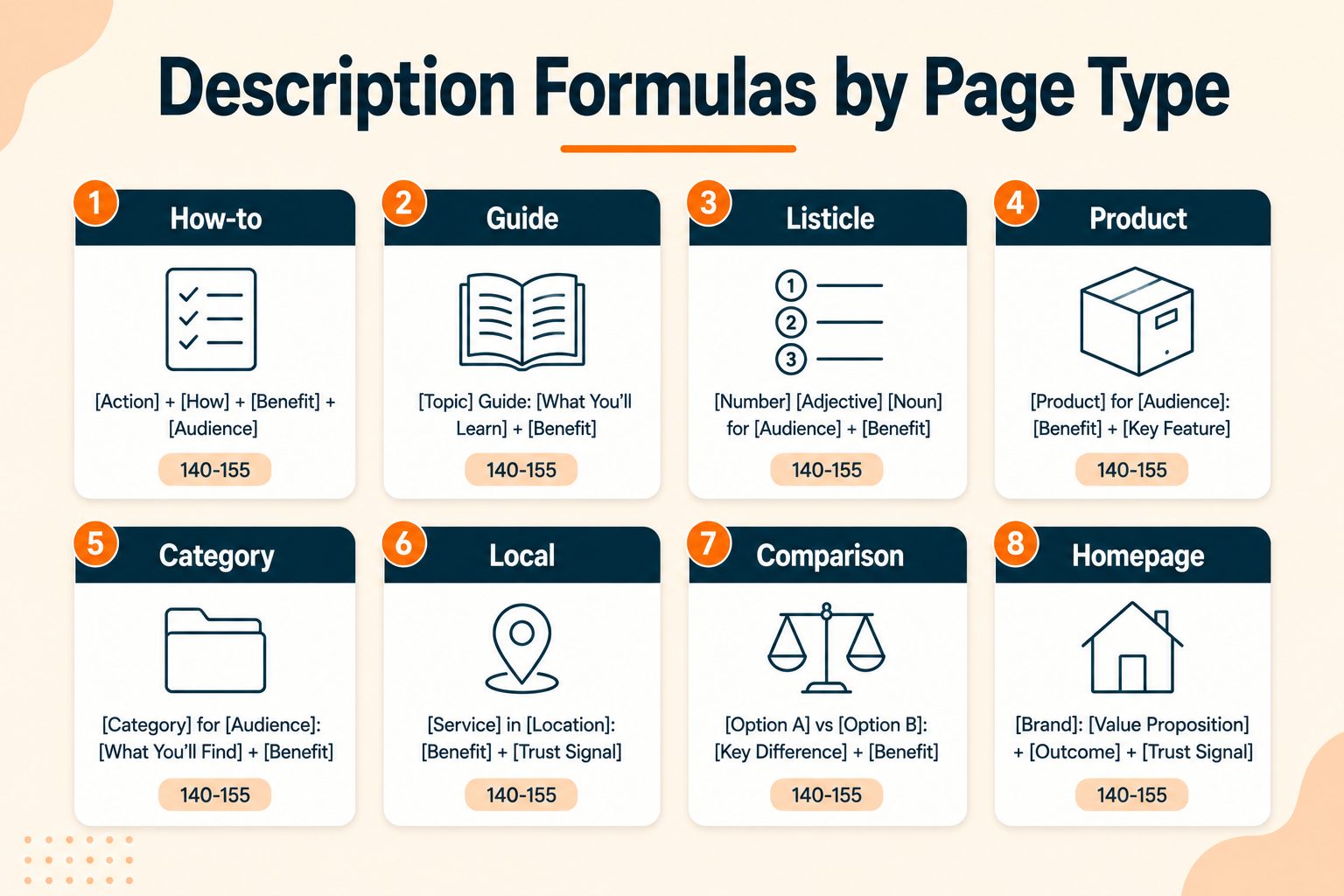
Meta Description Formulas by Page Type
Different pages have different jobs. These are starting shapes, not templates to apply mechanically.
| Page type | Formula | Character target |
|---|---|---|
| Blog how-to | [Outcome] in [steps or time]. [What's included]. [Light CTA]. | 140 to 155 |
| Blog guide | [What the reader learns]. Covers [A], [B] and [C]. | 145 to 155 |
| Listicle | [Number] [things] for [audience]. [Selection criteria]. | 130 to 150 |
| Product or tool page | [What it does], free and no signup. [Key spec]. [CTA]. | 130 to 150 |
| Category page | Browse [number] [category] tools. [What they cover]. | 120 to 145 |
| Local business | [Service] in [city]. [Differentiator]. [Contact CTA]. | 130 to 150 |
| Comparison | [A] vs [B] compared on [criteria]. [What the reader decides]. | 140 to 155 |
| Homepage | [What you do] for [audience]. [Proof point]. [CTA]. | 140 to 155 |
A caution on using these. Apply the same formula across forty pages and your descriptions all start to sound identical, and that flatness costs clicks even when each one is individually fine. Use the shape to get started, then write the version that fits the page.
Why Google Rewrites Most Meta Descriptions
Two independent studies have put numbers on this. Ahrefs found Google rewrote descriptions around 63 percent of the time across 20,000 keywords. Portent's study of 30,000 keywords found rates near 68 percent on desktop and 71 percent on mobile. Both are tool-vendor studies rather than Google figures, and both are a few years old, but they agree closely enough to be useful.
Most articles stop at that number and treat it as a reason to give up. The more interesting fact is what the number hides.
The rewrite rate is not evenly distributed. Google is most likely to substitute its own snippet on long-tail and unusual queries where your general-purpose description does not match what someone specifically typed. It is most likely to keep yours on your head terms, which are exactly the queries you wrote the description for in the first place.
So the third it keeps is disproportionately the third you care about. That reframes the whole exercise. You are not writing for every query. You are writing for the queries you targeted, and on those you have a much better chance than 30 percent.
Why rewrites happen:
- Your description does not match the specific query that was typed
- The description is missing, very short, or duplicated across pages
- The description reads as keyword stuffing
- Better matching text exists somewhere in your page body
- The description does not honestly reflect what the page contains
What actually reduces rewrites:
Write to the query rather than to the page. If someone is going to search a specific phrase, that phrase should appear naturally in the description.
Make sure the page delivers the promise. Google compares your description against your content, and a mismatch is a rewrite trigger.
Keep it unique and inside the pixel budget. Both of these are simple to check and both are common failures.
Cover the query language in your body copy too. If Google does write its own snippet, it will pull from your page, so good body copy means even the rewrite works in your favor.
Google's own documentation on controlling snippets covers the mechanics from the source, which is more reliable than any secondhand summary.
When You Can Skip Writing a Meta Description
Nobody ranking for this keyword says this, so here it is plainly. On some pages, writing a description is not worth your time.
If you run a store with 4,000 product pages, hand-writing a unique description for each one is a poor use of anyone's afternoon. Google's auto-generated snippet is often better matched to the specific query anyway, because it can pull whichever part of your page fits what was typed.
The prioritization rule that works:
Write descriptions for your homepage, your top-level category pages, your highest-traffic posts, and any page you are actively trying to rank.
Let the rest run from a sensible template or be auto-generated.
There is also a control most people have never heard of. The robots meta tag supports a max-snippet directive that lets you cap or extend how long an auto-generated snippet can be, and nosnippet to suppress it entirely. There is also data-nosnippet, an attribute you can put on specific elements to keep them out of any generated snippet, which is useful for boilerplate or promotional text you never want appearing in search. Google's robots meta tag reference documents all three.
These are not everyday tools, but on a large site where most snippets are auto-generated, they give you real influence over pages you will never write descriptions for individually.
Meta Description vs Title vs Open Graph Description
Three fields that sound similar and do different jobs.
| Field | Where it shows | Ranking factor | Target length |
|---|---|---|---|
| Meta title | Search result headline | Yes | 50 to 60 characters |
| Meta description | Search result grey text | No | 120 to 155 characters |
| og:description | Social preview card | No | Around 110 characters |
Two things follow from this table.
First, the title is doing the ranking work, not the description. If you only have time to fix one thing, fix the titles. Your meta title does the ranking work and it deserves the first pass.
Second, most social platforms fall back to your meta description when no og:description exists. So a good meta description quietly does double duty across search and social. That is a decent safety net, but the two audiences arrive in different frames of mind, so it is better to set a dedicated Open Graph description on pages you expect to be shared. The Open Graph Generator builds that block if you want it done quickly.
Common Meta Description Mistakes
- Leaving it blank on important pages. Google writes whatever it wants, and you lose the one chance to frame your result.
- Copying the same description across every page. The most common cause of a site-wide rewrite pattern.
- Restating the title word for word. You had two lines of space and used one idea.
- Writing over 250 characters. Nearly guarantees a rewrite rather than a truncation.
- Using double quotation marks. Google may cut your description at the quote.
- Stuffing keywords. Reads as spam and invites a replacement.
- Writing something the page does not deliver. Wins the click, loses the visitor, and that is a worse outcome than no click.
- Ignoring mobile. Most of your traffic sees the shorter version, and that is where your tail disappears.
- Never updating them. A description written three years ago may not match how people search for that topic now.
- Two plugins outputting duplicate tags. Easy to create, easy to miss, and it undoes careful work.
How to Audit Your Meta Descriptions
"Review your descriptions" is not a process. This is.
- Export your URL list with the current description for each page.
- Flag the outliers. Anything blank, over 160 characters, or under 70.
- Sort alphabetically to surface duplicates, which cluster together immediately.
- Pull impressions and CTR from Search Console and match them to the list.
- Rank by opportunity, meaning high impressions paired with low click-through rate.
- Rewrite the top 20, log the change date, and re-check the same pages in four weeks.
Step five is the one people skip and the one that decides whether the work pays off. A page with 8,000 impressions and a 1.1 percent CTR is worth ten times the attention of a page with 40 impressions and a flawless description. Fix where the traffic already is.
To check what a single page currently outputs, the Meta Tag Analyzer pulls the live title and description from any URL. To find missing and duplicate descriptions across a whole site rather than one page at a time, run a full site audit and work from the list it produces.
Wrapping Up
The short version: 120 to 155 characters, keyword near the front, unique on every page that matters, and written to answer the query rather than describe the page.
Accept that Google will rewrite a lot of them. Write well anyway, because the ones it keeps are disproportionately the ones on the queries you were targeting. And on the pages where a hand-written description is not worth the effort, say so, prioritize elsewhere, and let the auto-generated snippet do its job.
Frequently Asked Questions
Frequently Asked Questions (FAQs) is a list of common questions and answers provided to quickly address common concerns or inquiries.
What is a meta description?
It is an HTML meta tag that summarizes a page's content. Search engines may display it as the grey snippet text underneath your title in search results.
How long should a meta description be?
Aim for 120 to 155 characters. Google truncates around 920 pixels on desktop and 680 on mobile, so front-load your main point in the first 120 characters.
Do meta descriptions affect SEO rankings?
Not directly. Google confirmed in 2009 that the description tag is not a ranking factor. It affects click-through rate, which is a separate and still valuable outcome.
Why does Google not use my meta description?
Usually because it does not match the specific query someone typed, or because Google found better matching text in your page body. Missing, short, and duplicate descriptions also get replaced.
What happens if you do not write a meta description?
Google generates one from your page content. That is sometimes fine and occasionally better matched to the query, but you lose control over how your result reads.
Where do you put a meta description in HTML?
Inside the head element, anywhere before the closing head tag. Most content management systems provide a field so you never touch the code directly.
Should every page have a unique meta description?
Every page you care about ranking, yes. On very large sites, prioritize your homepage, category pages, and top-traffic posts, and let the rest be auto-generated.
What is the difference between a meta title and a meta description?
The title is the clickable headline and it is a ranking factor. The description is the grey summary below it and it is not. Both affect click-through rate.
Should meta descriptions include keywords?
Yes, naturally and near the front. Google bolds words matching the query, which makes your result more visually prominent. Repeating the keyword does not help.
How do I check my meta description?
Run the URL through a meta tag analyzer, or view the page source and search for the description tag. Check both desktop and mobile length before publishing.

.jpg)
.jpg)

