
This practical guide helps bloggers decide whether a cheap VPS is worth it in 2026. It explains what VPS hosting is, which specs matter, how a VPS compares with shared and cloud hosting, and how to set one up for WordPress. It does not test or rank hosts. Where it names a host, the facts come from that host’s own pages, read on November 21, 2026.
Some links in this article are referral links. If you sign up through them, we may earn a commission at no extra cost to you.
Quick summary: what to expect
A cheap VPS can give a growing blog its own allocation of CPU and RAM and more control over server settings than basic shared hosting, at a higher monthly price. It is not a ranking shortcut: Google says good Core Web Vitals results do not guarantee top rankings, and that it always seeks to show the most relevant content. This guide explains which VPS specs matter, how to configure a blog for speed and when it makes sense to upgrade.
Run a quick pre-migration audit with our Website SEO Score Checker so you have a baseline to compare with after the move. The audit reports on your pages, so it cannot tell you by itself whether your host is the cause of a problem it finds.
Introduction: why cheap VPS matters for bloggers in 2026
Bloggers historically used shared hosting because it was cheap and simple. Pages often carry many images, scripts and embeds, and Google says its ranking systems use Core Web Vitals, so a slow or overloaded server can hold a blog back. A VPS gives you an allocated share of CPU and RAM, SSD or NVMe storage on many plans, and control over server-level caching, at a price between basic shared hosting and a premium managed plan. A well-configured VPS can make pages load faster and more consistently. It will not make weak content rank, and a lean blog on good shared hosting can still be fast.
What is VPS hosting? A beginner-friendly explanation
VPS stands for Virtual Private Server. It’s a virtualized server that sits between basic shared hosting and expensive dedicated servers. Unlike shared hosting, where many sites share the same physical machine and resources, a VPS gives you a slice of a server (or cloud node) that behaves like a standalone environment. That usually means reserved RAM and isolated storage, and on some plans dedicated CPU cores, which makes performance more predictable under load. Some cheaper plans use shared CPU instead, so check which kind a plan offers.
In plain terms: a VPS gives you more control than shared hosting for a modest increase in cost.
 Diagram: shared hosting versus VPS.
Why a blogger might move to a VPS
- Performance matters: Readers expect fast pages, and Google says its ranking systems use Core Web Vitals. A VPS with its own allocation of resources can respond more consistently than a crowded shared server, but your theme, plugins and images also affect page speed.
- Growth & traffic stability: As blogs scale (social shares, newsletters, organic growth), shared hosts can falter during spikes; a VPS with its own allocation of resources can cope better, though that depends on the plan, since some cheap plans use shared CPU.
- Security & isolation: VPS instances are isolated, a compromised neighbor is less likely to impact your site.
- Control & tooling: On a VPS you can add server-level caching, tune PHP workers, and choose your stack, decisions that can affect how fast your pages load.
Bottom line: A cheap VPS can be a sensible next step for bloggers moving beyond hobby traffic, but check caching, image sizes and plugins on your current plan first.
What to look for in a cheap VPS hosting plan (2026 checklist)
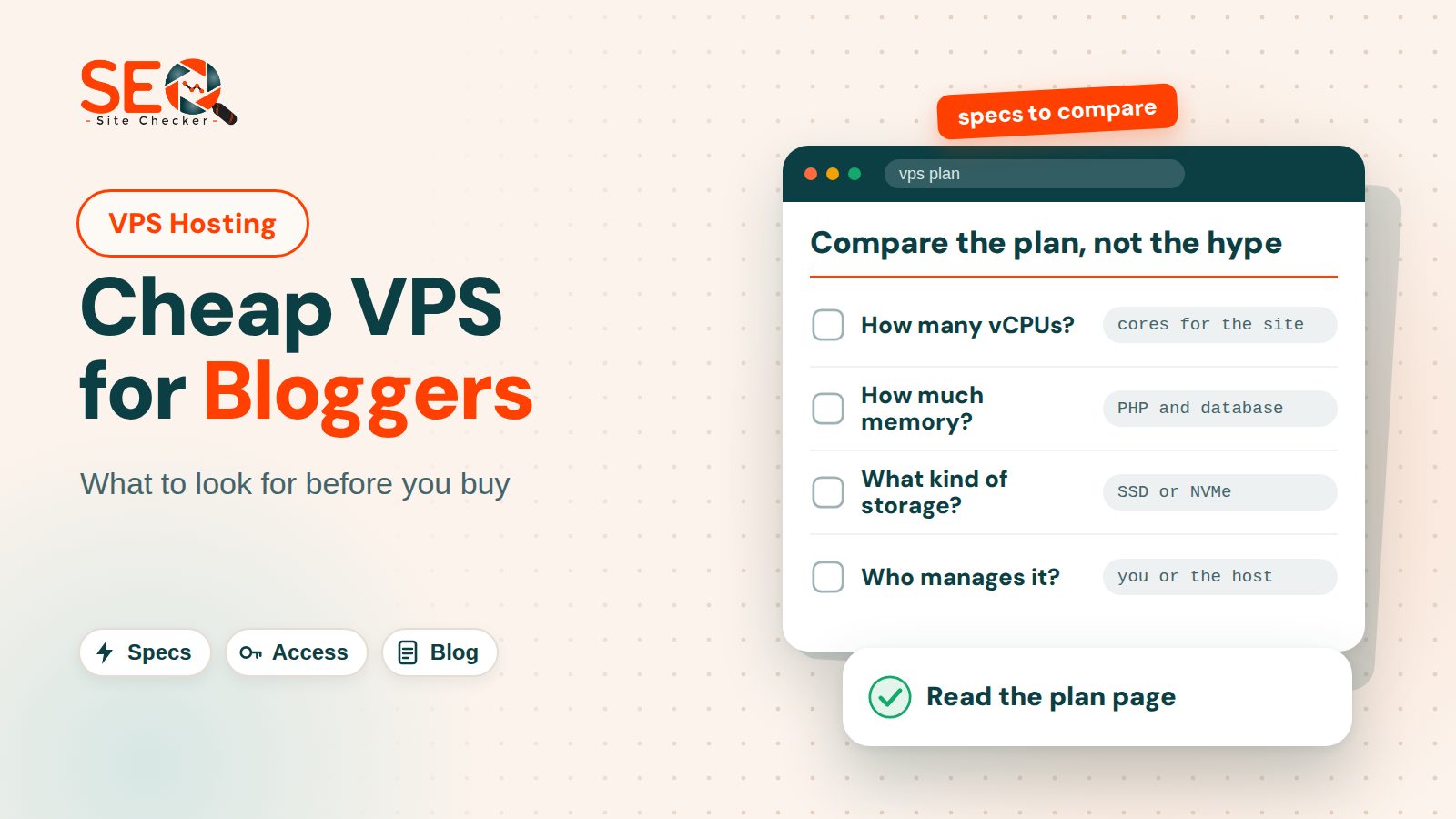
Not all cheap VPS plans are equal. When selecting a budget VPS for your blog, focus on these specs and features. The sizes below are our rules of thumb, not measured requirements: your theme, plugins and traffic decide what you actually need.
- vCPU / cores: A common starting point is 1-2 vCPU cores for a small blog and 2-4 cores for a growing site. Ask whether the cores are dedicated or shared: shared CPU costs less and suits light or variable workloads that can handle uneven CPU performance, while dedicated CPU gives steadier performance.
- RAM: 1-2 GB is the starting point; 2-4 GB for WordPress with plugins and moderate traffic.
- Storage: NVMe/SSD storage offers significant speed gains over spinning disks, prefer NVMe if available.
- Bandwidth / Network: Unmetered or ample monthly bandwidth and a strong network provider reduce slowdowns.
- Server location & CDN: Choose data centers near your main audience; ensure easy CDN integration (Cloudflare or built-in CDN).
- Backups & snapshots: Daily or automated snapshots simplify recovery after an error or plugin update.
- Managed vs unmanaged: Managed VPS saves time (and mistakes), ideal if you prefer focusing on content rather than server ops.
- Control panel: cPanel, Plesk, CyberPanel or a provider dashboard that simplifies management.
- Support & monitoring: 24/7 support, monitoring, and clear SLA on uptime.
If you are not comfortable with server administration, favor a managed plan. If you are, an unmanaged plan leaves updates, security and backups in your hands.
Examples of budget VPS plans, from the providers’ own pages
We have not tested these providers, and this is not a ranking. The notes below repeat what each provider’s own page said on November 21, 2026. Plans, prices and promotions change often, so check the current page before you buy.
- Hostinger: its VPS page (hostinger.com/vps-hosting) listed a KVM 1 plan with 1 vCPU core, 4 GB RAM, 50 GB NVMe disk space and 4 TB bandwidth at a discounted $6.49 a month. That monthly figure was the plan price spread over a 24-month term paid upfront ($155.76 in total), and the page said the plan renews at $11.99 a month for the same term. The page also listed NVMe SSD storage, root access, free weekly backups and a 30-day money-back guarantee.
- DigitalOcean: its Droplet pricing page (digitalocean.com/pricing/droplets) said bundled plans are billed per second with a monthly cap, so you never pay more than the flat monthly price. The cheapest Basic Droplet in its table costs $4.00 a month and has 1 vCPU, 512 MiB of RAM and 10 GiB of SSD storage. The page describes Basic Droplets as ideal for bursty applications that can handle variable levels of CPU, and its CPU-Optimized Droplets as using dedicated vCPUs.
- InterServer: its Cloud Compute VPS page (interserver.net/vps) said plans start at $3.00 per month (1 core, 2 GB of memory and 40 GB of SSD) and that managed support is included on plans of 8 or more slices, so check what support the $3.00 plan includes before you assume it is managed.
The plan with the lowest price is not automatically the plan you will pay for. Before you buy, check three things on the provider’s own page: the length of the billing term and whether it is paid upfront, the renewal price, and whether the CPU is dedicated or shared. The cheapest DigitalOcean plan above has less RAM than the 1-2 GB starting point suggested in the checklist, so match the plan to your blog, not to the lowest price.
Cheap VPS vs Shared Hosting vs Cloud: which should bloggers choose?
Each hosting model has a role:
- Shared hosting: lowest cost, easiest setup fine for hobby blogs with low traffic.
- Cheap VPS: more control than shared hosting and often steadier performance, without a premium price. A good fit for bloggers ready to scale.
- Cloud hosting: best for high traffic sites needing auto-scaling and global distribution; usually more expensive.
If your blog regularly sees traffic spikes or slow page loads on shared hosting, a cheap VPS can be a cost-effective next step.
How to set up a cheap VPS for your blog (step-by-step)
This section walks through a typical managed VPS setup for WordPress. If you choose an unmanaged VPS, the steps are similar but require additional server administration.
- Pick the right plan: Start from the rules of thumb in the checklist above, for example 2 vCPU and 2-4 GB RAM for a growing blog, and upgrade when monitoring shows you need more.
- Choose an OS and stack: Pick a current long-term-support Linux release such as Ubuntu LTS and a web server that WordPress.org recommends, Apache or Nginx. WordPress.org’s requirements page also lists the PHP and database versions and the HTTPS support it recommends a host offer.
- Install a control panel (optional): CyberPanel, Plesk or cPanel if your plan supports it, or use the provider’s own dashboard.
- Harden security: enable UFW, fail2ban, and ensure automatic updates or managed security options.
- Enable caching: implement server-level caching (Redis, object cache, or LiteSpeed cache when supported) and full-page cache for WordPress.
- Enable CDN: connect Cloudflare or a CDN provider to reduce geographic latency.
- Backups & snapshots: schedule daily snapshots and off-site backups.
- Monitor: set up uptime monitoring (UptimeRobot) and use SEO Site Checker to measure page performance.
If you prefer a simpler path, a managed VPS plan takes over some of these steps. Ask the provider which of them it handles.
Common mistakes bloggers make with cheap VPS hosting (and how to avoid them)
- Picking the smallest plan forever: Start small but plan upgrades; monitor RAM/CPU usage.
- Ignoring backups: Always enable snapshots and off-site backups.
- Skipping CDN: Geographic speed still matters add Cloudflare or a CDN immediately.
- Not optimizing WordPress: Use lightweight themes, disable unused plugins, and serve images in next-gen formats.
- Poor security hygiene: failing to harden SSH, use strong passwords, or limit admin access.
Conclusion: is a cheap VPS right for your blog in 2026?
A cheap VPS can give a growing blog steadier performance and more control than basic shared hosting, but it is not a ranking shortcut. If you decide to move, start with a modest plan, check the billing term, renewal price and CPU type on the provider’s own page, and put your effort into caching, a CDN and backups.
Before changing hosts, run a baseline audit with our Website SEO Score Checker and track changes after migration.
Further reading: Google’s explanation of page experience in Google Search, its list of Core Web Vitals metrics and targets, and Cloudflare’s documentation for its Cache (CDN) service.
Frequently Asked Questions
Frequently Asked Questions (FAQs) is a list of common questions and answers provided to quickly address common concerns or inquiries.
Is VPS hosting good for bloggers?
It can be. A VPS gives your blog an allocated share of server resources and more control than many basic shared plans, which can make pages load more consistently. Google says its ranking systems use Core Web Vitals and recommends good scores, but also says good scores do not guarantee top rankings, so treat a VPS as a way to remove a technical bottleneck, not as an SEO shortcut.
How much does a cheap VPS cost in 2026?
It depends on the provider, the plan size and the billing term. On November 21, 2026, InterServer's VPS page listed plans from $3.00 a month, DigitalOcean's pricing page listed its cheapest Basic Droplet at $4.00 a month, and Hostinger's VPS page listed its KVM 1 plan at a discounted $6.49 a month on a 24-month term paid upfront, renewing at $11.99 a month. Larger plans and managed support cost more, so check the provider's own page for current prices.
Can a blog on cheap VPS outrank a site on shared hosting?
Potentially, if the VPS site uses optimized server configuration, caching, CDN and follows on-page SEO best practices. Hosting alone does not guarantee ranking, but it can remove a technical bottleneck.
Do I need managed VPS for a blog?
Managed VPS is recommended if you prefer to avoid server administration. It costs more but saves time and reduces risks from misconfiguration.
How much RAM does my blog need on VPS?
As a rule of thumb, a small blog can start on 1-2 GB of RAM, while a blog with many plugins, WooCommerce or heavy media should consider 2-4 GB or more. These are rules of thumb, not measured requirements, so watch your actual memory use and upgrade when you need to.
Is Hostinger a good cheap VPS option?
We have not tested Hostinger, so we cannot rate it. On November 21, 2026, its VPS page listed NVMe SSD storage, root access, free weekly backups and a 30-day money-back guarantee, with the entry price tied to a 24-month term paid upfront and a higher renewal price. Compare the renewal price, the specs and the support options with other providers before you decide.
What is the difference between shared and dedicated CPU on a VPS?
On a dedicated CPU plan the vCPU cores are reserved for your server. On a shared CPU plan you do not get guaranteed access to a dedicated core at all times, which usually costs less and suits workloads that can handle variable CPU performance, but can be less steady. DigitalOcean's pricing page, for example, describes its Shared v5 Droplets as designed for bursty, variable work that does not need guaranteed access to a dedicated core at all times, and its CPU-Optimized Droplets as using dedicated vCPUs. Check which kind a plan uses before you buy.