

Hosting is one of several things that decide how fast a page loads, and slow loading can get in the way of the page experience Google says its ranking systems look for. This guide explains what Time to First Byte (TTFB) is, how it feeds into Largest Contentful Paint (LCP), what Google’s own documentation says about page experience and crawling, and how to check whether your host is the slow part. It draws on Google’s and web.dev’s documentation. It does not test, rank or review hosting providers.
Some links in this article are referral links. If you sign up through them, we may earn a commission at no extra cost to you.
Quick verdict
Hosting speed is not a ranking switch, but it sits underneath things Google does look at. A slow server delays Time to First Byte (TTFB), and web.dev explains that a high TTFB adds time to every loading metric that follows it, including Largest Contentful Paint (LCP), one of the three Core Web Vitals. Google says Core Web Vitals are used by its ranking systems, that good scores do not guarantee a top position, and that it always seeks to show the most relevant content.
To see where your own site stands, run it through our Website SEO Score Checker. It reports lab measurements such as Largest Contentful Paint and First Contentful Paint, but it does not show TTFB as a separate number, so the measuring section below suggests tools for that.
Introduction: Why hosting speed matters for SEO
Most SEO discussions focus on content, links and markup. The server that delivers your pages comes first in the chain: before a browser can show anything, it has to wait for the server to start answering. A slow answer delays everything that follows, including Largest Contentful Paint, and Google says that slow responses and server errors make its crawlers crawl less.
This article explains how hosting speed relates to search performance as Google and web.dev document it, how to measure the signals that matter, and what to check before you pay for a different host.
What is hosting speed? Server metrics that matter
“Hosting speed” is an umbrella term that describes how quickly your server responds and serves content to users and crawlers. It is distinct from client-side performance (large images, third-party scripts), though the two interact. Key server-side metrics include:
- Time to First Byte (TTFB): the time from starting to navigate to a page until the first byte of the response begins to arrive. It includes more than the server, as explained below.
- Server latency: the delay introduced by the server’s network path and processing queue.
- Throughput and bandwidth: how much data can be transmitted per second.
- Concurrent connection limits: how many simultaneous requests the server handles before queuing.
- Disk I/O performance: the type of storage (NVMe SSD, another SSD or a spinning disk) affects how fast assets and dynamic content are read.
Hosting speed depends on the server hardware (CPU, RAM, disk type), the hosting architecture (shared, VPS, cloud) and the quality of the network path to your visitors. web.dev’s guide to optimizing TTFB says hosting should be the first thing to consider before other optimizations, with the rule of thumb that your host must be able to handle the traffic you send to it.
Google’s speed and experience signals that tie back to hosting
Google says there is no single page experience signal. A slow server can affect three things Google documents: Core Web Vitals, page experience more broadly and crawling.
Core Web Vitals
The Core Web Vitals are Largest Contentful Paint (LCP), Interaction to Next Paint (INP) and Cumulative Layout Shift (CLS). Google recommends aiming for an LCP within the first 2.5 seconds of the page starting to load, an INP below 200 milliseconds and a CLS below 0.1, and its page experience documentation says Core Web Vitals are used by its ranking systems. Hosting speed most directly affects LCP: web.dev explains that LCP includes connection setup time, redirect time and other TTFB delays, so a slow server response pushes the main content later.
Google: Understanding Core Web Vitals and Google search results
Time to First Byte (TTFB)
web.dev explains that TTFB adds up redirect time, DNS lookup, connection and TLS setup and the wait for the server’s first byte. Because it comes before every other loading metric, a high TTFB adds time to the metrics that follow. TTFB is not a Core Web Vital. web.dev gives 0.8 seconds or less as a rough guide for good and anything above 1.8 seconds as poor.
web.dev: Time to First Byte (TTFB)
Page experience
Google says its core ranking systems look to reward content that provides a good page experience. It also says that Google Search always seeks to show the most relevant content, even if the page experience is sub-par, but that for many queries there is a lot of helpful content available, and a great page experience can contribute to success in Search in those cases. Separately, Google uses the mobile version of a site’s content for indexing and ranking, so check your pages on a phone-sized screen as well as on a desktop.
Google: Understanding page experience in Google Search results
Google: Mobile site and mobile-first indexing best practices
Crawling and server errors
Google’s crawl budget guide says a site’s crawl capacity limit goes up when the site responds consistently and its response times, including latency and Time to First Byte, stay stable or improve. If the site slows down or answers with server errors (5xx) or rate-limiting signals such as HTTP 429, the limit goes down and Google crawls less. Google’s documentation on HTTP status codes adds that 5xx and 429 responses make its crawlers slow down temporarily, and that URLs which keep returning a server error are eventually removed from the index.
Google: Optimize your crawl budget
Google: How HTTP status codes affect Google’s crawlers
Server-side factors to check
These are the server-side factors worth checking when you suspect the host is slowing your pages:

- TTFB: compare your own figure with web.dev’s rough guide above.
- Server errors and timeouts: how often the server answers with 5xx errors. Google says it crawls less when a site slows down or answers with server errors.
- Storage type: SSD and NVMe storage generally read data faster than spinning disks, which matters for dynamic sites that read files and database content to build each page.
- Memory and CPU allocation: web.dev notes that an application with too little memory struggles to serve pages quickly. Too little CPU can have the same effect under load.
- Distance to visitors: web.dev says users far from your origin server can see a high TTFB even when the backend is well optimized. A CDN (content delivery network) serves cached copies from servers closer to them.
- Concurrency handling: server software and limits (PHP-FPM workers, NGINX configs) determine how many simultaneous requests can be served efficiently.
- Software versions: web.dev notes that language runtimes, HTTP implementations and database software get faster over time as new versions are released, so ask whether your host keeps its stack up to date.
Measuring these takes two kinds of data. web.dev recommends treating field data (real visits) as the primary source for TTFB, because redirects add to it and lab tools are often measured using the final URL. Lab tools are still useful for finding the cause.
How slow hosting can hurt SEO
When a server is slow or unreliable, the effects show up in several places:
Slower crawling
As covered above, Google crawls less when a site slows down or returns server errors. Google’s crawl budget guide is advanced material for large or fast-changing sites. It lists sites with 1 million or more unique pages that change weekly, sites with 10,000 or more unique pages that change daily and sites with a large share of their URLs classified by Search Console as discovered but currently not indexed, and it calls these numbers a rough estimate, not exact thresholds. It says that if your site does not have a large number of rapidly changing pages, or if your pages seem to be crawled the same day they are published, you do not need to read it. For a typical small site, that means repeated server errors are a reason to fix the server, but crawl budget is not the main concern.
Frustrated visitors
Slow pages are frustrating to use, and some visitors may leave before a page finishes loading, whatever Google does with the page. Google says Core Web Vitals, which include the loading metric LCP, are used by its ranking systems.
A later Largest Contentful Paint
Google suggests aiming for an LCP within the first 2.5 seconds. Every moment the server spends before it starts answering comes out of that time, which leaves less of it to load the main content.
In short: a slow or unreliable server adds delay to page loads, can make Google crawl less and can cost you visitors. Measure first, then fix the server-level causes before moving on to site-level optimizations.
Hosting types and what they mean for speed
Your hosting type decides how much server capacity your site gets and how much of it you share. These are general descriptions: how a plan performs depends on the provider, the plan and your site, so measure before you decide.
Shared hosting
Shared hosting puts many sites on one server that competes for the same CPU, memory and disk. web.dev says shared hosting is generally slower, which is probably fine for a small personal site that serves mostly static files, while for a larger application with many users, personalization and database queries the choice of host becomes critical for TTFB. Because resources are shared, response times can vary during busy periods.
VPS hosting
A VPS (virtual private server) gives your site its own allocated share of a server, with set amounts of CPU, memory and storage, so other customers’ sites are less likely to slow it down. What exactly is allocated differs by plan, so read the plan details.
Cloud hosting
Cloud hosting spreads resources across multiple servers, which can help with availability and with handling traffic spikes. Providers build it differently, so check how a specific plan works.
Managed WordPress hosting
Managed WordPress hosting often bundles server-level caching and WordPress-specific tuning, so you do not set them up yourself. What is included varies by provider, so check the plan page.
Dedicated hosting
A dedicated server gives you a whole machine: the most resources and control, with the highest cost and the most server administration. It is often more than a small or mid-sized site needs.
When is your hosting the bottleneck?
It is not always clear whether the host or the site itself is the slow part. These signs point at the server:
- TTFB stays high in real-user data, well above web.dev’s 0.8 second rough guide and especially above 1.8 seconds, even after you have removed redirects and trimmed plugins.
- Traffic spikes cause slowdowns or 5xx errors.
- Largest Contentful Paint misses Google’s 2.5 second target and a slow server response accounts for a large part of the delay.
- Server errors keep appearing in your own logs or in Google Search Console, which generates error messages for status codes in the 4xx and 5xx range.
Before you pay for a bigger plan, measure first: web.dev’s conclusion is to measure TTFB in the field, use lab tools to find the causes and then apply optimizations. Its guide covers whether your host can handle the traffic you send to it, and also a CDN, caching, redirects and platform-specific causes such as WordPress plugins and themes. It also notes that caching can hide a slow backend, so test an uncached page too.
web.dev: Optimize Time to First Byte
If you decide to move: compare the plans of several providers on their own pages rather than relying on a ranked list. web.dev suggests asking how much memory your application instance is allocated, whether the host keeps your backend software (language runtime, HTTP implementation, database) up to date and, if you want the lowest level of access to server configuration files, whether it makes sense to customize your own application instance’s backend. Also check where the data centers are and whether the plan includes server-level caching.
As one example, Hostinger sells VPS plans. As of November 21, 2026, the VPS page on its own site (hostinger.com/vps-hosting) lists NVMe SSD storage, data centers on four continents and free weekly backups, and its plans differ in CPU cores, memory and disk space. This is an example, not a recommendation, and we have not tested it.
How to measure hosting speed
Here are tools that cover real-user data and lab tests:
1. Our Website SEO Score Checker
Reports lab measurements such as page load time, First Contentful Paint and Largest Contentful Paint from one load in a headless Chromium browser. It does not show TTFB as a separate figure, so use it for the overall picture. Run the Website SEO Score Checker.
2. Google PageSpeed Insights
Shows real-user data from the Chrome User Experience Report (the previous 28 days, when there is enough data), including TTFB (which PSI labels experimental), and lab data from Lighthouse. web.dev says TTFB problems in lab data appear in the “Document request latency” insight, and that Lighthouse’s server response time audit leaves out DNS lookup and redirect time, so it covers only part of TTFB.
Google: About PageSpeed Insights
3. Chrome DevTools and WebPageTest
web.dev lists the Network panel in Chrome DevTools and WebPageTest as lab tools for measuring TTFB, and the Chrome User Experience Report and the web-vitals JavaScript library as field sources.
Run more than one test, because a single run can vary. Also test a page that bypasses your cache: web.dev warns that caching can mask a slow backend, since testing a cached page often shows no TTFB problem.
Ways to lower TTFB
These steps come from web.dev’s guide to optimizing TTFB, apart from the point about storage and the mention of CPU, which are general server advice. Which ones help depends on what your measurements show.
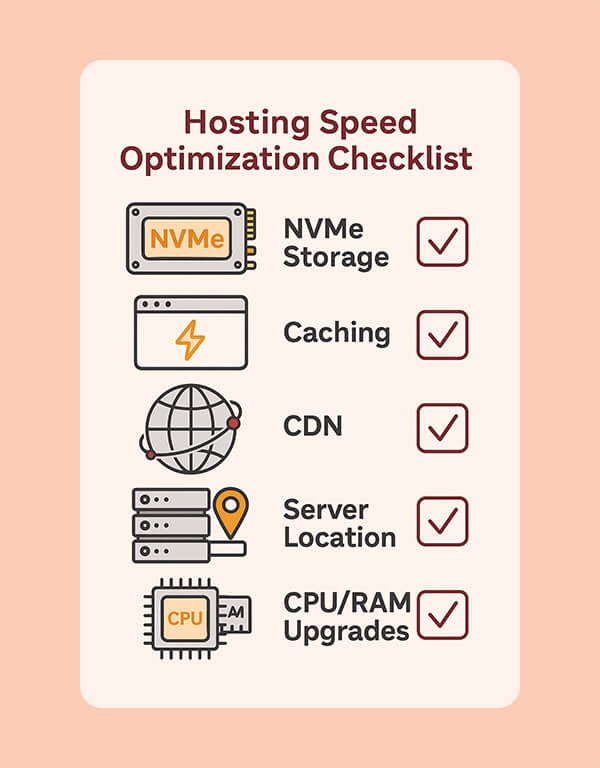
Check that your plan can handle your traffic
If measurements show the host is the bottleneck, a different plan or type of hosting is the fix to consider. web.dev adds that if you still see long TTFB values on dedicated hosting, you may need to re-evaluate your provider’s capabilities.
Use faster storage
Faster disks help dynamic sites that read from disk and a database to build every page, so ask what type of storage a plan uses.
Use caching
Caching lets a server or CDN reuse a stored copy instead of building the page again for every visitor. web.dev says even a short cache time can bring noticeable gains on busy sites, because only the first visitor in that window waits for the full trip to the origin server. Keep a way to bypass the cache, such as a URL parameter, so you can still see the real server time.
Choose a server closer to your visitors
web.dev says users located far from your origin server may still see high TTFB, even when the backend is well optimized. Hosting in or near your main audience’s region, or putting a CDN in front of the site, reduces that distance.
Use a CDN
A CDN is a distributed network of servers that cache resources physically closer to your users. web.dev says adopting one should be a high priority for lowering TTFB if your site does not use one yet, although caching at the edge does not suit personalized content.
Remove extra redirects
web.dev lists redirects as a common contributor to a high TTFB. One redirect adds latency, and a chain adds more. Check that your internal links use the final address, including the https scheme and the right trailing slash, so visitors are not redirected on the way in.
Give the server enough memory and CPU
web.dev asks how much memory your application instance is allocated and warns that an application with too little will struggle to serve pages quickly. If your measurements point to memory or CPU limits, a plan with more resources is the fix to consider.
Look at your application stack
web.dev says the platform matters: for WordPress, the number and quality of plugins and the theme in use affect TTFB. Slow database queries and server-side rendering time are among the backend processes it suggests timing with the Server-Timing header. Keeping backend software up to date helps too, because web.dev notes that the performance of language runtimes, HTTP implementations and database software improves over time as new versions are released.
Watching uptime and availability
A percentage on a hosting sales page is a promise, not a measurement of your site. Read the host’s own terms to see what the guarantee covers and what you receive if it is missed. Then watch your own site: the Crawl Stats report in Search Console shows a host status that tells you whether Google ran into availability problems while crawling, with separate charts for robots.txt fetching, DNS resolution and server connectivity. Google says that if it cannot get a valid robots.txt file or a 404 for it, it will slow or stop crawling your site until it gets an acceptable response.
How to move to a new host
Google’s guide to changing your hosting covers moves where the visible URLs stay the same. It defines a change in hosting infrastructure as switching hosting providers or moving to a CDN, and it gives these steps:
- Prepare and test. Upload a copy of your site to the new host and test pages, images, forms and downloads. If the test copy is public, Google suggests adding a noindex rule so it is not indexed by accident.
- Check Googlebot access. Use the URL Inspection tool in Search Console, and make sure your firewall or denial of service protection does not block Googlebot.
- Lower the DNS TTL. Google suggests a conservative low value, for example a few hours, at least a week before the move.
- Keep Search Console verification working. If you verify with an HTML file or a meta tag, include it in the new copy of the site.
- Remove temporary blocks. Before you start the move, delete any robots.txt disallow rules or noindex tags that you used while building the new copy.
- Update DNS and monitor. Point the DNS records at the new host, then watch the server logs on both hosts and crawling in Search Console.
- Shut down the old host. Do this once traffic to it reaches zero and you are confident that users and Googlebot receive content correctly from the new one.
Google also says it is normal to see a temporary drop in Googlebot’s crawl rate right after launch, followed by a steady increase over the next few days. If your URLs change as well, start with Google’s guide for site moves with URL changes instead.
Final recommendations
Hosting speed is not a ranking factor on its own. It matters because a slow server delays TTFB, which adds time to LCP, a Core Web Vital that Google says its ranking systems use, and because repeated server errors make Google crawl your site less. Google is also clear that good scores do not guarantee a top position and that it always seeks to show the most relevant content.
Measure before you spend. Check TTFB in real-user data if you can, rule out redirects, missing caching and heavy plugins, and consider a different plan or host only when the numbers point at the server.
Start with the Website SEO Score Checker for an overall picture and PageSpeed Insights for TTFB.
Frequently Asked Questions
Frequently Asked Questions (FAQs) is a list of common questions and answers provided to quickly address common concerns or inquiries.
Does hosting speed affect Google rankings?
Indirectly. Hosting speed sets how soon a server starts answering, which adds time to Largest Contentful Paint, a Core Web Vital that Google says its ranking systems use. Google also says good Core Web Vitals do not guarantee a top position, and that it always seeks to show the most relevant content.
Does TTFB impact SEO?
TTFB is not a Core Web Vital, but web.dev explains that it comes before every other loading metric, so a high TTFB adds time to Largest Contentful Paint. web.dev also says it is not absolutely necessary to meet the good TTFB threshold as long as it does not stop the page from scoring well on the metrics that matter.
What is a good TTFB for SEO?
web.dev gives 0.8 seconds or less as a rough guide for a good TTFB and anything above 1.8 seconds as poor. TTFB is not a Core Web Vital, so treat those numbers as a guide rather than a search requirement.
Can shared hosting hurt SEO?
It can, if it makes your server slow. web.dev says shared hosting is generally slower, which is probably fine for a small site that serves mostly static files, but the host matters much more for larger applications with many users and database queries. If your TTFB stays high or the server returns errors, the host is worth looking at.
Does upgrading to VPS improve rankings?
Not by itself. A VPS can lower TTFB if the old plan was the bottleneck, which helps Largest Contentful Paint, but Google says good scores do not guarantee a top position. Measure first, and rule out redirects, missing caching and heavy plugins before you pay for a bigger plan.
How much does server location matter for SEO?
Distance adds delay. web.dev says users far from your origin server may still see high TTFB even when the backend is well optimized. Hosting near your main audience, or using a CDN, shortens that distance.
Is website speed or hosting speed more important?
You need both. Hosting determines server response; site optimization handles the rest.
Does Google rank faster sites higher?
Google says Core Web Vitals, which include a loading speed metric, are used by its ranking systems, and that there is no single page experience signal. It also says good scores do not guarantee a top position, and that it always seeks to show the most relevant content.
What hosting type is best for SEO?
Neither Google’s page experience documentation nor web.dev names a best hosting type for SEO. What matters is whether your server answers quickly and reliably for your visitors, which you can measure on your own site. web.dev says shared hosting is generally slower and that, for larger applications with many users, the choice of host becomes critical for TTFB.
How do I check if my hosting is slowing down my site?
Look at TTFB in real-user data first, for example in PageSpeed Insights, and test an uncached page as well, because caching can hide a slow backend. Our Website SEO Score Checker shows overall lab measurements such as Largest Contentful Paint, but not TTFB on its own.