Most SEO advice assumes you already have a $100-a-month tool subscription sitting behind your work. That's not realistic for a blogger just starting out, and honestly, it's not realistic for plenty of bloggers a few years in without massive traffic yet either.
Here's the reassuring part: the 10 tools in this list cover everything from topic research to technical health checks, and every single one is free. For each one, you'll get what it actually does, why it matters specifically for bloggers rather than just generic SEO advice, one honest limitation, and a practical tip for using it well.
What Makes a Tool Actually Useful for a Blogger (Not Just "SEO")
Before diving into the list, it's worth being clear about what actually matters here, since bloggers have genuinely different needs than agencies or large sites.
You need less enterprise-scale competitor tracking and more help with topic ideation, on-page guidance, and simple technical health checks. Look for tools that give you a clear next action on a single post, rather than a dashboard built for managing hundreds of pages at once.
Data source matters too. Tools pulling directly from Google, like Search Console, Keyword Planner, and Trends, tend to be more reliable than third-party estimates, especially for a blog that doesn't have massive traffic yet to generate reliable third-party data from.
And free tier limits are rarely a real obstacle at blog scale. A search cap or single-domain limit almost never gets hit by an individual blogger working through a normal week of research and writing, those limits tend to matter far more for agencies managing dozens of client sites than for a single person running one blog.
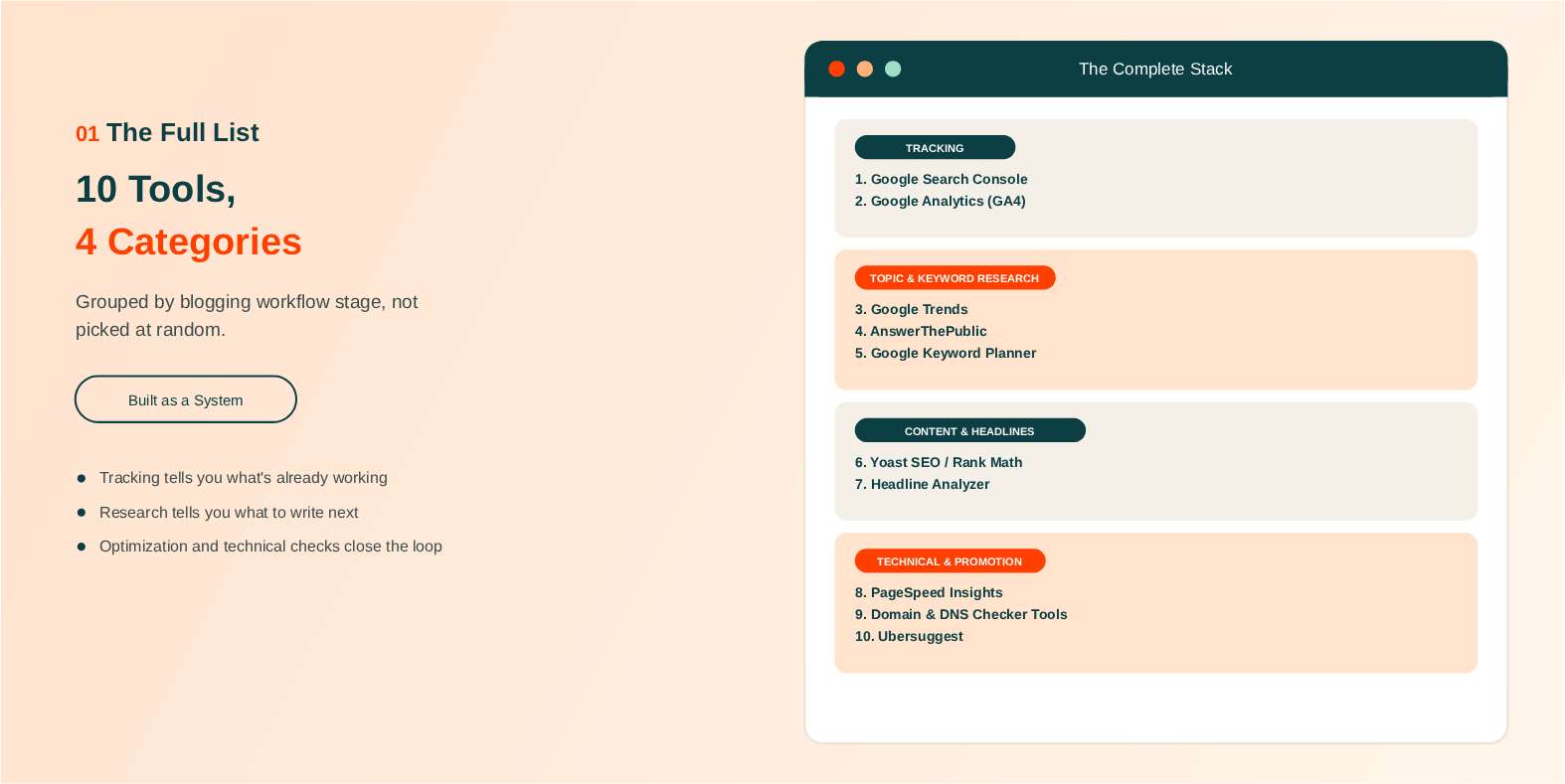
The 10 Free SEO Tools Every Blogger Needs
Rather than list these randomly, they're grouped by what stage of the blogging workflow they support: foundational tracking, topic and keyword research, content and headline optimization, and technical health. Building a small, connected toolkit from each category will get you further than grabbing tools at random.
Foundational Tracking
These tools tell you what's actually happening with your blog right now, and they should be the first thing you set up.
1. Google Search Console
Google Search Console gives you direct, first-party data on which queries actually bring readers to your posts, along with indexing status and crawl errors.
For bloggers specifically, this is often the fastest traffic win available: it shows you exactly which existing posts are close to ranking on page one. Updating and strengthening a post that's already ranking position 9 or 10 usually beats writing something entirely new from scratch, since Google has already decided the post is relevant enough to show, it just needs a stronger version to earn a better spot.
The limitation is that it only shows data for your own site, with no competitor visibility built in. If you want a walkthrough of getting it running, you can set up Google Search Console directly through Google's own page. Verification typically takes a few minutes, and data usually starts populating within a day or two.
Beginner tip: check the Performance report weekly and look specifically for queries ranking positions 8 through 15. Those are your prime candidates for a content refresh.
2. Google Analytics (GA4)
GA4 tracks which posts actually get read, how long people stay, and where they go next on your site.
This matters for bloggers because it helps you double down on the topics and formats your audience genuinely engages with, not just whatever happens to rank. Rankings and engagement don't always line up perfectly, and GA4 is where you catch that gap.
The real limitation is the learning curve. GA4's interface asks more of new users than Search Console's more straightforward reports do.
Beginner tip: check your top landing pages monthly and look for high-traffic posts with poor engagement. That combination is often a sign the content itself needs a rewrite, not just an SEO tweak.
Topic and Keyword Research
Once your tracking foundation is in place, these tools help you figure out what to actually write next.
3. Google Trends
Google Trends shows whether interest in a topic is rising, seasonal, or declining over time, something a raw volume number can't tell you on its own.
This matters a lot for bloggers specifically. It lets you time seasonal content, holiday recipes, back-to-school guides, gift lists, weeks ahead of the actual search spike, and it helps you avoid sinking hours into a topic that's quietly fading.
The limitation is that it shows relative interest rather than exact search volume.
Beginner tip: compare 2 to 3 potential post topics directly against each other in Trends before committing to one. Seeing them side by side makes the decision much easier than evaluating each in isolation.
4. AnswerThePublic
AnswerThePublic visualizes the real questions people search around a topic, organized by question word, who, what, why, how, and so on.
For bloggers, this maps almost directly onto post structure. Question-based results become headings and FAQ sections with very little extra work, which genuinely speeds up outlining, especially for posts that need to cover a topic comprehensively rather than just hit one narrow angle.
The limitation is that the free tier caps out at a small number of searches per day, with no export option, so you can't casually browse dozens of topics in one sitting.
Beginner tip: run your main post idea through it before you start outlining, and build your subheadings directly from the real questions it surfaces rather than guessing at what readers want to know.
5. Google Keyword Planner
Keyword Planner gives you search volume ranges and keyword suggestions sourced directly from Google's own advertising data, which makes it the most accurate free source of keyword data available.
For bloggers, this is genuinely useful for confirming a topic idea actually has search demand before you invest hours writing 2,000 words about it. You can access Google's Keyword Planner tool once you've set up a free Google Ads account, no ad spend required.
The limitation is that it's built for PPC first, so volume shows as a range rather than an exact number on accounts without ad spend history.
Beginner tip: use the "Discover new keywords" feature with a successful competitor post's URL to see what related terms it's likely already capturing.
Content and Headline Optimization
These tools make sure the post you've researched actually gets written, and read, well.
6. Yoast SEO or Rank Math (WordPress Plugins)
If your blog runs on WordPress, Yoast SEO and Rank Math both give you real-time on-page checks while you write: readability, keyword usage, and meta tag reminders, all in one sidebar.
For bloggers, this turns abstract on-page SEO advice into a simple checklist you can follow post by post, without needing to re-learn the rules every single time you sit down to write.
The limitation is twofold: it's WordPress-only, and following the scoring too literally can nudge you toward keyword stuffing rather than natural writing.
Beginner tip: treat the checklist as a guide, not a rulebook. A post that reads naturally and fully answers the question will always outperform one optimized purely for a green checkmark.
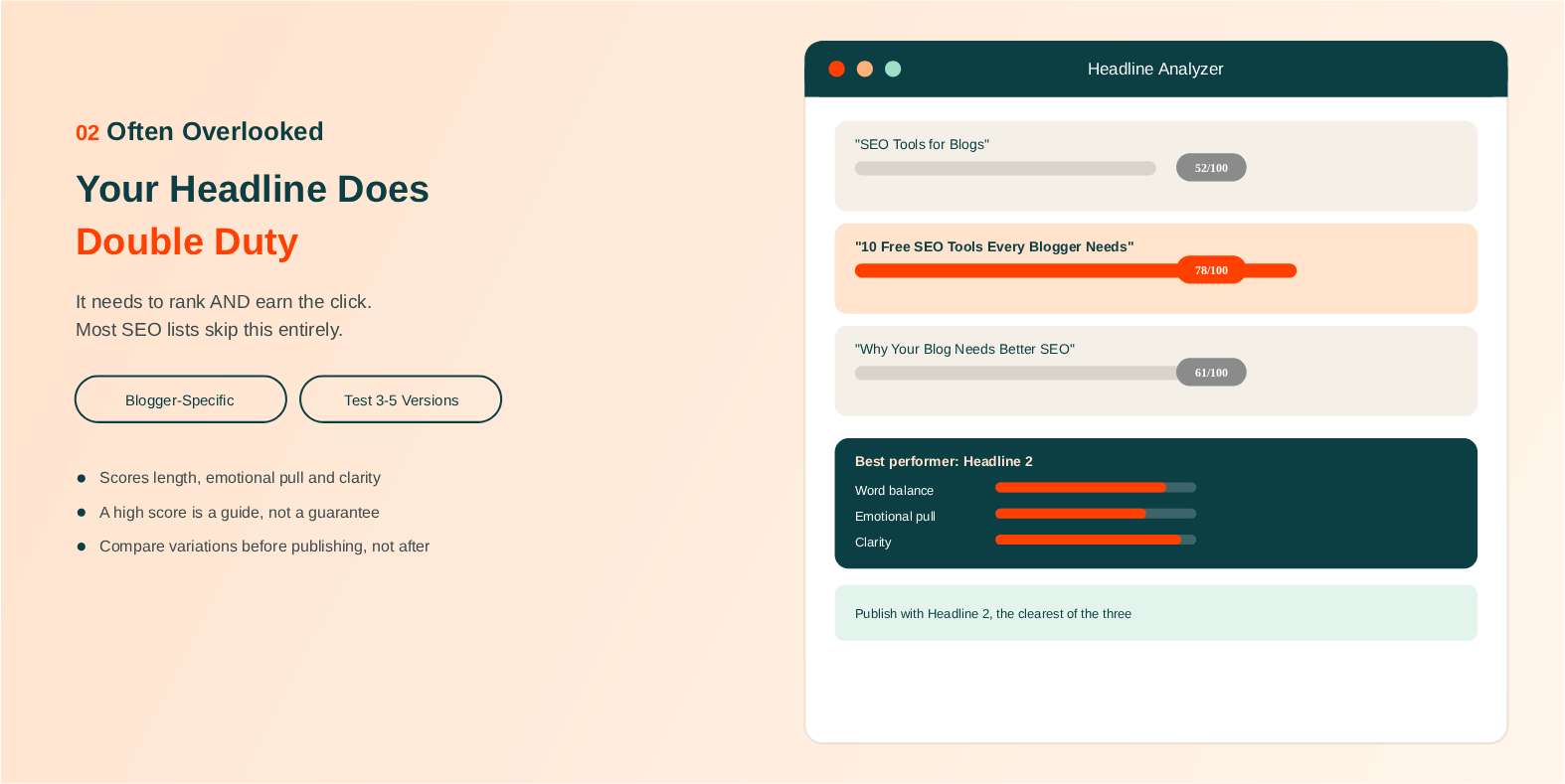
7. A Free Headline Analyzer (like CoSchedule's Headline Studio)
A headline analyzer scores your post title for length, emotional pull, word balance, and overall clarity.
This is genuinely blogger-specific in a way most generic SEO tool lists completely skip. Your headline is doing double duty, it needs to rank in search and earn the click once it actually shows up, and that's a distinct skill from general keyword optimization. Two headlines can target the exact same keyword and perform completely differently based on wording alone.
The limitation is that scoring is a helpful guide, not a guarantee. A "perfect" score doesn't guarantee clicks if the underlying topic itself isn't compelling to begin with, and some genuinely strong headlines score lower than expected simply because the tool's model doesn't capture every nuance of good writing.
Beginner tip: run 3 to 5 headline variations through it before publishing and compare them side by side, rather than settling on whatever title you happened to write first.
Technical Health and Site Checks
Content and keywords only go so far if the underlying site has technical problems working against it.
8. PageSpeed Insights
PageSpeed Insights scores any page from 0 to 100 and flags specific fixes: oversized images, unused scripts, slow-loading elements.
For bloggers, image-heavy posts are one of the most common speed culprits out there, and slow pages both rank worse and lose readers before the page even finishes loading.
The limitation is that the technical recommendations can feel dense without a development background.
Beginner tip: focus on the top 2 to 3 flagged issues, usually image optimization first, rather than trying to fix everything the report lists in one sitting. Once those few fixes are in, a free website SEO checker can show how the same page does on meta tags and mobile friendliness, and it only needs a web address.
9. Domain and Technical Checker Tools
Most blogger-focused SEO advice stays entirely at the content level and skips domain-level diagnostics completely. That's a real gap, since domain authority, ownership records, DNS setup, and hosting details are all useful whether you're auditing your own blog's health or researching a site before pursuing a guest post or link exchange.
A free option worth bookmarking here is SEO Site Checker's free domain and SEO tools, which bundle several of these checks in one place. You can check your blog's domain authority to get a quick read on where you currently stand, run a WHOIS lookup when you're evaluating a potential guest post opportunity, and check your DNS records if you're ever troubleshooting an email or hosting issue.
Beginner tip: check your own blog's domain authority now as a baseline, then revisit it every few months to see genuine progress as you build out content and links over time. Watching that number move slowly upward over a year is one of the more satisfying, tangible proofs that your overall SEO effort is actually working, beyond just individual post rankings.
Promotion and Competitive Insight
The last tool rounds out your stack with a way to see what's actually working for other blogs in your niche.
10. Ubersuggest
Ubersuggest combines keyword research, competitor content analysis, and a basic site audit into one free tool.
For bloggers, the standout feature is seeing which of a competing blog's posts get the most estimated traffic, a genuinely useful way to spot content gaps and fresh topic ideas within your own niche. If a competitor's post on a subtopic you haven't covered is pulling strong estimated traffic, that's a solid signal your audience might want that content too.
The limitation is that the free tier caps daily searches and data depth, so heavy, repeated use runs into a wall fairly quickly.
Beginner tip: plug in 2 to 3 blogs in your niche and compare their top-performing posts side by side. It's one of the fastest ways to generate a real list of topic ideas in a single sitting.
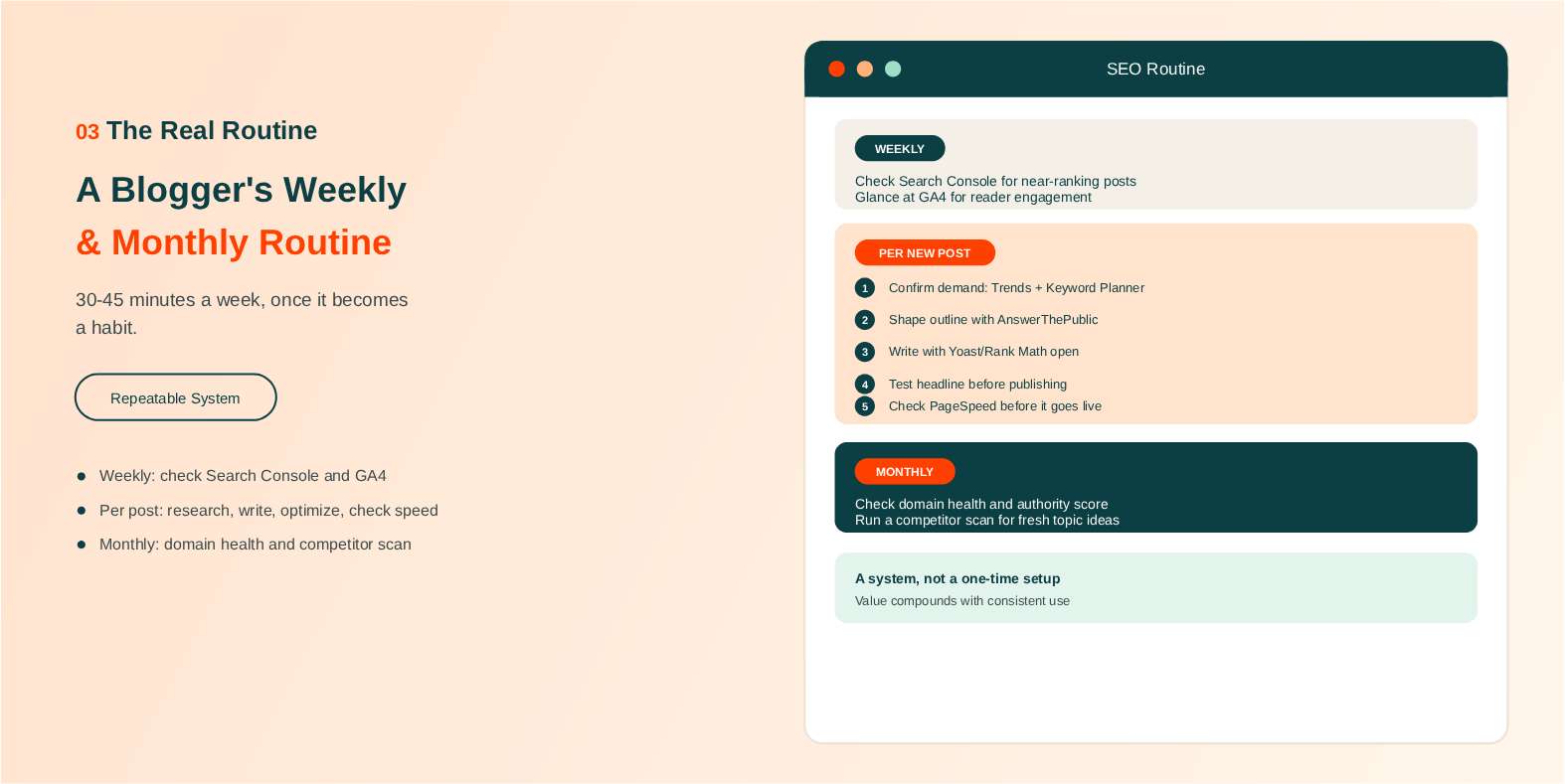
How to Use These Tools Together (A Blogger's Weekly and Monthly Routine)
Listing tools without explaining how they connect is one of the most common gaps in guides like this, so here's a simple, repeatable routine for actually using the stack above.
Weekly, check Search Console for near-ranking posts worth refreshing, and glance at GA4 to see how recent posts are actually performing with real readers.
Before writing a new post, run the topic through Google Trends and Keyword Planner to confirm real demand exists, then use AnswerThePublic to shape your outline around the actual questions people are asking.
While writing, keep Yoast or Rank Math open for on-page guidance, and run your headline through a headline analyzer before you hit publish, not after.
Right before publishing, check PageSpeed Insights on the finished post, especially if it's image-heavy.
Monthly, check your domain authority and general site health, and run a quick competitor scan in Ubersuggest for fresh topic ideas. This is a routine worth repeating, not a one-time setup, and the real value compounds the more consistently you use it.
None of this needs to take more than 30 to 45 minutes a week once it becomes a habit. The point isn't to obsessively check every tool every day, it's to build small, regular checkpoints into a schedule you already keep, so SEO stops feeling like a separate project and starts feeling like a normal part of running a blog.
Free vs. Paid SEO Tools: When a Blogger Should Upgrade
Free tools comfortably cover keyword research, on-page optimization, and technical checks for the vast majority of individual bloggers. There's genuinely no rush to pay for anything in your first year or two of consistent blogging.
A few signs suggest you've actually outgrown the free tier: tracking upward of 100 keywords, managing multiple blogs or sites at once, or needing deeper historical or competitor backlink data than free tools provide.
Even then, upgrading doesn't have to mean a full commitment right away. Tools like Ahrefs Webmaster Tools and Moz's free offerings give you meaningful expanded access without a full paid subscription, a reasonable middle step before committing to anything larger.
A useful gut check: if you're consistently hitting the free limits of a tool multiple times a week, that's a real signal worth paying attention to. If you're only occasionally bumping against a cap, it's usually a sign you're fine sticking with the free tier a while longer.
Quick Comparison: Free SEO Tools for Bloggers by Use Case
| Tool | Best For | Biggest Limitation |
|---|---|---|
| Google Search Console | Rankings, indexing, crawl errors | Only works on sites you own |
| Google Analytics (GA4) | Reader engagement and behavior | Steeper learning curve |
| Google Trends | Timing seasonal and trending topics | Relative data, not exact volume |
| AnswerThePublic | Question-based post outlines | 3 searches per day, no export |
| Google Keyword Planner | Confirming real search demand | Volume shown as a range |
| Yoast SEO / Rank Math | On-page optimization while writing | WordPress only |
| Headline Analyzer | Title and click-through optimization | A good score isn't a guarantee |
| PageSpeed Insights | Diagnosing slow-loading posts | Dense technical recommendations |
| Domain/DNS checker tools | Domain health and guest post research | Authority scores are estimates |
| Ubersuggest | Competitor content and topic gaps | Limited daily searches |
Final Thoughts
Free tools genuinely cover what most bloggers actually need: topic validation, on-page guidance, technical health, and tracking, all without a monthly bill. The real differentiator was never the tools themselves, it's using a small, connected set of them consistently as part of your actual writing routine.
If this list feels like a lot to take in at once, that's normal. Start with just two: Google Search Console for tracking and one keyword research tool for planning your next post. Add the rest of the stack gradually as those two become second nature.
Pick one tool from this list you're not using yet, and try it on your next post.
Frequently Asked Questions
Frequently Asked Questions (FAQs) is a list of common questions and answers provided to quickly address common concerns or inquiries.
Do bloggers really need SEO tools, or just good writing?
Good writing matters most, but SEO tools help confirm real search demand exists before you write, and they catch technical issues great writing alone can't fix.
What is the best free SEO tool for a new blogger?
Google Search Console is the best starting point, since it shows exactly which of your posts are already close to ranking and worth improving first.
Can I grow a blog using only free SEO tools?
Yes, for most bloggers in their first several years, free tools comfortably cover keyword research, on-page optimization, and technical checks without any real gap. The limiting factor tends to be consistency and content quality, not tool access.
How many SEO tools does a blogger actually need?
A small, connected set of 5 to 7 tools, covering tracking, research, on-page optimization, and technical checks, is enough rather than trying to use everything available. More tools rarely means better results.
Does Google offer free SEO tools for bloggers?
Yes. Search Console, Analytics, Trends, and Keyword Planner are all completely free, pull data directly from Google, and cover most of what a blogger genuinely needs.
Is Yoast SEO or Rank Math better for bloggers?
Both work well and cover similar ground. The choice mostly comes down to interface preference, since either one turns on-page SEO into a simple, repeatable checklist.
How often should a blogger check their SEO tools?
A weekly check of Search Console and Analytics, combined with a monthly domain and competitor check, is enough for most bloggers without becoming a time sink.
Are free SEO tools accurate enough for a small blog?
Yes, especially tools pulling data directly from Google. Third-party metrics like domain authority are estimates, but they're still useful for tracking your own progress over time.