


You hand someone a paper card. They glance at it, put it in a pocket, and it ends up in a drawer with eleven others. Meanwhile your phone number changed nine months ago, and there are two hundred cards in your desk with the wrong details on them.
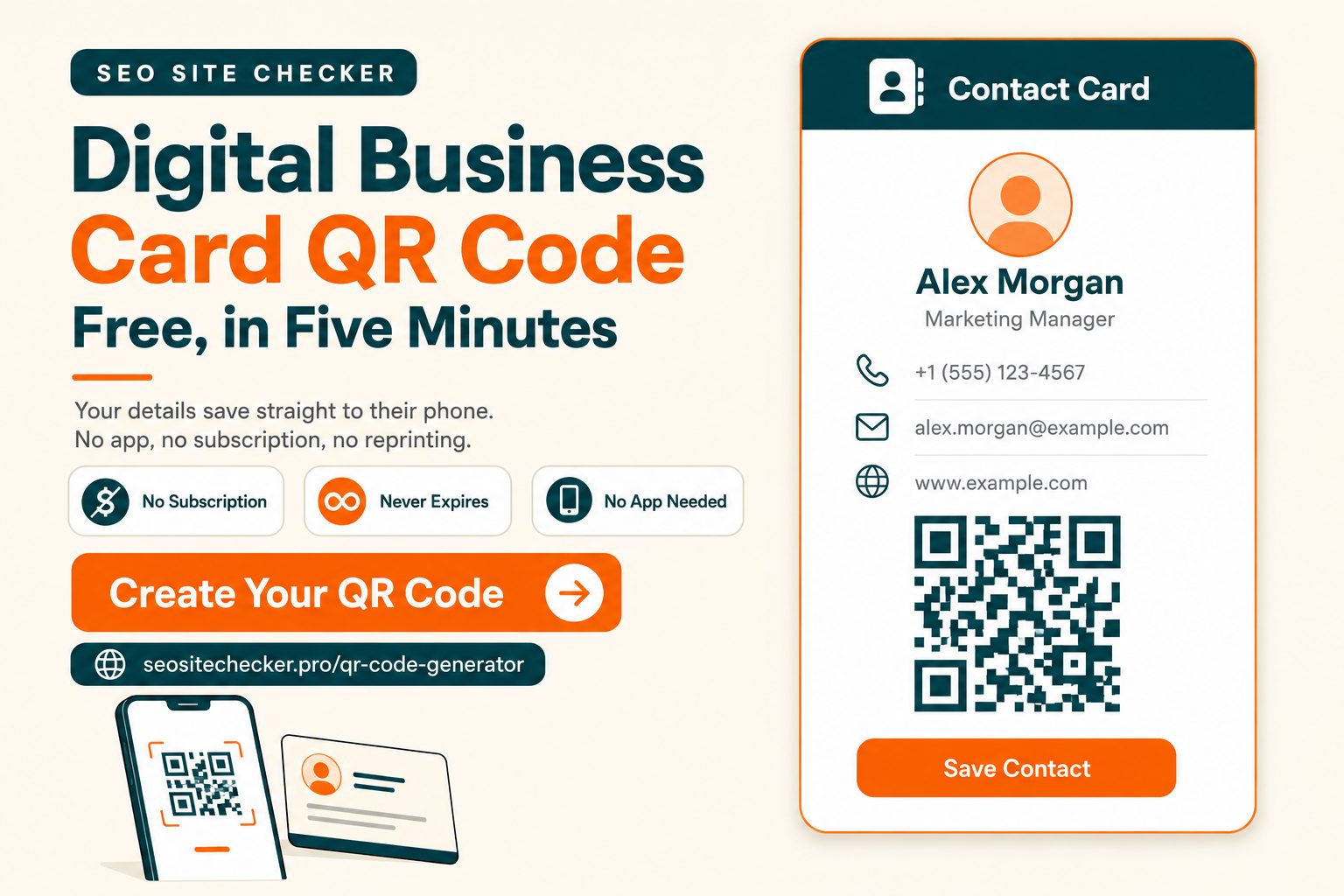
There is a better version of this exchange. Someone points their phone at a square pattern, and your contact details save straight into their address book in about two seconds. No app on either side. No typos. No card to lose.
That is a digital business card QR code, and here is the part nobody selling one will tell you: for most people it costs nothing and takes about five minutes. This guide covers how the technology actually works, the one decision that determines whether you need to pay, how to make and test one, and the print rules that decide whether it scans reliably.
What Is a Digital Business Card with a QR Code?
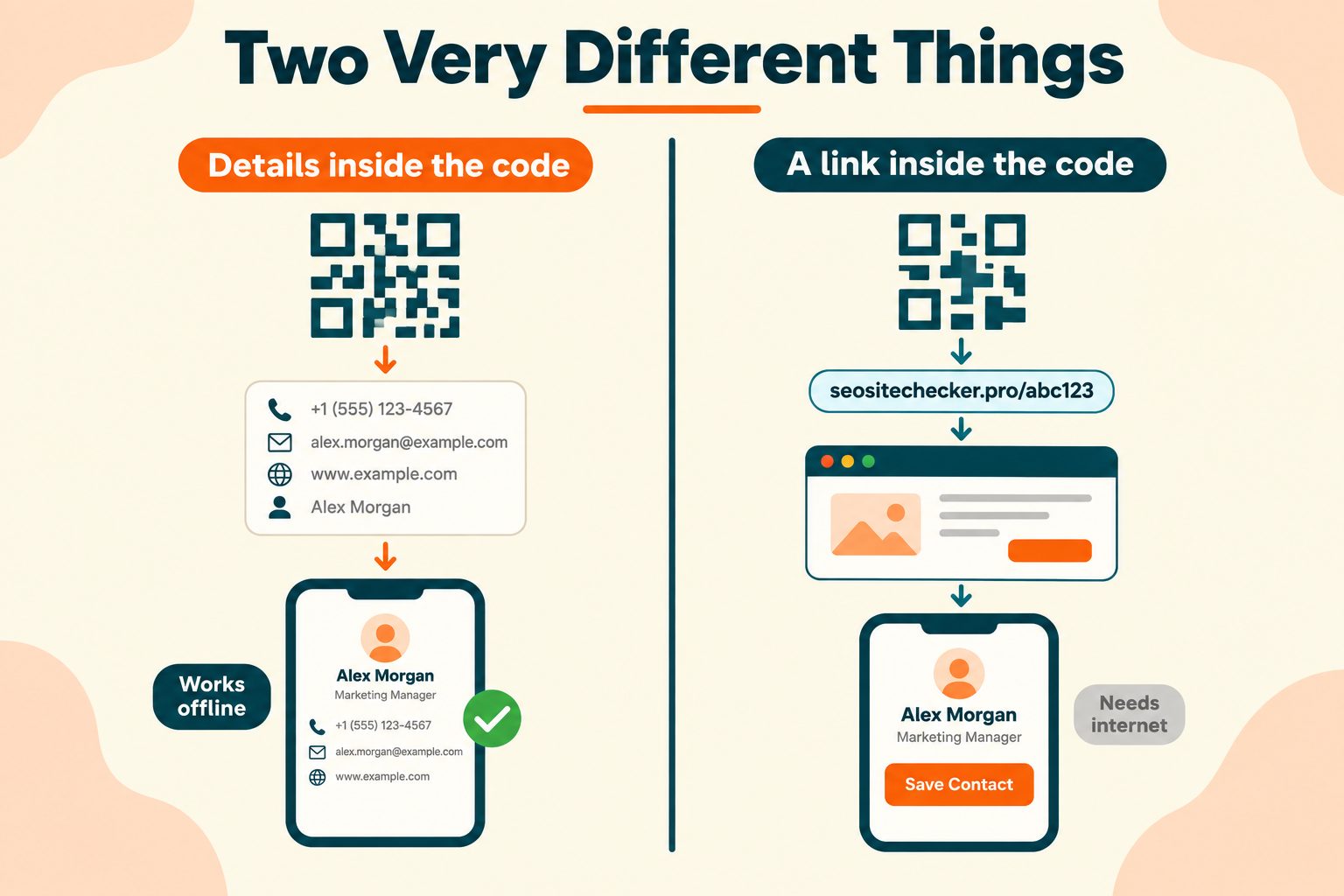
A digital business card is your contact details in a format a phone can save directly. The QR code is how you deliver it, not the card itself. That distinction matters more than it sounds, because there are two very different things people call by the same name.
The code contains your details directly. Your name, number, and email are encoded inside the black and white pattern using vCard format, a text standard that phones and address book apps have understood for decades. Someone scans it, the phone reads the data, and it offers to save you as a contact. No internet connection required on either side.
The code contains a link. The pattern holds a short web address pointing to a page that displays your details. Someone scans it, their browser opens, and the page offers a save button.
Most articles on this subject blur these together, which causes real confusion later when someone wonders why they cannot edit a card they already printed. The whole of the next section rests on this difference, so it is worth holding onto.
The technical foundation here is genuinely old and genuinely stable. If you want the formal definition of what goes inside a contact card, RFC 6350, the vCard format specification is the standard that phones and contact apps implement.
One reassurance before going further, since it is the most common hesitation. The person scanning does not need to install anything. iPhones running iOS 11 or later and Android phones running version 9 or later read QR codes straight from the camera app. Apple's guide to scanning a QR code with the camera shows the whole process, which is essentially pointing the camera and tapping a notification.
Why People Are Switching From Paper
The practical reasons, without the evangelism.
Your details stay current. A new phone number or a job change does not mean reordering five hundred cards, or worse, handing out wrong ones for a year because you already paid for them.
Nothing to print. No minimum order, no design fee, no reprint cycle.
Nothing to run out of. Your phone is in your pocket. That is the whole inventory.
Details get saved correctly. Nobody retypes your email and drops a letter, which is a surprisingly common way to lose a contact entirely.
It works when you are not in the room. An email signature, a video call background, or a LinkedIn banner all carry the same code.
Less waste. Most paper cards are thrown away, often the same week.
One honest counterpoint, since every page selling this leaves it out. Paper still works in some rooms. Certain industries and certain events run on physical cards, and some people simply prefer receiving one. The realistic answer for most professionals is not choosing between them. It is putting a QR code on the paper card you already have, so both routes work.
Static vCard QR Codes vs Dynamic Hosted Cards
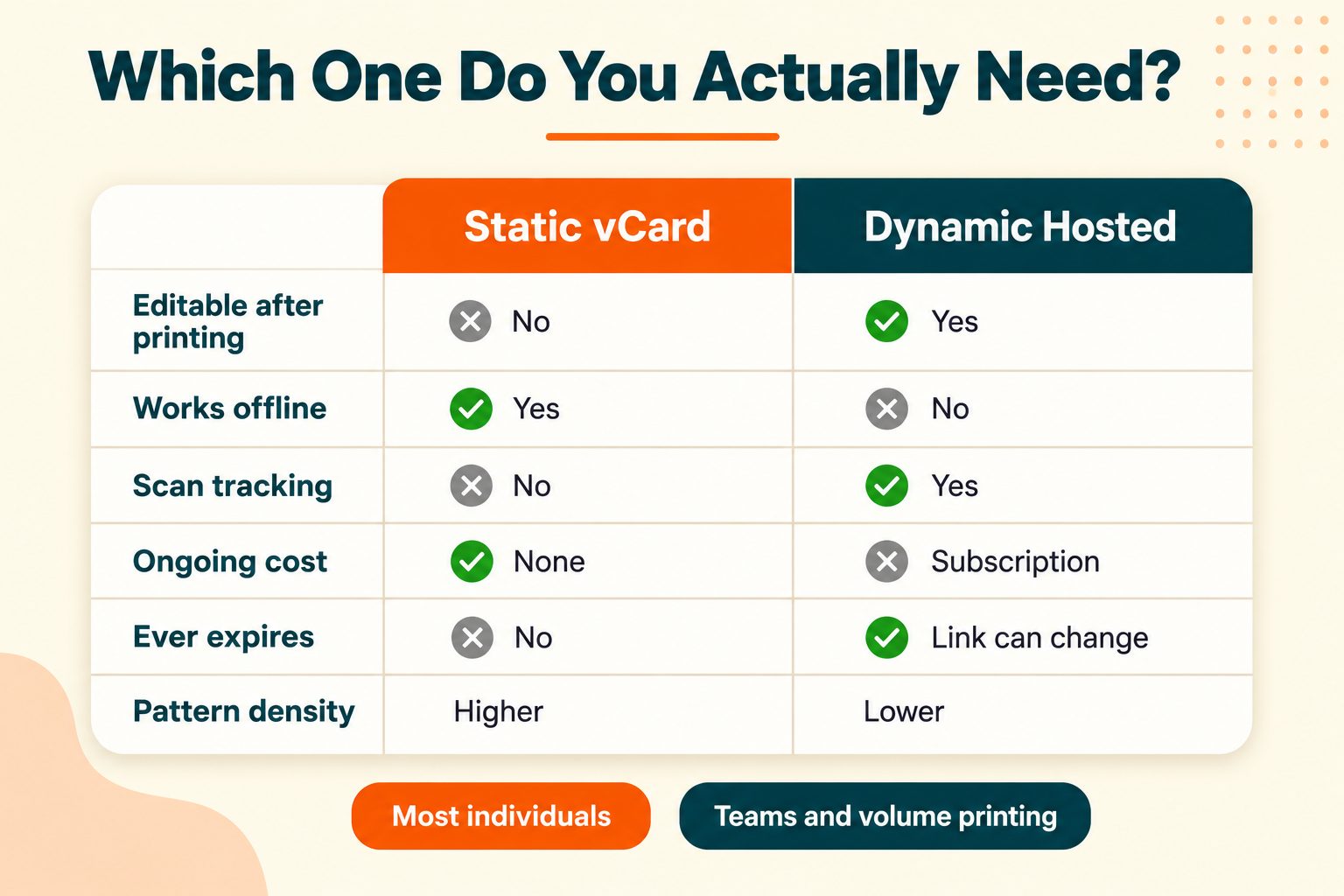
This is the decision that determines whether you spend money, so it deserves a straight explanation rather than one that steers you toward a subscription.
| Static vCard QR | Dynamic hosted card | |
|---|---|---|
| What is in the code | Your actual contact details | A short redirect link |
| Editable after printing | No | Yes |
| Needs internet to scan | No | Yes |
| Scan tracking | None | Yes |
| Ongoing cost | Free, permanently | Usually a subscription |
| Pattern density | Denser, harder to scan small | Simpler, scans easily |
| Stops working if | Never | You stop paying, or the provider closes |
When static is the right choice
Your details are reasonably stable. You do not need to know how many people scanned. And you want something that keeps working indefinitely without an account, a login, or a company staying in business.
That describes most individuals. A freelancer, a consultant, a job seeker, a student, a small business owner. If that is you, a free static code does the entire job.
When dynamic is worth paying for
You print at volume and might change roles, so being able to update every card already in circulation has real value. Or you genuinely need scan data, because you are measuring event ROI rather than just curious. Or you want a designed landing page with a photo, a bio, and social buttons rather than a plain contact save.
A forty-person sales team tracking conference performance benefits from this. One person handing out cards at a networking event almost certainly does not.
The point most comparisons skip
A dynamic card lives on someone else's server. When you stop paying, or if that company shuts down, every printed code you handed out goes dead. Not "shows old details" dead. Actually dead.
A static vCard code has no server. The data is in the pattern. It works in ten years whether or not the tool you made it with still exists.
There is a real trade-off on the other side too, and it deserves saying plainly. More encoded data makes a denser pattern with more squares packed into the same space, and dense patterns are harder to scan at small print sizes. If you are printing a code at 1.5 cm on a business card, a dynamic code holding only a short link genuinely scans more reliably than a static one holding twelve fields. That is a legitimate argument for dynamic, and it is about physics rather than features.
How to Create a Digital Business Card with a QR Code
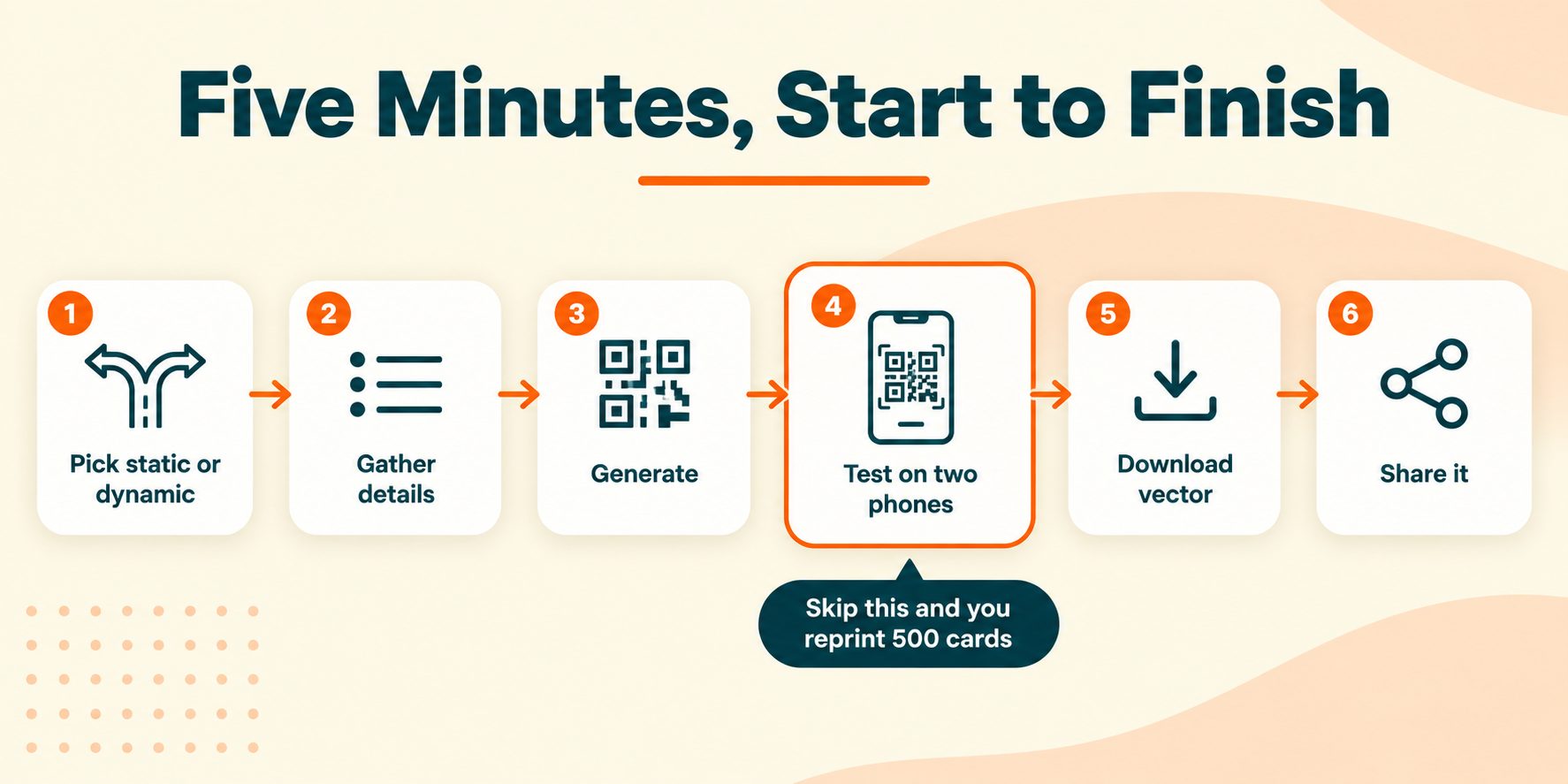
Six steps. The whole thing takes about five minutes, and step four is the one that saves you from an expensive mistake.
Step 1: Decide static or dynamic
Go back to the table above. For most individuals the answer is static, and that means free and permanent. If you need editing or analytics, pick a dynamic platform and accept the subscription.
Step 2: Gather your details
Write them out before you start typing into anything. Name, job title, company, mobile number, email address, website, and one social link at most.
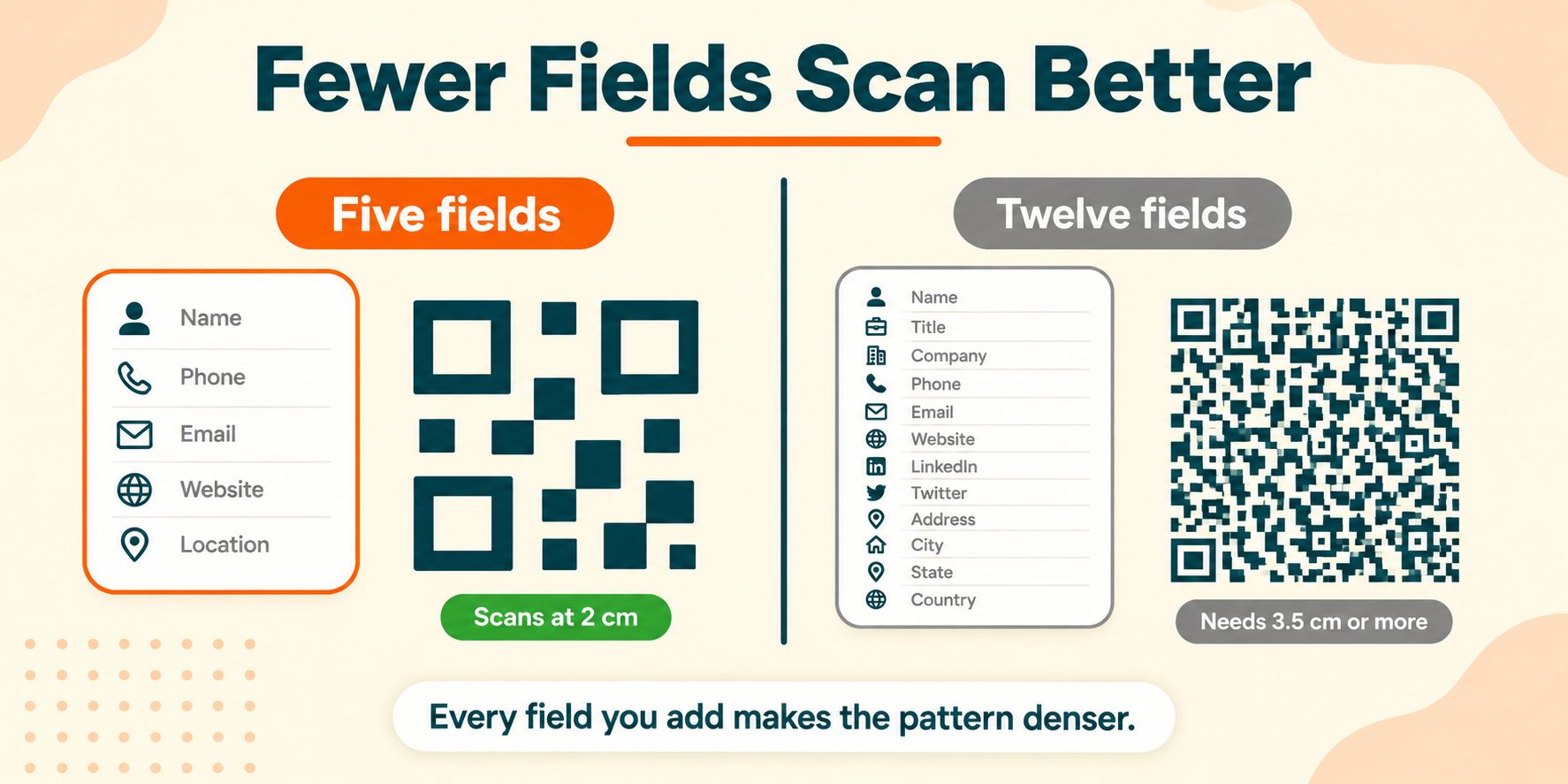
Keep this tight. Every field you add makes the pattern denser, and density costs you scan reliability. More on which fields earn their place below.
Step 3: Generate the code
Enter your details into a vCard QR generator and download the result. You can build one with the free QR Code Generator on SEO Site Checker, which is free with no account required.
The process is the same across any tool worth using: fill in your fields, generate, download. What differs is whether the tool produces a static code you own outright or a dynamic one tied to an account.
Step 4: Test it before you do anything else
Scan your own code with your phone. Then scan it with a different phone if you can, ideally one on the other platform, since iPhone and Android camera apps handle contact saves slightly differently.
Check every single field landed correctly. Phone number, email spelling, company name. Then check the phone number actually dials.
This is the step people skip. It is also the step that separates a working card from discovering a typo after you have printed five hundred of them.
Step 5: Download at the right size and format
For anything going to print, use SVG or another vector format. A QR code saved as a small PNG and scaled up gets fuzzy edges, and fuzzy edges break scanning.
For screen use, a PNG at a reasonable resolution is fine. If you are putting it in an email signature, keep the file size sensible so it does not slow the email down. The Image Compressor will bring the weight down without visible quality loss.
Step 6: Put it somewhere people will scan it
Covered in full below, but the simplest answer is your phone screen. No printing, no setup, always with you.
What to Put on Your Digital Business Card
Field selection matters more than people expect, because of that density trade-off.
Always include: full name, mobile number, email address. These three are the entire point.
Usually worth including: job title, company name, website.
Include selectively: one social profile, physical address, a second phone number. Add these only if someone genuinely needs them.
Usually leave out: every social platform you have an account on, a long bio, a fax number, a second email you never check.
The reason is concrete rather than aesthetic. A card with five fields produces a noticeably simpler pattern than one with twelve. A simpler pattern scans faster, works at smaller print sizes, and survives poor lighting and a shaky hand. Five well-chosen fields beat twelve every time.
One formatting note worth getting right. Write your phone number in full international format with the country code, so +1 415 555 0142 rather than 415-555-0142. A number saved without a country code will not dial when someone travels or when they are calling from another country, and you will never find out that it failed.
Where to Use Your QR Code
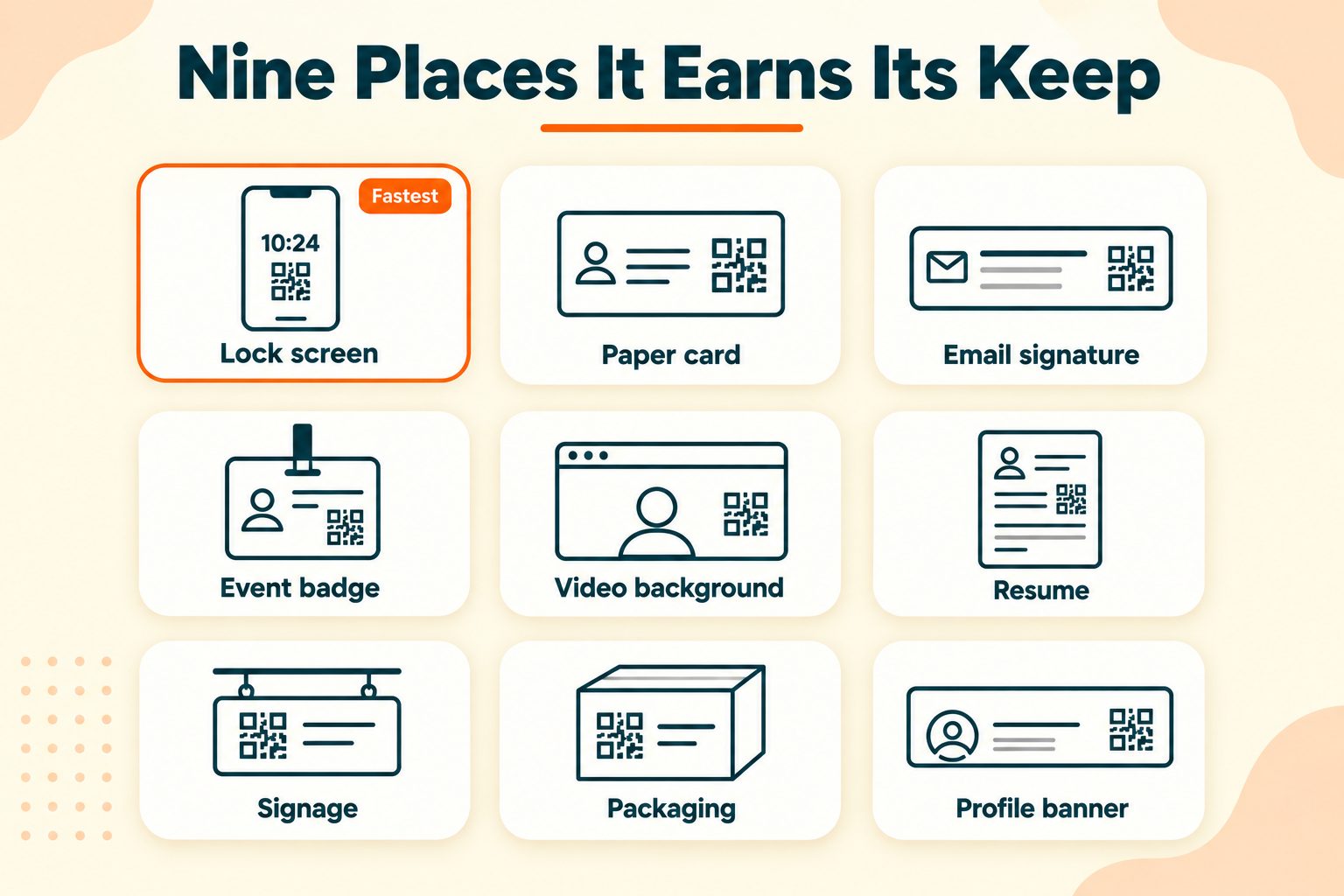
In person
- Your phone screen, which is the simplest option and needs no setup
- Your phone's lock screen as a wallpaper image, so you do not even unlock to share
- Printed on your existing paper business card
- Your name badge at an event
- A table tent or standing sign at a booth
In print
- Business cards, flyers, and postcards
- Your resume or portfolio
- Product packaging
- Vehicle or shopfront signage
- Conference banners and pull-up displays
Digital
- Email signature
- Video call virtual background
- LinkedIn banner image
- Website contact page
- PDF proposals and invoices
Two things that make a measurable difference and that almost nobody does.
Add a short call to action beside the code. "Scan to save my contact" outperforms a bare code, because people hesitate before pointing a camera at an unlabelled square. Tell them what happens and more of them do it.
Put it on your lock screen. It is the fastest possible exchange. No app to open, no unlocking, no scrolling. Hold up the phone and it is done.
Different placements need different dimensions, and a code sized for a business card will not work on a pull-up banner. The Image Resizer handles that quickly, though for print you should resize from the vector file rather than scaling a PNG.
QR Code Design and Print Rules
This is where most printed QR codes go wrong, and all of it is avoidable.
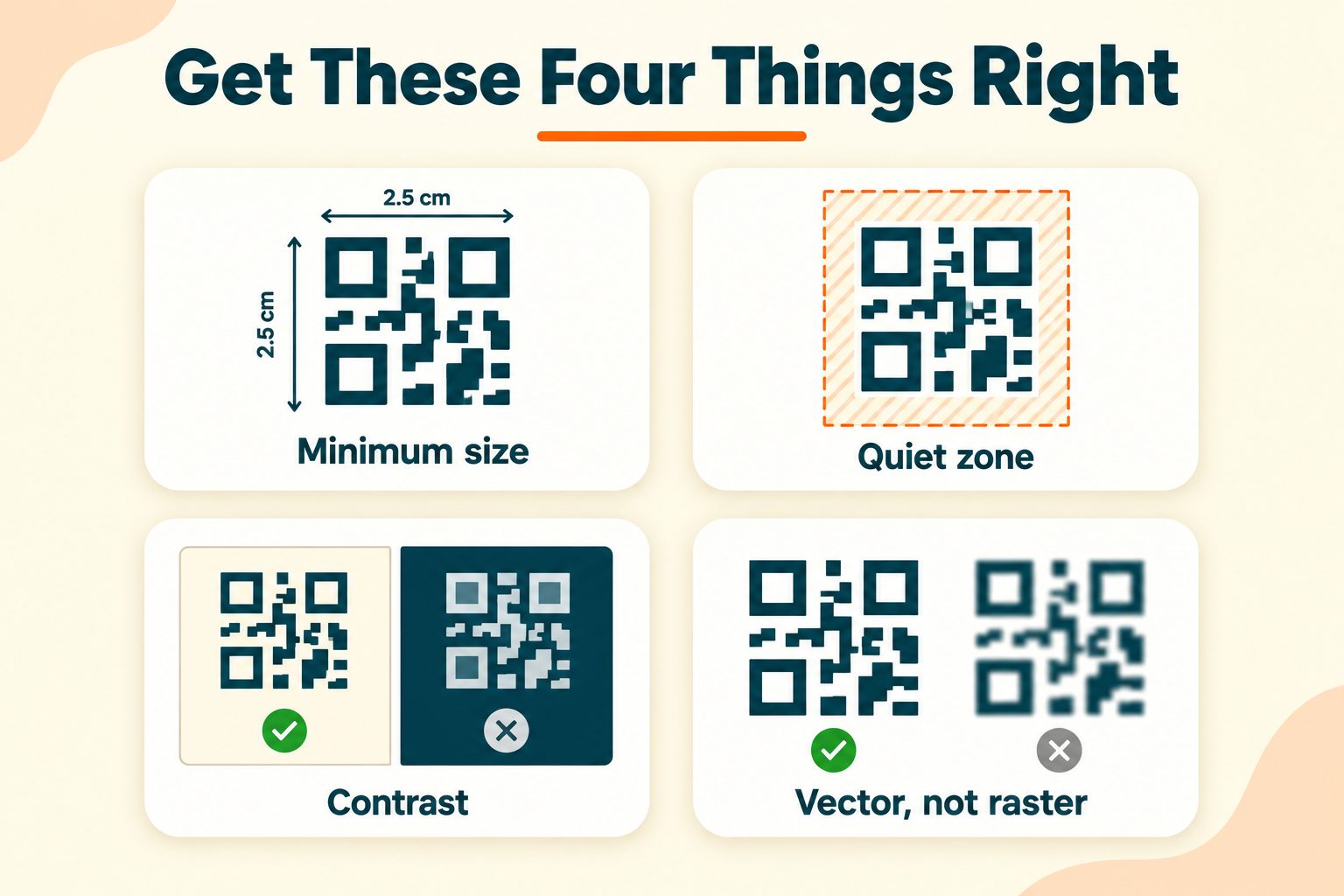
Minimum size. 2 x 2 cm is the floor. 2.5 x 2.5 cm is safer. A dense static vCard code may need more.
Leave a quiet zone. QR codes need clear space around all four edges, roughly four modules wide, where a module is one of the small squares. Text or a border crowding the pattern is the single most common reason a printed code fails to scan.
Keep contrast strong. Dark pattern on a light background. This is not a style preference. Many readers cannot process an inverted code, light pattern on dark, so a design choice that looks striking can break the code for a chunk of your audience.
Colors are fine, within limits. You can use brand colors, but keep the contrast ratio high and avoid gradients running across the pattern. Test after any color change.
A center logo usually works. QR codes have built-in error correction that tolerates some obstruction. Keep the logo under roughly 30 percent of the code area and test it afterward. Denso Wave, the company that invented the QR code, publishes the specification if you want the technical detail on error correction levels.
Use vector for print. SVG, EPS, or PDF. A raster image scaled up produces soft edges, and soft edges are what a scanner fails on.
Size for scanning distance. Roughly a 10 to 1 ratio. A code meant to be scanned from 2 metres away needs to be about 20 cm across. This is why a business card code and a banner code are not the same asset.
Test on both platforms. iPhone and Android camera apps differ enough that passing one does not guarantee the other.
Free vs Paid: What You Actually Need
Every page ranking for this topic sells a subscription, so here is the fair version.
What a paid platform genuinely gives you:
- The ability to change your details after printing
- Scan analytics showing when, where, and how often
- A designed landing page with photo, bio, and social buttons
- Lead capture, turning scans into contacts in a dashboard
- Team management and branded templates across an organization
- NFC card hardware for tap-to-share
Those are real features and some people need them. A sales organization measuring event performance across a team is a legitimate use case, and the subscription pays for itself.
But be honest about whether that is you. If you are a freelancer, a consultant, a job seeker, a student, or a small business owner handing out cards at local events, you will use approximately none of that list. You want your details to save correctly into someone's phone. A free static vCard code does that completely.
The reframe that matters: the free version has no expiry and no dependency. You are not renting your business card. And if your needs change later, moving to a paid platform costs you nothing you have already built, because you can simply generate a new code.
Start free. Upgrade when you have an actual reason, not before.
Common Mistakes to Avoid
- Not testing before printing. The most expensive mistake on this list, by a wide margin.
- Printing too small. Below 2 cm, reliability drops off quickly.
- No quiet zone. Text or a border pressed against the pattern breaks the scan.
- Low contrast or inverted colors. Looks designed, fails to scan.
- Cramming in every field you have. Density costs you more than the extra fields gain.
- Phone numbers without a country code. Works locally, fails abroad, and you never find out.
- No call to action. A bare square gets fewer scans than a labelled one.
- Using a raster image for print. Fuzzy edges do not scan.
- A dynamic code from a service you might stop paying for. Every printed card goes dead when the subscription lapses.
- Only testing on your own phone. Check both iPhone and Android.
Privacy and What Happens to Your Data
This section does not appear on any competitor page, which is itself informative, since most of them are hosting your data.
A static vCard code carries your details inside the pattern. If the generator runs in your browser, nothing is uploaded and nobody holds a copy. The code is yours and the data went nowhere.
A dynamic hosted card stores your details on a company's server. That company can see your information, can see who scanned it and when, and controls whether the card keeps working at all.
Neither is wrong, and the second is the necessary trade for editability and analytics. But someone putting a card on public signage should know which one they picked and what it means.
Two practical notes. Use a work email and a business number rather than personal ones on anything publicly displayed, since a code on a shopfront or a banner is visible to everyone who walks past. And remember that a static code, once printed, carries those details permanently. You cannot recall it. Choose what goes in with that in mind.
Wrapping Up
Four things decide whether this works.
Pick static unless you specifically need editing or analytics. Keep your fields tight, since density is the enemy of a reliable scan. Test on two phones before you print anything at all. And print at 2.5 cm or larger with clear space around every edge.
That is the whole job. It takes about five minutes and, for most people, costs nothing.
Frequently Asked Questions
Frequently Asked Questions (FAQs) is a list of common questions and answers provided to quickly address common concerns or inquiries.
How do I create a digital business card with a QR code?
Enter your contact details into a vCard QR code generator, download the code, then test it by scanning with your phone before printing or sharing it anywhere.
Are digital business cards free?
Static vCard QR codes are free and never expire. Paid platforms charge for editable details, scan analytics, and designed landing pages, which most individuals do not need.
What is a vCard QR code?
A QR code containing your contact details in vCard format, the standard phones use for address book entries. Scanning it lets someone save you directly to their contacts.
Do QR code business cards expire?
Static codes never expire because the data lives in the pattern. Dynamic codes stop working if you cancel the subscription or the provider shuts down.
Can I update my digital business card after printing it?
Only if you used a dynamic code, which stores a link rather than your details. Static codes cannot be changed once created, so you would need a new code.
What size should a QR code be on a business card?
At least 2 x 2 cm, and 2.5 x 2.5 cm is safer. Leave clear space around all four edges so nothing crowds the pattern.
Do people need an app to scan my card?
No. iPhones on iOS 11 or later and Android phones on version 9 or later scan QR codes from the built-in camera app with nothing installed.
What information should a digital business card include?
Name, mobile number, and email at minimum. Job title, company, and website are usually worth adding. Every extra field makes the code denser and harder to scan.
Are digital business cards worth it?
For most professionals, yes. Details stay accurate, nothing runs out, and the free version costs nothing. Many people use both, with a QR code printed on their paper card.
Can I put a logo in the middle of my QR code?
Yes. Built-in error correction tolerates some obstruction. Keep the logo under roughly 30 percent of the code area and test the result on two phones before printing.





