


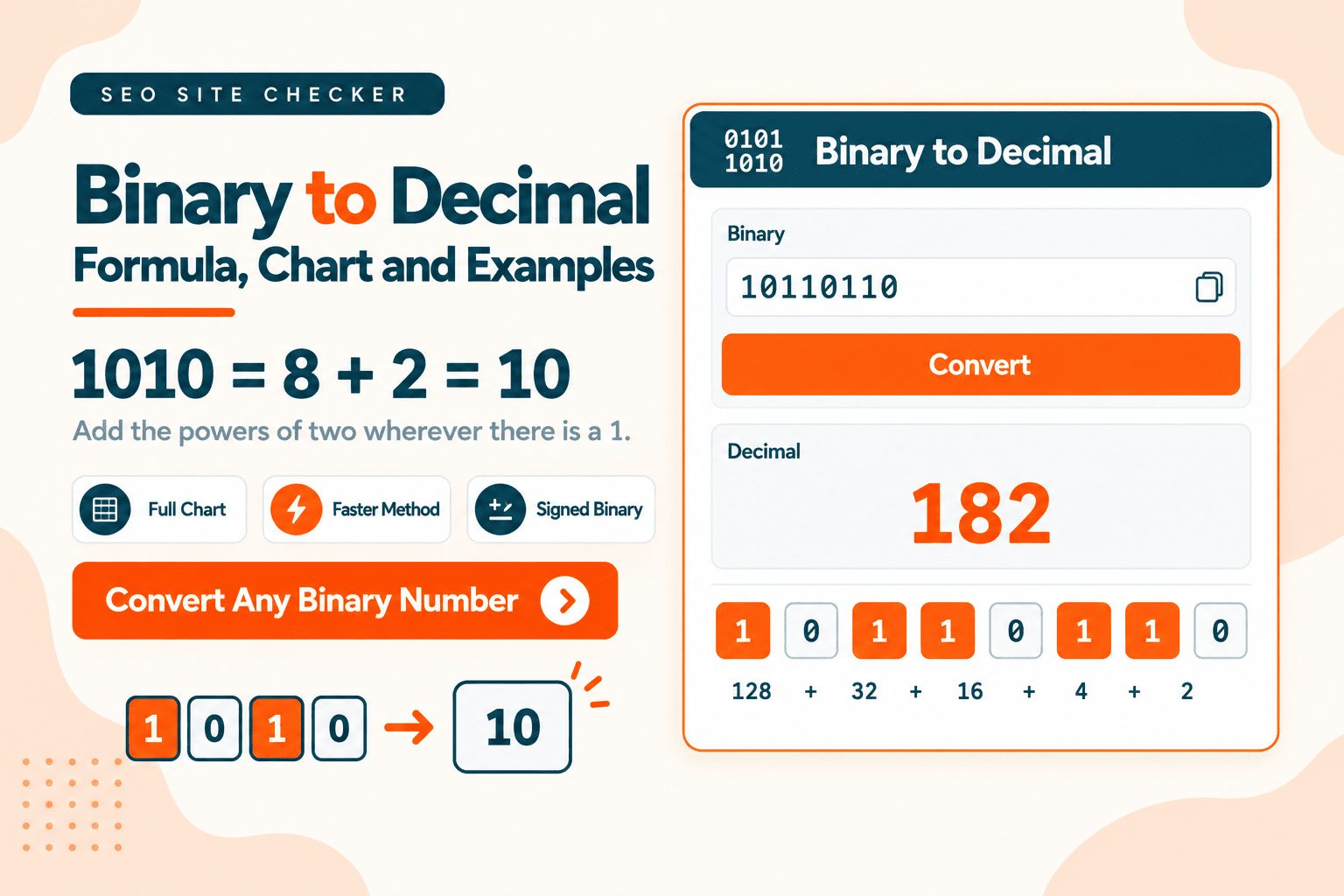
Each digit in a binary number represents a power of two. Add up the powers wherever there is a 1.
1010 is 8 + 2, which is 10.
That is the whole method. Below you will find a longer worked example, a faster technique for long numbers, a reference chart, the signed binary problem that catches almost everyone, and where binary actually shows up in real work.
How to Convert Binary to Decimal: A Beginner's Guide
Three steps:
- Write the powers of two above each digit, starting from the right with 1
- Ignore every position holding a 0
- Add what is left
Here is 1101:
Binary:    1     1     0     1
                Power:     8     4     2     1
                Counts:    8  +  4  +  0  +  1  =  13
One idea makes the whole system click. Position determines value, and the value doubles as you move left.
Decimal already works this way. In 347, the 3 is not three, it is three hundreds. Binary does the same thing with twos instead of tens, and each position holds either one of that value or none of it.
The detail that trips up nearly everyone the first time: the rightmost position is 1, not 2. It is 2 to the power of 0, and any number to the power of 0 is 1. Start counting from 1 and double leftward.
The Place Value Method, Step by Step

Longer numbers work exactly the same way. Here is 10110110, an eight-bit number:
| Position | 128 | 64 | 32 | 16 | 8 | 4 | 2 | 1 |
|---|---|---|---|---|---|---|---|---|
| Bit | 1 | 0 | 1 | 1 | 0 | 1 | 1 | 0 |
| Counts | 128 | 0 | 32 | 16 | 0 | 4 | 2 | 0 |
128 + 32 + 16 + 4 + 2 = 182
Three things make this faster by hand:
Write the powers right to left. Start at 1 and double: 1, 2, 4, 8, 16, 32, 64, 128. Writing them left to right means guessing where to start, and miscounting by one position doubles or halves your answer.
Ignore leading zeros. 00001010 and 1010 are the same number. Zeros on the left add nothing, exactly as they do in decimal.
Sanity check the size. An eight-bit number cannot exceed 255. If your answer is bigger, you have written one power too many.
Powers of Two Reference
| Power | Value | Power | Value | |
|---|---|---|---|---|
| 2⁰ | 1 | 2⁸ | 256 | |
| 2¹ | 2 | 2⁹ | 512 | |
| 2² | 4 | 2¹⁰ | 1,024 | |
| 2³ | 8 | 2¹¹ | 2,048 | |
| 2⁴ | 16 | 2¹² | 4,096 | |
| 2⁵ | 32 | 2¹³ | 8,192 | |
| 2⁶ | 64 | 2¹⁴ | 16,384 | |
| 2⁷ | 128 | 2¹⁶ | 65,536 |
The first eight cover any single byte, so they are the ones worth knowing by heart.
And 2¹⁰ is 1,024, which is why a kilobyte is 1,024 bytes rather than a round thousand. Nobody rounded oddly. It is simply the closest power of two.
The Faster Method for Long Numbers
Writing out place values gets tedious past six or seven digits, and it is where miscounting happens. There is a better way.

Start at 0. For each digit, left to right, double your running total and add the digit.
Here is 1101 again:
Start:              0
                Digit 1:  0 × 2 + 1 = 1
                Digit 1:  1 × 2 + 1 = 3
                Digit 0:  3 × 2 + 0 = 6
                Digit 1:  6 × 2 + 1 = 13
Same answer, and you never had to know that the leftmost position was worth 8.
That is the real advantage. On a sixteen-digit number, the place value method needs you to remember that position sixteen is 32,768. The doubling method only ever asks you to double a number and add 0 or 1, which is arithmetic anyone can do while reading.
For anything longer than about six digits, use this one.
Worked Examples
1010 = 8 + 2 = 10
1111 = 8 + 4 + 2 + 1 = 15
101 = 4 + 1 = 5
10000000 = 128
11111111 = 128 + 64 + 32 + 16 + 8 + 4 + 2 + 1 = 255
That last one deserves a note, because it causes a specific and very common confusion.
11111111 is 255, not 256. An eight-bit number has 256 possible values, but they run from 0 to 255, because zero is one of them. The count of values and the largest value are different numbers, and mixing them up is behind a surprising share of off-by-one errors in real code.
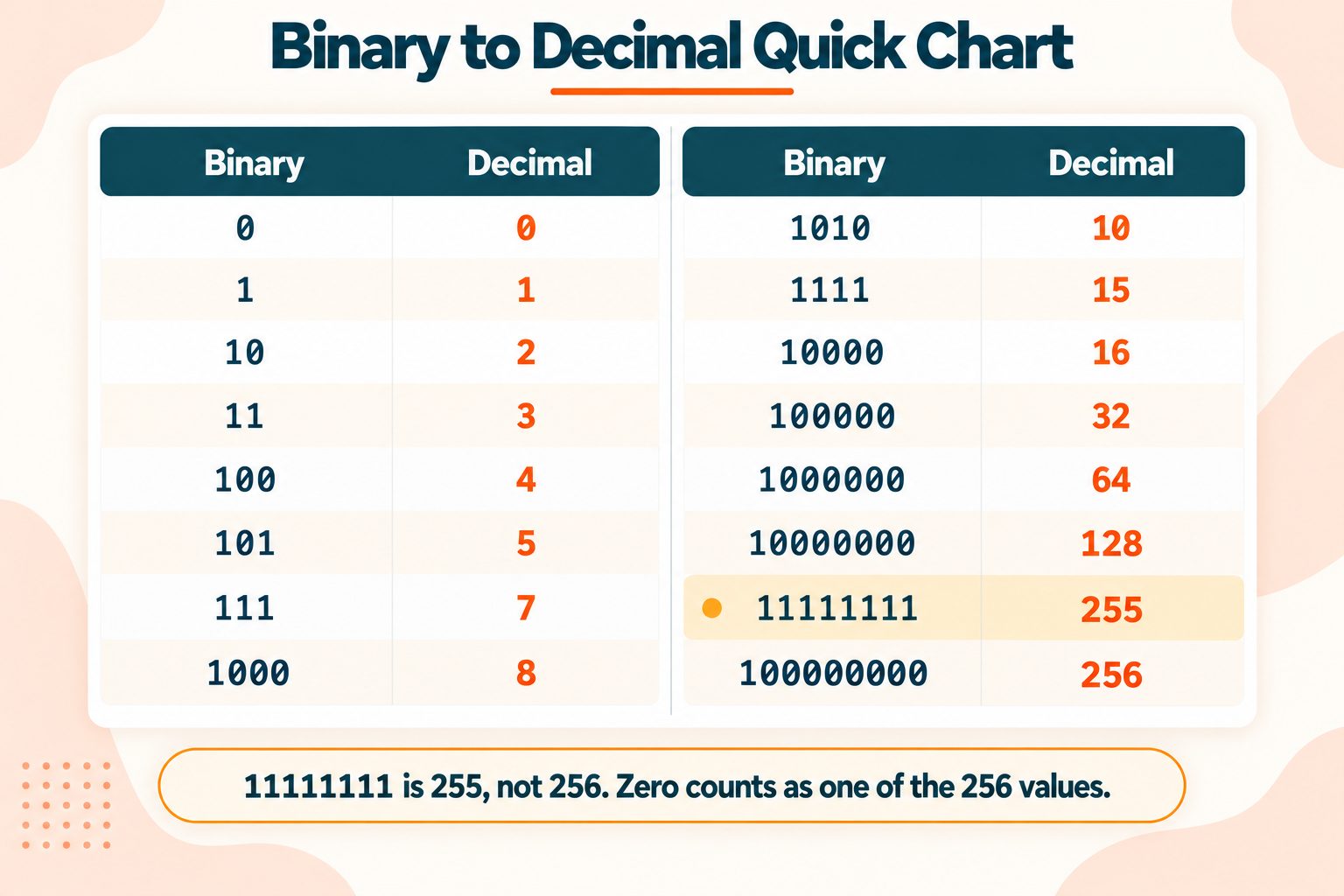
Binary to Decimal Chart
| Binary | Decimal | Binary | Decimal | |
|---|---|---|---|---|
| 0 | 0 | 1010 | 10 | |
| 1 | 1 | 1111 | 15 | |
| 10 | 2 | 10000 | 16 | |
| 11 | 3 | 100000 | 32 | |
| 100 | 4 | 1000000 | 64 | |
| 101 | 5 | 10000000 | 128 | |
| 111 | 7 | 11111111 | 255 | |
| 1000 | 8 | 100000000 | 256 |
Signed Binary and Two's Complement
Everything above assumes the number is positive. That assumption is fine for homework and wrong the moment you read real data.
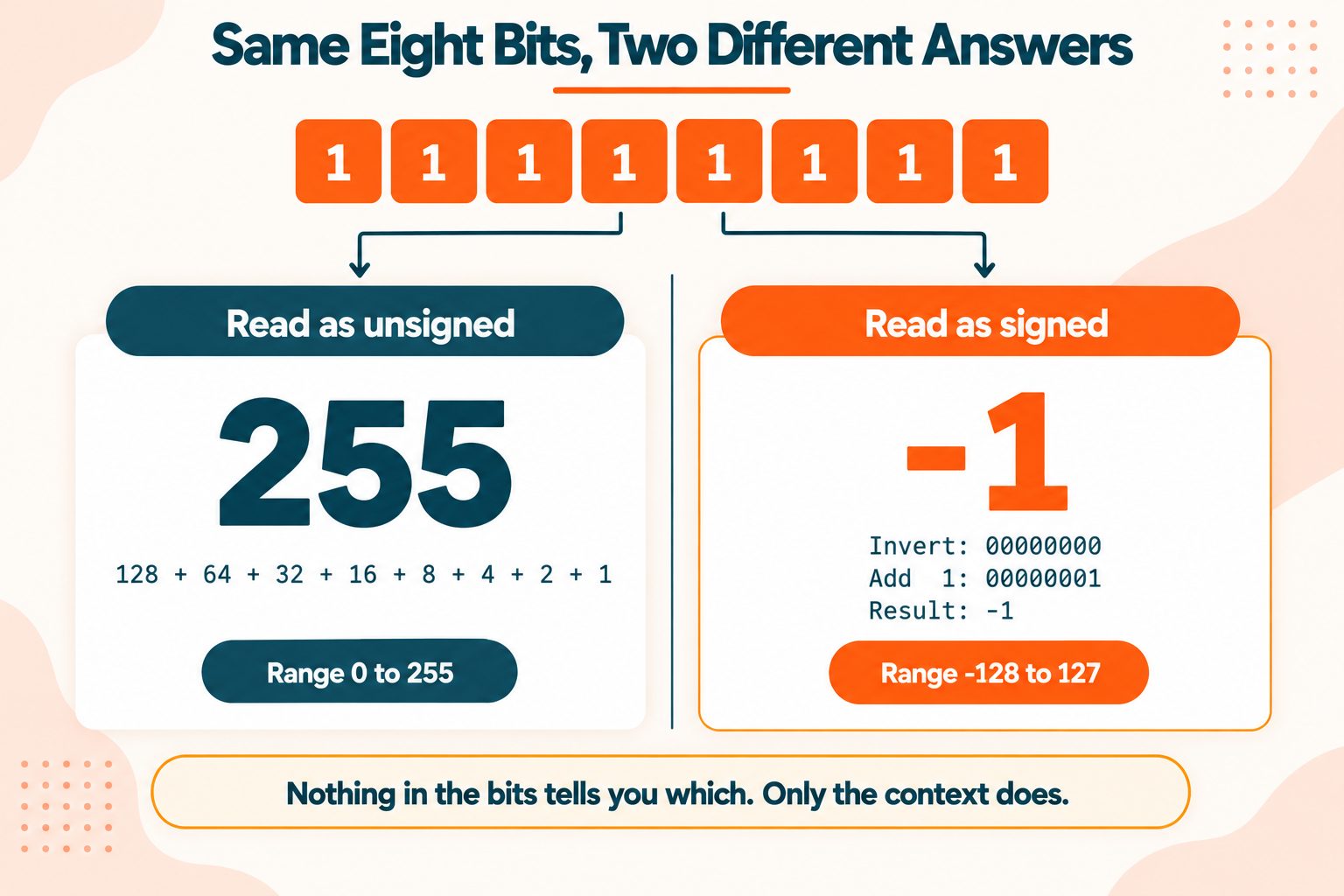
Here is the problem in one line. 11111111 is 255 if you read it as an unsigned byte, and negative 1 if you read it as signed. Same eight bits. Two completely different answers. Nothing in the string itself tells you which one is correct.
The interpretation comes from context: how the variable was declared, what the file format specifies, what the protocol says. The bits alone are ambiguous.
How signed binary works
In signed binary, the leftmost bit is the sign bit.
- Leading 0 means positive. Read the rest normally.
- Leading 1 means negative. Read it differently.
To convert a negative signed number, use two's complement:
- Invert every bit, so every 0 becomes 1 and every 1 becomes 0
- Add 1
- That result is the magnitude, and the answer is negative
Try it on 11111111:
Original:   11111111
                Inverted:   00000000
                Add 1:      00000001  = 1
                Answer:     -1
So 11111111 as a signed byte is -1.
The ranges
| Interpretation | Range |
|---|---|
| Unsigned byte | 0 to 255 |
| Signed byte | -128 to 127 |
Both hold 256 distinct values. Signed binary simply spends half of them on negatives.
Where this bites: reading raw file bytes, parsing network packets, or working in a language where a variable's signedness is not obvious at the call site. If you are seeing -1 where you expected 255, or -128 where you expected 128, this is almost always the reason.
Binary Fractions
Positions to the right of a binary point are negative powers of two: 1/2, then 1/4, then 1/8, and so on.
Binary:    1  .  0     1      1
                Value:     1  .  0.5   0.25   0.125
                Counts:    1  +  0  +  0.25 + 0.125  =  1.375
So 1.011 is 1.375.
This explains something most developers meet early and never quite forget. Many decimal fractions have no exact binary representation. 0.1 in binary repeats forever, in the same way 1/3 repeats in decimal. Computers store an approximation.
Which is why, in most programming languages:
0.1 + 0.2 = 0.30000000000000004That is not a bug in the language. It is the same limitation as writing 1/3 as 0.333 and expecting three of them to make exactly 1.
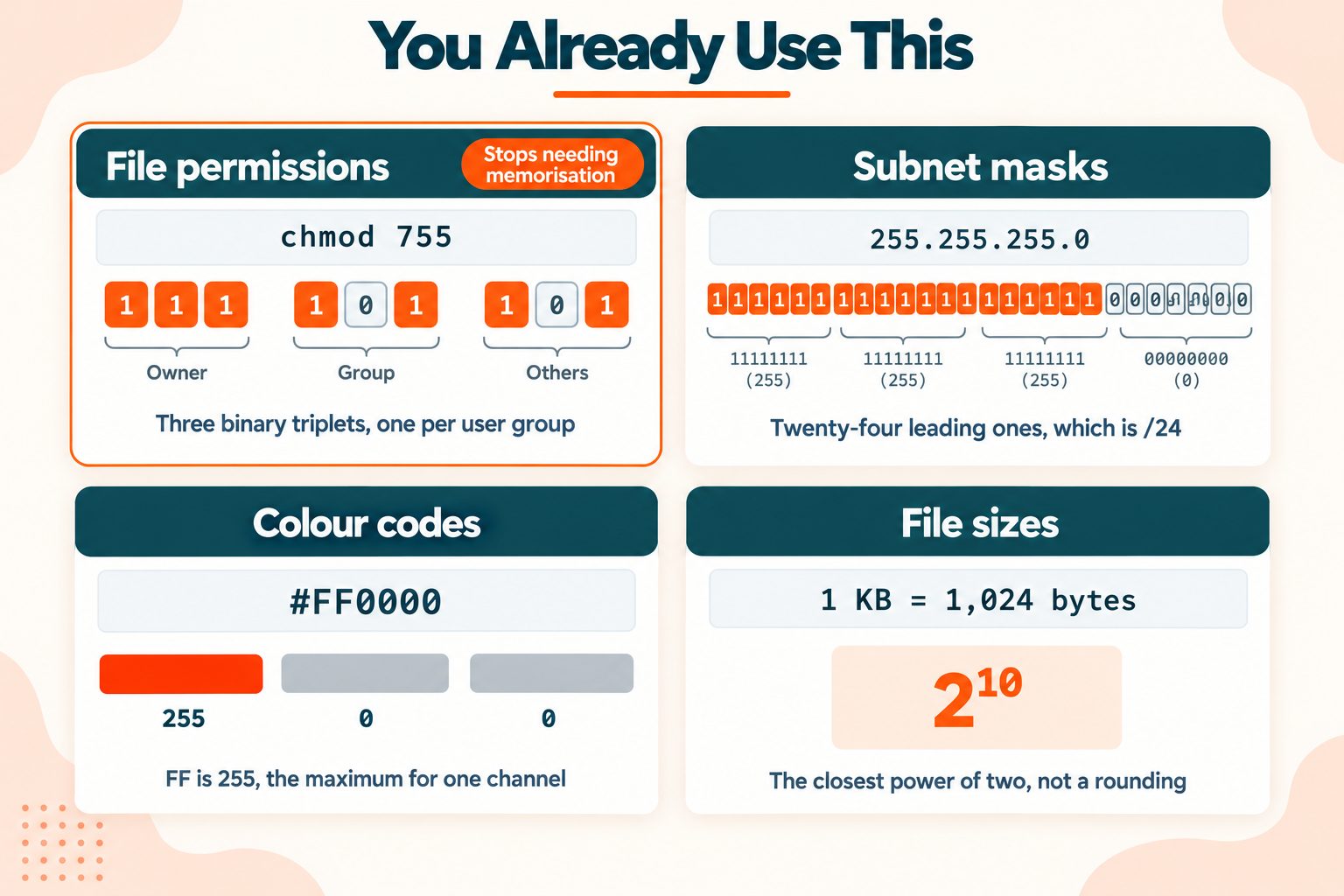
Where You Actually Meet Binary
Binary stops feeling abstract once you notice how often you already use it.
File permissions. chmod 755 is three binary triplets. The 7 is 111, meaning read, write and execute. Each 5 is 101, meaning read and execute but not write. Once you see permission numbers as binary, they stop needing memorisation, because each digit is just three switches.
Subnet masks. 255.255.255.0 is thirty-two bits, and twenty-four of them are ones. That is exactly where /24 comes from in CIDR notation: the number of leading 1 bits in the mask. RFC 4632, the CIDR specification defines it, and it makes far more sense once you can see the mask as bits rather than as four numbers.
Colour codes. #FF0000 is three bytes, one per colour channel. FF is 255, the maximum a single byte can hold, which is why that code is pure red. If you work with colour values often, converting between binary and hex makes the relationship obvious.
File sizes. A kilobyte is 1,024 bytes because that is 2¹⁰.
Flags and bitmasks. Configuration packed into a single number, with each bit switching one option on or off. Common in APIs, permissions systems and low-level code.
Character encoding. Every character you read is stored as a number, and every number is stored as bits. The Text to Binary converter shows this directly, and Base64 is another way of moving binary through systems built for text.
Khan Academy's lessons on digital information go deeper on how all of this fits together, free and with practice exercises.
Common Mistakes
- Starting the powers at 2. The rightmost position is 2⁰, which is 1.
- Reading right to left. The leftmost digit is the largest, exactly as in decimal.
- Assuming eight ones is 256. It is 255. Zero is one of the 256 values.
- Missing the sign bit. Check whether the number is signed before converting anything with a leading 1.
- Miscounting position on long strings. Use the doubling method instead.
- Expecting leading zeros to change something. They never do.
Quick Reference
Method: add the powers of two wherever there is a 1 Faster for long numbers: double your total and add each digit, left to right Eight bits: 0 to 255 unsigned, or -128 to 127 signed Check your answer: an eight-bit number can never exceed 255
Binary looks intimidating and is one of the simplest number systems there is. Every position is worth double the one to its right, and each position is either counted or it is not.
Frequently Asked Questions
Frequently Asked Questions (FAQs) is a list of common questions and answers provided to quickly address common concerns or inquiries.
How do you convert binary to decimal?
Add the powers of two for every position holding a 1. 1010 is 8 + 2, which is 10.
What is 1010 in decimal?
1010 is 10. The positions are 8, 4, 2 and 1, and the 1 bits sit at 8 and 2.
What is 11111111 in decimal?
255 as an unsigned byte. Read as a signed byte, the same bits mean -1.
What is the formula for binary to decimal?
Multiply each digit by 2 raised to its position number, counting from 0 on the right, then add the results.
What is 1111 in decimal?
That is 8 + 4 + 2 + 1, the maximum a four-bit number can hold.
What is the easiest way to convert binary to decimal?
For short numbers, add the powers of two. For long ones, double your running total and add each digit left to right.
How do you convert negative binary to decimal?
Invert every bit, add 1, then read the result as a negative number. 11111111 becomes 1, so it is -1.
Why do computers use binary?
Circuits reliably detect two states, on and off. Two states map naturally onto 1 and 0, which makes binary the practical choice.
How many decimal values can 8 bits represent?
256 values, running from 0 to 255. Signed, the same 256 values run from -128 to 127.
What is a binary fraction?
Digits after a binary point representing halves, quarters and eighths. 1.011 is 1 + 0.25 + 0.125, which is 1.375.





