


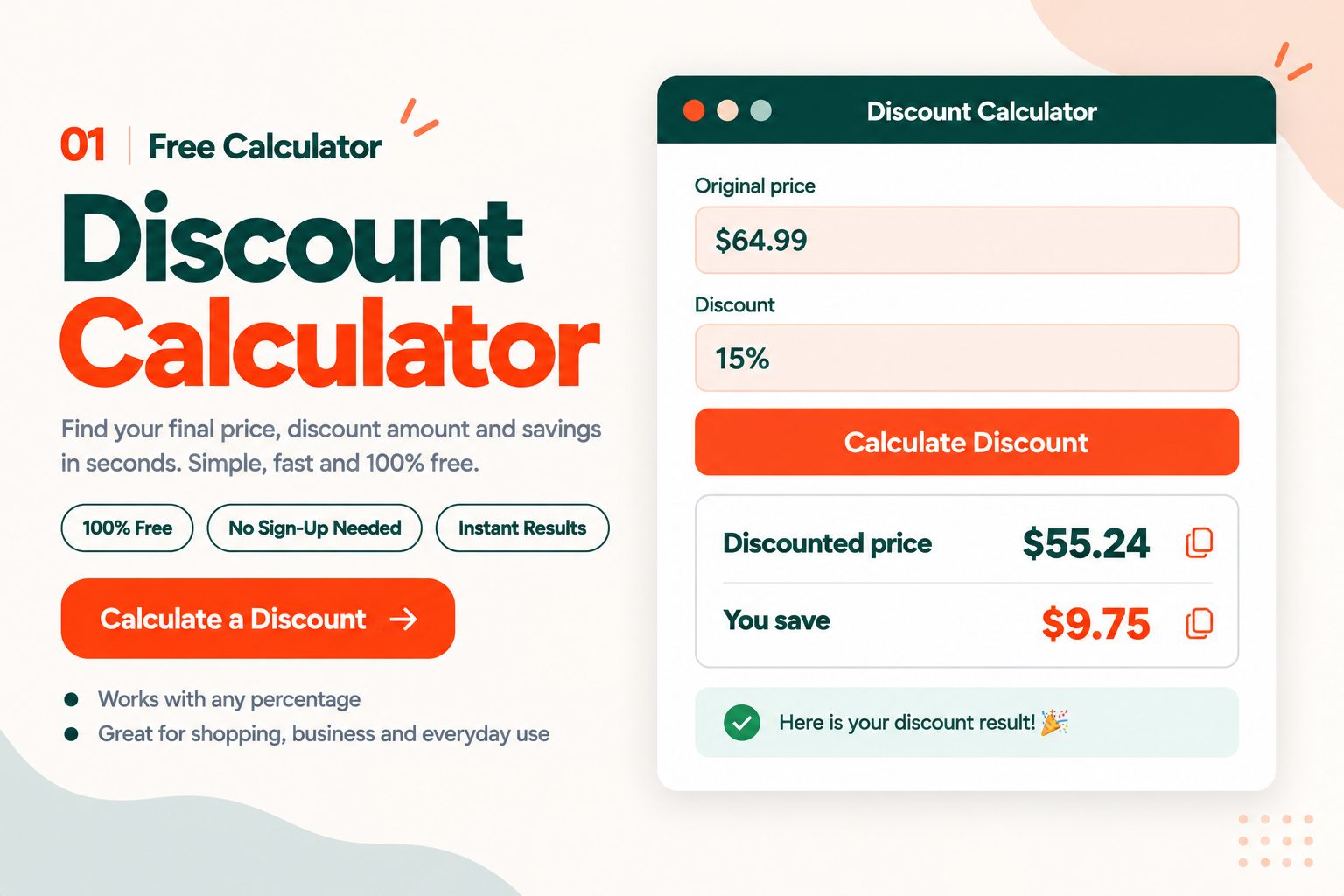
Use this free discount calculator to find the sale price of anything in seconds. Enter the original price and the percentage off, and it tells you exactly what you will pay and how much you save, with no sign-up and no limits.
Real sales are rarely that simple, though. Stores stack an extra discount on top of a sale, hand you a dollar-off coupon that competes with a percentage-off one, or show you a sale price without the original. This page walks through each of those, with the quick method for every case and the worked numbers to check yourself against.
How to Calculate Discount and Savings
Using the calculator
- Enter the original price. For example,
64.99. - Enter the discount percentage. For example,
15. - Click Calculate Discount.
- Read your results. You get the discounted price and your total savings, and each one has a copy button so you can paste it wherever you need it.
Example: a $64.99 item at 15% off comes to $55.24, which saves you $9.75.
The formula behind it
Savings     = price × (discount ÷ 100)
Sale price  = price × (1 − discount ÷ 100)
The second line is the one worth remembering. A discount tells you what comes off, so the price you pay is whatever is left. At 25% off you pay 75% of the price, so you multiply by 0.75. At 15% off you pay 85%, so you multiply by 0.85. Once that clicks, every calculation further down this page gets easier.
Doing it in your head
Start with 10%, because it only takes moving the decimal point one place to the left. On an $80 item, 10% is $8. From there you can build almost anything: 20% is double that at $16, 5% is half of it at $4, and 15% is the two added together at $12.
When you need an exact answer rather than a rough one, the Discount Calculator at the top of this page does it instantly.
Quick Percent Off Shortcuts
Here are the most common discounts worked out on everyday prices:
| Discount | You pay | On $30 | On $80 | On $250 |
|---|---|---|---|---|
| 10% off | 90% | $27.00 | $72.00 | $225.00 |
| 20% off | 80% | $24.00 | $64.00 | $200.00 |
| 25% off | 75% | $22.50 | $60.00 | $187.50 |
| 30% off | 70% | $21.00 | $56.00 | $175.00 |
| 50% off | 50% | $15.00 | $40.00 | $125.00 |
Two shortcuts cover a lot of real shopping. 25% off is the same as taking a quarter off, and 50% off is simply half price. For anything else, use the "you pay" column and multiply.
Stacked Discounts: Why 20% Plus 10% Is Not 30%
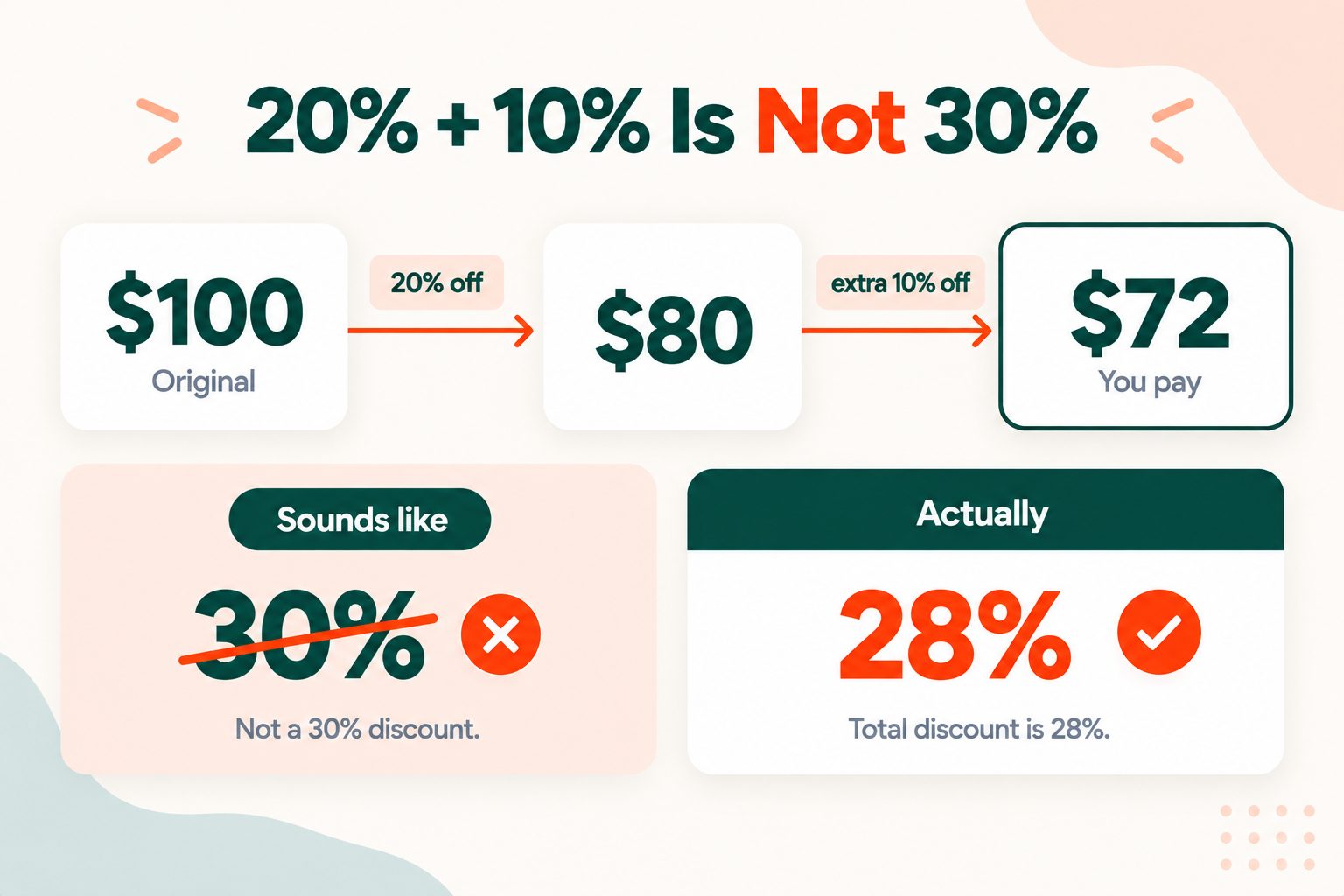
You have seen the sign: 20% off everything, plus an extra 10% off at checkout. It sounds like 30% off. It is not.
The second discount comes off the price that is already reduced, not the original. So $100 becomes $80 after the first discount, and then 10% of $80 comes off, which leaves $72. You saved $28, which means the real discount is 28%.
The gap gets bigger as the discounts get bigger:
| Deal | Sounds like | Actually is | $100 becomes |
|---|---|---|---|
| 20% then 10% | 30% | 28% | $72 |
| 30% then 20% | 50% | 44% | $56 |
| 40% then 10% | 50% | 46% | $54 |
| 50% then 50% | 100% (free) | 75% | $25 |
That last row surprises people most. Half off and then half off again is not free. It is a quarter of the original price.
The quick way to work any stack out is to multiply what you pay at each step. 20% off means you pay 0.80, and 10% off means you pay 0.90, so 0.80 × 0.90 = 0.72. You pay 72% of the price.
You can do this with the calculator too. Run it twice. Enter $100 at 20% off, copy the $80 result, then enter $80 at 10% off. The copy buttons make it a few seconds' work, and it works for three or four stacked discounts just as well as two.
Percent Off or Dollars Off: Which Coupon Saves More
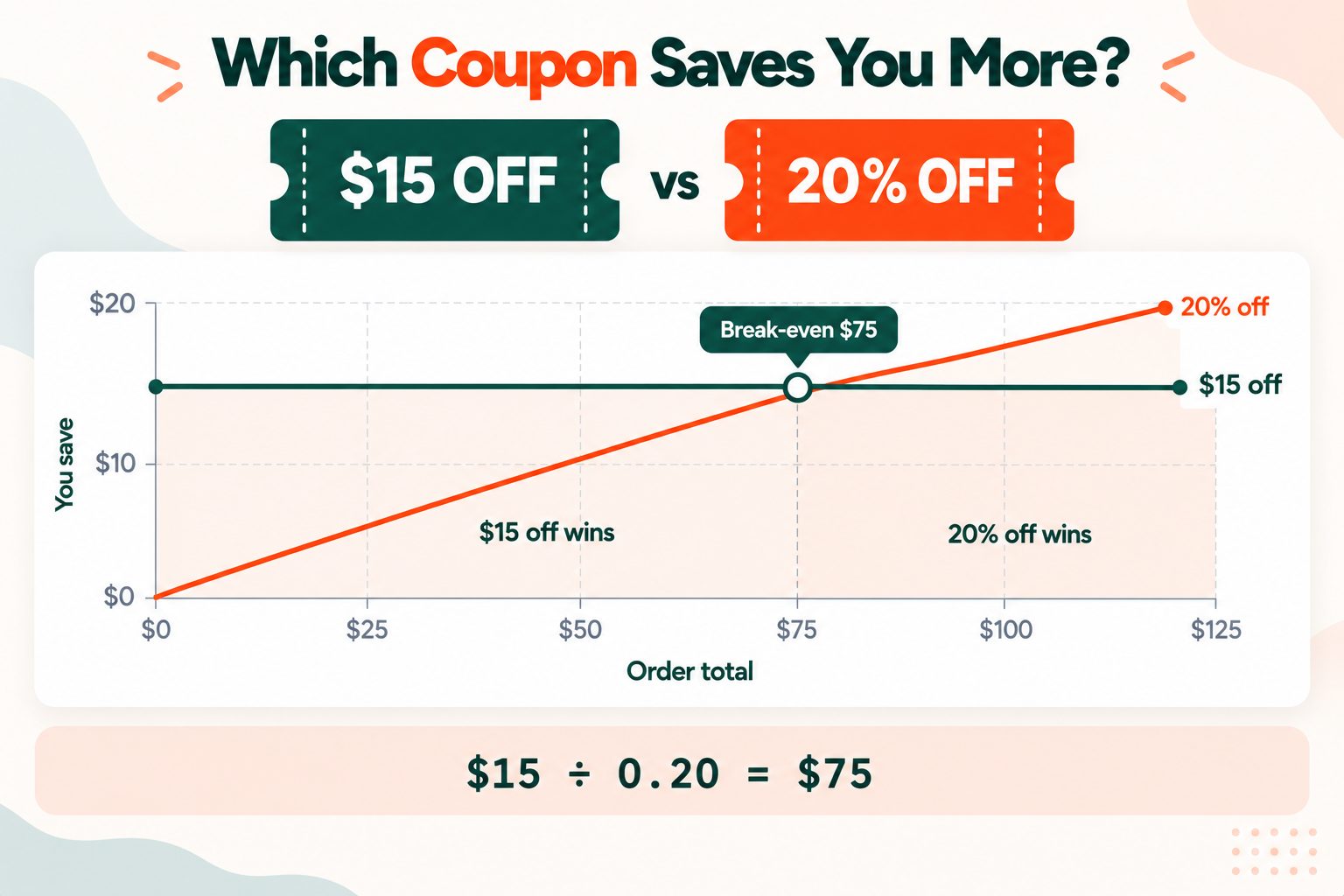
This is the question most people guess at the checkout. You have two coupons, "20% off" and "$15 off", and the store will only take one. Which should you use?
There is a one-line rule that answers it every time:
Break-even price = dollar amount ÷ percentage (as a decimal)For these two coupons, $15 ÷ 0.20 = $75. That is the price where both coupons save you exactly the same. If you are spending more than $75, the 20% coupon wins. If you are spending less, the $15 coupon wins.
You can check it from both sides. On a $60 order, 20% saves you $12 while the dollar coupon saves $15. On a $100 order, 20% saves you $20 while the dollar coupon still saves only $15.
Here is the rule applied to some common coupon pairs:
| Coupons | Break-even price | Spending less? | Spending more? |
|---|---|---|---|
| $15 off vs 20% off | $75.00 | $15 off wins | 20% off wins |
| $10 off vs 25% off | $40.00 | $10 off wins | 25% off wins |
| $20 off vs 15% off | $133.33 | $20 off wins | 15% off wins |
| $50 off vs 30% off | $166.67 | $50 off wins | 30% off wins |
The same rule works from the other side of the counter. If you run a shop and are choosing between a percentage promotion and a flat discount, work out the break-even price and compare it with your average order value. Whichever coupon the rule favours for your typical customer is the one that costs you more.
BOGO and Multi-Buy Deals, Worked Out
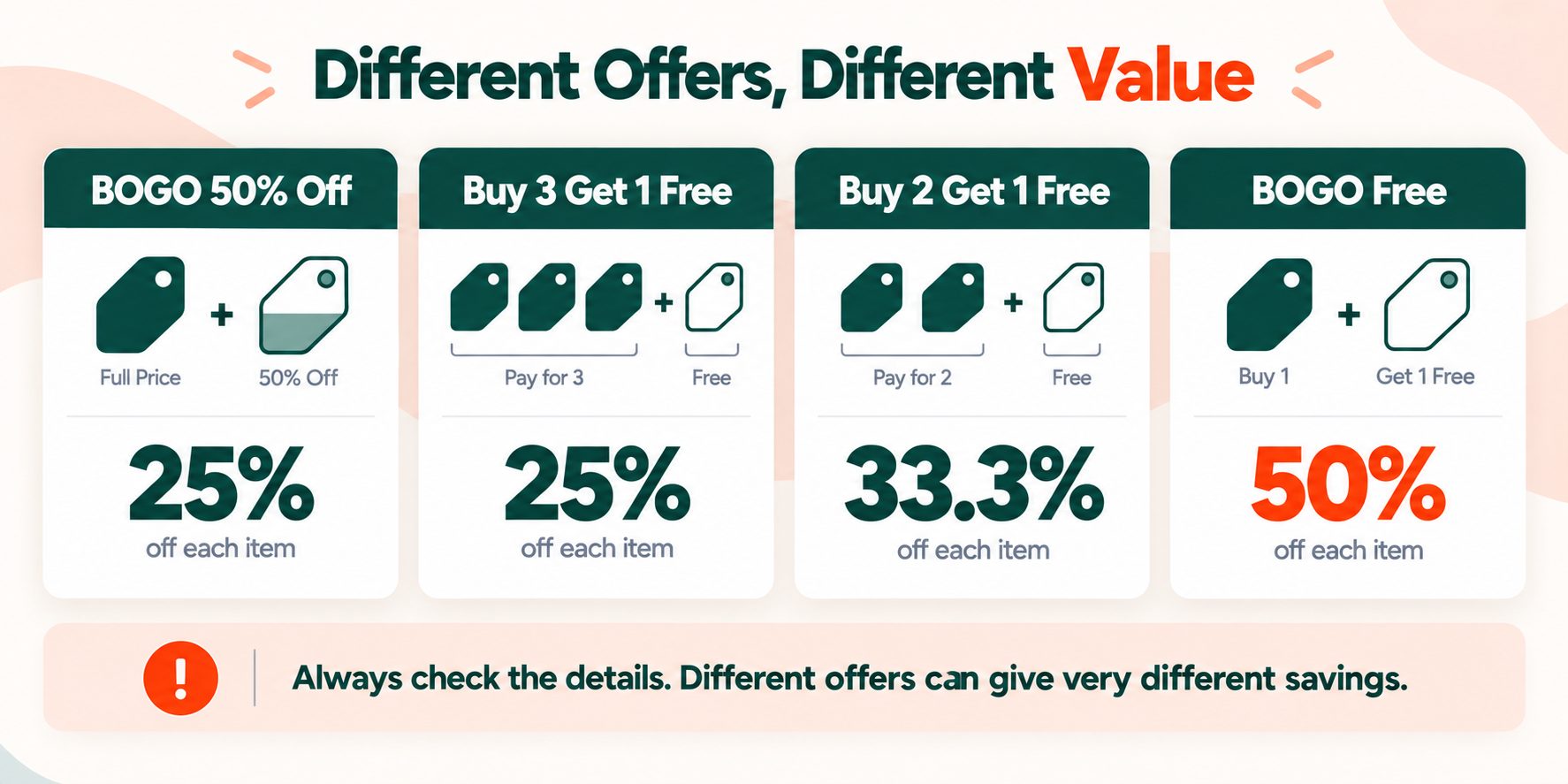
Buy-one-get-one and multi-buy offers are hard to compare with ordinary discounts because they are not written as a percentage. Converting them makes the comparison easy:
| Offer | Effective discount per item |
|---|---|
| Buy one, get one 50% off | 25% |
| Buy 3, get 1 free | 25% |
| Buy 2, get 1 free | 33.3% |
| Buy one, get one free | 50% |
Buy one, get one 50% off is the one people most often overestimate. You pay for one and a half items and take home two, so each item works out at 25% off, not 50%.
There is an important catch with all of these. The saving is only real if you would have bought that many anyway. A "buy 2, get 1 free" deal on something you only needed one of does not save you 33%. It means spending twice as much and taking home extra you did not want.
Find the Original Price or the Discount Percentage
Sometimes you have the sale price and need to work backwards.
Finding the original price
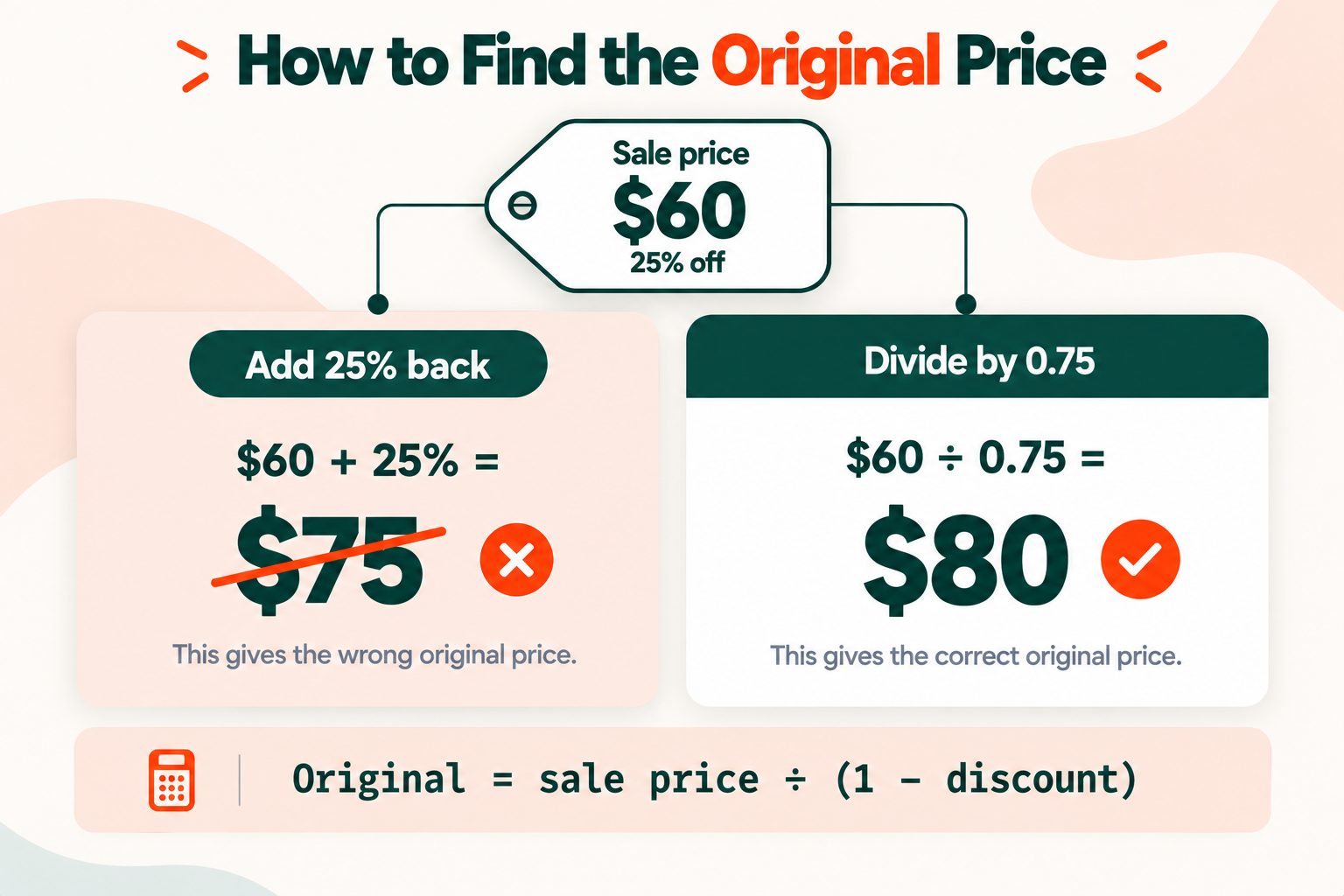
Original price = sale price ÷ (1 − discount ÷ 100)If something costs $60 after 25% off, divide $60 by 0.75 to get $80. If something costs $42 after 30% off, divide $42 by 0.70 to get $60.
Watch for the tempting shortcut here. Adding 25% back on to $60 gives you $75, which is wrong. The 25% was taken off the original price, not the sale price, so adding it back to the smaller number never gets you to where you started.
Finding the discount percentage
Discount % = (original − sale price) ÷ original × 100If a price drops from $150 to $105, the difference is $45. Divide $45 by $150 and multiply by 100, and the discount is 30%.
For other percentage change questions, the Percentage Calculator handles increases and decreases directly, and our guide on how to calculate percentage walks through the basics.
Why a Discount Is Harder to Undo Than It Looks
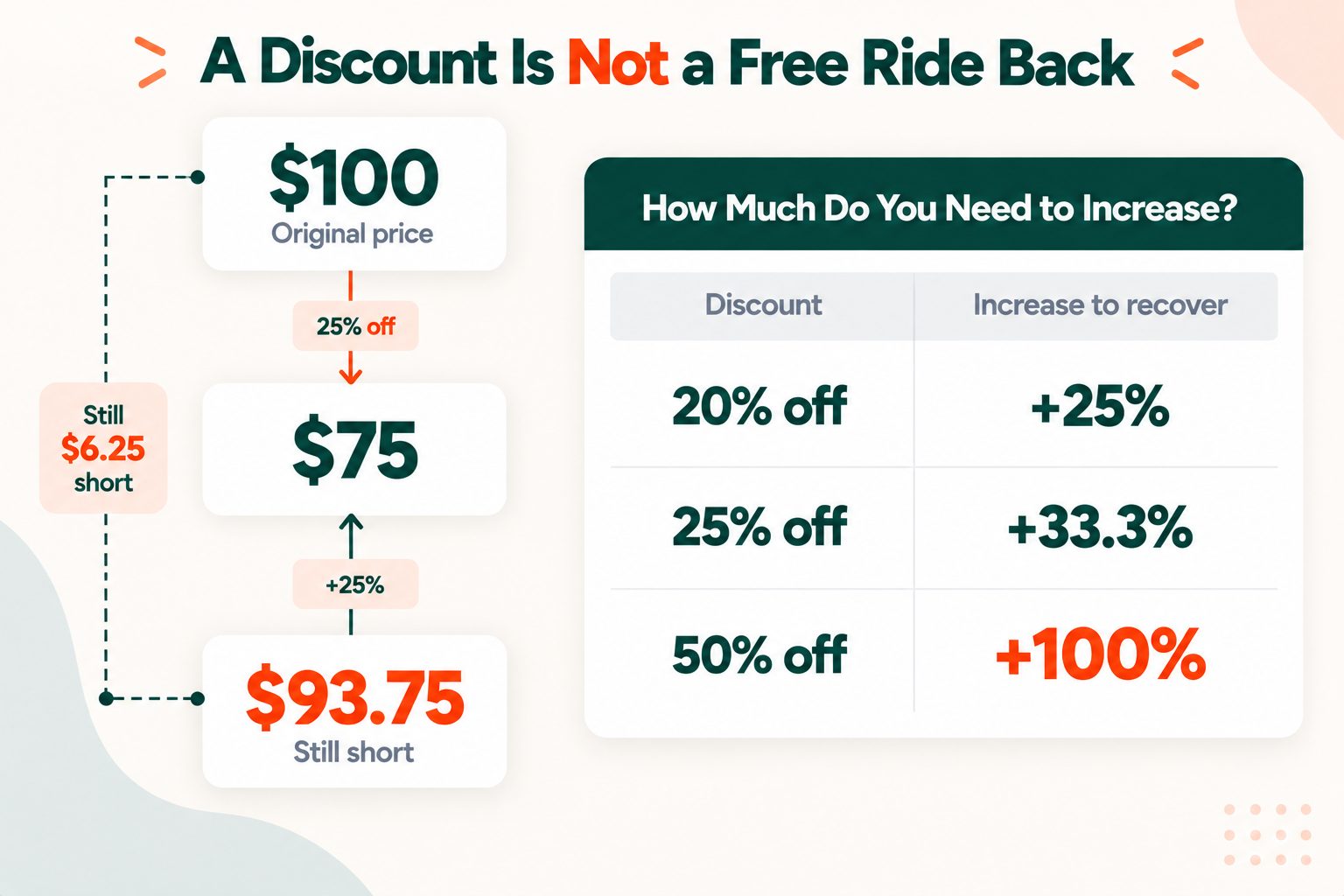
Here is a fact that catches out plenty of shop owners. After a sale, raising prices by the same percentage does not bring them back to where they were.
| Discount | Increase needed to get back to the original price |
|---|---|
| 20% off | +25% |
| 25% off | +33.3% |
| 50% off | +100% |
The reason is that the increase is calculated on a smaller number. Take $100 down 25% to $75, then raise it 25%, and you only reach $93.75. To get back to $100, you need to raise it by a third. So if you run a 25% off sale and then put prices up 25% afterward, you are still selling below your original price.
If you want to practise this kind of problem, Khan Academy's discount and markup practice problems are a good free place to start.
Discounts and Sales Tax
In general, sales tax is charged on the discounted price, not the original one. So an $80 item at 25% off with 8% sales tax comes to $60 before tax and $64.80 after it.
For percentage discounts, the order makes no difference, because multiplying works the same either way round. Coupons are a different story, since some states treat store coupons and manufacturer coupons differently for tax. The Sales Tax Calculator page explains how that works and adds tax to your sale price in one step.
How to Spot a Fake Discount
A discount is only as real as the price it starts from. A common tactic is an inflated "was" price, a figure the item never actually sold at, which makes an ordinary price look like a bargain.
In the US, the FTC's Guides Against Deceptive Pricing say a former price comparison should only be used when the item was really offered at that price, openly and in good faith, for a reasonable period of time. In practice, that is hard for a shopper to verify, so a few habits help:
- Check the price history if the retailer or a price tracker shows it.
- Compare the same item at two or three other retailers before deciding a sale price is a good one.
- Be wary of "compare at" wording, which often refers to someone else's price rather than the retailer's own former price.
A calculator can tell you exactly what a discount is worth. It cannot tell you whether the starting price was honest, so that part is still up to you.
Discount Formulas in Excel and Google Sheets
If you are working through a price list, a spreadsheet does the whole column at once. With the original price in A2, the discount in B2 formatted as a percentage, and a sale price in C2:
Sale price:   =A2*(1-B2)
Savings:      =A2*B2
Discount %:   =(A2-C2)/A2
Original:     =C2/(1-B2)
For the last two, format the result cell to match: percentage for the discount and currency for the original price. These formulas work in Google Sheets without any changes. Microsoft's guide to calculating percentages in Excel covers formatting and more examples.
Quick Reference
| I want to | Formula |
|---|---|
| Find the sale price | Price × (1 − discount) |
| Find the savings | Price × discount |
| Stack two discounts | Price × (1 − d1) × (1 − d2) |
| Find the original price | Sale price ÷ (1 − discount) |
| Find the discount % | (Original − sale) ÷ original |
| Compare two coupons | $ off ÷ % off = break-even price |
Frequently Asked Questions
Frequently Asked Questions (FAQs) is a list of common questions and answers provided to quickly address common concerns or inquiries.
How do you calculate a discount?
Multiply the original price by the discount as a decimal to get your savings, then subtract that from the price. 20% off $50 saves you $10, so you pay $40.
How do I take 20% off a price?
Multiply the price by 0.80. For a $250 item, $250 × 0.80 = $200, which means you save $50.
What is 20% off $30?
$24. Twenty percent of $30 is $6, and $30 minus $6 leaves $24.
How do I find the discount percentage from two prices?
Subtract the sale price from the original, divide by the original, then multiply by 100. A drop from $150 to $105 is a 30% discount.
How do I find the original price before a discount?
Divide the sale price by one minus the discount. Something that costs $60 after 25% off was originally $60 ÷ 0.75 = $80.
Are stacked discounts the same as adding them together?
No. 20% off followed by an extra 10% off is 28% in total, not 30%, because the second discount comes off the already reduced price.
Is 50% off the same as half price?
Yes. 50% off and half price mean exactly the same thing, so you pay half the original. A $40 item costs $20.
Is sales tax calculated before or after a discount?
Usually after. Sales tax is generally charged on the discounted price, so $80 at 25% off with 8% tax comes to $64.80.
Which is better, a percentage or a dollar-off coupon?
Divide the dollar amount by the percentage to get the break-even price. For $15 off versus 20% off, the 20% coupon saves more on anything above $75.
How do I calculate a discount in Excel?
With the price in A2 and the discount in B2 formatted as a percentage, use =A2*(1-B2) for the sale price and =A2*B2 for the savings.





