You check Search Console and the numbers do not add up. One of your posts sits at position four for a keyword you care about. It picked up 6,000 impressions last month. It got 71 clicks.
Position four should do better than that. Usually when it does not, the title is the reason.
Meta title best practices are worth learning because a title rewrite is one of the few SEO changes that can move traffic within days instead of months. You are not waiting on links or on a crawl of your whole site. You are changing one line and letting the same ranking work harder. This guide covers the correct length and why that number exists, the rules that actually matter, why Google keeps replacing your titles, formulas you can apply by page type, and a process for auditing what you already have.
What Is a Meta Title?
A meta title, also called a title tag, is an HTML element that sits in the head section of your page. It sets two things: the clickable blue headline in search results, and the label on your browser tab.
It looks like this:
html
<title>Meta Title Best Practices: How to Write Titles That Get Clicks</title>One point worth clearing up. Almost everyone calls this a meta tag, including plenty of SEO software. Technically it is not one. It is its own HTML element with its own syntax, which is why it does not use the name or property attributes that real meta tags use. MDN's reference on the HTML title element covers the spec if you want the formal version. The naming does not change anything practical, but knowing the difference helps when you are hand-editing a head section and wondering why the syntax looks different.
Three related elements get confused constantly, so here is the short version:
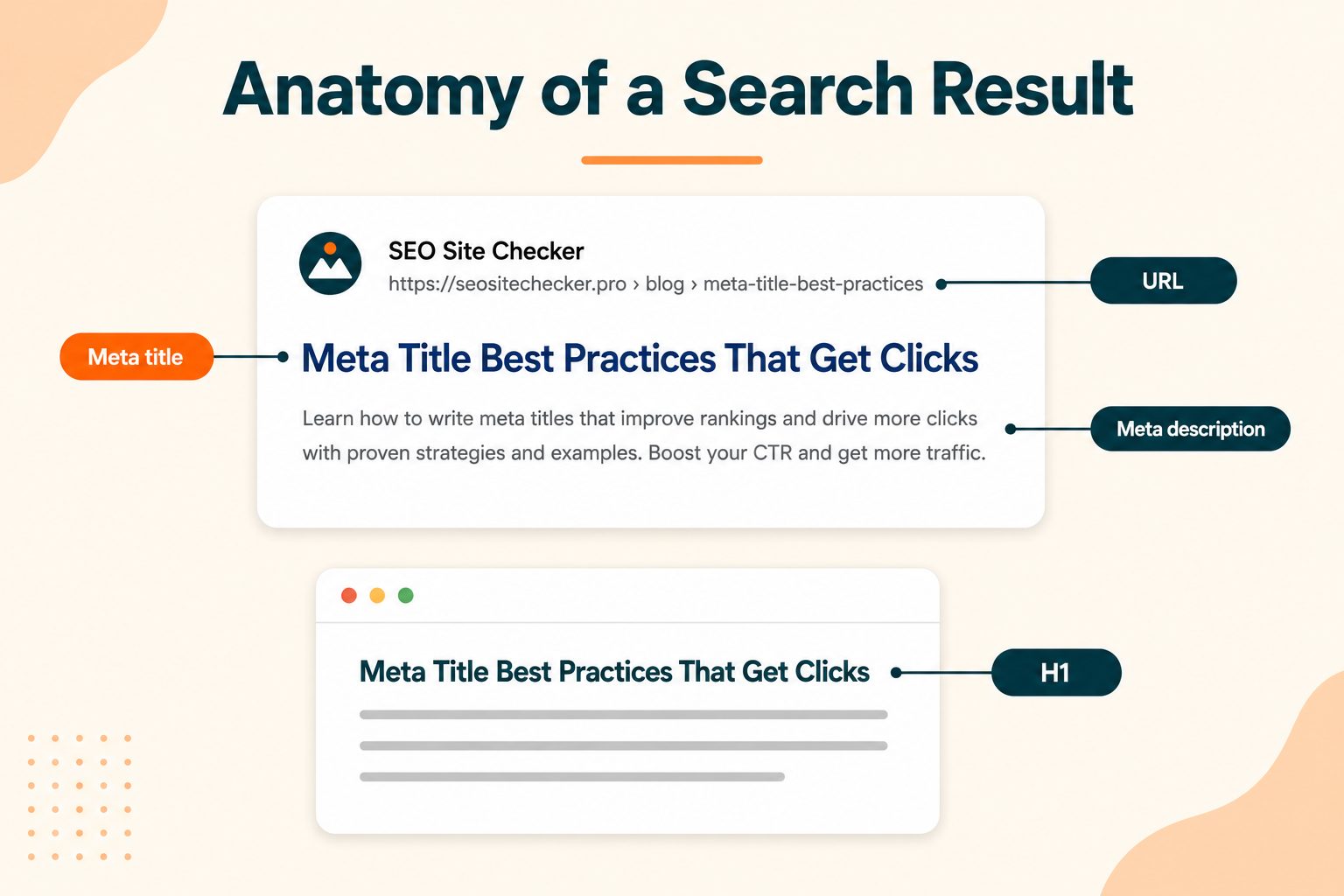
Meta title. The headline in search results. Speaks to someone who has not clicked yet.
Meta description. The grey summary text below it. Not a ranking factor, but it supports the click.
H1. The visible heading at the top of your page. Speaks to someone who already clicked.
They overlap, but they are not interchangeable. More on the title and H1 relationship further down.
Worth noting too that your social title is a fourth thing again. If you set Open Graph tags, your Open Graph title should differ from your SEO title, because a social feed audience and a search audience arrive in completely different frames of mind.
Why Meta Titles Matter More Than Most On-Page Elements
Two separate reasons, and they work in different ways.
It is a confirmed ranking signal. Unlike the meta description, the title tag genuinely influences how search engines judge whether your page matches a query. Keywords placed here carry real weight. That is not true of every element people spend time on.
It controls your click-through rate. Two pages sitting at the same position can pull wildly different traffic depending on what their titles say. This is the part most people underuse. You already earned the impression. The title decides whether that impression turns into a visit.
Put those together and you get the reason titles are worth a dedicated afternoon. You can rewrite fifty of them in a few hours, no links required, no development work, no waiting on a technical fix. It is close to the lowest-effort, highest-leverage edit available in on-page SEO.
Ideal Meta Title Length: Characters vs Pixels
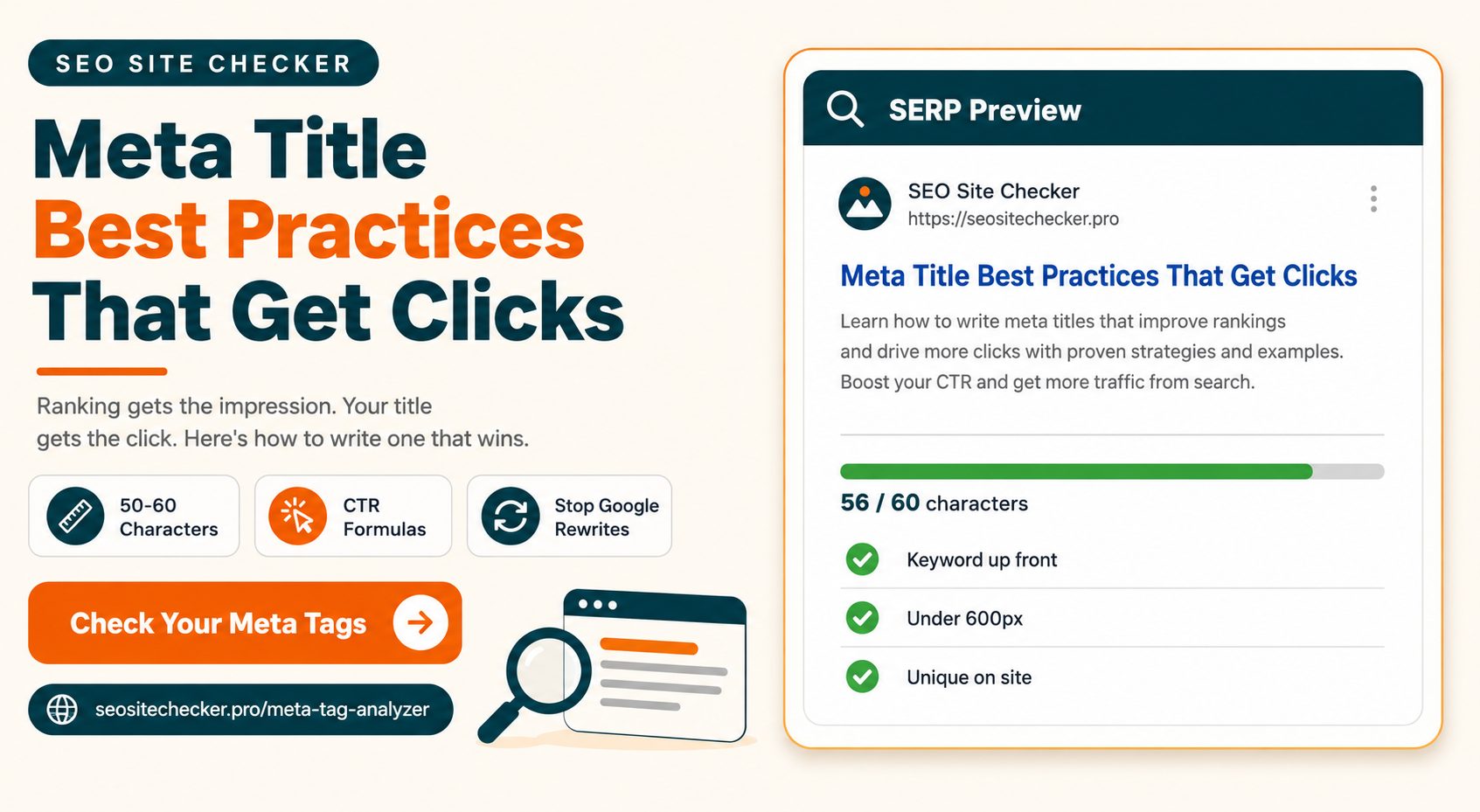
The number you came here for is 50 to 60 characters. That is the range worth working within.
But the reason behind it matters more than the number, because the number is only an approximation.
Google does not count characters. It measures display width in pixels, and titles start getting cut around 600 pixels on desktop. Characters vary in width. A capital W is roughly three times wider than a lowercase i. So a title packed with wide letters can truncate at 52 characters, while a title of narrow ones might survive past 62.
That means character count is a useful proxy, not a rule. If your title runs long and it is full of capitals, assume it will get cut earlier than the counter suggests.
Here is what happens across the range:
| Title length | What to expect |
|---|---|
| Under 40 characters | Fine if it is specific. Often too vague to stand out against nine other results |
| 40 to 50 characters | Safe on every device. Room to spare |
| 50 to 60 characters | Displays reliably, lowest chance of being rewritten |
| 60 to 70 characters | Truncation likely on mobile, sometimes on desktop |
| Over 70 characters | Google rewrites the large majority of these |
The operational rule that comes out of all this: front-load the words that matter. If the tail gets cut, the meaning should still survive. A title that reads "Complete Guide to Choosing the Right Image Format for Web Performance" loses nothing critical when it truncates. One that reads "Everything You Need to Know Before You Choose an Image Format" loses the entire point.
10 Meta Title Best Practices That Actually Move the Needle
1. Put your primary keyword near the front
This does two jobs at once. It signals relevance clearly, and it protects the keyword from truncation. Both matter, and the second one matters more on mobile than most people account for.
2. Write a unique title for every page
Duplicate titles are one of the most common reasons Google discards what you wrote and builds its own. If twelve of your pages say "Services | Company Name," you have handed the search engine a problem it will solve without asking you.
3. Match search intent, not just the keyword
Someone searching "how to compress an image" wants a guide. Someone searching "image compressor" wants a tool. Same topic, different intent, and the title should signal which one your page is. Look at the words the top ten results are using and notice what format they are promising.
4. Keep it under 600 pixels
The practical version of the length section above. If your CMS shows a length indicator, treat it as a rough guide rather than a verdict, and check wide-character titles more carefully.
5. Use your brand name selectively
Your homepage and category pages benefit from it. A deep blog post usually does not. Appending "| Company Name" to a post title spends 15 or 20 of your 60 characters on something the searcher is not looking for.
6. Write for a person, not a crawler
A title that hits every keyword and reads like a database entry will rank and then sit there collecting impressions. Read your title out loud. If you would not say it, rewrite it.
7. Avoid keyword stuffing
"SEO Tools, Free SEO Tools, Best SEO Tools Online" reads as spam to a human and signals low quality to a search engine. Say it once.
8. Add a modifier that earns the click
A year, a format, a number, a qualifier. "Checklist," "With Examples," "2026," "Step by Step." These work because they tell the reader what shape the content takes before they commit.
9. Use a consistent separator
Hyphens and pipes both work fine. Pick one and apply it across the site. Hyphens tend to survive Google's rewrites slightly more often, but consistency matters more than which one you choose.
10. Front-load the outcome, not the category
"Fix Slow WordPress Load Times" beats "Website Speed Information." The first tells the reader what changes for them. The second names a topic and hopes they are interested.
How to Write a Meta Title That Gets Clicks
Everything above is about writing a title that is correct. This section is about writing one that wins.
The distinction matters because ranking and clicking are two separate jobs. Ranking gets you onto the page. The title gets you the click. Most people optimize hard for the first and treat the second as an afterthought, which is why so many well-ranked pages underperform.
Specificity beats vagueness every time. "7 Fixes for a Slow WordPress Site" pulls harder than "Improving Website Speed." Numbers and concrete nouns tell the reader there is something definite waiting on the other side. Vague titles ask them to gamble.
Answer the question, or promise the answer directly. For informational searches, a title that states what the reader will learn outperforms one that only names the subject. Compare "Meta Title Length" against "How Long Should a Meta Title Be? 50 to 60 Characters." The second one has already started being useful.
Lead with the reader's outcome. What they get, not what you covered. This is the single most common fix when a title is technically fine but flat.
Create a small information gap. Enough that someone wants to know the rest, never enough that the title feels like bait. There is a real risk here worth naming. An overpromising title gets the click and then loses the visitor within seconds, and that pattern works against you rather than for you. Curiosity is useful. Misdirection is expensive.
Write against the actual competition. Your title is not judged in isolation. Search your keyword, read the ten titles already on the page, and notice what they all sound like. If eight of them start with "The Complete Guide To," yours should not. Standing out on a results page is partly about being different from the results next to you.
Once you have the wording settled, the free Meta Tag Generator will build the title and description block for you to paste into your head section. If you are rewriting titles in bulk and want consistent capitalization across all of them, run the batch through the Case Converter first. Inconsistent title casing across a site looks careless in a way that is hard to notice until you see all the titles listed together.
Meta Title Formulas by Page Type
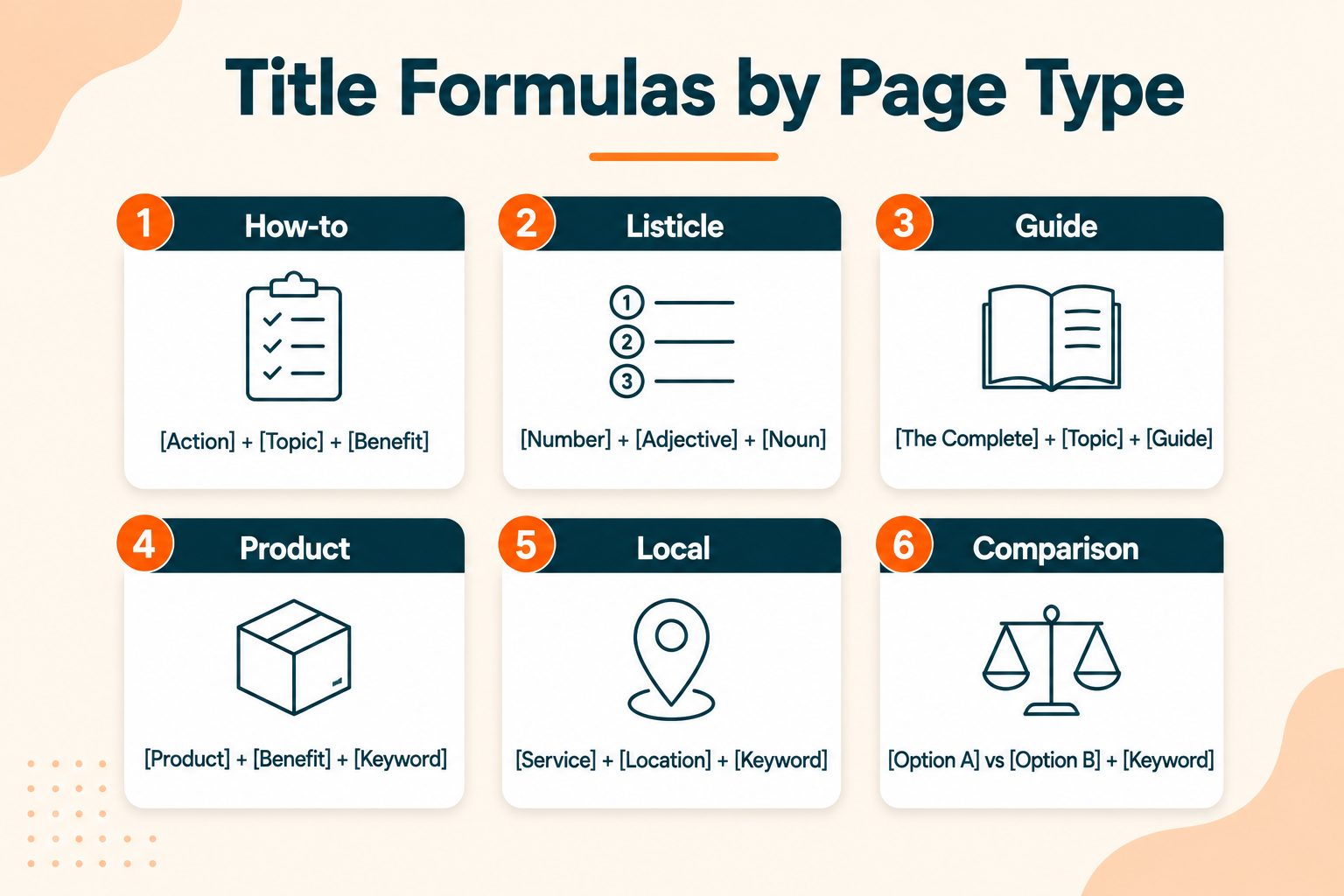
Different page types have different jobs, so they need different title shapes. These are starting points, not templates to apply mechanically.
| Page type | Formula | Example |
|---|---|---|
| Blog how-to | How to [Outcome] + [Qualifier] | How to Compress Images Without Losing Quality |
| Blog listicle | [Number] + [Thing] + for [Audience] | 12 Free SEO Tools for Small Business Owners |
| Guide or pillar page | [Topic]: Complete Guide + [Modifier] | Meta Tags: Complete Guide With Examples |
| Product or tool page | [Product] + [Key Attribute] | Free JSON Formatter and Validator Online |
| Category page | [Category] + [What It Contains] | Image Tools: Compress, Resize and Convert |
| Local business | [Service] in [Location] + [Brand] | Emergency Plumber in Austin, TX |
| Comparison | [A] vs [B]: [What the Reader Decides] | Semrush vs Free Tools: Which You Actually Need |
| Homepage | [Brand] + [What You Do] | SEO Site Checker: 100+ Free SEO Tools |
One caution on using these. If you apply the same formula across forty pages, your titles start to look manufactured, and that flatness costs you clicks even when each individual title is fine. Use the shape as a starting point and then write the specific version.
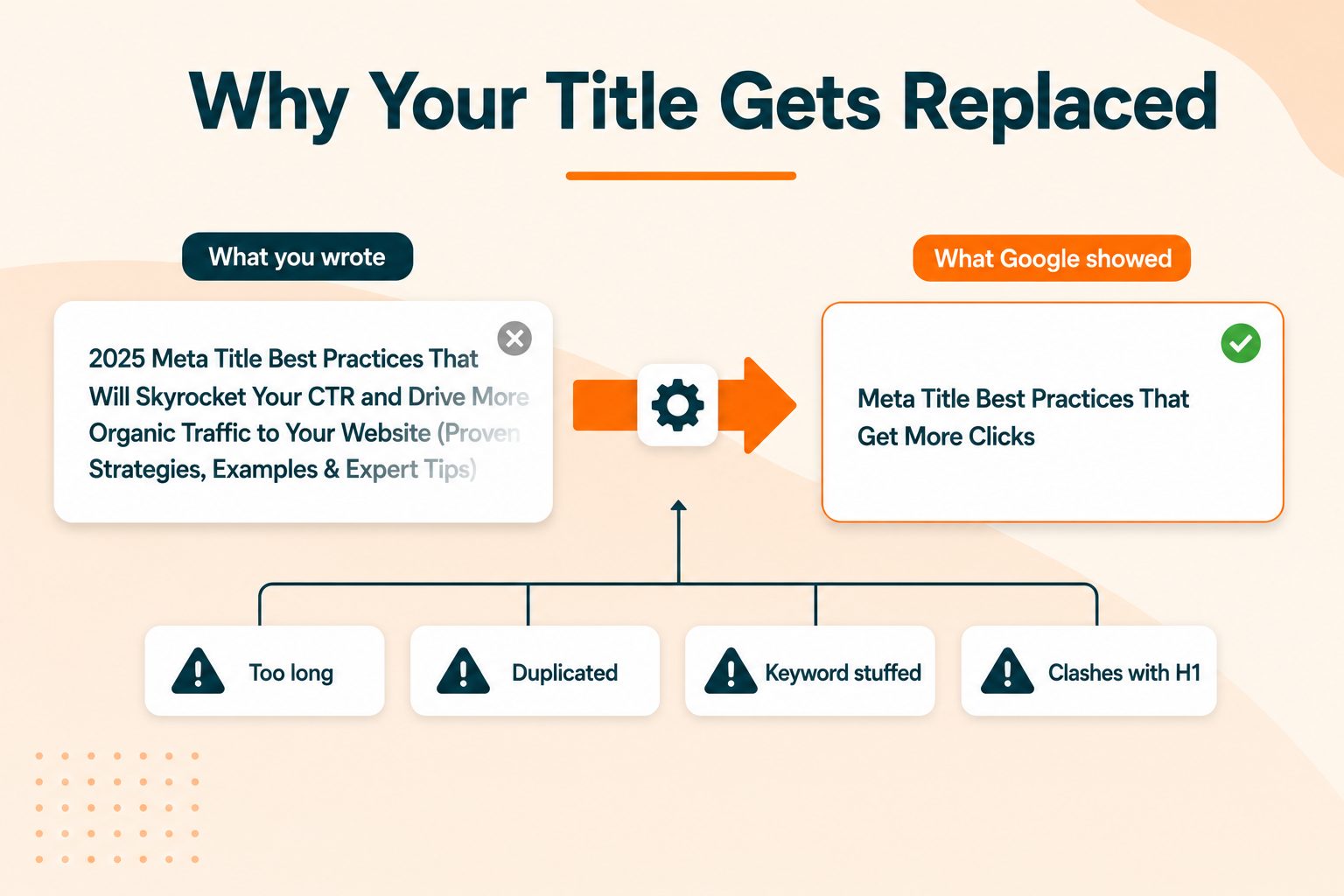
Why Google Rewrites Your Title and How to Prevent It
You write a careful title, publish it, check the search results a week later, and Google is showing something else entirely.
This is normal and it happens more often than most people realize. Google treats your title tag as a strong suggestion rather than an instruction. It generates what it calls a title link, and it may pull wording from your H1, your visible page copy, the anchor text of links pointing at you, or your site name when it judges that combination a better match for the query.
You cannot force Google to use your version. You can make yours the strongest candidate.
The common causes:
- Title runs too long and gets rebuilt to fit the space
- Title is too short or too vague to give useful context
- Title repeats the same keyword several times
- Title is duplicated across many pages on the site
- Title does not accurately describe what is on the page
- Title and H1 disagree about what the page is
What actually reduces rewrites:
Keep the title inside the pixel limit. This is the single most effective change, because a title that fits does not need rebuilding.
Align the title and H1 in meaning. They do not have to be identical, and they should not be, but they should clearly describe the same thing. When they agree, Google has less reason to look elsewhere.
Make every title unique. This alone fixes a large share of rewrites on template-heavy sites.
Drop boilerplate brand suffixes from deep pages. They add nothing for the searcher and eat the space that would otherwise carry meaning.
Make the title honest about the page. If the title promises a comparison and the page is a product pitch, the mismatch shows up in the rewrite.
Google's own documentation on title links covers the signals it uses, and it is the most reliable source on this since it comes from the people building the system.
To find duplicate, missing, or overlong titles across a whole site rather than one page at a time, run a full site audit and work from the list it produces.
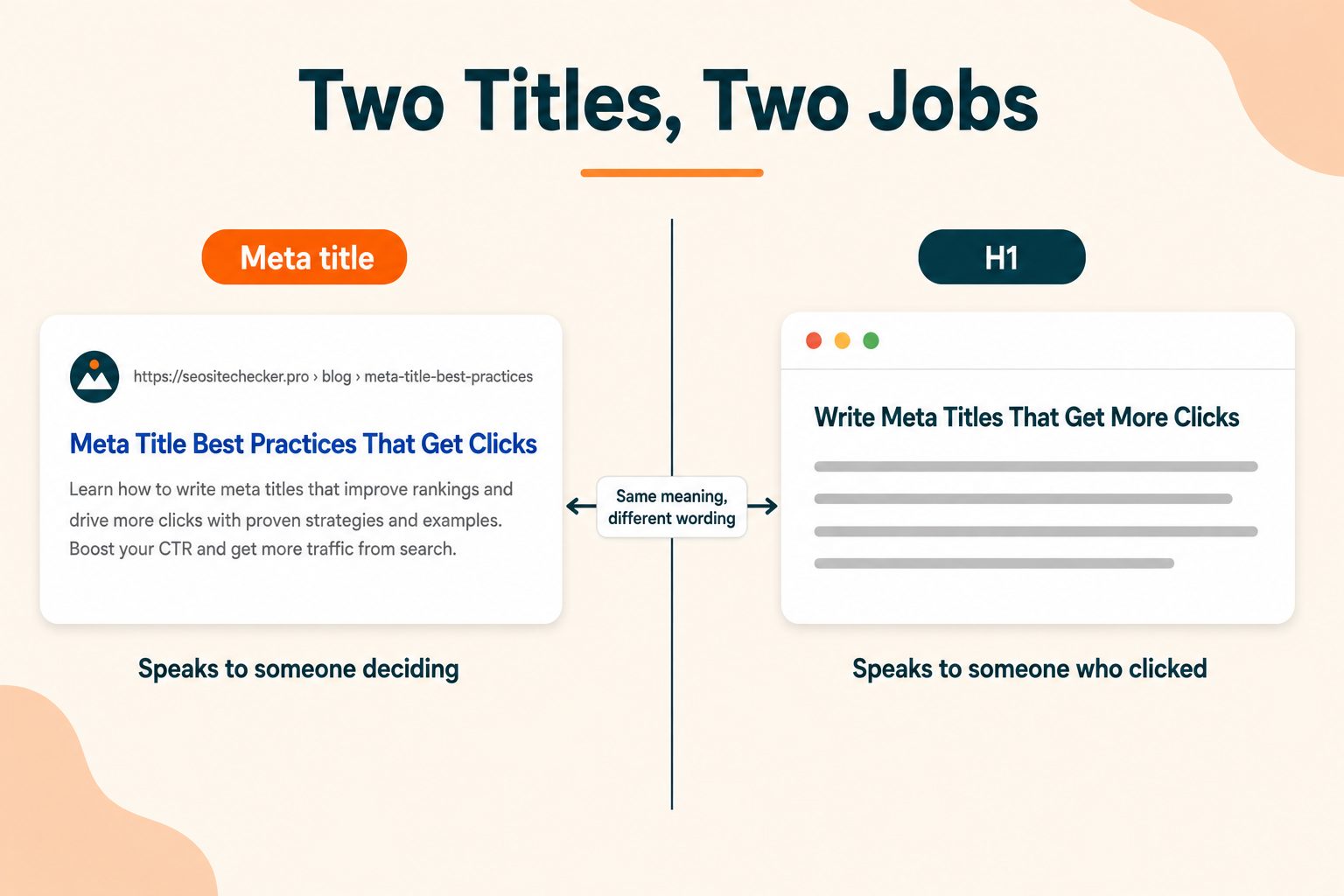
Meta Title vs H1: How They Should Differ
This one generates a lot of contradictory advice, including from pages currently ranking for this keyword. Some say the meta title should be wrapped in your H1. Others say they must be completely different. Neither is right.
Here is the actual relationship. They serve two different moments.
The meta title speaks to someone on a results page who has not committed yet and is scanning ten options. It has to compete.
The H1 speaks to someone who already clicked and wants immediate confirmation that they landed in the right place. It does not have to compete. It has to reassure.
The working rule: share the meaning and the core keyword, but write each one for its own job. Close alignment reduces rewrites. Identical wording wastes an opportunity, because you had two chances to communicate and only used one.
A quick example:
Meta title: How Long Should a Meta Title Be? 50 to 60 Characters
H1: Meta Title Length: Characters, Pixels and What Actually Gets Cut
Same topic, same keyword, different jobs. The title makes a promise on the results page. The heading confirms the reader is in the right place and sets up the section.
There is also an accessibility dimension here that almost nobody covers. Page titles are how screen reader users identify which tab or window they are in, which is why descriptive titles are a formal requirement rather than just an SEO preference. The W3C accessibility guidance on descriptive page titles is worth reading if you work on sites with accessibility obligations.
Common Meta Title Mistakes
- Leaving the CMS default in place. Pages titled "Home," "Untitled," or "Blog Post 47" still exist on a surprising number of live sites.
- Duplicating titles across pages. The most reliable way to get your titles rewritten.
- Repeating the keyword three times. Reads as spam to both audiences.
- Burying the keyword at the end. It disappears first when the title truncates.
- Leading every title with your brand name. Spends your most valuable characters on the least useful information.
- Promising something the page does not deliver. You win the click and lose the visitor, which is worse than not getting the click.
- Ignoring mobile. Mobile results cut earlier than desktop, and most of your traffic is probably mobile.
- Never revisiting old titles. A title written three years ago may not match how people search for that topic now.
- Using all capitals. Wide characters eat your pixel budget and it reads as shouting.
How to Audit Your Existing Meta Titles
"Review your titles" is not a process. This is:
- Export your page list with the current title for each URL.
- Sort by length. Flag anything over 60 characters or under 30. Those two groups have the highest rewrite risk.
- Sort alphabetically to surface duplicates. They cluster together immediately.
- Pull impressions and CTR from Search Console and match them to your list.
- Rank by opportunity, which means high impressions paired with low click-through rate. Rewrite those first.
- Log the change date and re-check the same pages in four weeks.
Step five is the one people skip, and it is the one that matters most. A page with 8,000 impressions and a 1.2 percent CTR is worth ten times the attention of a page with 40 impressions and a flawless title. Fix where the traffic already is.
To check what a specific page currently outputs, the Meta Tag Analyzer pulls the live title and description from any URL. If you suspect your CMS or a plugin is overriding what you set, the Online HTML Viewer shows you the raw source your server is actually sending, which is where the real answer lives.
Tools for Writing and Checking Meta Titles
Four free tools cover this whole workflow, with no account needed for any of them.
Meta Tag Generator. Builds your title and description block ready to paste into the head section.
Meta Tag Analyzer. Pulls the current tags from a live URL so you can see what is really there rather than what you think is there.
Website SEO Score Checker. Finds title problems across an entire site, including duplicates and missing tags.
Case Converter. Applies consistent capitalization across a batch of rewrites, which matters more than it sounds once you are looking at forty titles side by side.
Wrapping Up
Most of this comes down to five things. Keep it between 50 and 60 characters. Put the keyword near the front. Make every title unique. Keep it aligned with your H1. Write it for a person rather than a crawler.
The rest is testing. Titles are not a set-and-forget element, and the way people search for a topic shifts over time. Put a quarterly title review on the calendar, work from your Search Console impression data rather than from instinct, and you will find traffic sitting in pages you already have.
You check Search Console and the numbers do not add up. One of your posts sits at position four for a keyword you care about. It picked up 6,000 impressions last month. It got 71 clicks.
Position four should do better than that. Usually when it does not, the title is the reason.
Meta title best practices are worth learning because a title rewrite is one of the few SEO changes that can move traffic within days instead of months. You are not waiting on links or on a crawl of your whole site. You are changing one line and letting the same ranking work harder. This guide covers the correct length and why that number exists, the rules that actually matter, why Google keeps replacing your titles, formulas you can apply by page type, and a process for auditing what you already have.
What Is a Meta Title?
A meta title, also called a title tag, is an HTML element that sits in the head section of your page. It sets two things: the clickable blue headline in search results, and the label on your browser tab.
It looks like this:
html
<title>Meta Title Best Practices: How to Write Titles That Get Clicks</title>One point worth clearing up. Almost everyone calls this a meta tag, including plenty of SEO software. Technically it is not one. It is its own HTML element with its own syntax, which is why it does not use the name or property attributes that real meta tags use. MDN's reference on the HTML title element covers the spec if you want the formal version. The naming does not change anything practical, but knowing the difference helps when you are hand-editing a head section and wondering why the syntax looks different.
Three related elements get confused constantly, so here is the short version:
Meta title. The headline in search results. Speaks to someone who has not clicked yet.
Meta description. The grey summary text below it. Not a ranking factor, but it supports the click.
H1. The visible heading at the top of your page. Speaks to someone who already clicked.
They overlap, but they are not interchangeable. More on the title and H1 relationship further down.
Worth noting too that your social title is a fourth thing again. If you set Open Graph tags, your Open Graph title should differ from your SEO title, because a social feed audience and a search audience arrive in completely different frames of mind.
Why Meta Titles Matter More Than Most On-Page Elements
Two separate reasons, and they work in different ways.
It is a confirmed ranking signal. Unlike the meta description, the title tag genuinely influences how search engines judge whether your page matches a query. Keywords placed here carry real weight. That is not true of every element people spend time on.
It controls your click-through rate. Two pages sitting at the same position can pull wildly different traffic depending on what their titles say. This is the part most people underuse. You already earned the impression. The title decides whether that impression turns into a visit.
Put those together and you get the reason titles are worth a dedicated afternoon. You can rewrite fifty of them in a few hours, no links required, no development work, no waiting on a technical fix. It is close to the lowest-effort, highest-leverage edit available in on-page SEO.
Ideal Meta Title Length: Characters vs Pixels
The number you came here for is 50 to 60 characters. That is the range worth working within.
But the reason behind it matters more than the number, because the number is only an approximation.
Google does not count characters. It measures display width in pixels, and titles start getting cut around 600 pixels on desktop. Characters vary in width. A capital W is roughly three times wider than a lowercase i. So a title packed with wide letters can truncate at 52 characters, while a title of narrow ones might survive past 62.
That means character count is a useful proxy, not a rule. If your title runs long and it is full of capitals, assume it will get cut earlier than the counter suggests.
Here is what happens across the range:
| Title length | What to expect |
|---|---|
| Under 40 characters | Fine if it is specific. Often too vague to stand out against nine other results |
| 40 to 50 characters | Safe on every device. Room to spare |
| 50 to 60 characters | Displays reliably, lowest chance of being rewritten |
| 60 to 70 characters | Truncation likely on mobile, sometimes on desktop |
| Over 70 characters | Google rewrites the large majority of these |
The operational rule that comes out of all this: front-load the words that matter. If the tail gets cut, the meaning should still survive. A title that reads "Complete Guide to Choosing the Right Image Format for Web Performance" loses nothing critical when it truncates. One that reads "Everything You Need to Know Before You Choose an Image Format" loses the entire point.
10 Meta Title Best Practices That Actually Move the Needle
1. Put your primary keyword near the front
This does two jobs at once. It signals relevance clearly, and it protects the keyword from truncation. Both matter, and the second one matters more on mobile than most people account for.
2. Write a unique title for every page
Duplicate titles are one of the most common reasons Google discards what you wrote and builds its own. If twelve of your pages say "Services | Company Name," you have handed the search engine a problem it will solve without asking you.
3. Match search intent, not just the keyword
Someone searching "how to compress an image" wants a guide. Someone searching "image compressor" wants a tool. Same topic, different intent, and the title should signal which one your page is. Look at the words the top ten results are using and notice what format they are promising.
4. Keep it under 600 pixels
The practical version of the length section above. If your CMS shows a length indicator, treat it as a rough guide rather than a verdict, and check wide-character titles more carefully.
5. Use your brand name selectively
Your homepage and category pages benefit from it. A deep blog post usually does not. Appending "| Company Name" to a post title spends 15 or 20 of your 60 characters on something the searcher is not looking for.
6. Write for a person, not a crawler
A title that hits every keyword and reads like a database entry will rank and then sit there collecting impressions. Read your title out loud. If you would not say it, rewrite it.
7. Avoid keyword stuffing
"SEO Tools, Free SEO Tools, Best SEO Tools Online" reads as spam to a human and signals low quality to a search engine. Say it once.
8. Add a modifier that earns the click
A year, a format, a number, a qualifier. "Checklist," "With Examples," "2026," "Step by Step." These work because they tell the reader what shape the content takes before they commit.
9. Use a consistent separator
Hyphens and pipes both work fine. Pick one and apply it across the site. Hyphens tend to survive Google's rewrites slightly more often, but consistency matters more than which one you choose.
10. Front-load the outcome, not the category
"Fix Slow WordPress Load Times" beats "Website Speed Information." The first tells the reader what changes for them. The second names a topic and hopes they are interested.
How to Write a Meta Title That Gets Clicks
Everything above is about writing a title that is correct. This section is about writing one that wins.
The distinction matters because ranking and clicking are two separate jobs. Ranking gets you onto the page. The title gets you the click. Most people optimize hard for the first and treat the second as an afterthought, which is why so many well-ranked pages underperform.
Specificity beats vagueness every time. "7 Fixes for a Slow WordPress Site" pulls harder than "Improving Website Speed." Numbers and concrete nouns tell the reader there is something definite waiting on the other side. Vague titles ask them to gamble.
Answer the question, or promise the answer directly. For informational searches, a title that states what the reader will learn outperforms one that only names the subject. Compare "Meta Title Length" against "How Long Should a Meta Title Be? 50 to 60 Characters." The second one has already started being useful.
Lead with the reader's outcome. What they get, not what you covered. This is the single most common fix when a title is technically fine but flat.
Create a small information gap. Enough that someone wants to know the rest, never enough that the title feels like bait. There is a real risk here worth naming. An overpromising title gets the click and then loses the visitor within seconds, and that pattern works against you rather than for you. Curiosity is useful. Misdirection is expensive.
Write against the actual competition. Your title is not judged in isolation. Search your keyword, read the ten titles already on the page, and notice what they all sound like. If eight of them start with "The Complete Guide To," yours should not. Standing out on a results page is partly about being different from the results next to you.
Once you have the wording settled, the free Meta Tag Generator will build the title and description block for you to paste into your head section. If you are rewriting titles in bulk and want consistent capitalization across all of them, run the batch through the Case Converter first. Inconsistent title casing across a site looks careless in a way that is hard to notice until you see all the titles listed together.
Meta Title Formulas by Page Type
Different page types have different jobs, so they need different title shapes. These are starting points, not templates to apply mechanically.
| Page type | Formula | Example |
|---|---|---|
| Blog how-to | How to [Outcome] + [Qualifier] | How to Compress Images Without Losing Quality |
| Blog listicle | [Number] + [Thing] + for [Audience] | 12 Free SEO Tools for Small Business Owners |
| Guide or pillar page | [Topic]: Complete Guide + [Modifier] | Meta Tags: Complete Guide With Examples |
| Product or tool page | [Product] + [Key Attribute] | Free JSON Formatter and Validator Online |
| Category page | [Category] + [What It Contains] | Image Tools: Compress, Resize and Convert |
| Local business | [Service] in [Location] + [Brand] | Emergency Plumber in Austin, TX |
| Comparison | [A] vs [B]: [What the Reader Decides] | Semrush vs Free Tools: Which You Actually Need |
| Homepage | [Brand] + [What You Do] | SEO Site Checker: 100+ Free SEO Tools |
One caution on using these. If you apply the same formula across forty pages, your titles start to look manufactured, and that flatness costs you clicks even when each individual title is fine. Use the shape as a starting point and then write the specific version.
Why Google Rewrites Your Title and How to Prevent It
You write a careful title, publish it, check the search results a week later, and Google is showing something else entirely.
This is normal and it happens more often than most people realize. Google treats your title tag as a strong suggestion rather than an instruction. It generates what it calls a title link, and it may pull wording from your H1, your visible page copy, the anchor text of links pointing at you, or your site name when it judges that combination a better match for the query.
You cannot force Google to use your version. You can make yours the strongest candidate.
The common causes:
- Title runs too long and gets rebuilt to fit the space
- Title is too short or too vague to give useful context
- Title repeats the same keyword several times
- Title is duplicated across many pages on the site
- Title does not accurately describe what is on the page
- Title and H1 disagree about what the page is
What actually reduces rewrites:
Keep the title inside the pixel limit. This is the single most effective change, because a title that fits does not need rebuilding.
Align the title and H1 in meaning. They do not have to be identical, and they should not be, but they should clearly describe the same thing. When they agree, Google has less reason to look elsewhere.
Make every title unique. This alone fixes a large share of rewrites on template-heavy sites.
Drop boilerplate brand suffixes from deep pages. They add nothing for the searcher and eat the space that would otherwise carry meaning.
Make the title honest about the page. If the title promises a comparison and the page is a product pitch, the mismatch shows up in the rewrite.
Google's own documentation on title links covers the signals it uses, and it is the most reliable source on this since it comes from the people building the system.
To find duplicate, missing, or overlong titles across a whole site rather than one page at a time, run a full site audit and work from the list it produces.
Meta Title vs H1: How They Should Differ
This one generates a lot of contradictory advice, including from pages currently ranking for this keyword. Some say the meta title should be wrapped in your H1. Others say they must be completely different. Neither is right.
Here is the actual relationship. They serve two different moments.
The meta title speaks to someone on a results page who has not committed yet and is scanning ten options. It has to compete.
The H1 speaks to someone who already clicked and wants immediate confirmation that they landed in the right place. It does not have to compete. It has to reassure.
The working rule: share the meaning and the core keyword, but write each one for its own job. Close alignment reduces rewrites. Identical wording wastes an opportunity, because you had two chances to communicate and only used one.
A quick example:
Meta title: How Long Should a Meta Title Be? 50 to 60 Characters
H1: Meta Title Length: Characters, Pixels and What Actually Gets Cut
Same topic, same keyword, different jobs. The title makes a promise on the results page. The heading confirms the reader is in the right place and sets up the section.
There is also an accessibility dimension here that almost nobody covers. Page titles are how screen reader users identify which tab or window they are in, which is why descriptive titles are a formal requirement rather than just an SEO preference. The W3C accessibility guidance on descriptive page titles is worth reading if you work on sites with accessibility obligations.
Common Meta Title Mistakes
- Leaving the CMS default in place. Pages titled "Home," "Untitled," or "Blog Post 47" still exist on a surprising number of live sites.
- Duplicating titles across pages. The most reliable way to get your titles rewritten.
- Repeating the keyword three times. Reads as spam to both audiences.
- Burying the keyword at the end. It disappears first when the title truncates.
- Leading every title with your brand name. Spends your most valuable characters on the least useful information.
- Promising something the page does not deliver. You win the click and lose the visitor, which is worse than not getting the click.
- Ignoring mobile. Mobile results cut earlier than desktop, and most of your traffic is probably mobile.
- Never revisiting old titles. A title written three years ago may not match how people search for that topic now.
- Using all capitals. Wide characters eat your pixel budget and it reads as shouting.
How to Audit Your Existing Meta Titles
"Review your titles" is not a process. This is:
- Export your page list with the current title for each URL.
- Sort by length. Flag anything over 60 characters or under 30. Those two groups have the highest rewrite risk.
- Sort alphabetically to surface duplicates. They cluster together immediately.
- Pull impressions and CTR from Search Console and match them to your list.
- Rank by opportunity, which means high impressions paired with low click-through rate. Rewrite those first.
- Log the change date and re-check the same pages in four weeks.
Step five is the one people skip, and it is the one that matters most. A page with 8,000 impressions and a 1.2 percent CTR is worth ten times the attention of a page with 40 impressions and a flawless title. Fix where the traffic already is.
To check what a specific page currently outputs, the Meta Tag Analyzer pulls the live title and description from any URL. If you suspect your CMS or a plugin is overriding what you set, the Online HTML Viewer shows you the raw source your server is actually sending, which is where the real answer lives.
Tools for Writing and Checking Meta Titles
Four free tools cover this whole workflow, with no account needed for any of them.
Meta Tag Generator. Builds your title and description block ready to paste into the head section.
Meta Tag Analyzer. Pulls the current tags from a live URL so you can see what is really there rather than what you think is there.
Website SEO Score Checker. Finds title problems across an entire site, including duplicates and missing tags.
Case Converter. Applies consistent capitalization across a batch of rewrites, which matters more than it sounds once you are looking at forty titles side by side.
Wrapping Up
Most of this comes down to five things. Keep it between 50 and 60 characters. Put the keyword near the front. Make every title unique. Keep it aligned with your H1. Write it for a person rather than a crawler.
The rest is testing. Titles are not a set-and-forget element, and the way people search for a topic shifts over time. Put a quarterly title review on the calendar, work from your Search Console impression data rather than from instinct, and you will find traffic sitting in pages you already have.
Frequently Asked Questions
Frequently Asked Questions (FAQs) is a list of common questions and answers provided to quickly address common concerns or inquiries.
What is the best length for a meta title?
Aim for 50 to 60 characters, or under roughly 600 pixels. That range displays fully on most devices and has the lowest chance of being rewritten by Google.
Is the meta title a ranking factor?
Yes. Unlike the meta description, the title tag directly influences how search engines assess your page's relevance to a query. Keywords placed here carry real weight.
What is the difference between a meta title and a meta description?
The meta title is the clickable headline in search results and affects rankings. The meta description is the grey summary text below it and only affects click-through rate.
What is the difference between a meta title and an H1?
The meta title appears in search results and browser tabs. The H1 is the visible heading on the page itself. They should share meaning but do not need identical wording.
Should the meta title include my brand name?
On your homepage and category pages, yes. On deep blog posts, usually not. A brand suffix can consume 20 of your 60 available characters without helping the searcher.
Why does Google change my meta title?
Google treats your title as a suggestion and generates its own when yours is too long, too vague, duplicated, keyword-stuffed, or inconsistent with your page content and H1.
Does every page need a unique meta title?
Yes. Duplicate titles are one of the most common triggers for Google rewriting your titles, and they make it harder for search engines to distinguish your pages.
Where do you put the meta title in HTML?
Inside the head section of your page, using the title element. Most content management systems provide a field for it so you never touch the code directly.
How many keywords should a meta title have?
One primary keyword, placed near the front. A secondary term is fine if it fits naturally. Repeating the same keyword reads as spam to readers and search engines.
How often should I update my meta titles?
Review high-traffic pages quarterly. Rewrite any page with strong impressions but weak click-through rate, and refresh titles containing a year or a version number.