What Is a Meta Tag? Complete Guide for Beginners

Kendall Chris Kendall Chris Jul 12 / 2 hours ago
dot shape
What Is a Meta Tag? Complete Guide for Beginners


A meta tag is a small piece of HTML code that sits behind the scenes of every webpage, quietly telling search engines and browsers important information about that page without ever appearing on the page itself. If you've ever wondered why some search results show a compelling description while others look thrown together, meta tags are usually the reason.

This guide breaks down exactly what meta tags are, the specific types that actually matter for SEO, and how to write them well. Before diving in, it's worth seeing this in action on a real page. Running any URL through a free Meta Tag Analyzer will show you exactly which tags a site is using right now, which is a helpful reference as you read through the rest of this guide.


What Is a Meta Tag? (Simple Definition)

A meta tag is a snippet of HTML code placed in the <head> section of a webpage that provides information about the page to search engines and browsers. The word "meta" essentially means data about data, so a meta tag is quite literally information describing the page's own content, rather than being part of the content itself.

Here's what a basic set of meta tags looks like in raw HTML:

 
<head>
  <meta charset="utf-8">
  <title>Example Page Title</title>
  <meta name="description" content="A short summary of what this page is about.">
  <meta name="robots" content="index,follow">
</head>

None of this text appears directly on the visible page a visitor sees. Instead, it works quietly in the background, shaping how search engines interpret the page and how browsers render it.


Where Do Meta Tags Live in Your Website's Code?

Every meta tag lives inside the <head> section of a page's HTML, which sits separately from the <body> section where all the visible content, like paragraphs, images, and headings, actually lives. This separation is intentional. The head section is reserved for information about the page, while the body holds what visitors actually see and read.

If you're curious to see meta tags for yourself, it takes just a few seconds. Right-click anywhere on a webpage and select "View Page Source" (or press Ctrl+U in most browsers). Once the source code opens, press Ctrl+F and search for <meta to jump straight to every meta tag on the page.


Are Title Tags Technically Meta Tags?

This trips up a lot of beginners, so it's worth clarifying directly. Technically, no. The title tag uses its own dedicated <title> element rather than the <meta> element, which makes it structurally different from every other tag discussed in this guide.

That said, the SEO community almost universally discusses the title tag alongside meta tags anyway, often referring to it as the "meta title." It's grouped together because it lives in the same <head> section and serves a closely related purpose: giving search engines and users information about the page. So while the distinction is technically accurate, don't be surprised to see the title tag included in virtually every meta tag guide, including this one.


Why Meta Tags Matter for SEO

Meta tags matter because they help search engines understand and categorize your content, shape how your page appears in search results, and influence whether someone actually clicks through to your site.

It's worth being clear that not every meta tag works the same way. Some, like the title tag, genuinely influence search rankings directly. Others, like the meta description, don't affect rankings at all but have a real impact on click-through rate, since a compelling description can be the difference between someone clicking your result or scrolling past it. Still others, like the robots tag, don't influence rankings or clicks directly at all. They simply give search engines instructions about how to treat the page. Understanding which category each tag falls into helps set realistic expectations about what optimizing them will actually accomplish.
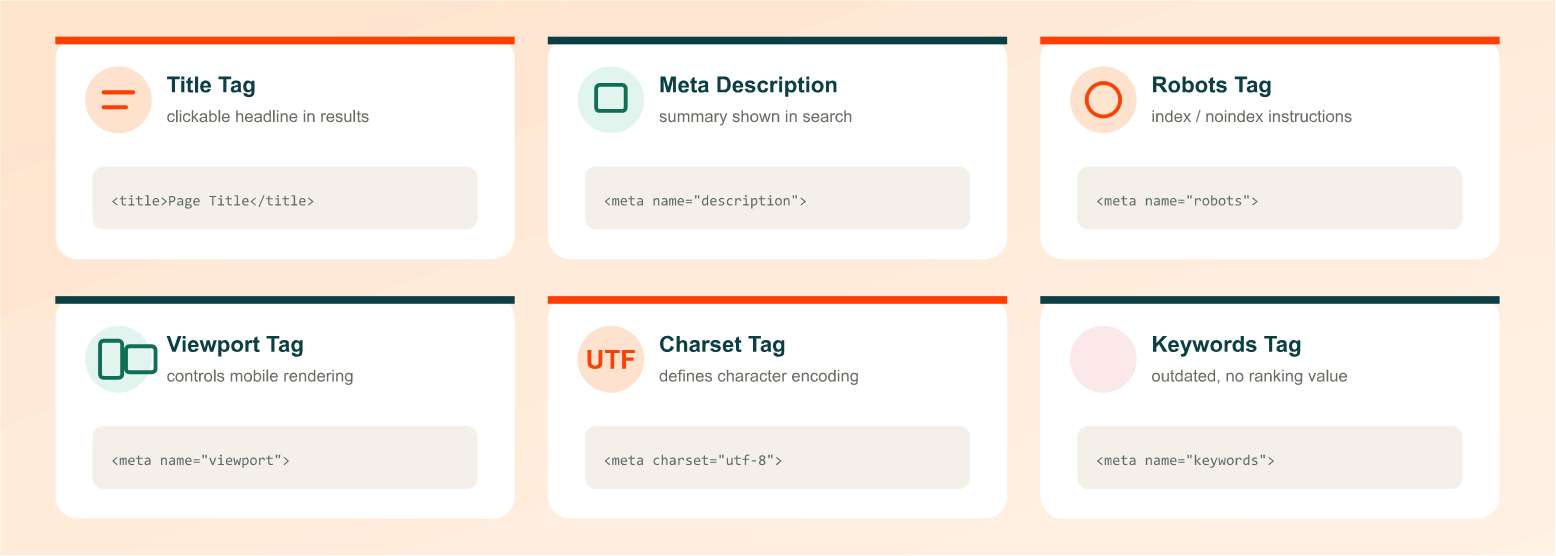
The Most Important Meta Tags for SEO

There are dozens of meta tags in existence, but only a handful genuinely matter for SEO in practice. Here's a breakdown of the ones worth understanding and using correctly.

Title Tag (Meta Title)

The title tag is the clickable headline that appears in search results, and it also shows up in browser tabs and when a page gets shared on social media. Despite the earlier technical distinction, it's the single most important piece of on-page SEO real estate you control.

Keep your title tags under roughly 60 characters to avoid truncation in search results, include your primary keyword naturally rather than forcing it in awkwardly, and make sure every page on your site has a unique title. A well-written title should be immediately readable to a human, not just technically keyword-optimized.

Meta Description

The meta description is the short summary that appears beneath the title in search results, functioning essentially as your pitch to convince someone to click. According to Google's official list of supported meta tags, the description tag doesn't directly influence rankings, but its impact on click-through rate makes it one of the most valuable tags to get right.

Aim for roughly 150 to 160 characters so your full description displays without cutting off, write a genuine summary of the page's value rather than a vague generalization, and make sure every page has its own unique description rather than reusing the same one sitewide.

Meta Robots Tag

The robots meta tag gives search engines direct instructions about how to treat a specific page, most commonly whether to index it and whether to follow the links on it. A tag like <meta name="robots" content="noindex,nofollow"> tells search engines to skip indexing that page entirely and to not pass any authority through its outbound links.

This is particularly useful for pages you don't want showing up in search results, such as internal thank-you pages after a form submission, login screens, or internal search result pages that offer little value to someone arriving from Google.

Meta Viewport Tag

The viewport tag controls how a page renders on mobile devices, and it plays a direct role in supporting responsive design. Since Google evaluates websites primarily through Google's guidance on mobile-first indexing, having a properly configured viewport tag is genuinely important, not just a nice-to-have.

The standard implementation looks like this: <meta name="viewport" content="width=device-width, initial-scale=1.0">. This single line tells the browser to match the page's width to the device's screen width and sets an appropriate initial zoom level.

Meta Charset Tag

The charset tag defines the character encoding used on a page, most commonly UTF-8 in modern web development. Without it, browsers are left guessing how to interpret the page's text, which can result in garbled or broken characters displaying to visitors, particularly with special characters, accented letters, or non-English text.

Meta Keywords Tag (Why It's Outdated)

This tag used to let site owners list target keywords directly in their page code, and years ago, it genuinely influenced rankings. That changed once marketers began stuffing irrelevant, high-traffic keywords into the tag purely to game search results. Google eventually devalued it completely, and today it carries no ranking weight whatsoever.

There's no harm in leaving this tag in place if it's already part of your site's template, but there's also no reason to add it to new pages. Your time is better spent elsewhere.
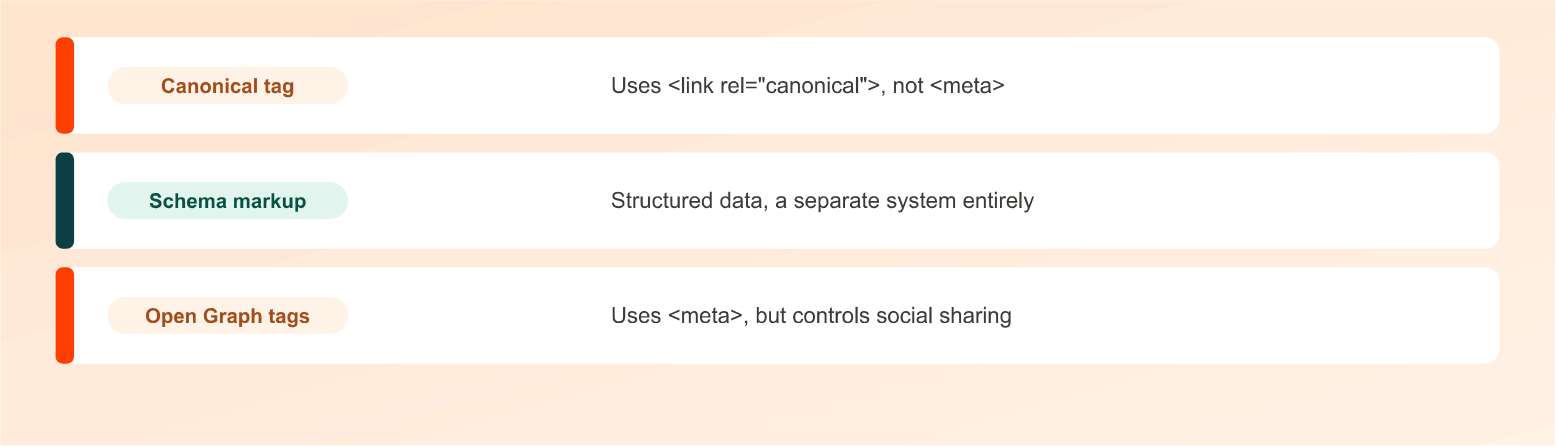
Meta Tags vs Other On-Page Elements People Confuse With Them

A few closely related HTML elements frequently get mislabeled as meta tags, even in reputable SEO resources, so it's worth setting the record straight:

  • Canonical tags. These use the <link rel="canonical"> element rather than <meta>, and they tell search engines which version of a page is the original when duplicate or near-duplicate content exists across multiple URLs.
  • Schema markup. This is structured data that describes specific types of content, like recipes, products, or reviews, in a format search engines can parse more precisely. It's a separate system entirely from meta tags, even though both live in a page's code.
  • Open Graph tags. These do technically use the <meta> element, so they're closer cousins to true meta tags, but they control how a page appears when shared on social media platforms like Facebook or LinkedIn, rather than how it appears in search results.


How to Check the Meta Tags on Any Website

There are two straightforward ways to see what meta tags a page is actually using. The manual approach involves viewing the page source directly, as described earlier, and scanning through the raw HTML for every instance of <meta.

The faster, more readable approach is running the page through a dedicated tool. The Meta Tag Analyzer pulls every meta tag from a given URL and presents them in a clear, organized breakdown, along with recommendations for anything that's missing, too long, or otherwise worth improving. This is particularly useful when auditing a site with many pages, since manually checking source code one page at a time simply doesn't scale.


How to Add or Edit Meta Tags on Your Website

Most modern website platforms make this far easier than editing raw HTML directly. WordPress users typically rely on an SEO plugin like Yoast SEO or All in One SEO, which provides dedicated fields for the title tag and meta description right on the page editing screen. Wix and Shopify offer similar built-in SEO settings panels for each page or product listing.

If you prefer generating properly formatted tags from scratch, or you're working on a platform without a dedicated SEO plugin, a Meta Tag Generator can quickly produce the correct HTML syntax for you to paste directly into your site's head section. For developers working directly in code, adding or adjusting a meta tag simply means editing the relevant line within the <head> section of the page template.
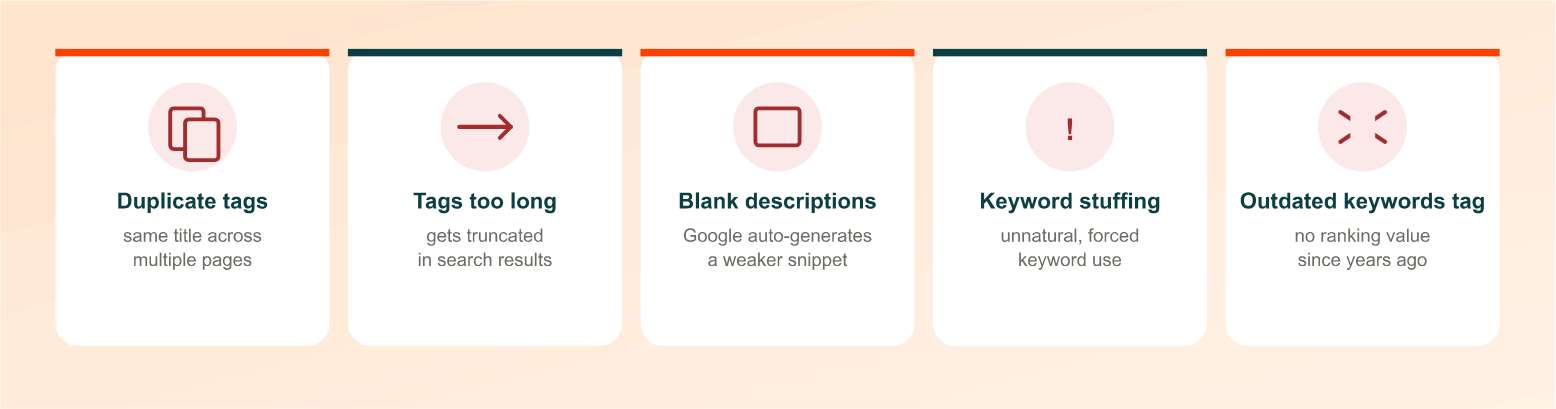
Common Meta Tag Mistakes to Avoid

A handful of recurring mistakes show up across even well-maintained websites:

  • Using the same title or description across multiple pages. This confuses search engines about which page is actually relevant for a given query and wastes an opportunity to differentiate each page.
  • Writing titles or descriptions too long. Anything significantly over the recommended character limits gets truncated in search results, often cutting off mid-sentence in an unappealing way.
  • Leaving meta descriptions blank. Google will auto-generate a snippet from the page content when no description is set, and it rarely matches the persuasive, intentional pitch you'd write yourself.
  • Keyword stuffing. Cramming keywords unnaturally into a title or description reads poorly to humans and can actively hurt click-through rates.
  • Forgetting to update tags after major content changes. A meta description written for outdated content can mislead visitors and hurt engagement once the page's content has evolved.
  • Still using the meta keywords tag out of habit. Since it carries zero ranking weight today, time spent maintaining it is better spent elsewhere.


Do Meta Tags Still Matter in 2026?

Yes, though the landscape around them keeps evolving. Title tags and viewport tags remain genuinely important, and meta descriptions still meaningfully influence click-through rate even as AI-generated summaries and answer boxes increasingly appear above traditional search results.

There's also a newer dimension worth understanding: well-structured metadata increasingly helps AI tools and language models understand and summarize page content accurately when generating their own responses. As search behavior continues shifting toward AI-assisted answers, having clean, accurate meta tags helps ensure your content gets represented correctly wherever it shows up, not just in traditional blue-link search results.


Final Thoughts: Start Optimizing Your Meta Tags Today

Meta tags are one of the simplest, most fully controllable pieces of SEO available to you. No backlinks to earn, no algorithm to guess at, just clear, well-written HTML that helps search engines and visitors understand your page. Run your site through a free meta tag check to see exactly where you stand, then work through any gaps using the guidance above.

Frequently Asked Questions

Frequently Asked Questions (FAQs) is a list of common questions and answers provided to quickly address common concerns or inquiries.

What is a meta tag in simple terms?

A meta tag is a piece of HTML code in a webpage's head section that gives search engines and browsers information about the page, without appearing in the visible content itself.

Do meta tags still matter for SEO?

Yes. Title tags directly influence rankings, meta descriptions impact click-through rates, and technical tags like viewport and robots guide how search engines handle your pages.

How many characters should a meta title be?

Aim for under approximately 60 characters to avoid truncation in search results, though the actual cutoff depends on pixel width rather than a strict character count.

How many characters should a meta description be?

Stay within roughly 150 to 160 characters so the full description displays without being cut off in search engine results pages.

Is the title tag really a meta tag?

Technically no, since it uses the separate element rather than <meta>. However, it's almost always discussed alongside meta tags due to its closely related role. </div> </div> </div> <div x-data="accordionItem('5')" class="overflow-hidden rounded-lg border border-slate-150 dark:border-navy-500"> <div @click="expanded = !expanded" role="button" tabindex="0" @keydown.enter="expanded = !expanded" @keydown.space.prevent="expanded = !expanded" class="flex items-center justify-between bg-slate-150 px-4 py-4 dark:bg-navy-500 sm:px-5" style="cursor:pointer"> <div class="flex items-center space-x-3.5 tracking-wide outline-none transition-all"> <div> <p class="text-slate-700 line-clamp-1 dark:text-navy-100 mb-0"> Does the meta keywords tag still help SEO? </p> </div> </div> <button type="button" @click.stop="expanded = !expanded" class="btn -mr-1.5 h-8 w-8 rounded-full p-0 hover:bg-slate-300/20 focus:bg-slate-300/20 active:bg-slate-300/25 dark:hover:bg-navy-300/20 dark:focus:bg-navy-300/20 dark:active:bg-navy-300/25"> <i :class="expanded && '-rotate-180'" class="fas fa-chevron-down text-sm transition-transform"></i> </button> </div> <div x-collapse x-show="expanded"> <div class="px-4 py-4 sm:px-5"> No. Google stopped using it as a ranking signal years ago due to widespread abuse, and it carries no meaningful weight in modern search rankings. </div> </div> </div> <div x-data="accordionItem('6')" class="overflow-hidden rounded-lg border border-slate-150 dark:border-navy-500"> <div @click="expanded = !expanded" role="button" tabindex="0" @keydown.enter="expanded = !expanded" @keydown.space.prevent="expanded = !expanded" class="flex items-center justify-between bg-slate-150 px-4 py-4 dark:bg-navy-500 sm:px-5" style="cursor:pointer"> <div class="flex items-center space-x-3.5 tracking-wide outline-none transition-all"> <div> <p class="text-slate-700 line-clamp-1 dark:text-navy-100 mb-0"> Can meta tags directly improve my rankings? </p> </div> </div> <button type="button" @click.stop="expanded = !expanded" class="btn -mr-1.5 h-8 w-8 rounded-full p-0 hover:bg-slate-300/20 focus:bg-slate-300/20 active:bg-slate-300/25 dark:hover:bg-navy-300/20 dark:focus:bg-navy-300/20 dark:active:bg-navy-300/25"> <i :class="expanded && '-rotate-180'" class="fas fa-chevron-down text-sm transition-transform"></i> </button> </div> <div x-collapse x-show="expanded"> <div class="px-4 py-4 sm:px-5"> Some can. Title tags are a genuine ranking signal. Others, like meta descriptions, don't affect rankings directly but improve click-through rate, which can indirectly support performance. </div> </div> </div> <div x-data="accordionItem('7')" class="overflow-hidden rounded-lg border border-slate-150 dark:border-navy-500"> <div @click="expanded = !expanded" role="button" tabindex="0" @keydown.enter="expanded = !expanded" @keydown.space.prevent="expanded = !expanded" class="flex items-center justify-between bg-slate-150 px-4 py-4 dark:bg-navy-500 sm:px-5" style="cursor:pointer"> <div class="flex items-center space-x-3.5 tracking-wide outline-none transition-all"> <div> <p class="text-slate-700 line-clamp-1 dark:text-navy-100 mb-0"> How do I view meta tags on a website? </p> </div> </div> <button type="button" @click.stop="expanded = !expanded" class="btn -mr-1.5 h-8 w-8 rounded-full p-0 hover:bg-slate-300/20 focus:bg-slate-300/20 active:bg-slate-300/25 dark:hover:bg-navy-300/20 dark:focus:bg-navy-300/20 dark:active:bg-navy-300/25"> <i :class="expanded && '-rotate-180'" class="fas fa-chevron-down text-sm transition-transform"></i> </button> </div> <div x-collapse x-show="expanded"> <div class="px-4 py-4 sm:px-5"> Right-click the page, select "View Page Source," then search for <meta to find every tag, or use a free meta tag checker tool for a faster, more readable breakdown. </div> </div> </div> <div x-data="accordionItem('8')" class="overflow-hidden rounded-lg border border-slate-150 dark:border-navy-500"> <div @click="expanded = !expanded" role="button" tabindex="0" @keydown.enter="expanded = !expanded" @keydown.space.prevent="expanded = !expanded" class="flex items-center justify-between bg-slate-150 px-4 py-4 dark:bg-navy-500 sm:px-5" style="cursor:pointer"> <div class="flex items-center space-x-3.5 tracking-wide outline-none transition-all"> <div> <p class="text-slate-700 line-clamp-1 dark:text-navy-100 mb-0"> What happens if I don't add a meta description? </p> </div> </div> <button type="button" @click.stop="expanded = !expanded" class="btn -mr-1.5 h-8 w-8 rounded-full p-0 hover:bg-slate-300/20 focus:bg-slate-300/20 active:bg-slate-300/25 dark:hover:bg-navy-300/20 dark:focus:bg-navy-300/20 dark:active:bg-navy-300/25"> <i :class="expanded && '-rotate-180'" class="fas fa-chevron-down text-sm transition-transform"></i> </button> </div> <div x-collapse x-show="expanded"> <div class="px-4 py-4 sm:px-5"> Google will automatically generate a snippet from the page's existing content, which is often less compelling and less accurate than a description you'd write intentionally. </div> </div> </div> <div x-data="accordionItem('9')" class="overflow-hidden rounded-lg border border-slate-150 dark:border-navy-500"> <div @click="expanded = !expanded" role="button" tabindex="0" @keydown.enter="expanded = !expanded" @keydown.space.prevent="expanded = !expanded" class="flex items-center justify-between bg-slate-150 px-4 py-4 dark:bg-navy-500 sm:px-5" style="cursor:pointer"> <div class="flex items-center space-x-3.5 tracking-wide outline-none transition-all"> <div> <p class="text-slate-700 line-clamp-1 dark:text-navy-100 mb-0"> What's the difference between a meta tag and schema markup? </p> </div> </div> <button type="button" @click.stop="expanded = !expanded" class="btn -mr-1.5 h-8 w-8 rounded-full p-0 hover:bg-slate-300/20 focus:bg-slate-300/20 active:bg-slate-300/25 dark:hover:bg-navy-300/20 dark:focus:bg-navy-300/20 dark:active:bg-navy-300/25"> <i :class="expanded && '-rotate-180'" class="fas fa-chevron-down text-sm transition-transform"></i> </button> </div> <div x-collapse x-show="expanded"> <div class="px-4 py-4 sm:px-5"> Meta tags provide general page information using the <meta> element. Schema markup is structured data describing specific content types, like products or recipes, using a different, more detailed format. </div> </div> </div> </div> </div> </div> </div> <!--<div class="team-details p-relative">--> <div class="author-bio-card"> <div class="author-avatar"> <img src="/public/storage/137/kendal-cris.jpg" width="80" height="80" alt="Kendall Chris" style="border-radius: 50%;" /> </div> <div class="author-info"> <div class="author-meta"> <span class="author-label">Written by</span> <a href="/author/kendall-chris" class="author-name"> Kendall Chris </a> <span class="author-title">Kendall Chris</span> </div> <p class="author-bio">Kendal is an SEO specialist with 5+ years of experience helping small businesses and freelancers grow their organic traffic. She writes about on-page SEO, content strategy and website optimization at SEO Site Checker.</p> <div class="author-tags"> <!-- Loop through expertise tags --> <span class="tag"></span> </div> </div> </div> <style> /* Related free tools (hub-to-spoke) */ .related-tools-box { margin: 32px 0; padding: 24px; border: 1px solid #e4e8eb; border-radius: 14px; background: #f7f8fa; } .related-tools-title { font-size: 20px; font-weight: 800; color: #00222b; margin: 0 0 4px; } .related-tools-sub { font-size: 14px; color: #536570; margin: 0 0 18px; } .related-tools-grid { display: grid; grid-template-columns: repeat(auto-fill, minmax(220px, 1fr)); gap: 12px; } .related-tool-link { display: flex; align-items: center; gap: 12px; padding: 14px 16px; background: #fff; border: 1px solid #e4e8eb; border-radius: 10px; text-decoration: none; transition: border-color .2s, box-shadow .2s, transform .2s; } .related-tool-link:hover { border-color: #ff4001; box-shadow: 0 4px 16px rgba(255,64,1,.1); transform: translateY(-2px); text-decoration: none; } .related-tool-link .rt-ico { flex-shrink: 0; width: 34px; text-align: center; } .related-tool-link .rt-ico i { font-size: 28px; line-height: 1; color: var(--bs-primary, #ff4001); } .related-tool-link .rt-ico img { width: 34px; height: 34px; } .related-tool-link .rt-txt { display: flex; flex-direction: column; line-height: 1.3; } .related-tool-link .rt-txt strong { font-size: 14px; font-weight: 700; color: #00222b; } .related-tool-link .rt-txt small { font-size: 12px; color: #536570; } .author-bio-card { display: flex; gap: 20px; padding: 24px; border: 1px solid #e0e0e0; border-left: 4px solid #FF4001; /* Orange brand accent */ border-radius: 8px; background: #fafafa; margin-top: 48px; } .author-name { font-weight: 700; font-size: 18px; color: #00222B; /* Dark teal */ text-decoration: none; } .author-title { font-size: 14px; color: #FF4001; /* Orange */ font-weight: 500; } .author-bio { font-size: 14px; color: #444; line-height: 1.6; } .author-tags .tag { background: #FFF3EF; color: #FF4001; padding: 4px 10px; border-radius: 20px; font-size: 12px; margin-right: 6px; } </style> <!--</div>--> </div> </div> <div class="w-100"> <div class="d-flex align-items-center flex-column flex-md-row w-100 justify-content-between pb-3"> <div class="fw-bold me-2"> <h5 class="mb-0">Share on Social Media:</h5> </div> <div class="offcanvas__social style2"> <a title="Share to Facebook" data-bs-toggle="tooltip" data-placement="top" target="_blank" href="https://www.facebook.com/share.php?u=https%3A%2F%2Fseositechecker.pro%2Fpost%2Fwhat-is-a-meta-tag-complete-guide-for-beginners&quote=What+Is+a+Meta+Tag%3F+Complete+Guide+for+Beginners" rel="nofollow noreferrer noopener"><i class="fab fa-facebook-f"></i></a> <a title="Share to Twitter" data-bs-toggle="tooltip" data-placement="top" target="_blank" href="https://twitter.com/intent/tweet?text=What+Is+a+Meta+Tag%3F+Complete+Guide+for+Beginners https%3A%2F%2Fseositechecker.pro%2Fpost%2Fwhat-is-a-meta-tag-complete-guide-for-beginners" rel="nofollow noreferrer noopener"><i class="fab fa-twitter"></i></a> <a title="Share to Pinterest" data-bs-toggle="tooltip" data-placement="top" target="_blank" href="https://pinterest.com/pin/create/link/?url=https%3A%2F%2Fseositechecker.pro%2Fpost%2Fwhat-is-a-meta-tag-complete-guide-for-beginners"><i class="fab fa-pinterest"></i></a> <a title="Share to LinkedIn" data-bs-toggle="tooltip" data-placement="top" target="_blank" href="https://www.linkedin.com/shareArticle?mini=true&url=https%3A%2F%2Fseositechecker.pro%2Fpost%2Fwhat-is-a-meta-tag-complete-guide-for-beginners&title=What Is a Meta Tag? Complete Guide for Beginners&summary=Meta tags explained simply, from title tags and descriptions to robots and viewport tags. Learn what actually matters for SEO, then check your own site free.&source=https%3A%2F%2Fseositechecker.pro%2Fpost%2Fwhat-is-a-meta-tag-complete-guide-for-beginners"><i class="fab fa-linkedin"></i></a> <a title="Share to Reddit" data-bs-toggle="tooltip" data-placement="top" target="_blank" href="https://www.reddit.com/submit?url=https%3A%2F%2Fseositechecker.pro%2Fpost%2Fwhat-is-a-meta-tag-complete-guide-for-beginners&title=What+Is+a+Meta+Tag%3F+Complete+Guide+for+Beginners"><i class="fab fa-reddit"></i></a> <a title="Share to WhatsApp" data-bs-toggle="tooltip" data-placement="top" target="_blank" href="whatsapp://send?text=What+Is+a+Meta+Tag%3F+Complete+Guide+for+Beginners%20%0Ahttps%3A%2F%2Fseositechecker.pro%2Fpost%2Fwhat-is-a-meta-tag-complete-guide-for-beginners"><i class="fab fa-whatsapp"></i></a> <a title="Email this Page" data-bs-toggle="tooltip" data-placement="top" target="_blank" href="mailto:?body=Take a look at this page I found: What+Is+a+Meta+Tag%3F+Complete+Guide+for+Beginners. You can read it here: https%3A%2F%2Fseositechecker.pro%2Fpost%2Fwhat-is-a-meta-tag-complete-guide-for-beginners" rel="nofollow noreferrer noopener"><i class="fa fa-share"></i></a> </div> </div> <div class="container"> <div class="row"> <div class="col-md-12"> <!-- Main --> <ins class="adsbygoogle" style="display:block" data-ad-client="ca-pub-2013535037713270" data-ad-slot="2538670210" data-ad-format="auto" data-full-width-responsive="true"></ins> <script> (adsbygoogle = window.adsbygoogle || []).push({}); </script> </div> </div> </div> </div> <div class="row"> <div class="col-md-12"> <!-- Main --> <ins class="adsbygoogle" style="display:block" data-ad-client="ca-pub-2013535037713270" data-ad-slot="2538670210" data-ad-format="auto" data-full-width-responsive="true"></ins> <script> (adsbygoogle = window.adsbygoogle || []).push({}); </script> </div> </div> </div> <div class="sidebar-lg col-md-3"> <!-- sidebar-top responsive --> <ins class="adsbygoogle mb-2" style="display:block" data-ad-client="ca-pub-2013535037713270" data-ad-slot="8751602187" data-ad-format="auto" data-full-width-responsive="true"></ins> <script> (adsbygoogle = window.adsbygoogle || []).push({}); </script> <style> .result .col-md-12{ overflow: hidden; } </style> <div class="wrap-content container blog-widget"> <div class="hero-title"> <h5> Recent Posts </h5> </div> <div class="post"> <div class="blog-img shadow-sm me-3"> <a href="https://seositechecker.pro/post/what-is-a-meta-tag-complete-guide-for-beginners"> <img src="/public/storage/168/meta-tag-hero-mockup.jpg" alt="What Is a Meta Tag? Complete Guide for Beginners" class="img-fluid rounded"> </a> </div> <div class="content"> <h4 class="post-title line-truncate line-2"> <a href="https://seositechecker.pro/post/what-is-a-meta-tag-complete-guide-for-beginners"> What Is a Meta Tag? Complete Guide for Beginners </a> </h4> <div class="post-meta"> <span class="date-read">07-12-2026 <span class="mx-1">/</span> 2 hours ago </span> </div> </div> </div> <ins class="adsbygoogle" style="display:block" data-ad-format="fluid" data-ad-layout-key="-hz+b-n-6y+fe" data-ad-client="ca-pub-2013535037713270" data-ad-slot="4812357177"></ins> <script> (adsbygoogle = window.adsbygoogle || []).push({}); </script> <div class="post"> <div class="blog-img shadow-sm me-3"> <a href="https://seositechecker.pro/post/domain-authority-checker"> <img src="/public/storage/166/domain-authority-hero-mockup.jpg" alt="How to Check Domain Authority: A Beginner's Guide" class="img-fluid rounded"> </a> </div> <div class="content"> <h4 class="post-title line-truncate line-2"> <a href="https://seositechecker.pro/post/domain-authority-checker"> How to Check Domain Authority: A Beginner's Guide </a> </h4> <div class="post-meta"> <span class="date-read">07-11-2026 <span class="mx-1">/</span> 19 hours ago </span> </div> </div> </div> <ins class="adsbygoogle" style="display:block" data-ad-format="fluid" data-ad-layout-key="-hz+b-n-6y+fe" data-ad-client="ca-pub-2013535037713270" data-ad-slot="4812357177"></ins> <script> (adsbygoogle = window.adsbygoogle || []).push({}); </script> <div class="post"> <div class="blog-img shadow-sm me-3"> <a href="https://seositechecker.pro/post/website-seo-score-checker"> <img src="/public/storage/159/seo-improve-hero-mockup.jpg" alt="How to Improve Your Website SEO Score (Step-by-Step Guide)" class="img-fluid rounded"> </a> </div> <div class="content"> <h4 class="post-title line-truncate line-2"> <a href="https://seositechecker.pro/post/website-seo-score-checker"> How to Improve Your Website SEO Score (Step-by-Step Guide) </a> </h4> <div class="post-meta"> <span class="date-read">07-10-2026 <span class="mx-1">/</span> 1 day ago </span> </div> </div> </div> <ins class="adsbygoogle" style="display:block" data-ad-format="fluid" data-ad-layout-key="-hz+b-n-6y+fe" data-ad-client="ca-pub-2013535037713270" data-ad-slot="4812357177"></ins> <script> (adsbygoogle = window.adsbygoogle || []).push({}); </script> <div class="post"> <div class="blog-img shadow-sm me-3"> <a href="https://seositechecker.pro/post/password-generator"> <img src="/public/storage/158/password-generator-hero-mockup.jpg" alt="Free Password Generator: Create Strong Passwords Instantly" class="img-fluid rounded"> </a> </div> <div class="content"> <h4 class="post-title line-truncate line-2"> <a href="https://seositechecker.pro/post/password-generator"> Free Password Generator: Create Strong Passwords Instantly </a> </h4> <div class="post-meta"> <span class="date-read">07-09-2026 <span class="mx-1">/</span> 2 days ago </span> </div> </div> </div> <ins class="adsbygoogle" style="display:block" data-ad-format="fluid" data-ad-layout-key="-hz+b-n-6y+fe" data-ad-client="ca-pub-2013535037713270" data-ad-slot="4812357177"></ins> <script> (adsbygoogle = window.adsbygoogle || []).push({}); </script> <div class="post"> <div class="blog-img shadow-sm me-3"> <a href="https://seositechecker.pro/post/ip-address-location"> <img src="/public/storage/157/ip-location-hero-mockup.jpg" alt="IP Address Location: How to Find Where an IP Is From" class="img-fluid rounded"> </a> </div> <div class="content"> <h4 class="post-title line-truncate line-2"> <a href="https://seositechecker.pro/post/ip-address-location"> IP Address Location: How to Find Where an IP Is From </a> </h4> <div class="post-meta"> <span class="date-read">07-09-2026 <span class="mx-1">/</span> 2 days ago </span> </div> </div> </div> <ins class="adsbygoogle" style="display:block" data-ad-format="fluid" data-ad-layout-key="-hz+b-n-6y+fe" data-ad-client="ca-pub-2013535037713270" data-ad-slot="4812357177"></ins> <script> (adsbygoogle = window.adsbygoogle || []).push({}); </script> </div> <style> .result .col-md-12{ overflow: hidden; } </style> <div class="wrap-content container"> <div class="hero-title"> <h5> Post Categories </h5> </div> <ul class="list-inline list"> <li> <a href="https://seositechecker.pro/blog/category/articles"> Articles <span class="text-muted">(9)</span> </a> </li> <li> <a href="https://seositechecker.pro/blog/category/technical-seo"> Technical SEO <span class="text-muted">(33)</span> </a> </li> <li> <a href="https://seositechecker.pro/blog/category/news-and-updates"> News & Updates <span class="text-muted">(11)</span> </a> </li> <li> <a href="https://seositechecker.pro/blog/category/hosting-and-security"> Hosting and Security <span class="text-muted">(4)</span> </a> </li> <li> <a href="https://seositechecker.pro/blog/category/website-development-tools"> Website Development Tools <span class="text-muted">(9)</span> </a> </li> </ul> </div> <style> .result .col-md-12{ overflow: hidden; } </style> <div class="wrap-content container"> <div class="hero-title"> <h5> Tags </h5> </div> <style> .tag-widget .btn{ padding:0.3rem 0rem !important; } </style> <div class="tag-widget"> <a class="btn btn-light text-light btn-sm rounded-pill me-1 mb-2" href="https://seositechecker.pro/blog/tag/seo">SEO</a> <a class="btn btn-light text-light btn-sm rounded-pill me-1 mb-2" href="https://seositechecker.pro/blog/tag/news">News</a> <a class="btn btn-light text-light btn-sm rounded-pill me-1 mb-2" href="https://seositechecker.pro/blog/tag/wordpress">WordPress</a> </div> </div> <!-- sidebar-bottom responsive --> <div class="sidebar-sticky-ad"> <!-- /23351306039/left_sticky --> <div id='div-gpt-ad-1777588979386-0' style='min-width: 300px; min-height: 250px;'> <script> googletag.cmd.push(function() { googletag.display('div-gpt-ad-1777588979386-0'); }); </script> </div> <ins class="adsbygoogle mt-3" style="display:block" data-ad-client="ca-pub-2013535037713270" data-ad-slot="4051059400" data-ad-format="auto" data-full-width-responsive="true"></ins> <script> (adsbygoogle = window.adsbygoogle || []).push({}); </script> </div> </div> </div> </div> </section> <footer class="footer mt-20"> <div class="contant"> <div class="container"> <div class="row"> <div class="col-lg-4 col-md-6"> <div class="footer-widget footer-col-1 mb-40"> <div class="footer-widget-logo mb-20"> <a href="https://seositechecker.pro" class="footer-col"> <img src="/public/storage/uploads/logo.png" alt="SEO Site Checker" class="logo-dark w-50"> </a> </div> <div class="footer-widget-content"> <p class="footer-widget-text mb-20">Find comprehensive search engine optimization (SEO) tools for your site. </p> <div class="footer-widget-social"> <span>Follow Us On</span> <a href="https://www.facebook.com/seositechecker/" target="_blank" rel="noopener"><i class="fa-brands fa-facebook-f"></i></a> <a href="https://www.linkedin.com/company/seositechecker/" target="_blank" rel="noopener"><i class="fa-brands fa-linkedin-in"></i></a> <a href="https://www.pinterest.com/seositechecker/" target="_blank" rel="noopener"><i class="fa-brands fa-pinterest"></i></a> </div> </div> </div> </div> <div class="col-lg-auto col-md-6 col-sm-12"> <style> .result .col-md-12{ overflow: hidden; } </style> <div class="wrap-content container full-widget"> <div class="hero-title"> <h5> Quick Links </h5> </div> <ul class="artisan-nav list-inline list"> <li class="nav-item"> <a href="https://seositechecker.pro/blog" target="_self" style="" class="nav-link"> Blogs </a> </li> <li class="nav-item"> <a href="https://seositechecker.pro/about-us" target="_self" style="" class="nav-link"> About Us </a> </li> <li class="nav-item"> <a href="https://seositechecker.pro/tools" target="_self" style="" class="nav-link"> All Tools </a> </li> <li class="nav-item"> <a href="https://seositechecker.pro/seo-reports" target="_self" style="" class="nav-link"> SEO Analysis </a> </li> <li class="nav-item"> <a href="https://seositechecker.pro/contact" target="_self" style="" class="nav-link"> Contact Us </a> </li> <li class="nav-item"> <a href="https://seositechecker.pro/login" target="_self" style="" class="nav-link"> Login / Register </a> </li> <li class="nav-item"> <a href="https://seositechecker.pro/seo-checks" target="_self" style="" class="nav-link"> SEO Checks Guide </a> </li> <li class="nav-item"> <a href="https://seositechecker.pro/badge" target="_self" style="" class="nav-link"> Free SEO Badge </a> </li> </ul> </div> </div> <div class="col-lg-auto col-md-6 col-sm-12"> <style> .result .col-md-12{ overflow: hidden; } </style> <div class="wrap-content container full-widget"> <div class="hero-title"> <h5> Use Cases </h5> </div> <ul class="artisan-nav list-inline list"> <li class="nav-item"> <a href="https://seositechecker.pro/use-cases/bloggers" target="_self" style="" class="nav-link"> Bloggers </a> </li> <li class="nav-item"> <a href="https://seositechecker.pro/use-cases/students" target="_self" style="" class="nav-link"> Students </a> </li> <li class="nav-item"> <a href="https://seositechecker.pro/use-cases/small-businesses" target="_self" style="" class="nav-link"> Small Businesses </a> </li> <li class="nav-item"> <a href="https://seositechecker.pro/use-cases/freelancers" target="_self" style="" class="nav-link"> Freelancers </a> </li> <li class="nav-item"> <a href="https://seositechecker.pro/use-cases/agencies" target="_self" style="" class="nav-link"> Agencies </a> </li> <li class="nav-item"> <a href="https://seositechecker.pro/use-cases/developers" target="_self" style="" class="nav-link"> Developers </a> </li> </ul> </div> </div> <div class="col-lg-auto col-md-6 col-sm-12"> <style> .result .col-md-12{ overflow: hidden; } </style> <div class="wrap-content container full-widget"> <div class="hero-title"> <h5> Comparisons </h5> </div> <ul class="artisan-nav list-inline list"> <li class="nav-item"> <a href="https://seositechecker.pro/vs/ahrefs" target="_self" style="" class="nav-link"> vs Ahrefs </a> </li> <li class="nav-item"> <a href="https://seositechecker.pro/vs/semrush" target="_self" style="" class="nav-link"> vs Semrush </a> </li> <li class="nav-item"> <a href="https://seositechecker.pro/vs/se-ranking" target="_self" style="" class="nav-link"> vs SE Ranking </a> </li> <li class="nav-item"> <a href="https://seositechecker.pro/vs/seo-site-checkup" target="_self" style="" class="nav-link"> vs SEO Site Checkup </a> </li> <li class="nav-item"> <a href="https://seositechecker.pro/vs/site-checker" target="_self" style="" class="nav-link"> vs Site Checker </a> </li> <li class="nav-item"> <a href="https://seositechecker.pro/vs/small-seo-tools" target="_self" style="" class="nav-link"> vs Small SEO Tools </a> </li> </ul> </div> </div> <div class="col-lg-auto col-md-6 col-sm-12"> </div> <div class="col-lg-auto col-md-6 col-sm-12"> </div> </div> </div> </div> <div class="copyright"> <div class="container"> <div class="row"> <div class="col-md-12 d-flex justify-between"> <p> © 2026 SEO Site Checker LLC. All rights reserved. </p> <p> <a href="https://seositechecker.pro/privacy-and-policy">Privacy Policy</a> | <a href="https://seositechecker.pro/terms-and-conditions">Terms & Conditions</a> </p> </div> </div> </div> </div> </footer> <script> document.addEventListener("DOMContentLoaded", function() { // Select both inputs: name="url" and name="domain" const inputs = document.querySelectorAll('input[name="url"], input[name="domain"]'); inputs.forEach(function(input) { input.addEventListener("blur", function() { let val = input.value.trim(); if (val !== "") { // Remove any leading protocol (http or https) val = val.replace(/^https?:\/\//i, ""); // Always prefix with https:// input.value = "https://" + val; } }); }); }); </script> <style> @media (min-width: 992px) { footer .col-lg-auto.col-md-6.col-sm-12 { width: 22.2%; } } </style> </main> <style> #dropdown-menu { width: 100vw; height: 100%; border: none; padding: 2rem; position: fixed; overflow-y: scroll; top: 0; } #dropdown-menu input { font-size: 2rem; } #dropdown-menu #close-search { cursor: pointer; align-items: center; justify-content: center; border-radius: 50%; width: 44px; height: 44px; text-decoration: none; font-size: 1.5rem; } .search-style { display: flex; flex-direction: column; justify-content: center; align-items: center; border: 1px solid; border-radius: 10px; padding: 2rem; } </style> <div class=" w-100 dropdown-menu" id="dropdown-menu"> <div class="row"> <div class="col-11"></div> <div class="col-1"> <button id="close-search" class="back-to-top back-top drop-shadow-md z-index" data-bs-toggle="tooltip" aria-label="Close Search" data-bs-original-title="Close Search"> <i class="fa fa-close"></i> </button> </div> </div> <div class="row"> <div class="col-12"> <input id="rest" name="text" type="text" class="form-control" placeHolder="Search" /> </div> </div> <div class="row pt-20" id="resultDiv"> </div> </div> <script> const SocialApp = function() { const popupSize = { width: 780 , height: 550 }; const initEvents = function() { // if (((navigator.userAgent.match(/Android|iPhone/i) && !navigator.userAgent.match(/iPod|iPad/i)) ? // true : false)) { // document.querySelector(".btn-whatsapp").parentNode.classList.remove('d-none'); // } document.querySelectorAll('.social-share').forEach(element => { element.addEventListener('click', e => { e.preventDefault() var verticalPos = Math.floor((window.innerWidth - popupSize.width) / 2) , horisontalPos = Math.floor((window.innerHeight - popupSize.height) / 2) , url = element.href; var popup = window.open(url, 'social' , 'width=' + popupSize.width + ',height=' + popupSize.height + ',left=' + verticalPos + ',top=' + horisontalPos + ',location=0,menubar=0,toolbar=0,status=0,scrollbars=1,resizable=1'); if (popup) { popup.focus(); } else { var win = window.open(url, '_blank'); win.focus(); } }); }); } return { init: function() { initEvents() } } }() document.addEventListener("DOMContentLoaded", function(event) { SocialApp.init(); }); </script> <script> $('document').ready(function() { $('#s').click(function() { $('#dropdown-menu').toggleClass('show'); $('html').css('height','100vh'); $('html').css('overflow','hidden'); }); $('#close-search').click(function() { $('#dropdown-menu').toggleClass('show'); $('html').css('height', ''); $('html').css('overflow', ''); }); $('#rest').keyup(function() { // Get the input value var inputValue = $(this).val(); // Make an AJAX request $.ajax({ url: 'https://seositechecker.pro/search', method: 'GET', // Change this to 'POST' if needed data: { input: inputValue, '_token': $('meta[name="csrf-token"]').attr('content'), // You can add more data parameters as needed }, success: function(response) { // Handle the success response here console.log(response); $('#resultDiv').html(''); var resultDiv = $('#resultDiv'); // Filter the data based on the input value var filteredResponse = response.filter(function(item) { return item.name.toLowerCase().includes(inputValue.toLowerCase()); }); if (filteredResponse.length === 0) { // No results found, display a message or take action resultDiv.html('<div class="col-md-3 p-2"><h2>No tools found.</h2> </div>'); } else { // Results found, loop through the filtered data and append it to the <div> $.each(filteredResponse, function(index, item) { var listItem = $('<div class="col-md-3 col-sm-6 col-xs-6 text-center p-2">'); listItem.append($('<a>', { href: item.url, class: 'search-style' }).html(item.icon + item.name)); resultDiv.append(listItem); }); } }, error: function(xhr, status, error) { // Handle any errors that occur during the AJAX request console.error("AJAX Error: " + status, error); } }); }); }); </script> </div> <div id="x-teleport-target"></div> <div class="js-cookie-consent cookie-consent-banner "> <div class="cookie-consent-banner-inner d-flex text-left justify-center"> <style> .cookie-consent-banner-copy{ width:80% } .cookie-consent-banner-actions{ align-items: center; justify-content: center; display: flex; } @media (max-width: 425px){ .cookie-consent-banner-copy{ width:fit-content; } .cookie-consent-banner-inner{ display:block; text-align:center; } } </style> <div class="cookie-consent-banner-copy" > <div class="cookie-consent-banner-header fw-bold">WE USES COOKIES</div> <div class="cookie-consent-banner-description">We use cookies to personalise content and ads, to provide social media features and to analyse our traffic. You consent to our cookies if you continue to use our website.</div> </div> <div class="cookie-consent-banner-actions"> <button class="btn btn-primary text-white js-cookie-consent-agree cookie-consent__agree"> Got It </button> </div> </div> </div> <script> window.addEventListener("DOMContentLoaded", () => Alpine.start()); </script> <script> function setImageAttributes() { var images = document.querySelectorAll('img'); images.forEach(function (img) { var renderedWidth = img.width; var renderedHeight = img.height; var src = img.src; // Generate fallback SEO text from the image filename var seoText = 'SEO Site Checker ' + src.substring(src.lastIndexOf('/') + 1).replace(/\.[^/.]+$/, ""); // Read current alt var currentAlt = img.getAttribute('alt'); let finalAlt; // ✔ If alt exists and not empty → keep it and use as title if (currentAlt && currentAlt.trim() !== "") { finalAlt = currentAlt.trim(); } // ✔ If alt missing/empty → set SEO alt AND use as title else { finalAlt = seoText; img.setAttribute('alt', finalAlt); } // ✔ Title always equals the final alt text img.setAttribute('title', finalAlt); // Set width/height img.setAttribute('width', renderedWidth); img.setAttribute('height', renderedHeight); }); } // Call the function on page load document.addEventListener('DOMContentLoaded', function () { setImageAttributes(); }); // function setImageAttributes() { // $('img').each(function () { // var renderedWidth = $(this).width(); // var renderedHeight = $(this).height(); // let a = $(this).attr('src'); // let b= 'SEO Site Checker ' +a.substring(a.lastIndexOf('/') + 1).replace(/\.[^/.]+$/, ""); // $(this).attr({ // 'width': renderedWidth, // 'height': renderedHeight // }); // $(this).attr('alt',b); // $(this).attr('title',b) // }); // } // // Call the function on page load // $(document).ready(function () { // setImageAttributes(); // }); // document.addEventListener('DOMContentLoaded', function () { // // Get all buttons and anchor tags // var buttons = document.querySelectorAll('button'); // var links = document.querySelectorAll('a'); // // Add title attribute with inner text to each button // buttons.forEach(function (button) { // button.setAttribute('title', button.innerText); // }); // // Add title attribute with inner text to each anchor tag // links.forEach(function (link) { // link.setAttribute('title', link.innerText); // }); // }); document.addEventListener('DOMContentLoaded', function () { // Get all buttons and anchor tags var buttons = document.querySelectorAll('button'); var links = document.querySelectorAll('a'); // Add title attribute with inner text of the first child element to each button buttons.forEach(function (button) { var firstChild = button.querySelector(':first-child'); if (firstChild && firstChild.innerText) { button.setAttribute('title', firstChild.innerText.trim()); } else { button.setAttribute('title', button.innerText.trim()); } }); // Add title attribute with inner text of the first child element to each anchor tag links.forEach(function (link) { var firstChild = link.querySelector(':first-child'); if (firstChild && firstChild.innerText) { link.setAttribute('title', firstChild.innerText.trim()); } else { link.setAttribute('title', link.innerText.trim()); } }); }); </script> <script src="https://seositechecker.pro/public/front/assets/js/meanmenu.js"></script> <script src="https://seositechecker.pro/public/front/assets/js/nav.js"></script> <script> $(document).ready(function(){ $('html').removeClass('dark') }); </script> <script> $(document).ready(function () { $('.delete_report').click(function () { var domain = $(this).attr('domain'); var filename = $(this).attr('filename'); $.ajax({ url: "https://seositechecker.pro/delete/report", type: 'POST', data: { 'id':domain, 'filename':filename, '_token': $('meta[name="csrf-token"]').attr('content'), }, success: function (data) { console.log(data); var toastHtml = ` <div x-data="{showModal:true}"> <template x-teleport="#x-teleport-target"> <div class="fixed inset-0 z-[100] flex flex-col items-center justify-center overflow-hidden px-4 py-6 sm:px-5" x-show="showModal" role="dialog" @keydown.window.escape="showModal = false"> <div class="absolute inset-0 bg-slate-900/60 backdrop-blur transition-opacity duration-300" @click="showModal = false" x-show="showModal" x-transition:enter="ease-out" x-transition:enter-start="opacity-0" x-transition:enter-end="opacity-100" x-transition:leave="ease-in" x-transition:leave-start="opacity-100" x-transition:leave-end="opacity-0"></div> <div class="relative max-w-2xl max-h-[calc(100vh-120px)] overflow-auto modals rounded-lg bg-white px-4 py-10 text-center transition-opacity duration-300 dark:bg-navy-700 sm:px-5" x-show="showModal" x-transition:enter="ease-out" x-transition:enter-start="opacity-0" x-transition:enter-end="opacity-100" x-transition:leave="ease-in" x-transition:leave-start="opacity-100" x-transition:leave-end="opacity-0" id="viewPort"> <button @click="showModal = false" class="btn mt-6 fa-pull-right font-large " style="margin-top:-2rem"> <i class="fa fa-close"></i> </button> <div> <div class="text-danger text-center" style="font-size:5rem;width:500px;height:100px"> <i class="fa fa-check"></i> <h2>Report Deleted Successfully</h2> </div> </div> </div> </div> </template> </div> `; // Append the toast to the container $('body').append(toastHtml); // Show the toast $('.toast').toast('show'); }, error: function (error) { console.error('Error deleting file:', error); } }); }); }); </script> <script> window.CookieConsent = (function() { const COOKIE_VALUE = 1; const COOKIE_DOMAIN = ''; function consentWithCookies() { setCookie('_cookie_consent', COOKIE_VALUE, 7300); hideCookieDialog(); } function cookieExists(name) { return (document.cookie.split('; ').indexOf(name + '=' + COOKIE_VALUE) !== -1); } function hideCookieDialog() { const dialogs = document.getElementsByClassName('js-cookie-consent'); for (let i = 0; i < dialogs.length; ++i) { dialogs[i].style.display = 'none'; } } function setCookie(name, value, expirationInDays) { const date = new Date(); date.setTime(date.getTime() + (expirationInDays * 24 * 60 * 60 * 1000)); document.cookie = name + '=' + value + ';expires=' + date.toUTCString() + ';domain=' + COOKIE_DOMAIN + ';path=/' + ';samesite=lax'; } if (cookieExists('_cookie_consent')) { hideCookieDialog(); } const buttons = document.getElementsByClassName('js-cookie-consent-agree'); for (let i = 0; i < buttons.length; ++i) { buttons[i].addEventListener('click', consentWithCookies); } return { consentWithCookies: consentWithCookies, hideCookieDialog: hideCookieDialog }; })(); </script> <script> /** * Robust AdBlock detector — does NOT reload adsbygoogle.js to avoid * re-triggering AdSense and causing "already have ads" / "availableWidth=0" errors. */ function detectAdBlockRobust({ timeoutMs = 2000 } = {}) { // 1) Check if the already-loaded adsbygoogle is actually functional function scriptLoadCheck() { return new Promise((resolve) => { // adsbygoogle.js is already loaded in <head>; check if it initialised properly const defined = typeof window.adsbygoogle !== 'undefined' && Array.isArray(window.adsbygoogle); // If it's missing or was replaced by a stub, treat as blocked setTimeout(() => resolve(!defined), 100); }); } // 2) Try a network request that looks like an ad (some blockers kill fetches too) function networkFetchCheck() { const url = 'https://pagead2.googlesyndication.com/pagead/js/adsbygoogle.js'; return fetch(url, { method: 'HEAD', mode: 'no-cors' }) .then(() => false) // opaque success = not blocked .catch(() => true); // blocked/rejected by extension } // 3) CSS bait element hidden check function cssBaitCheck() { return new Promise((resolve) => { const bait = document.createElement('div'); bait.className = 'ads adsbox ad ad-banner ad-slot advertisement'; bait.style.position = 'absolute'; bait.style.left = '-9999px'; bait.style.top = '0'; bait.style.width = '1px'; bait.style.height = '1px'; bait.style.pointerEvents = 'none'; bait.setAttribute('aria-hidden', 'true'); document.body.appendChild(bait); requestAnimationFrame(() => { const cs = getComputedStyle(bait); const hidden = cs.display === 'none' || cs.visibility === 'hidden' || bait.offsetWidth === 0 || bait.offsetHeight === 0 || bait.offsetParent === null; bait.remove(); resolve(hidden); // hidden => likely blocked }); }); } return new Promise(async (resolve) => { try { const [blockedByScript, blockedByFetch, hiddenBait] = await Promise.all([ scriptLoadCheck().catch(() => true), networkFetchCheck().catch(() => true), cssBaitCheck().catch(() => false), ]); // Only trust the CSS bait check — network/script checks have too many false positives resolve(Boolean(hiddenBait)); } catch { // If something unexpected happens, be conservative resolve(false); } }); } detectAdBlockRobust().then((isBlocked) => { const marquee = document.querySelector('.marquee'); if (isBlocked) { if (marquee) marquee.classList.remove('d-none'); } }); </script> <script> document.addEventListener('DOMContentLoaded', () => { const banner = document.getElementById('pwa-install-banner'); const installBtn = document.getElementById('pwa-install-btn'); const dismissBtn = document.getElementById('pwa-dismiss-btn'); const rememberCheck = document.getElementById('pwa-remember-check'); if (!banner) { console.error('❌ Banner element not found in DOM'); return; } // Show the install banner only ONCE per browser/device. After it has been // shown once (or the user opted out / installed), never auto-show it again. // localStorage is per-browser + per-device, so a new browser or a new device // starts fresh and sees it a single time. if (localStorage.getItem('pwa-never-show') === '1' || localStorage.getItem('pwa-shown') === '1') { return; } function showBanner() { banner.style.display = 'block'; localStorage.setItem('pwa-shown', '1'); // remember it was shown; do not show again on this device } // If prompt was already captured before DOM loaded if (window._pwaPrompt) { setTimeout(showBanner, 3000); } // If prompt fires AFTER DOM loaded (some browsers) window.addEventListener('beforeinstallprompt', (e) => { e.preventDefault(); window._pwaPrompt = e; setTimeout(showBanner, 3000); }); // ✕ Dismiss dismissBtn.addEventListener('click', () => { banner.style.display = 'none'; if (rememberCheck && rememberCheck.checked) { localStorage.setItem('pwa-never-show', '1'); } }); // Install button installBtn.addEventListener('click', async () => { if (!window._pwaPrompt) { console.error('❌ No prompt available'); return; } await window._pwaPrompt.prompt(); const { outcome } = await window._pwaPrompt.userChoice; console.log('User choice:', outcome); if (outcome === 'accepted') { localStorage.setItem('pwa-never-show', '1'); } banner.style.display = 'none'; window._pwaPrompt = null; }); window.addEventListener('appinstalled', () => { banner.style.display = 'none'; localStorage.setItem('pwa-never-show', '1'); }); }); </script> <!-- PWA Install Banner --> <div id="pwa-install-banner" style="display:none;" class="pwa-banner"> <div class="pwa-glow"></div> <div class="pwa-top"> <div class="pwa-icon-wrap"> <img src="https://seositechecker.pro/public/storage/uploads/SEO-Site-Checker-15.png" alt="SEO Site Checker" width="44" height="44"> <span class="pwa-ping"></span> </div> <div class="pwa-text"> <strong>Install SEO Site Checker</strong> <span>Free SEO tools - always in your pocket.</span> </div> <button id="pwa-dismiss-btn" class="pwa-close" aria-label="Close"> <svg width="14" height="14" viewBox="0 0 14 14" fill="none"> <path d="M1 1l12 12M13 1L1 13" stroke="currentColor" stroke-width="2" stroke-linecap="round"/> </svg> </button> </div> <div class="pwa-bottom"> <label class="pwa-remember"> <input type="checkbox" id="pwa-remember-check"> <span class="pwa-checkmark"></span> <span>Don't show this again</span> </label> <button id="pwa-install-btn" class="pwa-btn"> <svg width="14" height="14" viewBox="0 0 24 24" fill="none" stroke="currentColor" stroke-width="2.5" stroke-linecap="round" stroke-linejoin="round"> <path d="M21 15v4a2 2 0 01-2 2H5a2 2 0 01-2-2v-4M7 10l5 5 5-5M12 15V3"/> </svg> Install Free </button> </div> </div> <style> .pwa-banner { position: fixed; bottom: 24px; left: 50%; transform: translateX(-50%); width: calc(100% - 32px); max-width: 420px; background: rgba(255, 255, 255, 0.82); backdrop-filter: blur(20px); -webkit-backdrop-filter: blur(20px); border: 1px solid rgba(255, 255, 255, 0.9); border-radius: 20px; box-shadow: 0 4px 6px rgba(0, 34, 43, 0.04), 0 12px 40px rgba(0, 34, 43, 0.10), 0 0 0 1px rgba(255, 64, 1, 0.06), inset 0 1px 0 rgba(255,255,255,0.95); z-index: 9999; padding: 16px 16px 14px; font-family: 'Urbanist', sans-serif; overflow: hidden; animation: pwaBannerIn 0.5s cubic-bezier(0.34, 1.56, 0.64, 1) forwards; } /* Soft orange glow top-right */ .pwa-glow { position: absolute; top: -40px; right: -40px; width: 140px; height: 140px; background: radial-gradient(circle, rgba(255,64,1,0.12) 0%, transparent 70%); pointer-events: none; border-radius: 50%; } /* Top row */ .pwa-top { display: flex; align-items: center; gap: 12px; margin-bottom: 14px; } /* Icon */ .pwa-icon-wrap { position: relative; flex-shrink: 0; } .pwa-icon-wrap img { border-radius: 12px; display: block; box-shadow: 0 2px 8px rgba(255,64,1,0.15); } /* Pulse dot */ .pwa-ping { position: absolute; top: -3px; right: -3px; width: 10px; height: 10px; background: #FF4001; border-radius: 50%; border: 2px solid white; } .pwa-ping::after { content: ''; position: absolute; inset: -3px; border-radius: 50%; background: rgba(255, 64, 1, 0.4); animation: pwaPulse 1.8s ease-out infinite; } /* Text */ .pwa-text { flex: 1; display: flex; flex-direction: column; gap: 2px; } .pwa-text strong { font-size: 14.5px; font-weight: 700; color: #00222B; letter-spacing: -0.2px; line-height: 1.2; } .pwa-text span { font-size: 12.5px; font-weight: 400; color: #7a9099; line-height: 1.3; } /* Close button */ .pwa-close { background: rgba(0, 34, 43, 0.06); border: none; width: 28px; height: 28px; border-radius: 8px; color: #7a9099; cursor: pointer; display: flex; align-items: center; justify-content: center; flex-shrink: 0; transition: background 0.2s, color 0.2s; align-self: flex-start; } .pwa-close:hover { background: rgba(255, 64, 1, 0.08); color: #FF4001; } /* Bottom row */ .pwa-bottom { display: flex; align-items: center; justify-content: space-between; padding-top: 12px; border-top: 1px solid rgba(0, 34, 43, 0.07); } /* Remember checkbox */ .pwa-remember { display: flex; align-items: center; gap: 8px; font-size: 12.5px; color: #7a9099; cursor: pointer; user-select: none; } .pwa-remember input[type="checkbox"] { display: none; } .pwa-checkmark { width: 17px; height: 17px; border: 1.5px solid #d0dde0; border-radius: 5px; display: flex; align-items: center; justify-content: center; flex-shrink: 0; transition: all 0.2s; background: white; } .pwa-checkmark::after { content: ''; width: 9px; height: 5px; border-left: 2px solid white; border-bottom: 2px solid white; transform: rotate(-45deg) translateY(-1px); opacity: 0; transition: opacity 0.15s; } .pwa-remember input:checked ~ .pwa-checkmark { background: #FF4001; border-color: #FF4001; } .pwa-remember input:checked ~ .pwa-checkmark::after { opacity: 1; } /* Install button */ .pwa-btn { display: flex; align-items: center; gap: 7px; background: linear-gradient(135deg, #FF4001 0%, #ff6630 100%); color: white; border: none; padding: 9px 18px; border-radius: 10px; cursor: pointer; font-weight: 600; font-size: 13.5px; font-family: 'Urbanist', sans-serif; letter-spacing: -0.1px; box-shadow: 0 2px 8px rgba(255, 64, 1, 0.30), 0 1px 2px rgba(255, 64, 1, 0.20); transition: transform 0.15s, box-shadow 0.15s; } .pwa-btn:hover { transform: translateY(-1px); box-shadow: 0 4px 16px rgba(255, 64, 1, 0.40), 0 2px 4px rgba(255, 64, 1, 0.20); } .pwa-btn:active { transform: translateY(0); } /* Animations */ @keyframes pwaBannerIn { from { opacity: 0; transform: translateX(-50%) translateY(20px) scale(0.97); } to { opacity: 1; transform: translateX(-50%) translateY(0) scale(1); } } @keyframes pwaPulse { 0% { transform: scale(1); opacity: 0.6; } 100% { transform: scale(2.4); opacity: 0; } } /* Mobile tweak */ @media (max-width: 420px) { .pwa-banner { bottom: 16px; border-radius: 16px; } } </style> </body> </html>