


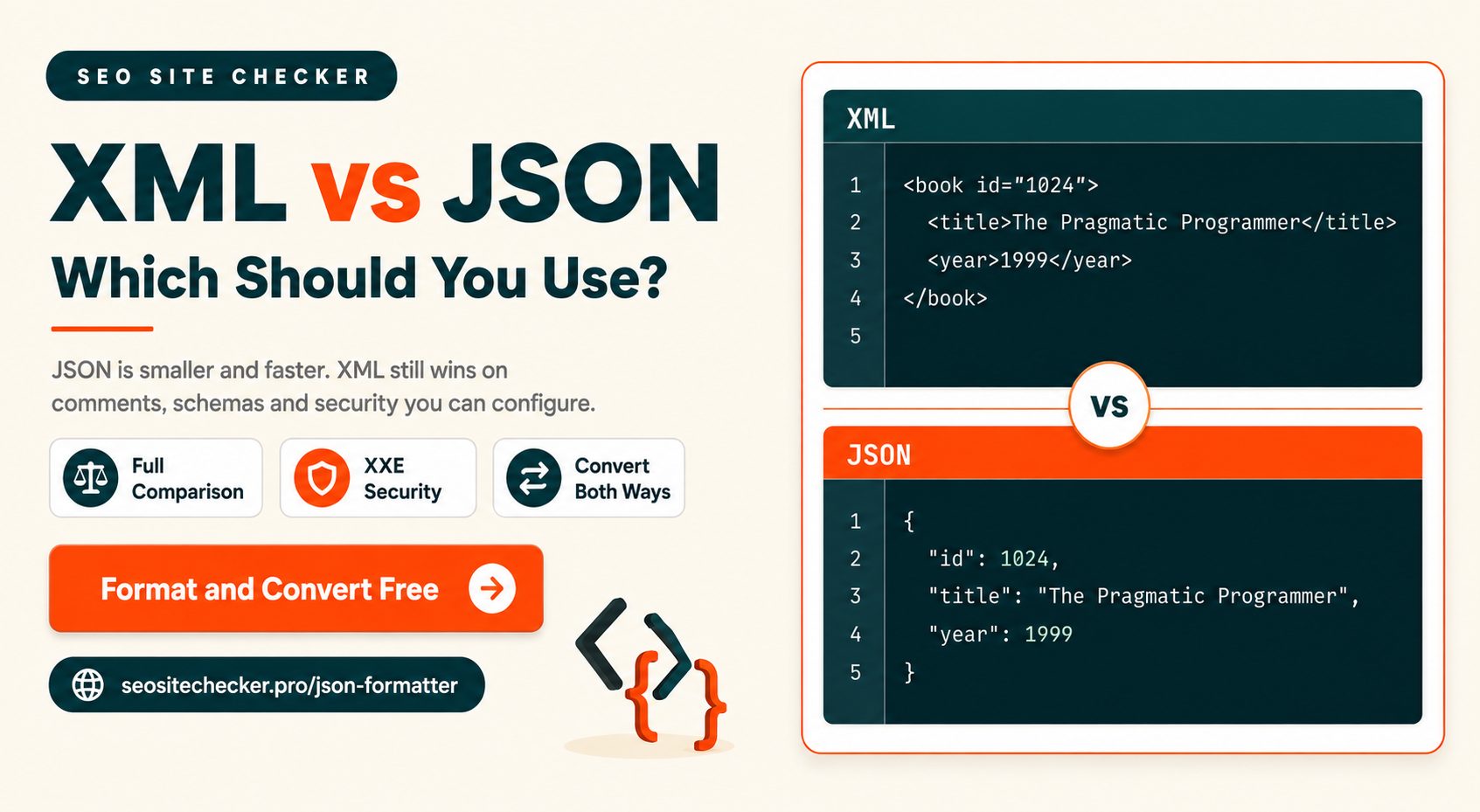
If you are picking a data format for a new web API, the answer is JSON, and you probably already suspected that before you opened this page.
So this guide is about the parts where the answer is not obvious. Where XML still genuinely wins, why one of these formats has a whole class of security vulnerability the other does not, what the file size difference actually looks like after compression rather than before it, and what happens when you convert between them.
The short version of XML vs JSON: JSON is smaller, faster to parse, and simpler to work with. XML is more capable, more verbose, and far better specified. Most modern development uses JSON. Most modern development also touches XML constantly, whether or not anyone chose it.
XML vs JSON: Which Format Should You Use?
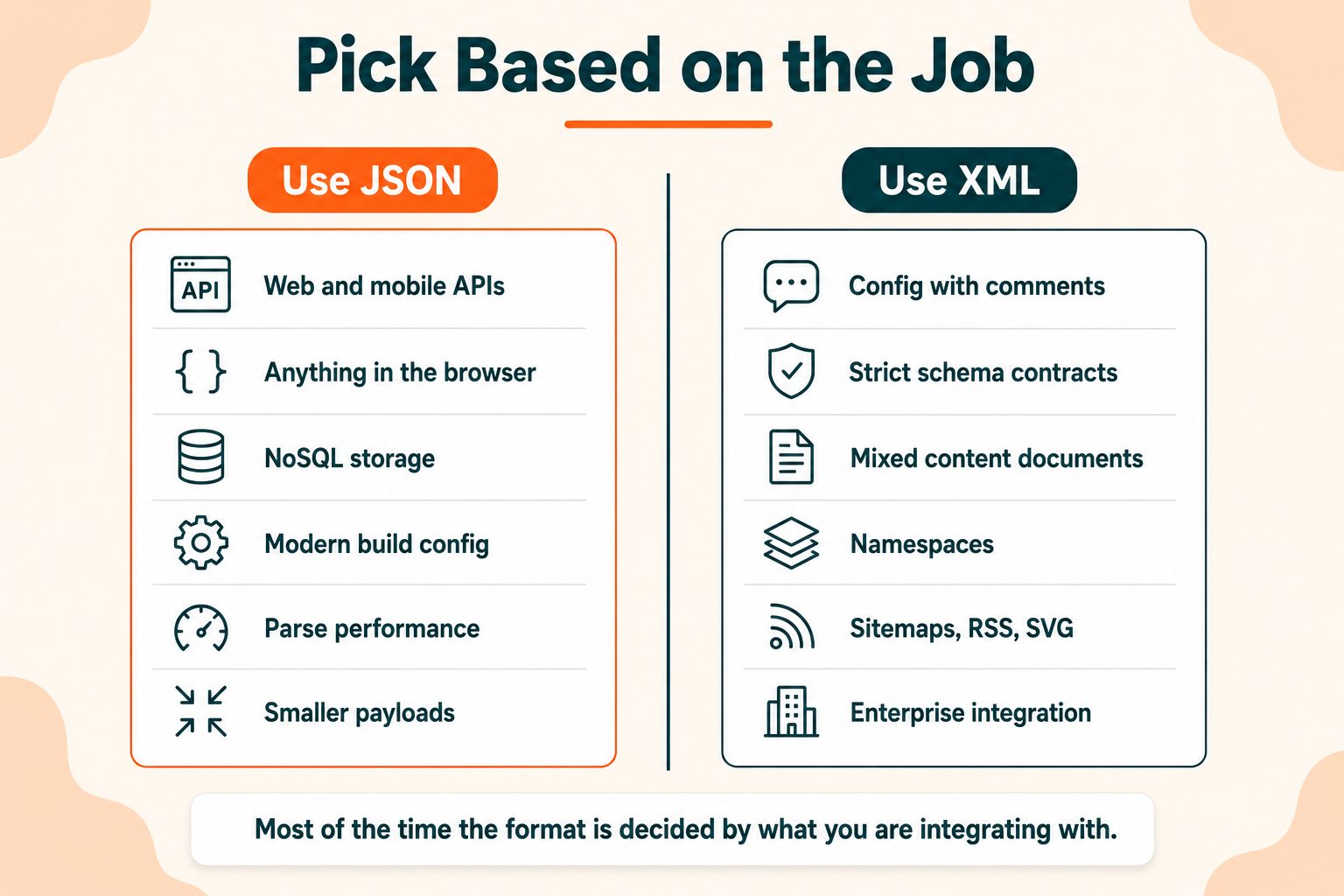
The quick answer, by situation:
| Situation | Use |
|---|---|
| New web or mobile API | JSON |
| Anything going straight to JavaScript | JSON |
| Config file a human edits and comments | XML, or YAML |
| Documents with mixed content | XML |
| Enterprise or legacy system integration | XML, usually because it is required |
| Strict machine-readable validation contract | XML |
| Sitemaps, RSS feeds, SVG files | XML, you have no choice |
| NoSQL document storage | JSON |
Notice how many of those rows are decided by something other than preference. In practice the format is usually chosen for you by what you are integrating with, what your framework expects, or what standard you are implementing. The genuinely free choice comes up less often than articles on this subject imply.
When you do have a free choice and no constraints, choose JSON. The rest of this guide is about recognising when you do not have a free choice, and what to do then.
What Is XML?
Extensible Markup Language. A W3C standard published in 1998, designed to describe structured documents in a way both people and machines can read.
xml
<book id="1024">
                  <title>The Pragmatic Programmer</title>
                  <author>Andrew Hunt</author>
                  <year>1999</year>
                </book>
The key characteristics: you define your own tags, data can live in elements or in attributes, comments are supported, and there is a standard schema language for defining and enforcing what a valid document looks like. There is also a standard query language, XPath, and a standard transformation language, XSLT.
Here is the thing beginners consistently get wrong about XML. It is not a legacy format you might occasionally run into. It is running underneath things you touch daily. Your sitemap is XML. Every RSS and Atom feed is XML. Every SVG on your site is XML. Word and Excel files are zipped XML. Android layouts, Maven builds, and most enterprise integration are XML.
You can go your whole career without choosing XML and still work with it every week. The W3C's XML specification is the standard itself if you want the formal rules.
What Is JSON?
JavaScript Object Notation. Derived from JavaScript object syntax, standardised as ECMA-404, the JSON data interchange standard, and now completely language-independent despite what the name suggests.
The same record:
json
{
                  "id": 1024,
                  "title": "The Pragmatic Programmer",
                  "author": "Andrew Hunt",
                  "year": 1999
                }
Key characteristics: key-value pairs, six data types and no more, no attributes, no comments, no schema in the base standard, and native parsing in essentially every language written in the last twenty years.
The reason JSON took over is simpler than most explanations make it. JSON maps almost directly onto data structures that programming languages already have. An object becomes a dictionary or a hash. An array becomes a list. There is no translation layer to write and no decisions to make.
XML requires you to decide how a document maps onto objects in your code, and every team decides slightly differently. That friction, repeated across thousands of projects, is what shifted the industry.
The Same Data, Side by Side
Comparisons in prose are less useful than seeing it. Here is one product record in both formats.
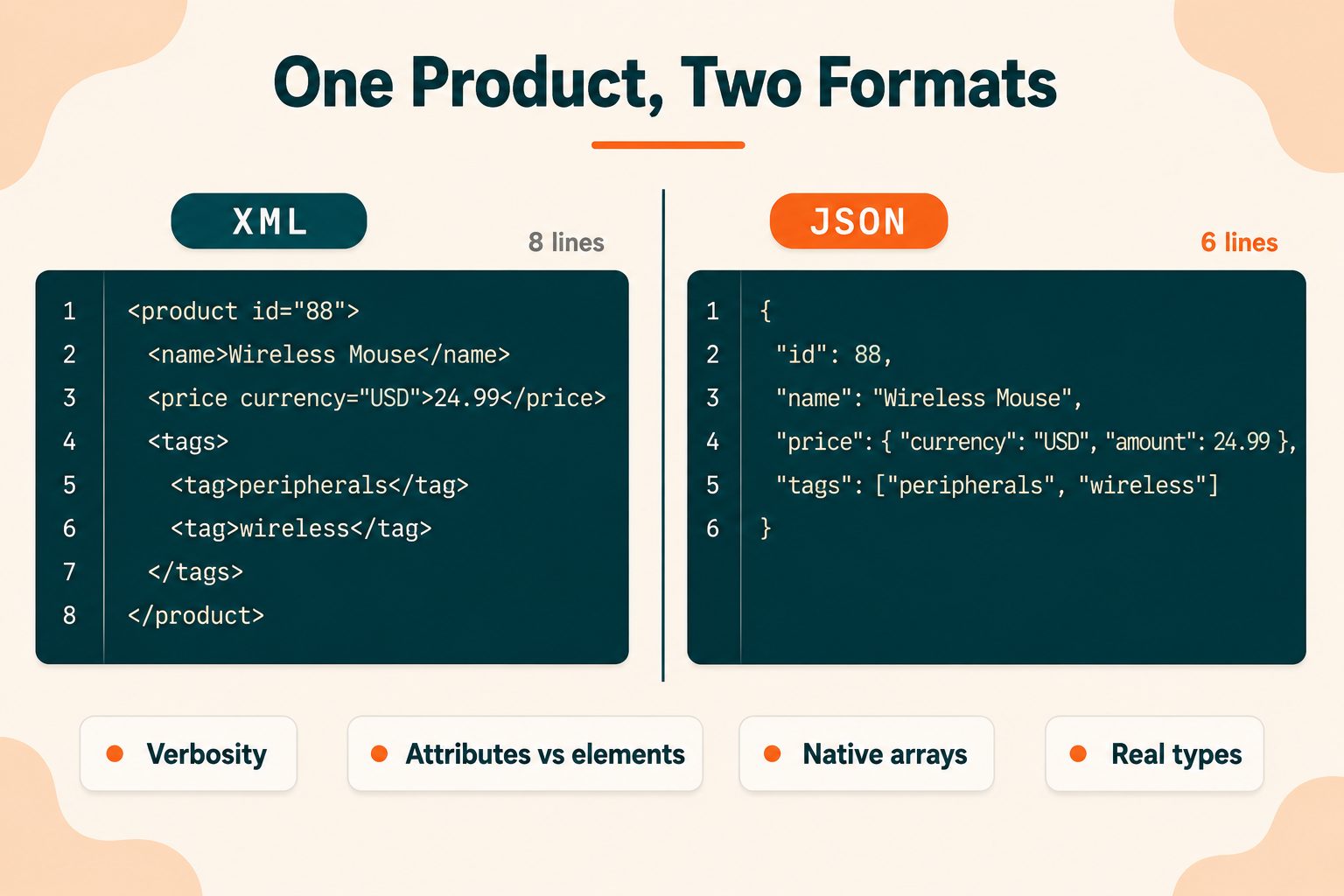
XML:
xml
<product id="88">
                  <name>Wireless Mouse</name>
                  <price currency="USD">24.99</price>
                  <tags>
                    <tag>peripherals</tag>
                    <tag>wireless</tag>
                  </tags>
                </product>
JSON:
json
{
                  "id": 88,
                  "name": "Wireless Mouse",
                  "price": { "currency": "USD", "amount": 24.99 },
                  "tags": ["peripherals", "wireless"]
                }
Four differences are visible in those two blocks, and they matter in different ways.
Verbosity. XML writes every tag name twice. JSON names each key once. That is where most of the size difference comes from.
Attributes versus elements. XML gives you two ways to express the same information, and teams genuinely argue about which to use. Should currency be an attribute or a child element? There is no right answer, which means every codebase has a convention and every integration has a mismatch. JSON gives you one way.
Arrays. JSON has a native array type. XML expresses lists as repeated elements, which creates a real ambiguity: a list containing one item is indistinguishable from a single value unless a schema says otherwise. Anyone who has parsed XML into objects has been caught by this.
Types. In JSON, 24.99 is a number and "24.99" is a string. In XML everything is text until a schema assigns it a type. That difference causes more day-to-day friction than the file size does, and almost nobody mentions it.
If you are comparing two documents and one of them is minified, run it through the XML Formatter or the JSON Formatter first. Both validate as well as format, so you find out immediately if the reason a document looks wrong is that it is actually broken.
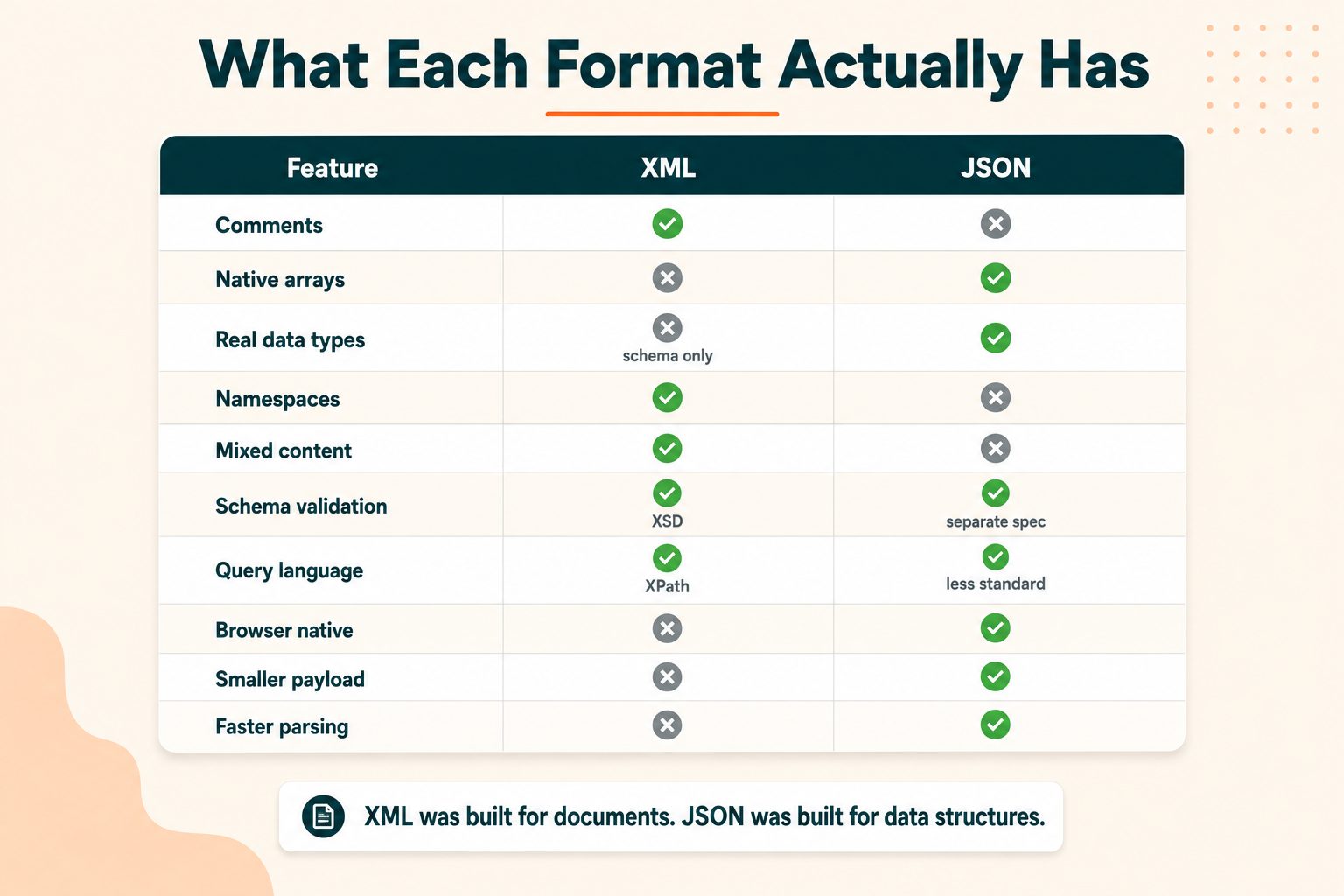
Full Comparison
| XML | JSON | |
|---|---|---|
| Full name | Extensible Markup Language | JavaScript Object Notation |
| Standardised | W3C, 1998 | ECMA-404, RFC 8259 |
| Syntax | Tags and attributes | Key-value pairs |
| Data types | Text unless schema-typed | String, number, boolean, null, object, array |
| Arrays | Repeated elements | Native |
| Comments | Yes | No |
| Schema validation | XSD, built into the ecosystem | JSON Schema, separate standard |
| Namespaces | Yes | No |
| Query language | XPath, XQuery | JSONPath, less standardised |
| Mixed content | Yes | No |
| Typical file size | Larger | Smaller |
| Parse speed | Slower | Faster |
| Browser handling | Needs a parser | Native |
| Common use today | Documents, feeds, enterprise, config | APIs, web, mobile, config |
Nearly every row in that table traces back to one design decision. XML was built for documents. JSON was built for data structures. Once you know that, the differences stop being a list to memorise and start being obvious.
Where JSON Wins
Web and mobile APIs. Smaller payloads, faster parsing, and no impedance mismatch with the language consuming them. This is the overwhelming majority of new API development and it is not a close call.
Anything touching JavaScript. JSON.parse is native and immediate. Handling XML in a browser means DOM traversal or pulling in a library, and both are slower to write and slower to run.
Developer speed. Less to type, less to read, fewer decisions. The attributes-versus-elements debate simply does not exist in JSON, and neither do namespaces, and that is time nobody spends.
NoSQL and document databases. MongoDB and its relatives store JSON-shaped documents natively. There is no mapping layer.
Configuration for modern tooling. package.json, tsconfig.json, and most build tools. Worth noting the irony here, since JSON is a genuinely poor config format for a reason covered in the next section, and it is used anyway because the tooling ecosystem settled on it.
Parse performance. Typically two to three times faster than XML on equivalent data. On small payloads the difference is irrelevant. On large ones, or on a phone, it is not.
Where XML Still Wins
Almost every article on this subject concludes that JSON won and stops there. That is right for new APIs and incomplete everywhere else, so here is the honest counter-case.
When you need comments. JSON has none, deliberately. For a configuration file that a human maintains, that is a real problem, and it is why several tools invented non-standard comment syntax that only their own parsers understand. XML has had standard comments since 1998.
When you need a machine-readable contract. XSD is mature, standardised, and built into the tooling across every major platform. JSON Schema is good and getting better, but it is a separate specification with less consistent support, and plenty of JSON APIs ship with no formal contract at all.
Mixed content. Text with markup inside it, like a paragraph containing a bolded phrase and a link. XML handles this natively because it was designed for exactly this. JSON has no clean way to express it, which is precisely why every document format in existence is XML-based rather than JSON-based.
Namespaces. Combining vocabularies from different sources without name collisions. JSON has no equivalent, and if you need it you will end up inventing a prefix convention that only your team understands.
Querying and transformation. XPath and XSLT are powerful, standardised, and widely implemented. The JSON equivalents are less mature and vary between libraries.
When it is already decided. Sitemaps, RSS, SOAP, SVG, Office documents, Android, Maven. You do not get a vote, and knowing the format properly is more useful than having an opinion about it.
The reframe worth taking away: JSON did not defeat XML. It took over the use case XML was overused for, and XML kept the use cases it was actually designed for.
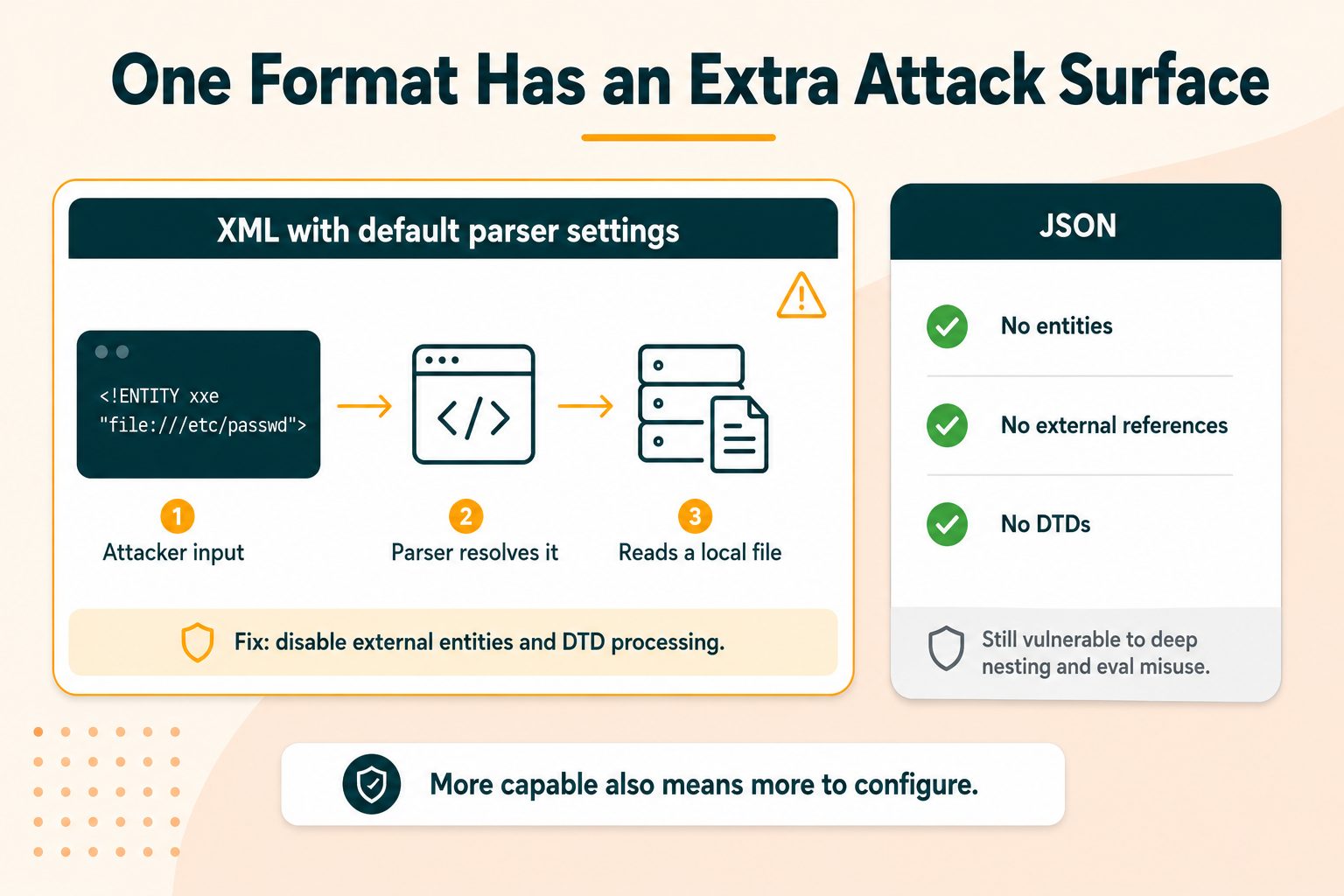
The Security Difference Nobody Mentions
This belongs in any honest comparison and it is almost universally left out.
XML External Entity injection, or XXE. XML parsers can be instructed to load external resources through entity declarations. A parser left on default settings can be tricked into reading files from the server's disk, making outbound network requests from inside your infrastructure, or being crashed entirely by a recursive entity expansion. That last one has a name, the billion laughs attack, because a few lines of XML can expand to gigabytes in memory.
This is not theoretical. It is a well-documented vulnerability class that has caused real breaches, and OWASP's guidance on XML External Entity processing covers both the attack and the fixes.
The remedy is straightforward: disable external entity resolution and DTD processing in your parser. Most modern libraries now default to safe settings. Plenty of code written before they did is still running.
JSON has a smaller attack surface. No entities, no external references, no DTDs. There is simply less machinery to abuse.
That does not make JSON automatically safe. Deeply nested structures can exhaust a parser and cause a denial of service. And using eval to parse JSON rather than a real parser is remote code execution waiting to happen, which is a mistake that still appears in older codebases.
The honest summary: XML is more capable, and some of that capability is capability an attacker can use. If you are accepting XML from outside your system, configure your parser deliberately rather than accepting the defaults.
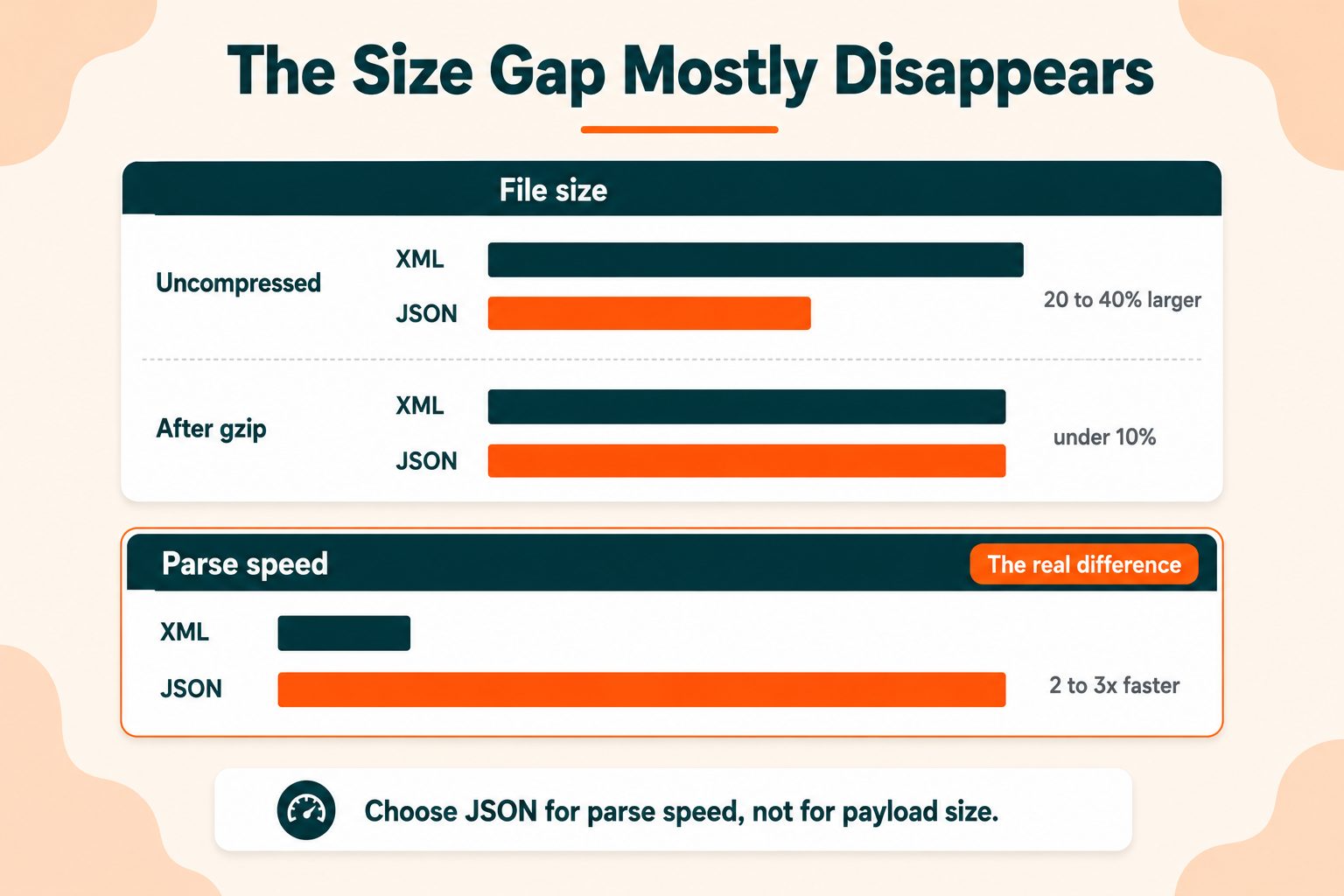
Size and Speed, With Realistic Numbers
The commonly quoted figures on this are misleading, so here is a fairer account.
Uncompressed, the same data in XML typically runs 20 to 40 percent larger than in JSON. Closing tags account for most of that.
After gzip or Brotli, the gap narrows sharply, often to under 10 percent. Compression algorithms are extremely good at repeated strings, and XML's repeated tag names are exactly that. Since essentially every production API compresses its responses, the raw size difference matters far less than the headline number suggests.
Parse speed is where the real difference sits. JSON parses meaningfully faster, commonly two to three times on equivalent data, and in a browser that work happens on the main thread where it competes with everything else.
So the practical conclusion is not the one usually given. Choose JSON for parse performance rather than for payload size. And if payload size is genuinely your problem, compression and minification are a bigger lever than switching data format.
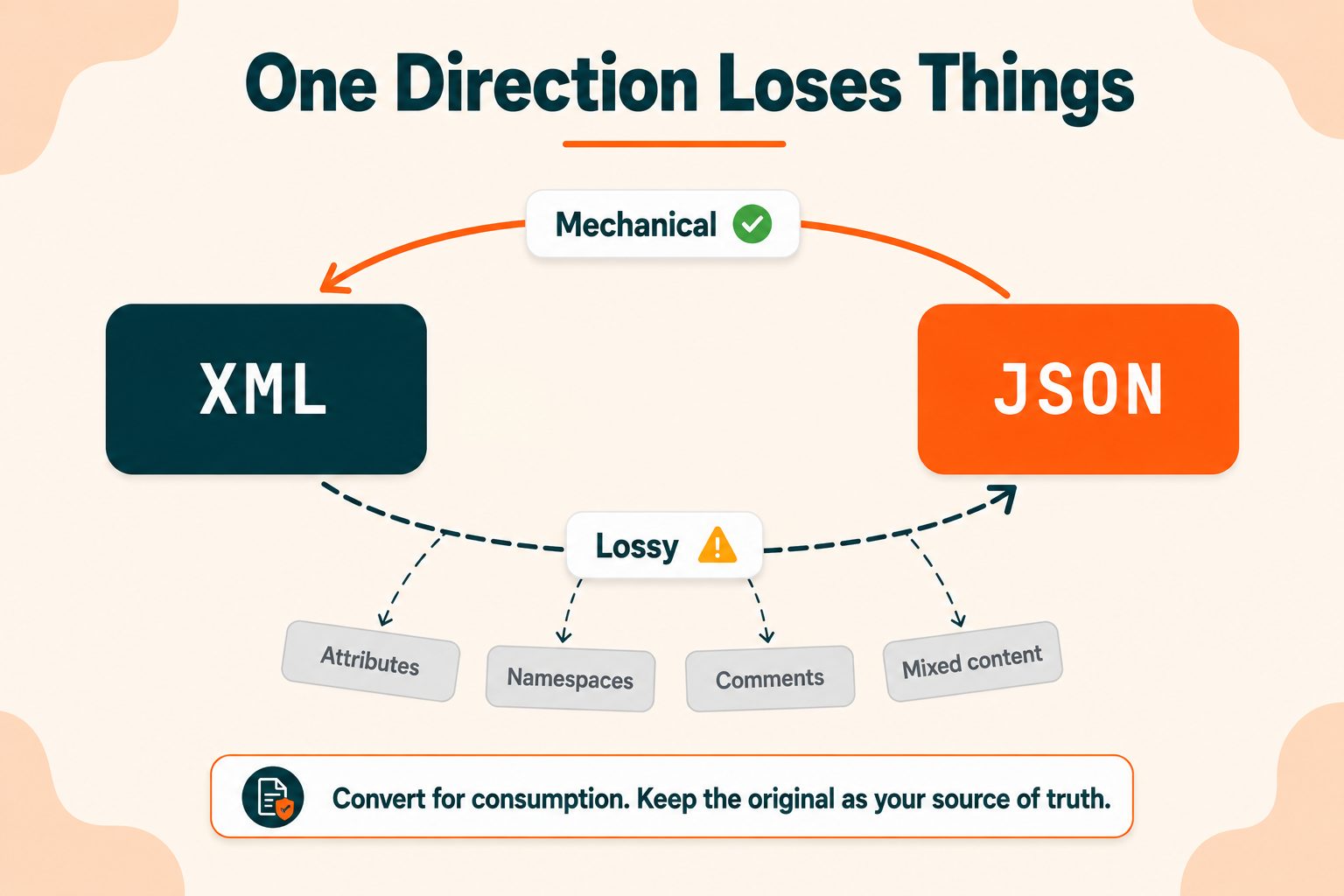
Converting Between XML and JSON
Sooner or later you inherit the format you did not choose. Converting is possible in both directions, and it is not symmetrical.
JSON to XML is mostly mechanical. You do have to decide whether values become elements or attributes, and JSON arrays have no direct XML equivalent, so the converter picks a convention. But nothing is lost.
XML to JSON loses information. Attributes, namespaces, comments, and mixed content have no JSON representation. Converters invent workarounds, usually prefixing attribute names with @ or similar, and those conventions differ between tools. Two converters can produce two different valid JSON documents from the same XML.
The practical rule: convert for consumption, not for storage. Keep the original in its native format as the source of truth, and convert at the boundary where it is consumed. Converting XML to JSON, storing the JSON, and discarding the original is how you quietly lose data you did not know you had.
The JSON to XML Converter and XML to JSON Converter handle both directions free. Validate the output before relying on it, particularly going from XML, since that is the direction where things go missing.
What About YAML?
The obvious follow-up question, so briefly.
YAML is a superset of JSON built for human editing. It supports comments, is much less noisy to read, and has become the default for configuration in tools like Docker Compose and Kubernetes.
The trade-offs are real. YAML is whitespace-sensitive, which produces a category of bug that simply does not exist in JSON or XML. And its type inference has some famous surprises, most notably that unquoted no was historically parsed as the boolean false, which caused genuine problems for anyone writing country codes.
The working split most teams land on: JSON for machine-to-machine data, YAML for configuration humans edit, XML for documents and anywhere it is mandated.
Wrapping Up
The question is usually settled by what you are integrating with rather than by which format is better in the abstract.
New API with no constraints: JSON. Documents, mixed content, or a strict validation contract: XML. Configuration a human edits: consider YAML. Anything involving sitemaps, feeds, SVG or Office files: XML, and the decision was made for you long ago.
And whichever you inherit, configure your parser deliberately. That advice applies to both, and it applies more urgently to XML.
Frequently Asked Questions
Frequently Asked Questions (FAQs) is a list of common questions and answers provided to quickly address common concerns or inquiries.
What is the difference between XML and JSON?
XML uses tags and attributes to describe documents. JSON uses key-value pairs to describe data structures. JSON is smaller and faster to parse; XML is more capable and better specified.
Is JSON better than XML?
For web APIs and anything touching JavaScript, yes. For documents, strict validation, or systems that already use XML, no. They were designed for different problems.
Why did JSON replace XML?
JSON maps directly onto data structures programming languages already have, so there is no translation layer. It is also smaller, faster to parse, and simpler to read.
Is XML still used in 2026?
Extensively. Sitemaps, RSS feeds, SVG files, Office documents, SOAP services, Android layouts and most enterprise integration all run on XML.
Which is faster, XML or JSON?
JSON, typically two to three times faster to parse. After gzip compression the file size difference is small, so parse speed is the more meaningful advantage.
Is JSON more secure than XML?
JSON has a smaller attack surface, with no entities or external references. XML parsers are vulnerable to XXE injection unless external entity processing is explicitly disabled.
Does JSON support comments?
No. The standard has no comment syntax. Some tools accept non-standard comments, but those files are not valid JSON and other parsers will reject them.
Can you convert XML to JSON?
Yes, though the conversion loses information. Attributes, namespaces, comments and mixed content have no JSON equivalent, so converters invent conventions that vary between tools.
Which is easier to read?
JSON, for most people and most data. XML becomes easier when documents are complex and well-formatted, since the tag names make structure explicit.
Should I use XML or JSON for an API?
JSON, unless you are implementing a standard that requires XML or integrating with a system that only speaks it. Modern API tooling assumes JSON.





