Someone emailed you a contract this morning and expects it back signed today. You do not own a printer, and you are not about to buy one for this.
Here is the honest answer, which most pages on this subject bury under a signup form: for the majority of everyday documents you do not need software, an account, or a paid service. For a small number of documents you need something more. This covers both, and it covers how to tell which situation you are in.
How to Sign a PDF for Free: No Software Needed
Four steps:
- Upload your PDF
- Create your signature
- Place it where it belongs on the page
- Download the signed file
There are three ways to create the signature, and they are legally equivalent. The difference is how they look.
Draw it. Mouse or trackpad on a computer, finger or stylus on a phone or tablet. Looks handwritten, which is what most people want.
Type it. Enter your name and pick a script font. Fastest option, and perfectly valid, though it looks less personal than a drawn mark.
Upload an image. Sign a sheet of paper, photograph it, and upload. Best fidelity if you already have a clean scan, and the closest match to your actual signature.
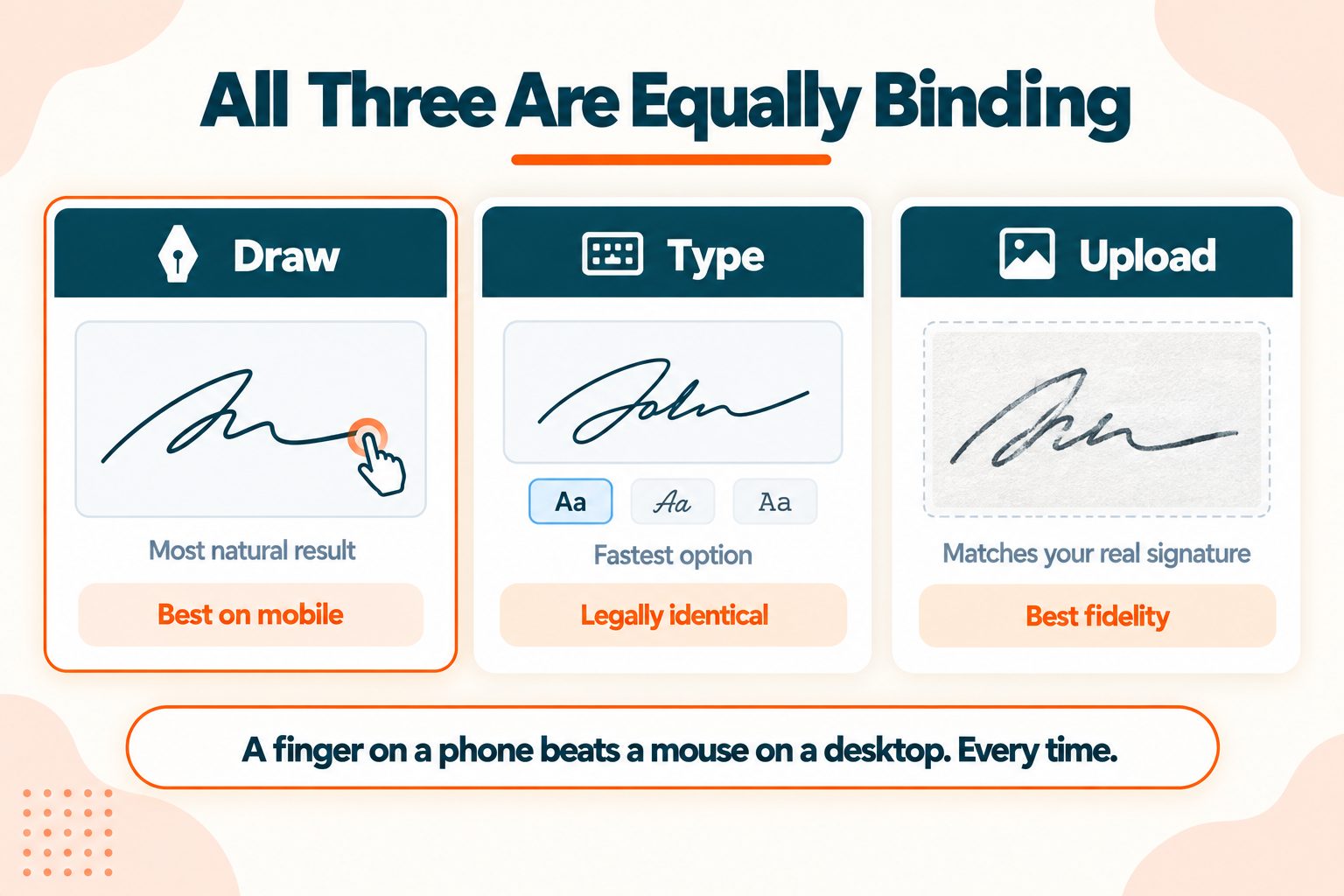
One practical tip that almost nobody mentions: drawing with a finger on a phone produces a far better signature than a mouse on a desktop. If your first attempt looks like a seismograph reading, switch devices rather than trying again. A trackpad is somewhere between the two.
Our own Sign PDF tool uses the upload method. Attach your PDF (up to 60MB, or 500MB if you sign up free) and a PNG or JPG of your signature (up to 5MB, or 50MB signed in), choose a position from bottom-right, bottom-left, bottom-center, top-right or top-left, set the width and height, and pick whether it goes on the last page, every page, or specific pages you list. There is no drag-and-drop canvas, so use the size fields to dial in the fit rather than eyeballing it. The signature is flattened into the page rather than left as a movable annotation, matching the flattening behaviour covered below.
Electronic Signature vs Digital Signature
These two terms get used interchangeably and they are not the same thing. The difference has legal consequences, and almost no free tool explains it, because explaining it does not help them sell anything.
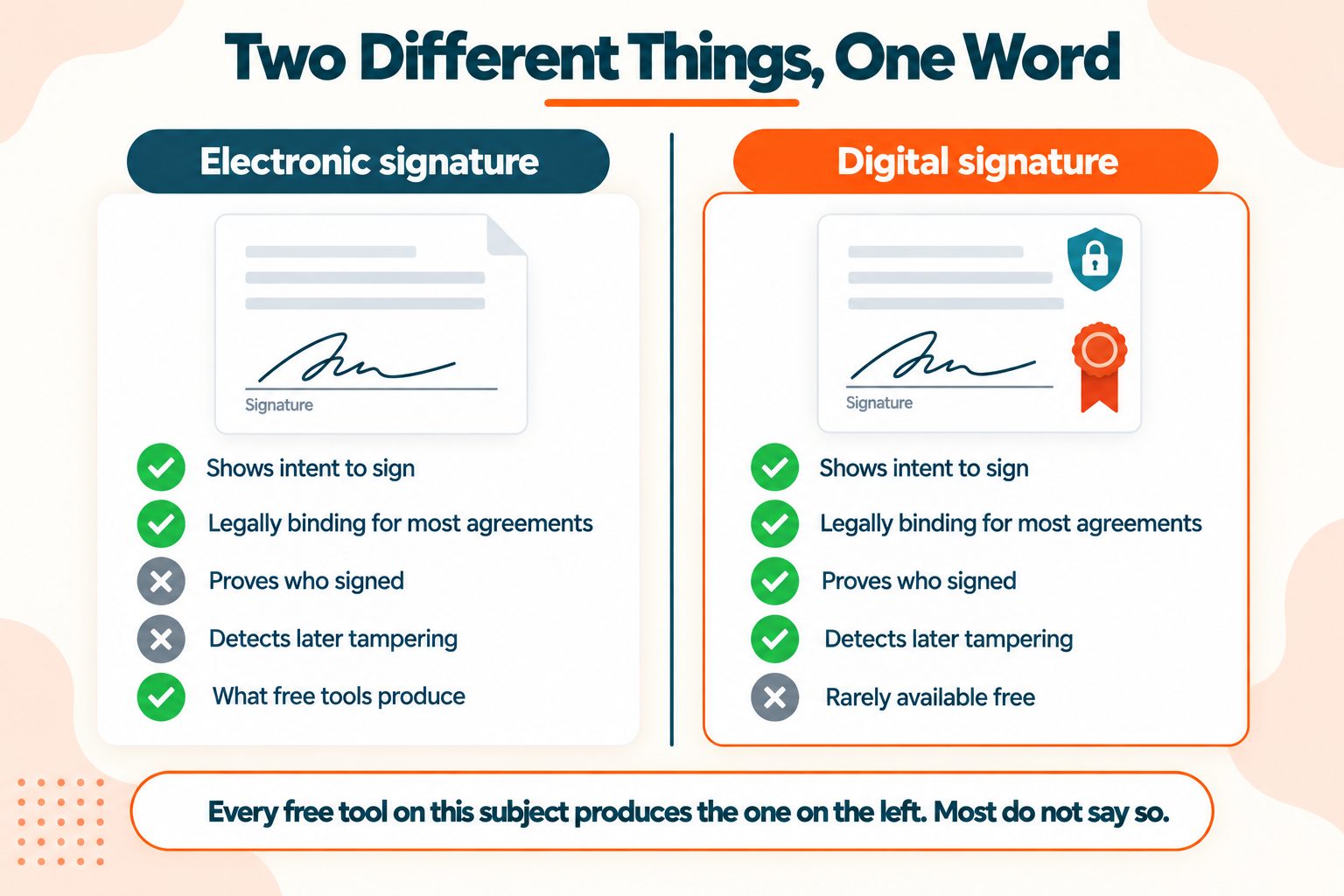
An electronic signature is any electronic mark showing intent to sign. A drawn squiggle, a typed name, a clicked checkbox saying "I agree." It carries no proof of who made it.
A digital signature is a cryptographic certificate embedded in the file. It proves who signed, proves the document has not been altered since, and can be verified independently by anyone with the file.
| Electronic signature | Digital signature | |
|---|---|---|
| What it is | A visual mark on the page | A cryptographic certificate |
| Proves who signed | No | Yes |
| Detects later tampering | No | Yes |
| Requires a certificate | No | Yes |
| Free tools provide it | Yes | Rarely |
| Enough for most agreements | Yes | Yes |
Every free tool on this subject produces an electronic signature. That includes the well-known ones. Most of them do not say so plainly, and several use "digital signature" as a marketing phrase for something that is not one.
The practical rule: for a lease, an invoice, a school consent form, a freelance contract or an NDA, an electronic signature is fine and always has been. For anything where identity needs proving or tampering needs detecting, you need a certificate-based signature, and that is a different kind of product.
The PDF Association is the industry body that governs how signatures are actually embedded in the format, if you want the technical side.
Is a Free Electronic Signature Legally Binding?
Usually yes, and it has been for over two decades.
In the United States, the ESIGN Act of 2000 and the state-level UETA give electronic signatures the same legal standing as ink for most agreements. A typed name, a drawn mark and a clicked button all qualify, provided there is clear intent to sign and both parties agreed to transact electronically. The FDIC's summary of the ESIGN Act covers the requirements in plain terms.
In the EU and UK, the eIDAS regulation defines three tiers with increasing evidentiary weight: simple, advanced, and qualified. A drawn signature from a free tool is a simple electronic signature, which is admissible but carries less weight than the higher tiers. The European Commission's page on eIDAS sets out the framework.
The exceptions, which few pages list. ESIGN specifically excludes certain document types, including wills and testamentary trusts, some family law matters such as adoption and divorce papers, court filings and orders, and a handful of notices such as eviction, foreclosure and the cancellation of health or life insurance benefits. Property transfers vary by state. Many jurisdictions still require wet ink or notarisation for these.
I am not a lawyer and this is general information rather than legal advice. Requirements vary by document type and jurisdiction, and they change. If you are signing something with real consequences, check what applies to your specific document and location, or ask someone qualified.
What Free Tools Give You, and What They Do Not
Worth being straight about, since nine of the pages competing on this topic are selling an upgrade.
Free tools reliably give you:
- A signature on your own document
- Immediate download
- No account on the better ones
- No watermark on the better ones
- Typing, drawing and image upload
Free tools generally do not give you:
- Sending a document to someone else for their signature
- An audit trail recording who signed, when, and from where
- Identity verification of the signer
- Certificate-based digital signatures
- Reminders and signing order for multiple parties
- Long-term storage and retrieval
Those absent features are the paid product, and for some situations they genuinely matter. If you need to collect signatures from other people, if you need a court-admissible audit trail, or if you work in a regulated industry with compliance obligations, a free tool is the wrong choice and no amount of positioning changes that.
For signing your own documents, which is what most people arrive here to do, free is sufficient.
Signing Without Any Online Tool
Worth knowing even if you use a web tool, because for some documents this is the better option.
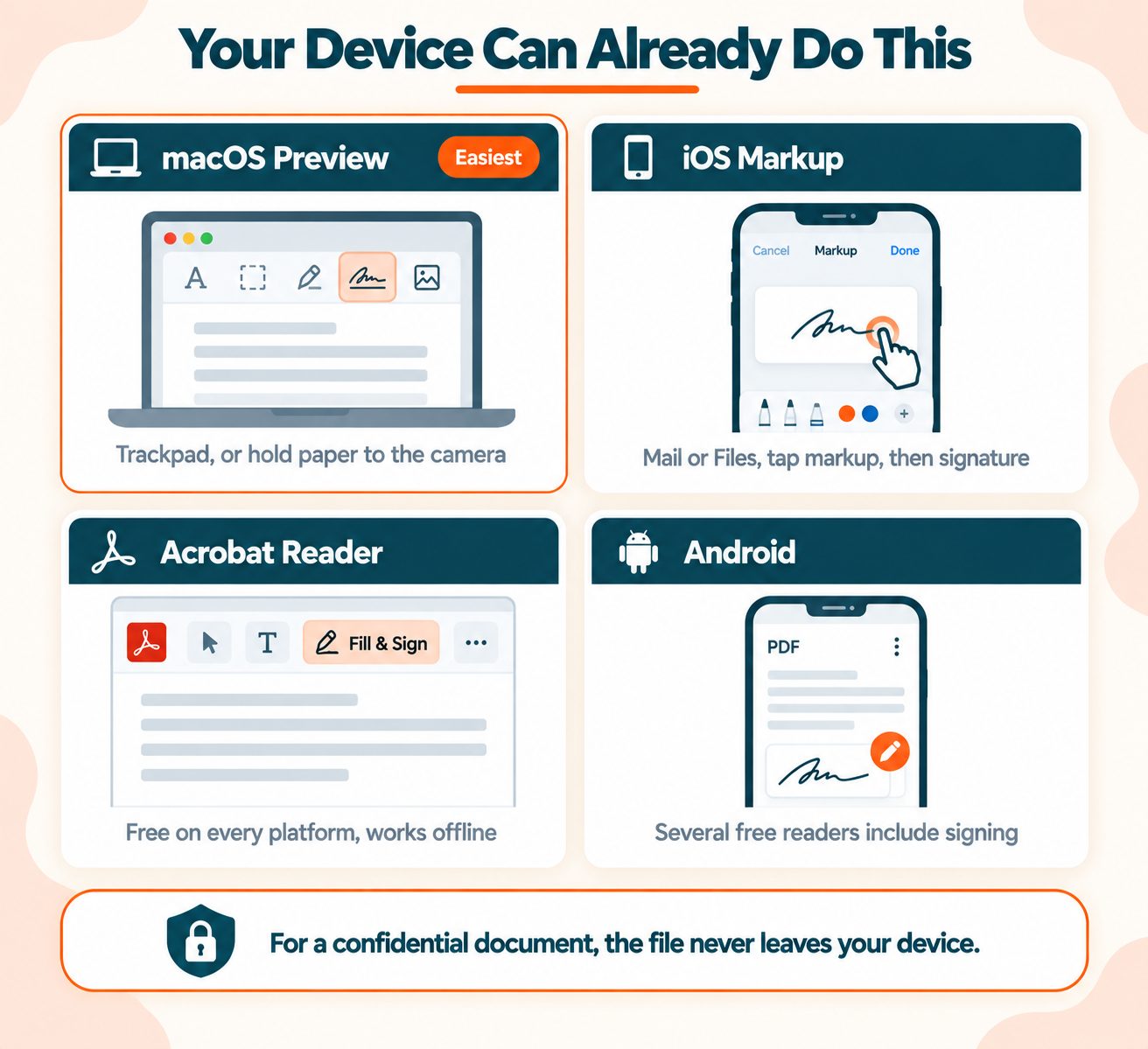
macOS Preview. Built into every Mac. Open the PDF, click the markup toolbar, then the signature icon. You can create a signature with the trackpad, or hold a signed sheet of paper up to the camera and it will capture and clean it. Place it, save, done.
Adobe Acrobat Reader. Free on every platform. The Fill & Sign tool handles signatures and works offline.
iOS Markup. Open the PDF in Mail or the Files app, tap the markup icon, then the plus button, then Signature. Signing with a finger on a phone screen genuinely produces a good result.
Android. Several free PDF readers include signing, and some Samsung and Pixel devices have it in the built-in viewer.
Windows. Edge can annotate PDFs, though its signature support is more limited than the others. Acrobat Reader is the more reliable route.
Here is why this matters rather than being a footnote. For a confidential document, the built-in option is better than any web tool, because the file never leaves your device. A contract with your address in it, a medical form, a document containing someone else's personal data. Those are exactly the cases where not uploading is worth the extra thirty seconds.
A Note on Privacy
Most online signing tools upload your document to a server, process it there, and delete it after some period. A few process entirely in your browser, and two of the better-known ones make a point of saying so.
Three things worth checking before uploading anything sensitive:
- Whether the tool processes on a server or in your browser
- What the stated retention period is
- Whether your workplace has rules covering client or employee documents
There is a consideration specific to signing that does not apply to compressing or merging. You are uploading a document that will contain your actual signature. A signature image is reusable by anyone who has it. That makes a signed contract a higher-value target than an ordinary file, and it is a reasonable argument for using the built-in option on anything you would not want circulated.
This tool processes on our server, not inside your browser. Your PDF and signature image are uploaded, the signature is applied, and the input files are deleted as soon as the job finishes, with an automatic cleanup pass as a backstop within about an hour. The signed file stays available to download for roughly two hours, then it is removed too. Compress PDF and Merge PDF on this site run the same way. If that is not acceptable for a specific document, use one of the on-device options above instead.
What Signing Does to Your File
Three things worth knowing about the file afterwards.
Flattening. A properly signed PDF flattens the signature into the page content, so it cannot be selected, moved or deleted. Some tools leave it as an editable annotation instead, which looks identical and is considerably weaker. If you can click your signature and drag it after saving, so can the recipient.
File size. An image-based signature adds some weight, usually small. If the signed file needs to go past an upload limit, compressing it afterwards is fine and will not affect the signature.
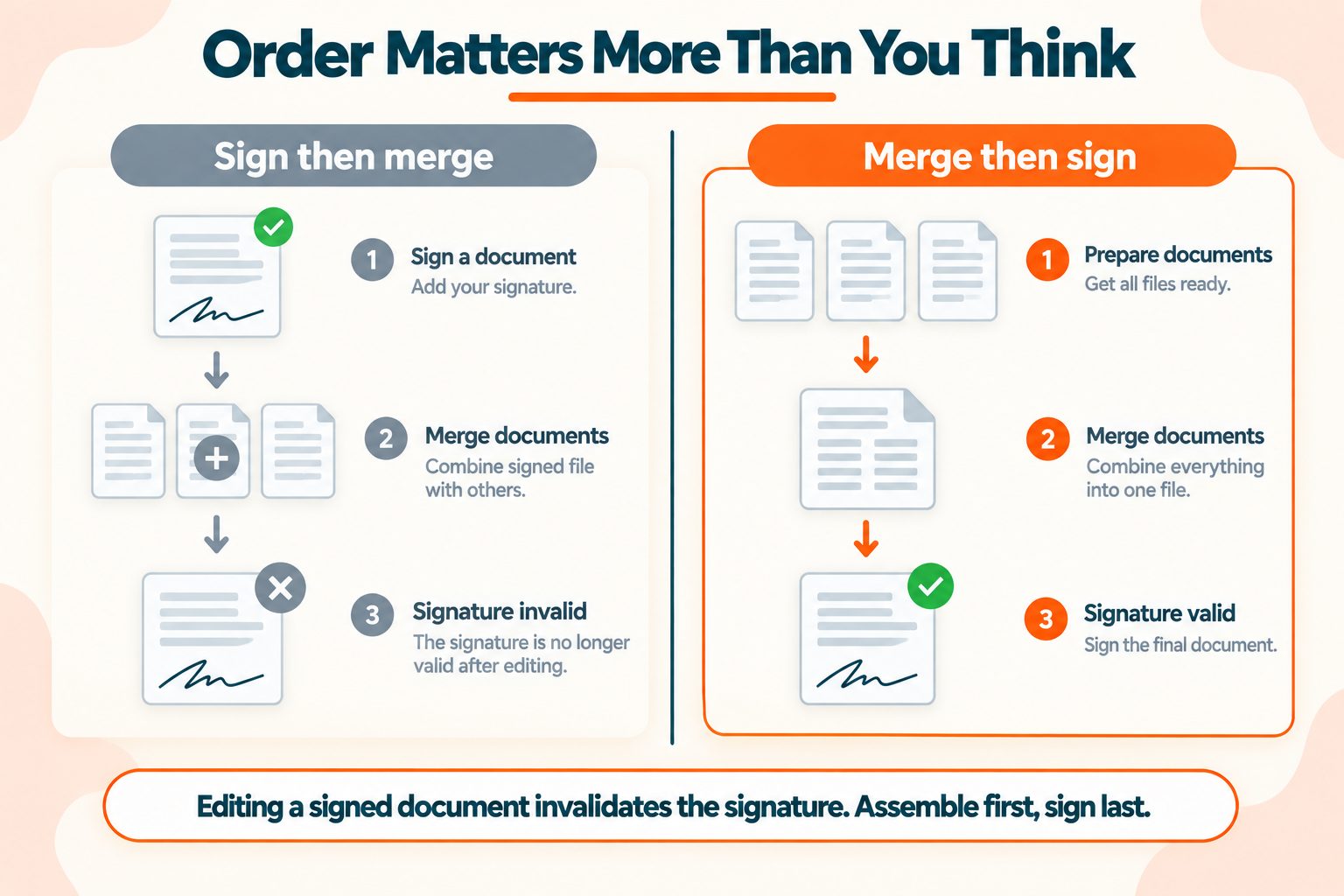
Later edits break things. Editing a document after signing invalidates a digital signature, because the signature covered the earlier version. And merging a signed PDF voids the signature entirely, which catches people out constantly when assembling a contract bundle. Sign last, not first.
Wrapping Up
Three things worth remembering.
For most documents, free is enough. A lease, an invoice, a consent form, a freelance contract. An electronic signature has had the same legal standing as ink since 2000 in the US and has equivalent recognition across the EU and UK.
Know which kind of signature you need. Electronic for ordinary agreements. Certificate-based digital for anything requiring proof of identity or tamper evidence, which is a different product and usually a paid one.
Sign last. Merging, editing or reassembling a document after signing will invalidate a digital signature and may leave an electronic one looking legitimate on a document that has since changed.
Frequently Asked Questions
Frequently Asked Questions (FAQs) is a list of common questions and answers provided to quickly address common concerns or inquiries.
How do I sign a PDF for free?
Upload it to a free signing tool, create a signature by drawing, typing or uploading an image, place it on the page, and download the result.
Is a typed signature legally binding?
In most cases yes. Under the ESIGN Act and eIDAS, a typed name showing clear intent to sign carries the same legal weight as a drawn one.
What is the difference between an electronic and a digital signature?
An electronic signature is a visual mark. A digital signature is a cryptographic certificate that proves who signed and detects tampering. Free tools produce the former.
Can I sign a PDF on my phone?
Yes, and it often produces a better signature than a desktop, since drawing with a finger beats drawing with a mouse.
Do I need Adobe to sign a PDF?
No. Free online tools work without any installation, and macOS Preview and iOS Markup both sign PDFs with nothing extra installed.
Is it safe to sign a PDF online?
For ordinary documents, generally yes. For confidential ones, consider a built-in tool instead, since your signature image is reusable by anyone who obtains it.
Can I sign a PDF without creating an account?
Yes. Several free tools require no signup at all, though some add watermarks or limits in exchange.
How do I sign a PDF on a Mac without software?
Open it in Preview, click the markup toolbar, then the signature icon. You can draw with the trackpad or capture a signed sheet of paper with the camera.
Will my signature be editable after signing?
It depends on the tool. A flattened signature becomes part of the page and cannot be moved. An annotation-based one can be dragged or deleted by anyone opening the file.
Can someone else sign a PDF I send them?
Free tools generally sign your own document only. Sending a document out for signature, with tracking and an audit trail, is a paid feature on every major platform.