

Long Tail Keywords for Blog Posts: How to Find, Choose and Use Them
 Kendall Chris
/
Updated
Kendall Chris
/
Updated

What a Long Tail Keyword Does for a Blog Post
Quick answer: Long tail keywords for blog posts are narrow search phrases, typically three words or longer, that one article can answer completely. Find candidates in Search Console queries, Google autocomplete and People Also Ask, choose one main phrase per post, place it in the title, opening paragraph and one heading, then check the live page.
In a blog, the phrase is also the topic: it is the question the post exists to answer, so choosing the phrase means choosing the post. Every step needs only a spreadsheet and free sources, and one step runs our report on the published page.
The definition, the head versus long tail comparison and the examples sorted by intent live in our long tail keywords guide, so this post sticks to the blogger's side: finding phrases, choosing one, placing it and checking the result.
One limit before you start. The free sources below give no search volume and no difficulty score, so you won't find either number here. Google's Search Central documentation says plainly that its starter guide holds no secrets that will automatically rank a site first, so nothing below is a promise.
Why Long Tail Keywords Suit Blog Posts, and Where They Fall Short
The case for long tail keywords for blog posts is simple. A post is one URL that can answer one question completely, and a long tail phrase names exactly that kind of question. A broad word such as tomato is answered by recipes, shops and growing guides at once. That is editorial judgment, not a Google rule, and the long tail keyword examples in this post come from an invented blog about growing tomatoes in containers, with no real search data behind them.
Guides often claim that these phrases face less competition, show clearer intent and convert better. Those are common claims, not promises. The Google documentation we read never uses the term long tail keyword or says such phrases are easier to rank for, so check the results page for each phrase and judge the competition yourself.
Four limits are worth knowing before you spend a weekend on a list:
- Each phrase tends to bring few visits, so one post rarely moves your totals.
- A new post may wait weeks before Search Console shows any impressions, and Google says some changes can take months.
- A longer phrase is not automatically easier, since the post still has to be the better answer.
- Thin posts, one per variation, written mostly to catch searches are what Google's helpful content questions warn about first.
How to Find Long Tail Keywords for a Blog Post for Free
Long tail keyword research for a blog starts with the questions readers already ask. Five free places hold them, each with a limit.
| Source | What it shows | Limit |
|---|---|---|
| Google Search Console, Performance report | Queries your site already appears for, with Clicks, Impressions, CTR and Average position | Only phrases you already show for; anonymized queries are left out |
| Google autocomplete | Suggested searches that, Google says, reflect real searches and weigh language, location, trending interest and past searches | Shows wording, not volume; policy systems remove some predictions |
| People Also Ask and related searches | Questions and phrasings Google groups around your seed phrase | They change between searches, so note the date and place you looked |
| Reader questions | Comments, emails, site search and support messages | A small sample of people who already found you |
| Forum and Q and A threads | Specific questions in real wording | Copy the question, never the answer |
Filter Search Console to Queries of Four Words or More
Your own queries are the strongest raw material for long tail blog topics, and a filter pulls out the long ones:
- Open and filter. Open the Performance report for your property, click the Queries tab, then click Add filter and choose Queries.
- Choose Custom (regex). Leave Matches regex selected, which is the default.
- Describe four words in a row. Enter a pattern for three words, each followed by whitespace, then a fourth word; a word here is any run of characters that are not spaces. The long tail keywords guide linked at the start of this post prints the exact pattern.
- Apply and sort. Click Apply, then click the Impressions heading to sort the table.
Google's help for the Search Console regex filter says it uses RE2 regular expressions, with partial matching by default that is not case-sensitive, plus a Doesn't match regex option. An empty table may only mean your site has no four word queries yet.
What to look for is judgment. A long query with impressions and no clicks, or a phrase you never wrote about on purpose, is a candidate for a new post or section. Google's help also warns that a listed query may not show your site when you search it yourself, since results depend on time, place, device and recent history.
Build a Long Tail Keyword List With the Word Combiner
Once you have seed keywords and the modifiers readers add, such as questions, problems, places and comparisons, our free Word Combiner joins them into candidate phrases. It is a joiner and nothing more: no search volume, no suggestions, no knowledge of search. It only multiplies the lists you type.
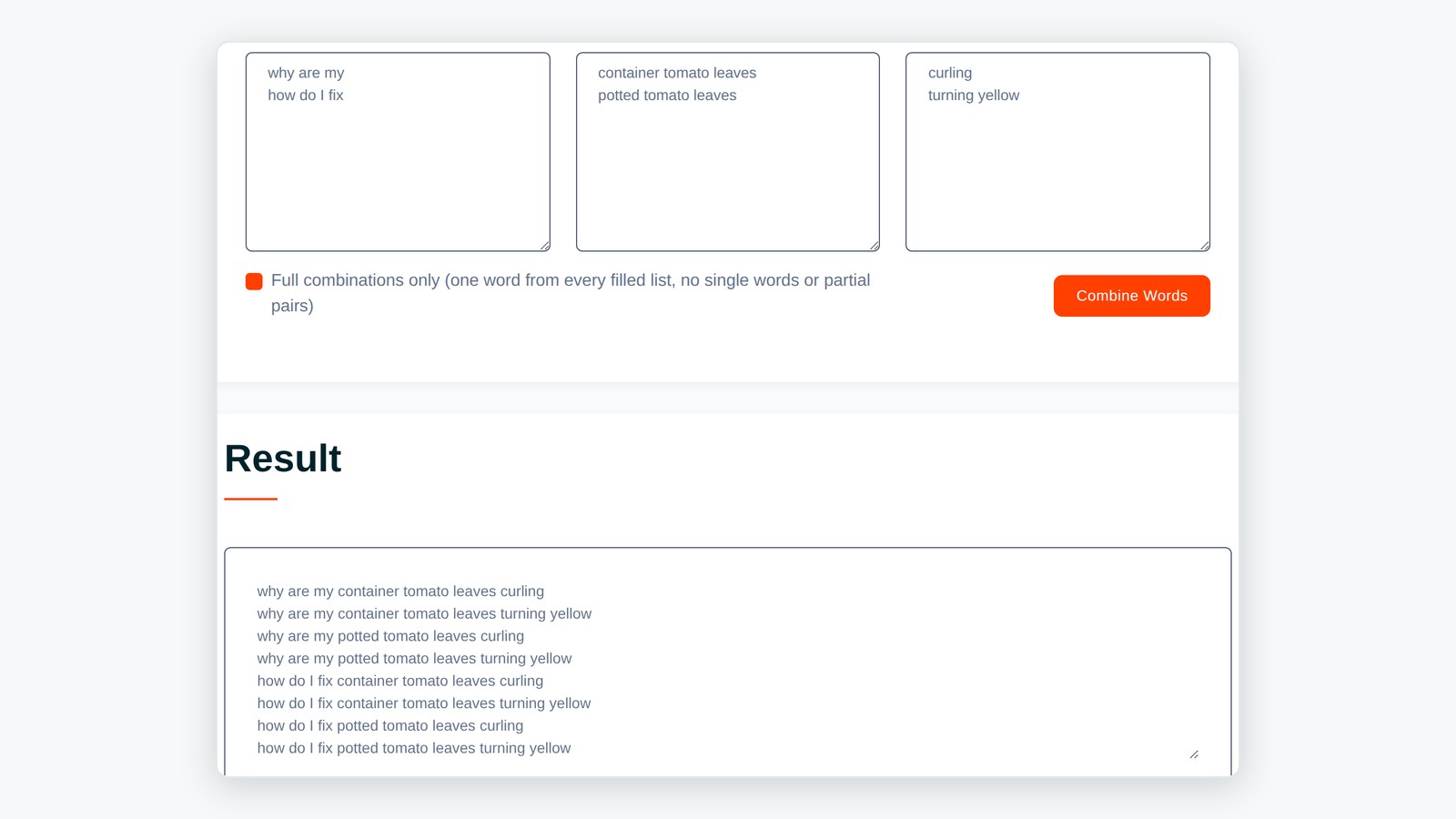
Back to the container tomato blog. In the first box, type why are my and how do I fix, one per line. In the second, type container tomato leaves and potted tomato leaves. In the third, type curling and turning yellow. The boxes have no visible captions, so go by position.
Choose Space under Separator, tick Full combinations only, then click Combine Words. When we ran it, it returned exactly 8 phrases in list order, starting with why are my container tomato leaves curling. Sort that output like this:
| Phrase | Keep | Why |
|---|---|---|
| why are my container tomato leaves curling | Keep | Reads like a real question |
| why are my potted tomato leaves turning yellow | Keep | A second problem with its own answer, so it may need its own post |
| how do I fix container tomato leaves curling | Edit | Sounds more natural as how do I fix curling container tomato leaves, but the tool keeps the order you give it |
| container tomatoes best soil | Reorder | From a separate test of three seeds by four modifiers (12 phrases); it should read best soil for container tomatoes |
Leave Full combinations only unticked and the same three lists gave 26 lines, including fragments such as why are my curling, so tick it whenever you are building phrases. Then type each keeper into Google and read the autocomplete and People Also Ask boxes before you trust it, because a phrase can sound natural and still be one nobody searches.
How to Choose One Long Tail Keyword for Each Blog Post
This rule is editorial advice, not a Google limit: one post, one main phrase, one question behind the phrase. Close variations share the post because the answer is the same. Four checks decide whether a candidate earns its own article:
- Same job. If two phrasings need different answers, they are two posts. If one answer serves both, they are one post.
- Read the results page. Search the phrase and note the search intent and the type of page that ranks, plus when and where you looked, since Google says results depend on time, place, device and history. Shops all over the results page (the SERP) while you write guides? Choose another phrase.
- Can you add something? Your own photos, a tested fix or a worked example show first-hand experience. Google's guidance on helpful, people-first content asks whether you picked a niche topic mainly for search traffic and whether you mostly restate what other pages say.
- Do you already have a post? Search Google for site:yourdomain.com followed by the phrase to see which of your indexed pages mention it. If one does, update that post instead of writing a second.
When two of your URLs compete for one query, SEO people call it keyword cannibalization. It is an SEO term, not Google's, and none of the Google pages we read names a penalty for it, but merging or separating overlapping posts can still help. A keyword map that records which post owns which phrase helps prevent it, and our keyword strategy guide shows how to build one.
Keyword variations are where this work widens coverage. Google's SEO guidance says to think about the words a searcher might use, such as charcuterie versus cheese board, and that its language systems can understand a page without the exact terms. It adds that varying your words naturally gives you more chances to show up. Three to five close phrases is a rule of thumb our long tail guide also uses, not a number from Google.
How to Use Long Tail Keywords in a Blog Post: Where Each Phrase Goes
How to use long tail keywords in blog posts comes down to keyword placement in six spots. The running example is the invented post whose main phrase is container tomato leaves curling, with supporting phrases why are my container tomato leaves curling and how to stop container tomato leaves curling. Again, it is an example, not researched.
| Place | What to do | Example |
|---|---|---|
| Title tag | Put the main phrase early, in plain words; our meta title guide covers the rest | Container Tomato Leaves Curling: Causes and Fixes |
| URL slug | Keep it short and readable; Google says keywords in the URL path alone have hardly any effect beyond appearing in breadcrumbs | /container-tomato-leaves-curling |
| Opening paragraph | Answer in the first sentences and work the phrase in naturally | If your container tomato leaves are curling, start with the checks below |
| H2 headings and H3 subheadings | Write supporting phrases as the questions the post answers; see our headings guide | Why Are My Container Tomato Leaves Curling? |
| Meta description | One natural sentence on what the reader will learn; see our meta description guide | Container tomato leaves curling? Find the cause and which fix to try first |
| Internal links | Link older related posts to the new one with descriptive anchor text; see our internal links guide | An older post on watering containers links with the anchor why container tomato leaves curl |
Write for readers first, in natural language. Google's SEO Starter Guide says excessively repeating the same words, even in variations, is tiring for users and that keyword stuffing is against Google's spam policies. It also says Google Search doesn't use the keywords meta tag, and that there is no word count target to hit and no ideal number of headings. Let the question set the length.
Close the post with an FAQ section built from real People Also Ask questions. Image alt text is a seventh place, but only when the picture needs a description. None of the Google pages we read gives a repetition or density target.
Check the Finished Post With a Free SEO Report
Publish the post, then run our free SEO report on its live address. Long Tail Keywords Usage is the card that matters, beside its single word siblings Most Common Keywords and Keywords Usage. It lists the 50 phrases of two to five words that occur most often on the page, with a tick or cross under Title, Description and Headings; Show More reveals them all.
Your main phrase ought to earn a tick in all three columns, but only if the page repeats it often enough to reach those 50 rows. If it is missing, other phrases are repeated more: information, not a failure. A tick is a plain text match, so it says nothing about ranking, and a walkthrough of a real report covers the rest of the results.
Four limits decide how far to trust the card:
- The count covers the whole page, menus and footers included; on one of our own posts, three of the first four rows were pieces of our site name.
- Accented and non-Latin letters are deleted, so cafe with an accent becomes caf and other languages break into fragments.
- A list of 52 stop words, such as how, why, for, not, to and your, and any word of two letters or fewer are dropped before phrases are built, so a title reading Curling Leaves on Container Tomatoes never ticks the row curling leaves container tomatoes. A colon or comma inside the phrase breaks the match too.
- The card is always marked passed, so a cross is a suggestion, never a failure.
The report shows no search volume, difficulty, readability score or rank history.
Track Results in Search Console and Update the Post
Google's SEO Starter Guide says some changes take effect in a few hours and others could take several months, and it suggests waiting a few weeks before assessing the work. Not every change has a noticeable effect, so no timing here is a promise.
In the Performance report, open the Pages tab, click the post's URL to filter to that page, then switch to the Queries tab to see which phrases showed it. By default the report covers the past three months, Google's help says, so compare two equal date ranges. Impressions show Google is showing the post; clicks and Average position follow.
A query you did not plan for that earns impressions is a section to add or a related post to write. Impressions without clicks point at the title and description. Nothing after several weeks is a reason to check that the page is indexed and linked from older posts, and our seven step SEO plan sets out the order of the wider work.
One caution from Google's helpful content questions: changing the date of a page to look fresh when the content has not substantially changed is a warning sign. Update the date only when the post really changed.
Long Tail Keyword Mistakes Bloggers Make
Most failures with long tail keywords for blog posts come from one of five habits.
- Treating a phrase as proof of demand. A Word Combiner line or an autocomplete prediction shows wording, not search volume. Google says predictions reflect real searches but gives no volume, so check the results page and your own impressions before you commit.
- Writing outside your experience because the phrase looks easy. Google's helpful content questions name entering a niche topic area without real expertise, mainly because you thought you would get search traffic. A low search volume phrase you cannot answer well is still a thin post.
- Turning the whole list into a content calendar. Google's questions flag producing lots of content on many topics in hopes some performs, and using extensive automation to do it. Pick the few phrases you can answer well and merge close variations into one post.
- Judging after a week. The tracking section above applies, and so does the date warning sign from Google's helpful content questions. An edited date is not a fresh post.
- Writing a new post when an older one already answers it. Search your own site for the phrase first, then update the older post. Link the two posts only when they answer different questions.
Frequently Asked Questions
Frequently Asked Questions (FAQs) is a list of common questions and answers provided to quickly address common concerns or inquiries.
How many long tail keywords should I use in one blog post?
Use one main phrase plus three to five close variations as a rule of thumb rather than a limit set by Google. Put the main phrase naturally in the title, opening and one heading, and let variations appear where the answer needs them. If two phrasings need different answers, they are two posts.
How do I find long tail keywords for free?
To find long tail keywords for blog posts for free, use Search Console queries filtered to four or more words, Google autocomplete, People Also Ask, related searches, reader questions and site search. None shows overall search volume. Our Word Combiner only joins seed and modifier lists into candidates.
Can two blog posts target the same long tail keyword?
Avoid it. Two of your URLs answering one query compete with each other, which SEO people call cannibalization, an SEO term rather than Google's. Give each post its own main phrase, merge posts that answer the same question and link supporting posts to the main one.
How long before a long tail keyword post starts to rank?
Nobody can say for a single post. Google's SEO Starter Guide says changes can show in a few hours or take several months, and it suggests waiting a few weeks before judging. Check the Performance report for impressions first and compare equal date ranges.
Do long tail keywords get enough searches to be worth a post?
Each phrase usually brings few searches, so one post may bring few visits, and we cannot show a volume figure. Judge by what you can see: impressions in Search Console, what autocomplete suggests and whether readers care about the question. A post that helps one reader well is still worth keeping.
How do I measure whether a long tail keyword is working?
In Search Console open the Performance report, go to the Pages tab, click the post's URL and switch to the Queries tab. Compare equal date ranges and read impressions, clicks, click-through rate and average position. Our free report only shows whether your most repeated phrases appear in the title, description and headings.
Can a free SEO report show search volume or difficulty for a long tail keyword?
Ours cannot. The SEO Site Checker report lists the phrases your own page repeats most and whether they appear in the title, description and headings. It shows no search volume, keyword difficulty, readability score or ranking history, so use Search Console and the results page to judge demand.




