How to Use an SEO Checker: A Free Walkthrough With a Real Report
 Kendall Chris
Oct 16 /
3 years ago
Kendall Chris
Oct 16 /
3 years ago

How to Use an SEO Checker in Four Steps
Quick answer: Here is how to use an SEO checker. Paste a full page address into the free website SEO score checker, wait for the scan to finish, read the score and the three counts (Passed, Warning, Failed), fix the failed checks first, then run the page again to confirm. It needs no sign-up.
- Enter a URL and run the scan. Paste the page address and click the button.
- Read the score and the overview. Treat the number as a to-do list, not a grade.
- Work through the failed and warning checks. Open each How to Fix box.
- Fix, run it again and compare. Note the old numbers first.
Every step uses one real report: a scan of example.com, stamped October 29, 2026. The numbers belong to that date, so a fresh run of the same page can differ a little.
What a Free SEO Checker Checks and What It Leaves Out
Knowing how to use an SEO checker well starts with knowing what it audits: one page at a time, against a fixed list. It is not a site crawler or a rank tracker, and any public page address works. Our report runs more than 60 scored checks in four sections labeled Seo, Speed optimizations, Server and Security, and Advance.
The list covers the title tag, headings, image alt text, internal links, the viewport meta tag and the language attribute. Speed numbers (page load time, First Contentful Paint, Largest Contentful Paint, Total Blocking Time, Cumulative Layout Shift) come from one lab test in a headless browser on our server, so Core Web Vitals are covered only partly: no INP, no field data. A separate AI Search Readiness block scores itself.
This free SEO audit leaves out:
- backlink data and domain authority
- keyword rankings and traffic numbers
- competitor comparisons and a history of past runs
- a noindex sent as an HTTP header (that check reads the meta tag only)
Step 1: Enter a URL and Run the Scan
Open the checker and find the field labeled "Enter a Website URL" (the placeholder says "Enter Url..."). Paste the full page address, then click "Generate Report". Type example.com without https:// and the field adds it when you click out of the box; the server accepts a bare host too.
A card reading "Analyzing your website... Please wait..." appears, with no progress bar, and then the browser jumps to /domain/ plus the address. Scan time varies: example.com took about 6 seconds in our runs, and the busier python.org pages took 16 to 20 seconds. The audit stage stops itself after 85 seconds.
A path is audited as typed. The address https://www.python.org/about/ became /domain/python.org-about, with www dropped and slashes turned into dashes. Audit the page you want to rank, so run your home page plus two or three landing pages.
Bad input gets a plain refusal: http://127.0.0.1/ shows "Address not allowed", and a name that does not exist shows "Website not found".
Step 2: Read the Score and the Overview
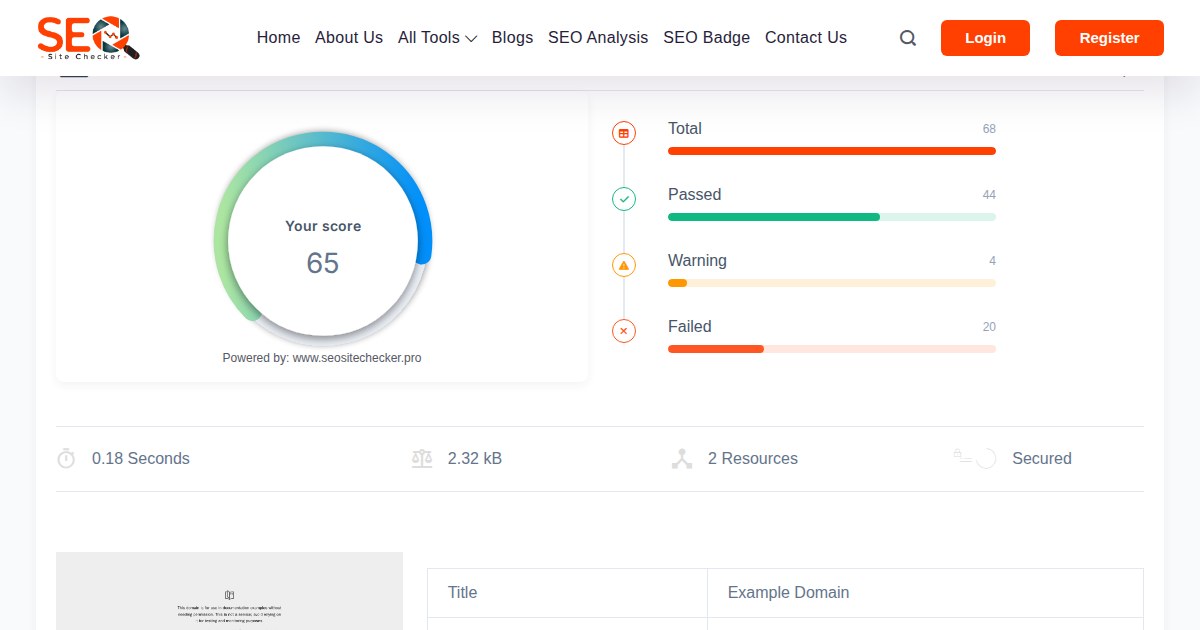
The circle labeled "Your score" is passed checks divided by total checks, times 100, and a warning counts as not passed. On example.com, 44 of 68 checks passed, which is 64.71 and shows as 65. The python.org home page passed 48 of 69 and shows 70.
Four bars sit beside the circle: Total, Passed, Warning and Failed, reading 68, 44, 4 and 20 for example.com. A bar pinned to the bottom of the screen jumps between sections, and each chip shows failed, warning and passed counts in that order: Seo reads 14, 2 and 16, Speed optimizations 5, 1 and 14.
Read the number as a to-do list. A score of 80 or above is strong, and few pages get there. It cannot promise visibility either: the Google SEO Starter Guide says following Search Essentials makes a site more likely to show up, not certain to.
What the AI Search Readiness Block Adds
A second score out of 100 sits under the overview, shown as "AI readiness 44/100" for example.com. It runs ten weighted checks: AI crawler access (does robots.txt block GPTBot, OAI-SearchBot, ClaudeBot, PerplexityBot, Google-Extended or CCBot), llms.txt, JSON-LD, one H1, a meta description, a canonical URL, indexability, content depth, Open Graph protocol tags and a declared language.
Crawler access and JSON-LD weigh 3 each, H1, indexability and content depth weigh 2 each, and the rest weigh 1, for a total of 17. A warning earns half. Content depth passes at 600 visible words, warns from 250 to 599 and fails below. A Quick wins list names the three heaviest gaps.
This block measures what a crawler can read, not whether any AI product cites you, and the report says so. The llms.txt file is optional and carries only 1 of the 17 points.
Step 3: Work Through the Failed and Warning Checks
Each check is a card with a status icon, a result sentence and a "?" tooltip. Failed and warning cards add an orange "How to Fix" button. Its popup opens with "Why this fails", which states the exact rule, then gives steps and platform shortcuts.
Description passes with exactly one meta description tag of 50 to 160 characters after trimming. None, an empty tag or two or more fail, and one tag outside that range warns. Headings pass with exactly one H1 heading. The audit reads the rendered page, so a tag added by JavaScript counts.
Guests see every result and explanation. Each detail list, such as "Missing Tags 11" on the social tags card, reads "To access the complete SEO report, please register or log in", and a free account shows it.
The report marks status, not severity, so this order is editorial advice. Fix failed checks before warnings, starting with whatever can keep the page out of search or hide its topic: a noindex tag, a missing title or H1, no HTTPS, a robots.txt that blocks the page. Then handle the description, structured data and canonical, and leave speed for last.
Google Search Central says a 4xx answer for robots.txt (other than 429) means Google assumes no crawl restrictions, and a well-linked site of about 500 pages or fewer, with little video or news content, might not need an XML sitemap. So those two failures are rarely urgent. The sitemap check only requests /sitemap.xml, so a sitemap kept elsewhere shows "No sitemap found". Our SEO checks guide explains each check.
A Worked Example: Fixing the Top Issues on a Real Report
On October 29, 2026, our scan of example.com scored 65: 44 passed, 4 warnings and 20 failed, with AI readiness at 44 of 100. It is a deliberately bare page, which makes it a clean example of how to use an SEO checker. These numbers belong to that date, because example.com is a live page that changes. Scan it yourself and compare.
| Check | What the report said | The fix | Where it goes |
|---|---|---|---|
| Headings | "does not have any H1 headings" | Add one H1 that names the topic (headings guide) | Page body |
| robots.txt and Sitemaps | "has no robots.txt file" and "No sitemap found" | Optional on a page this small, as Step 3 explains | /robots.txt and /sitemap.xml |
| Description | "missing a meta description tag" | Add one tag of about 110 to 155 characters (meta description guide) | Page head |
| Structured Data | "doesn't take the advantages of HTML Microdata or JSON-LD" | Add one JSON-LD (Schema.org) block (structured data guide) | Page head |
| Meta Canonical | "not using the Canonical meta tag" | Add one absolute rel=canonical link (canonical tag guide) | Page head |
Google's documentation on snippets and meta descriptions says Google builds snippets mainly from page content and may use the meta description when it describes the page better, so write one for the snippet it can shape. A canonical is optional too: see how Google handles canonical URLs, where no method is mandatory and Google picks a version itself when you name none. The Meta Tag Analyzer checks title and description tags.
Each check that moves to passed adds about 1.5 points on a 68-check report (1 divided by 68). We ran our own check code on a copy of the page with an H1, a 127 character description, a canonical link and one JSON-LD block. Five checks flipped to passed: the canonical link clears both Meta Canonical and URL Canonicalization, and the other three fixes clear one each. That would give 49 of 68, about 72, with AI readiness at 82.
The AI block also flagged thin content, about 152 visible words. That is a content decision, not a ten-minute edit, so do not pad a page just to pass a check.
Step 4: Fix, Run It Again and Compare
After each batch of fixes, clear your page cache, because the audit sees whatever your server sends. Then re-run the audit: paste the address again or click the orange reload icon beside the save button. A re-run replaces the old report for that address, and there is no history view, so note the score and the Passed, Warning and Failed counts first.
A guest sees "Sign up free to save & download". Once you are signed in, the button reads "Save Report" and, after you save, "Download PDF" for the PDF report. The gallery of published SEO reports gives everyone a Download PDF button.
Run a check after any meaningful change and routinely every four to six weeks. Rankings and traffic lag behind fixes, because Google has to recrawl the page, so confirm results in your own Google Search Console. Next, the six-step improvement plan goes further, and how to read an SEO audit report explains the report itself.
When the Scan Fails or a Site Blocks It
A failed scan shows an error card whose heading depends on the cause, plus a "Try Another URL" button. Very slow sites end with "Request timed out".
Bot protection is sneakier, because a report still appears. When a firewall serves a challenge page, a banner headed "This site's bot protection blocked our analysis" names the provider and says the checks graded the challenge page, so ignore that score.
If you own the site, let our scanner through while you test. The page loads in headless Chromium with its default user agent. A few small side requests, such as robots.txt and the sitemap, send Mozilla/5.0 (SEO Checker Bot), while others use a library default, so one rule on a name will not cover the scan. We publish no IP list and do not try to bypass protection.
Frequently Asked Questions
Frequently Asked Questions (FAQs) is a list of common questions and answers provided to quickly address common concerns or inquiries.
What is a good SEO score from an SEO checker?
In our report the score is the share of passed checks, so 80 or above is strong and few pages reach it, because a warning counts as not passed. Below 50 means over half the checks are not passing. Scores differ between tools, so compare within one tool.
How often should I run an SEO check?
Run one after any meaningful change to a page, and routinely every four to six weeks. Check more often only while you work through a fix list. A re-run replaces the old report for that address, so write down the score and the three counts first.
Should I fix warnings or failed checks first?
Failed checks first, because a failed check means something is missing or broken. Start with anything that can keep the page out of search or hide its topic: noindex, the title, the H1, HTTPS or a blocking robots.txt. Warnings come next, and a missing sitemap matters little on a small site.
Will fixing every issue guarantee higher rankings?
No. Fixes remove technical and on-page barriers, but rankings also depend on content quality, authority and competition, and Google says following its Search Essentials makes a site more likely to show up, not certain to. Check the effect in Google Search Console after Google recrawls the page.
Do I need an account to use the SEO checker?
No. Guests can run a scan and see the score and the result of every check. A free account also shows the detail lists inside many checks and the fix steps in the AI readiness card, and lets you save a report and download its PDF.
Can an SEO checker audit my whole site or a competitor?
It audits one page per run, so test your home page and key landing pages. Any public page address works, including a competitor's page, but you only see on-page, speed and security checks for it, not their backlinks, keywords or traffic.
Why do two SEO checkers give different scores?
Each tool picks its own checks, thresholds and weights, so one page can score 65 in one tool and 80 in another. Compare scores only within one tool over time, and judge the individual findings rather than the headline number on its own.