
Free Compare PDF Tool
Upload two versions of a PDF and download a side-by-side text comparison and a visual page comparison. Free, with no account needed.
Uploading your PDFs…
0%
Compare Two PDF Files and See What Changed
Quick answer: To compare PDF files, choose the Original PDF and the Modified PDF, press Compare PDFs, and download a side-by-side comparison of the text plus a visual PDF with changed pixels painted red. Compare your two PDFs in the tool above.
Use this free tool, no account needed, to find differences between two PDFs, such as two versions of a contract draft. The text comparison reads the text layer (the characters you can select), and the visual PDF shows layout and logos.
It takes Portable Document Format (PDF) files only. Scans, damaged files and files that ask for a password to open need preparing first.
How to Compare Two PDFs Online
Only step 3 is a setting.
- Choose the Original PDF. That is the older version.
- Choose the Modified PDF. That is the newer version. Both are required, up to 60 MB each without an account.
- Set Render DPI. Pick 100 dpi (faster), 150 dpi (balanced, the default) or 200 dpi (sharper). It changes only the visual PDF.
- Press Compare PDFs. An upload bar runs, then a Comparing your PDFs card counts elapsed time. Keep the page open; the bar is only an estimate and can sit near 80 percent.
- Download both files. The Comparison Result table lists File Name, Size and a download arrow: comparison.html is an HTML file for any browser and comparison-visual.pdf opens in any PDF viewer. Neither opens inside the page.
Order matters: Put the older file in Original PDF so added means new in the Modified PDF; swapping them swaps added and removed. Then choose your two PDFs in the tool above.
What You Get: a Side-by-Side Text Comparison and a Visual PDF
comparison.html lets you compare PDF files side by side, and comparison-visual.pdf is a pixel comparison of the rendered pages.
| File | What it shows | Use it for | Watch for |
|---|---|---|---|
| comparison.html | Two panes, PDF A (original) and PDF B (revised), with line numbers and a line-count banner. Added text is green, changed text yellow, deleted text red. | Wording, numbers and clauses. | Only 3 unchanged lines show around each change. Counts are lines, not words, and can miss a changed line that starts with two dashes. The table is up to about 1,800 px wide, so laptops and phones scroll sideways. |
| comparison-visual.pdf | Each page of the Original with the pixels that visibly differ from the Modified PDF painted red. | Layout, logos, images and stamps drawn into the same digital file. | Needs two files with the same layout, such as two exports of one document. Red marks additions and removals alike, shifted words turn red, and the file can get large. |
When comparison.html says No text differences, still open the visual PDF, because identical text does not prove an identical page.
Example: Comparing Two Versions of a Contract
We generated a three-page Services Agreement, not a real contract, and made four edits: the retainer rises from $4,500 to $5,400, notice goes from thirty days to sixty, a sentence leaves clause 4, and clause 7 is new.
The banner read 8 line(s) added, 4 line(s) removed. Four edits make 12 counted lines: two each for the retainer and notice changes, three for the clause 4 cut (two lines out, one back in), and five for the new clause: blank, heading, two body lines, blank.
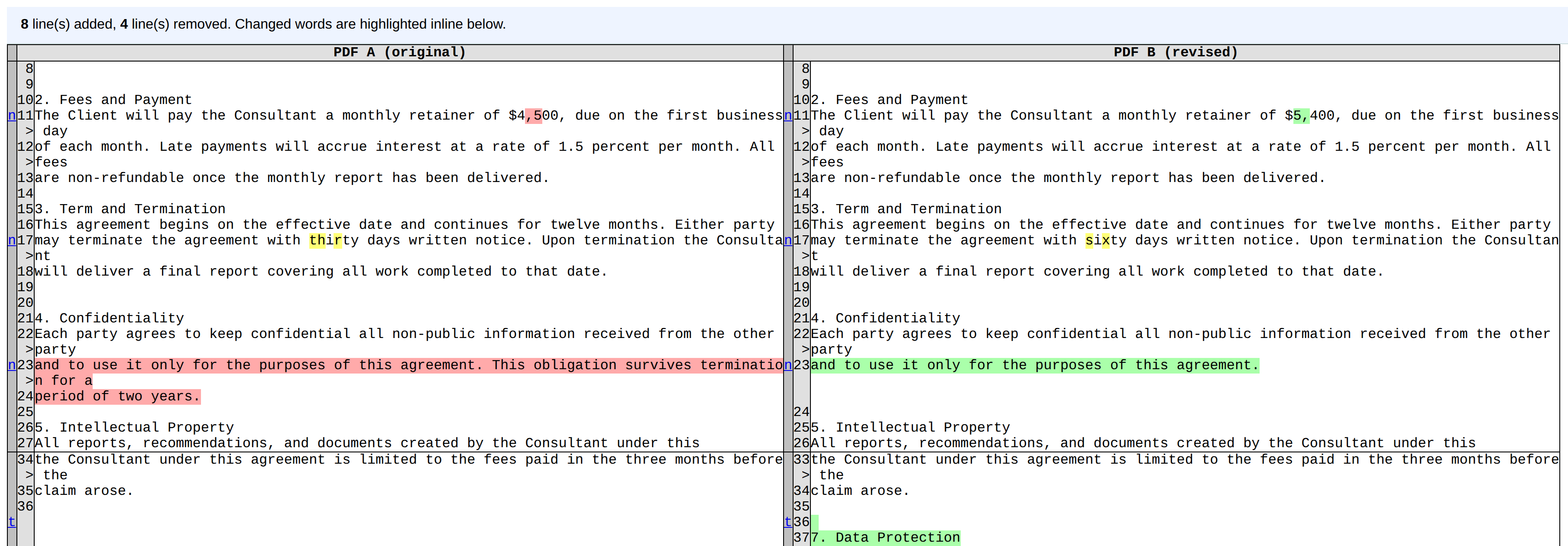
Unretouched output for the generated sample, cropped: the retainer line carries a red mark and a green one, a few letters of thirty and sixty are yellow, clause 4 is red against green, and clause 7 starts green.
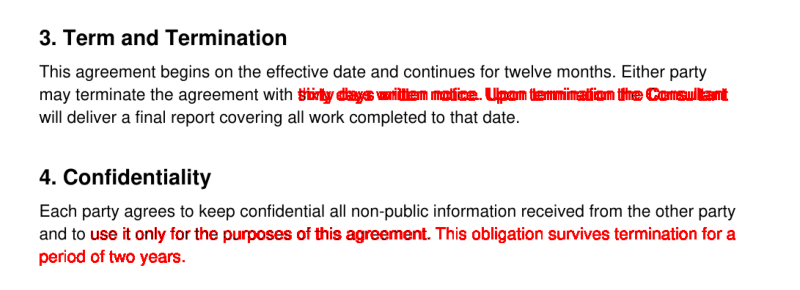
Page 2 of the visual PDF, also unretouched: red runs from the changed notice word to the line end because the shorter word slid the rest left, and clause 4 turns red a little before the cut, from drifts under half a point.
Before a long contract, run it in the tool above with one known edit and read the banner first.
What a PDF Comparison Catches and What It Misses
Every tool has blind spots; each row comes from a pair we ran.
| Situation | What you see | What to do |
|---|---|---|
| Two text PDFs with edited words or numbers | Changed lines are marked, digits included: 8 added, 4 removed on our sample. | Read each marked line. |
| A word added early, or the same text at another size | Every re-wrapped line shows as changed: 4 added, 3 removed for one added word, and a resized paragraph re-wraps its lines the same way. | Read the marked text, and use the visual PDF for layout. |
| Reordered pages | Moved text shows as removed in one place and added in another: 11 added, 11 removed, with no move detection. | Reorder pages first with the Organize PDF tool. |
| A different page count | Extra pages show as added, and the visual PDF counts missing pages as blank: 3 pages against 5 gave 12 added. | Read the added block as the new pages. |
| Letter and A4 paper sizes, one in each file | The text comparison can say No text differences while the visual PDF stretches the second file to the first file's size, doubling every line in red. | Use the same page size and orientation in both. |
A color change leaves the extracted text identical, so only the visual PDF shows it. A font change reaches the text comparison only when it re-wraps lines.
Prepare Scanned, Locked or Damaged PDFs First
Nearly every line added or removed? A damaged PDF or a text PDF against a scan gives no warning, while a locked PDF is refused with a message.
- Scans. A scanned PDF has no text layer until optical character recognition (OCR) adds one. Independent scans never line up pixel for pixel, so in our test the visual PDF was red on nearly every text line, and a text PDF against a scan showed 33 lines removed. Run each scan through the OCR PDF tool first (built on OCRmyPDF and Tesseract), pick the document's language in the Language of the text menu, and expect OCR slips to show as differences.
- Locked files. A password protected PDF (one that needs a password to open) is refused with a message asking you to remove the password, so no comparison is produced. Run Unlock PDF first with the password you know.
- Damaged files. A badly damaged file, such as one cut off mid-download, can give partial text and no visual PDF; milder damage can pass unnoticed. Try Repair PDF first, though it cannot restore missing data.
- Word files. Only PDFs are accepted, so save a .docx as a PDF first with the Word to PDF converter.
Tips for Reading the Differences
Colors and counts are shortcuts, so read around them.
- Start at the banner. Then click the small n beside each change to jump ahead (t returns to the top), and treat the count as a guide.
- Read the whole line. Inline highlighting marks characters, not numbers: changing $4,500 to $5,400 marks only a comma and a 5 on each side, so the 4 looks untouched. Check every number twice.
- Open the visual PDF. Look for red where nothing should have changed.
File Size, Speed and Render DPI
Limits first, then the timings we measured.
- Limits. Two files per run, 60 MB each as a visitor. The note beside the badge reads Get 500 MB per upload, free. No page selection, no page cap, no ignore rules for case or whitespace.
- Speed. In our tests a 3-page pair finished in about 3 to 4 seconds, and a light 200-page text-only pair took about 2 minutes at 150 dpi.
- Render DPI. DPI (dots per inch) is the resolution each page is rendered at. On the 3-page sample the visual PDF weighed 123 KB at 100 dpi, 198 KB at 150 and 272 KB at 200; the result table divides by 1,024, so it shows slightly smaller figures.
- Output size. The visual PDF is image-based, so it can dwarf its inputs: the 200-page pair, 156 KB per file, produced about 44 MB.
- One changed chapter? Use Extract PDF Pages to cut those pages from both files, then compare the extracts.
How the PDF Comparison Works
The text diff reads each file's text layer with Poppler's pdftotext in layout mode, and the Python difflib module compares the extracted text line by line. The visual diff renders both files at the chosen DPI and paints a pixel red when it differs by more than a small threshold, so very faint changes can drop out.
When to Compare PDF Documents
A PDF difference checker helps wherever document versions pile up.
- Contracts, policies and terms and conditions. See which clause or figure changed between drafts.
- Proposals, reports and proofreading. Check each revision for unintended edits.
A comparison speeds up reading but does not replace the final read or check digital signatures, and it is not legal advice.
Related Free PDF Tools
Fix what the comparison found, or prepare the next pair.
- Edit PDF: fix a wrong word or number in a PDF's text.
- Merge PDF: join revised sections into one file before comparing.
- All free PDF tools: the full list.
Frequently Asked Questions
Frequently Asked Questions (FAQs) is a list of common questions and answers provided to quickly address common concerns or inquiries.
How do I compare two PDF files for free?
What do the colors in the comparison mean?
Can I compare a PDF with a Word document?
Can I compare scanned PDFs?
Can it compare password protected or damaged PDFs?
Can I compare PDFs with different page counts or page sizes?
Does it detect moved text, reordered pages or formatting changes?
How big can the PDFs be and how long does it take?
Can I compare more than two PDFs at once?
