How to Do a Full Website SEO Audit for Free (2026 Guide)
 Kendall Chris
Aug 08 /
2 months ago
Kendall Chris
Aug 08 /
2 months ago


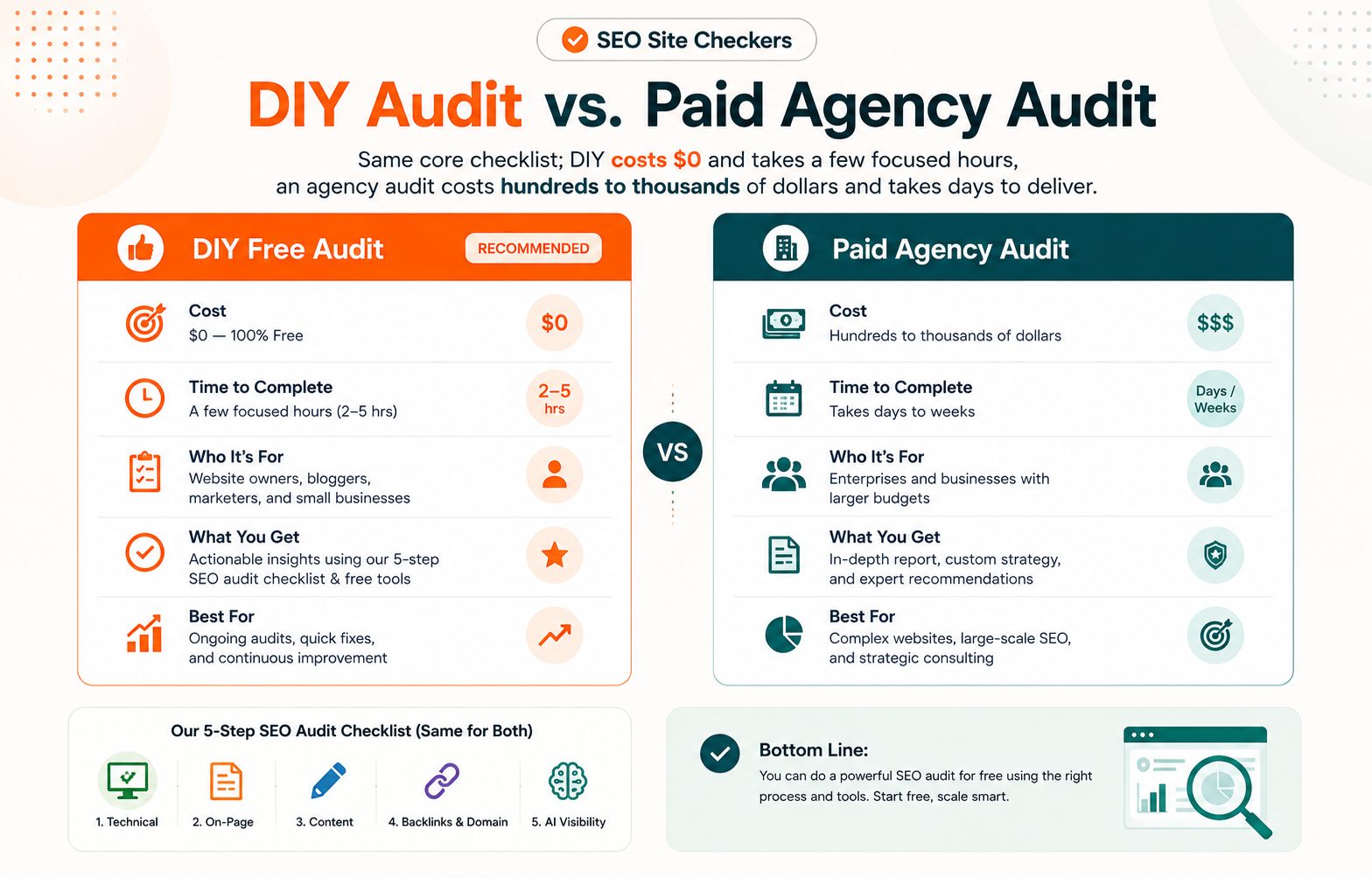
Agencies charge hundreds, sometimes thousands, of dollars for an SEO audit that's mostly a checklist run through free tools you already have access to. The methodology isn't secret, and most of the actual work is genuinely automatable, the value an agency adds is mainly in interpreting the results and knowing what to prioritize, both of which this guide walks you through directly.
This guide walks through a genuinely complete, five-part SEO audit: technical, on-page, content, backlinks and domain trust, and AI search visibility, using entirely free tools, with clear direction on what to actually fix first once you're done.
What Is an SEO Audit, and Why Do It Yourself
An SEO audit is a systematic review of a website's technical health, content, and authority signals to find what's holding back search visibility. It's less about discovering hidden magic and more about methodically checking a known list of things that commonly go wrong.
Doing it yourself works well for most sites because the actual checks are well-documented and mostly automatable with free tools. The real skill isn't running the checks, it's knowing what to prioritize once you actually have the data in front of you, which is exactly what this guide covers alongside the checks themselves.
There are a few situations where bringing in outside help makes more sense: very large sites with 10,000 or more pages, a site that's been hit with a manual penalty from Google, or a situation where you genuinely won't have time to act on findings even after they're identified. For most sites well under that scale, a DIY audit is entirely realistic, and the process below scales down comfortably for a five-page small business site just as well as it does for a larger blog or ecommerce store.
Before You Start: Set a Baseline
You can't measure improvement without knowing where you started, and this step gets skipped far more often than it should.
Set up Google Search Console if you haven't already, and note your current total clicks, impressions, and average position over the last 3 months. Do the same in Google Analytics, or whichever analytics platform you use, for organic traffic and your top landing pages.
Screenshot or export this data now. You'll want a clean comparison point when you check back in 60 to 90 days to see whether the changes you make from this audit actually moved the needle. Saving a PDF SEO report from the free SEO report generator alongside those exports gives your later comparison a fuller starting point.
For a quick website SEO check of the page itself, run it through the free SEO score checker and save the score and the list of failed checks next to your Search Console numbers. You will run it again after the fixes, so the before and after sit side by side.
Step 1: Technical SEO Audit
Technical issues are worth checking first, since they can silently cap everything else in this audit no matter how good your content is.
Start with crawlability and indexing. Check Search Console's Coverage report for pages that are excluded from the index, and confirm your XML sitemap is both valid and actually submitted, an outdated or broken sitemap is more common than you'd expect, especially on sites that have gone through a CMS change or URL restructuring without anyone double-checking the sitemap afterward.
Next, check site speed and Core Web Vitals. Run your key pages through PageSpeed Insights, and reference Google's Core Web Vitals documentation if you're not already familiar with what LCP, INP, and CLS actually measure. LCP tracks how quickly the largest visible element loads, INP measures how responsive the page feels to interaction, and CLS tracks unexpected layout shifts that make a page feel janky to use. These three metrics increasingly influence both user experience and how Google evaluates a page, and a page that fails even one of them is worth prioritizing.
Confirm mobile-friendliness by checking that your site passes Google's mobile usability checks within Search Console. With the overwhelming majority of search traffic now coming from mobile devices, a mobile usability failure is a significant, easily overlooked problem.
Check SSL and security next. Confirm your certificate is valid and correctly configured, since an expired or misconfigured certificate is a fast way to lose both visitor trust and rankings simultaneously.
DNS and hosting health matter more than most audits give them credit for. Verify your SEO Site Checker's DNS Record Checker results show correctly configured records, and confirm your SEO Site Checker's Domain Hosting Checker results match what you actually expect, especially important if you've been through any recent migration.
Finally, check for broken links and redirect chains. 404 errors and unnecessary multi-hop redirects both waste crawl budget and create a worse experience for anyone clicking through your site.
Step 2: On-Page SEO Audit
Once the technical foundation checks out, on-page factors are next, and these tend to be the fastest wins in the whole audit since most of them are quick to fix once identified.
Check your title tags and meta descriptions across your most important pages, looking specifically for anything missing, duplicated, or getting truncated in search results. These are quick wins that are often just sitting there unfixed for months or years after a site launch, quietly costing click-through rate every single day.
Confirm your header structure makes sense: each page should have one clear H1, with a logical H2 and H3 hierarchy organizing the content beneath it. A page with three H1 tags or no clear heading structure at all confuses both readers and search engines trying to understand what the page is actually about.
Check keyword usage. Your target keyword should appear naturally in the title, the first paragraph, and at least one heading, without reading as forced or unnaturally repetitive. If it feels awkward to say out loud, it probably reads that way to Google too, and to your actual readers.
Review internal linking. Confirm your most important pages are actually receiving internal links from elsewhere on the site. Orphaned pages, pages with no internal links pointing to them at all, are a genuinely common and easily fixed issue that quietly limits a page's ability to rank, since search engines rely heavily on internal links to understand which pages matter most on your site.
And check image optimization: confirm images have descriptive alt text and aren't needlessly oversized, which ties directly back into the site speed checks from Step 1.
Step 3: Content Quality Audit
This is where a lot of audits stop being purely mechanical and start requiring real judgment, since content quality genuinely can't be reduced to a checklist the same way a broken link can.
Start with search intent match. For your top pages, honestly ask whether the content actually delivers what someone searching that term would actually want, not just what you wanted to write about it. A page that technically covers a topic but misses what searchers are actually trying to accomplish will struggle no matter how well-optimized the rest of it is.
Flag thin or outdated content. Pages under roughly 300 words with no clear reason for being that short are worth a second look, as is any page containing facts, statistics, or examples that are now noticeably out of date. A page referencing "the latest" version of something from three years ago signals neglect to both readers and search engines.
Check for duplicate content, near-identical pages that end up quietly competing against each other in search results. This is a surprisingly common issue on larger or older sites where content has accumulated over years without much oversight, often the result of seasonal pages, location pages, or old campaign landing pages that never got cleaned up.
Confirm your E-E-A-T signals are actually present where they matter: author information, cited sources, and clear expertise markers, particularly important for YMYL (your money, your life) topics like health, finance, or legal content, where Google's quality bar is noticeably higher than it is for more casual topics.
For an actual standard to measure your content against, Google's guide to creating helpful, people-first content lays out exactly what Google says it's looking for, worth reading once even if you never reference it again, since it reframes a lot of vague SEO advice into a much more concrete standard.
Step 4: Backlinks and Domain Trust Audit
Off-page signals round out the traditional side of the audit, and they're often the area small site owners check least, mainly because they feel less within your direct control than content or technical fixes.
Review your backlink profile and flag anything that looks spammy, irrelevant, or potentially harmful. A backlink profile full of low-quality or unrelated links can genuinely work against you rather than helping, particularly if those links were built through questionable tactics in the past.
Check your domain authority baseline using SEO Sire Checker's Domain Authority Checker today. This gives you a concrete number to track progress against over the coming months, rather than relying on a vague sense that things are improving, which is much harder to act on or report to anyone else involved in the site.
Run a SEO Site Checker's Domain Age Checker and SEO Site Checker's WHOIS lookup check too. Both are useful for understanding your own site's context, and equally useful later if you're ever evaluating a potential backlink or partnership opportunity and want to know who you're actually dealing with before committing time or money to that relationship.
Domain age itself isn't a ranking factor, worth being clear about that, but domain trust signals compound with everything else covered in this audit. Knowing your starting point across all of these areas makes future decisions genuinely easier to evaluate, rather than guessing at whether something actually moved the needle six months down the line.
Step 5: AI Search and LLM Visibility Check (New for 2026)
This is the step most older audit guides simply don't include, and it's exactly why this needs to be part of a genuinely full audit now, rather than an optional bonus tacked onto the end.
A meaningful and growing share of search behavior runs through AI-generated answers and chat-based search interfaces now, not just traditional blue links. A page that ranks well but never gets pulled into an AI-generated summary is missing a real, growing slice of visibility that traditional rank tracking alone won't show you.
Check your structured data. Confirm your key pages have appropriate schema markup, which helps both traditional search features and AI systems correctly understand what your content actually is and covers. Article, FAQ, and product schema are the most commonly relevant types depending on your content, and missing markup here is one of the more common, fixable gaps.
Check for answer-first structure. Your important pages should lead with a clear, direct answer near the top, rather than burying the actual point under several paragraphs of preamble and throat-clearing. This matters for human readers too, but it matters even more for how AI systems extract and summarize content, since these systems tend to favor content that states its point plainly rather than building up to it gradually.
Finally, think about citability. Would an AI system summarizing your page actually have a clear, quotable, factual statement to pull from? Vague, hedge-everything, or overly promotional copy tends to get skipped over entirely in AI-generated summaries in favor of a competitor's more concrete, specific claim. Specific numbers, clear definitions, and direct statements all tend to get cited more reliably than marketing language ever does.
How to Prioritize and Fix What You Find
By this point you likely have a genuinely long list of issues, and prioritizing correctly matters more than tackling them in the order you happened to find them, since not all issues carry equal weight.
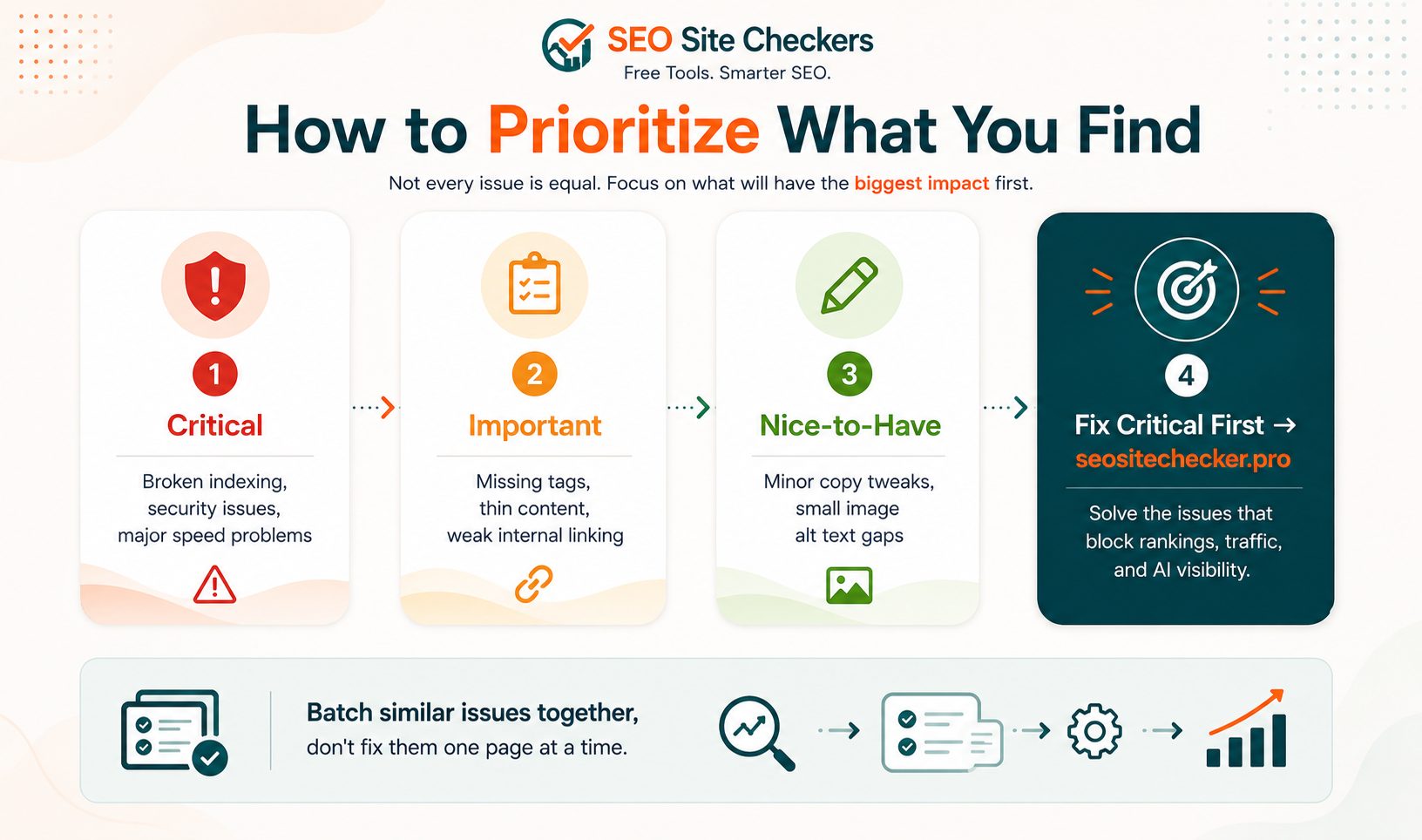
Sort every issue into three tiers. Critical issues include broken indexing, security problems, and major speed issues, these actively block rankings rather than just limiting them, and they should always jump the queue regardless of how quick or slow they are to fix. Important issues include missing tags, thin content, and weak internal linking, real problems worth fixing soon but not actively preventing a page from being found at all. Nice-to-have issues include minor copy improvements and small gaps in image alt text, worth cleaning up but never worth delaying the higher-priority work.
Fix critical issues first, always. A page that can't be indexed at all doesn't benefit from a perfectly optimized title tag, since nobody will ever see it in search results regardless of how well that tag is written.
Batch similar issues together rather than fixing everything page by page. Fixing every missing meta description across the whole site in one focused session is genuinely faster and far easier to track than bouncing between issue types on a single page before moving to the next, and it also makes it much easier to spot patterns, like an entire content category that was set up without proper metadata from the start.
Free Tools Checklist for a DIY SEO Audit
Here's every free tool mentioned in this guide, consolidated in one place so you're not hunting them down again next time.
Google Search Console and Google Analytics cover baseline tracking and indexing status. PageSpeed Insights covers site speed and Core Web Vitals. And SEO Site Checker's free SEO and domain tools cover the DNS, hosting, domain age, authority, and WHOIS checks that round out the technical and domain trust portions of the audit.
Bookmark this section specifically. Every future audit you run will need this same set of tools, and having them in one place saves real time compared to rebuilding your toolkit from scratch each time you sit down to do this again.
How Often to Run a Full SEO Audit
A full 5-step audit roughly twice a year is enough for most sites. SEO changes gradually enough that running the complete process more often than that rarely surfaces meaningfully new findings.
A lighter, technical-only check monthly, crawl errors, broken links, and Core Web Vitals specifically, catches problems faster in between full audits, since technical issues tend to be the ones that appear suddenly rather than developing slowly.
Always run a fresh audit after any major site change: a redesign, a CMS migration, or a significant content overhaul. These are exactly the moments where things quietly break without anyone noticing right away.
Quick Reference: Full SEO Audit Checklist
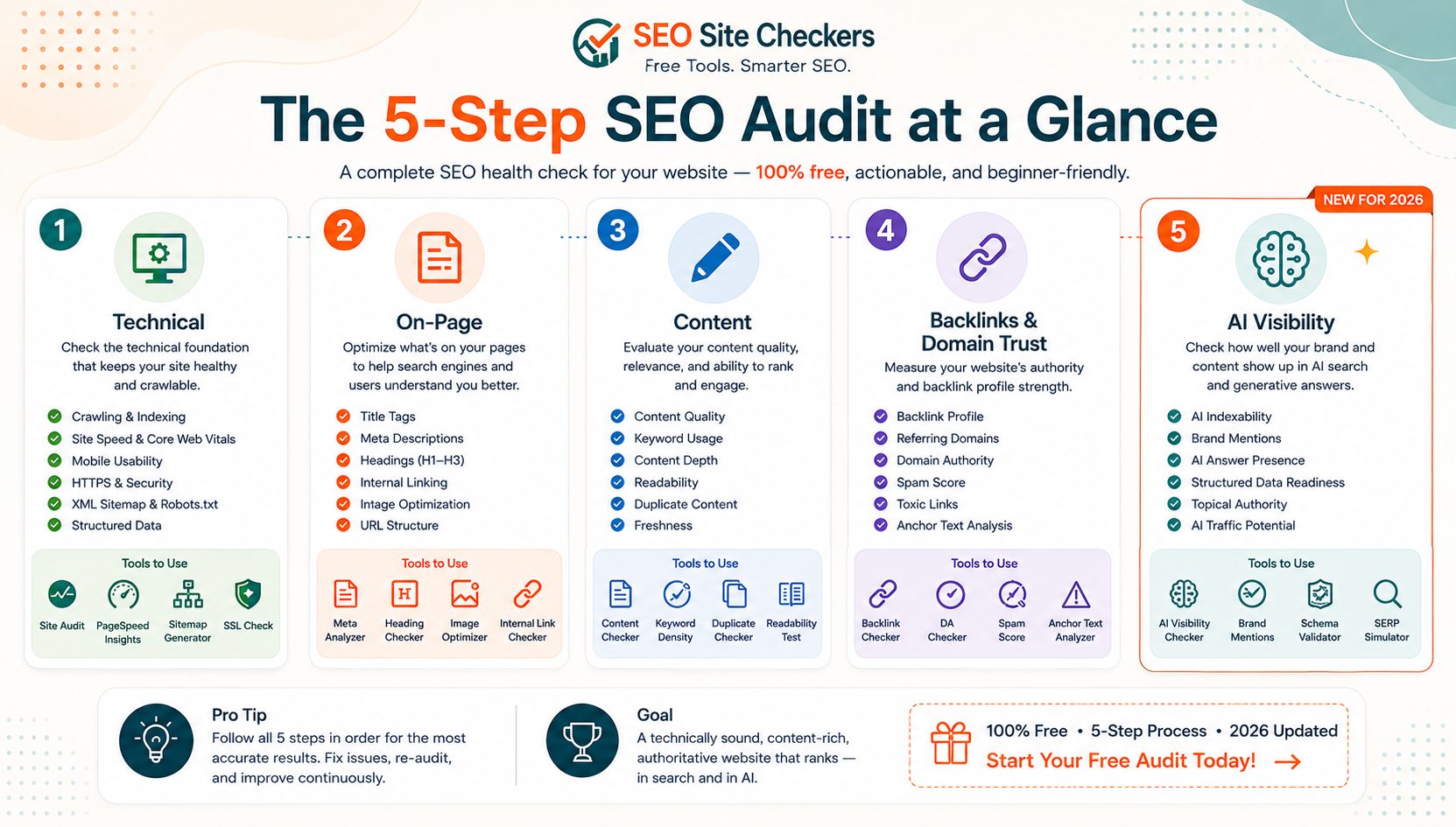
| Audit Area | What to Check | Free Tool to Use |
|---|---|---|
| Technical | Indexing, speed, mobile, SSL, DNS | Search Console, PageSpeed Insights, DNS Checker |
| On-Page | Titles, headers, keywords, internal links | Manual review, Search Console |
| Content | Intent match, thin/duplicate content, E-E-A-T | Manual review, Search Console |
| Backlinks & Domain | Link quality, authority, age, ownership | Domain Authority Checker, WHOIS, Domain Age Checker |
| AI Visibility | Schema, answer-first structure, citability | Manual review, structured data testing |
Final Thoughts
A genuinely full SEO audit covers technical health, on-page fundamentals, content quality, domain trust, and now AI visibility, all achievable with free tools and a few focused hours rather than a paid agency retainer.
The real value was never the audit itself. It's actually acting on what you find and checking back against your baseline in a few months to see what moved. An audit that produces a long document nobody ever opens again is barely worth the time it took to run.
SEO Site Checker's free SEO tools are a fast starting point for the domain and technical portions of the process, and pairing them with Search Console and PageSpeed Insights covers essentially everything this guide walks through.
Frequently Asked Questions
Frequently Asked Questions (FAQs) is a list of common questions and answers provided to quickly address common concerns or inquiries.
Can I really do a full SEO audit for free?
Yes. Every check in this guide uses free tools, Google Search Console, PageSpeed Insights, and free domain and DNS checkers, no paid subscription required.
How long does a full SEO audit take?
For most small to mid-sized sites, expect 3 to 6 hours for a complete 5-step audit, longer for larger sites with more pages to review.
What's the difference between a technical audit and a full audit?
A technical audit only covers crawlability, speed, and site health. A full audit adds on-page, content quality, backlinks, domain trust, and AI visibility checks.
Do I need coding knowledge to do an SEO audit?
No. Every tool in this guide returns a clear, readable result, and the fixes themselves (title tags, content updates) rarely require touching code directly.
What should I fix first after an SEO audit?
Always start with critical issues, broken indexing, security problems, and major speed issues, since these actively block rankings rather than just limiting them.
How often should I audit my website?
A full audit twice a year is enough for most sites, with a lighter monthly technical check to catch problems faster in between.
Is AI search visibility really part of a real SEO audit now?
Yes. A growing share of search happens through AI-generated summaries and chat-based search, making structured data and citability genuine ranking-adjacent factors.
What free tools do I need for a complete audit?
Google Search Console, Google Analytics, PageSpeed Insights, and free domain tools covering DNS, hosting, domain age, authority, and WHOIS checks cover the full process.