What Is a Domain Blacklist and How to Fix It
 Kendall Chris
Aug 30 /
1 month ago
Kendall Chris
Aug 30 /
1 month ago

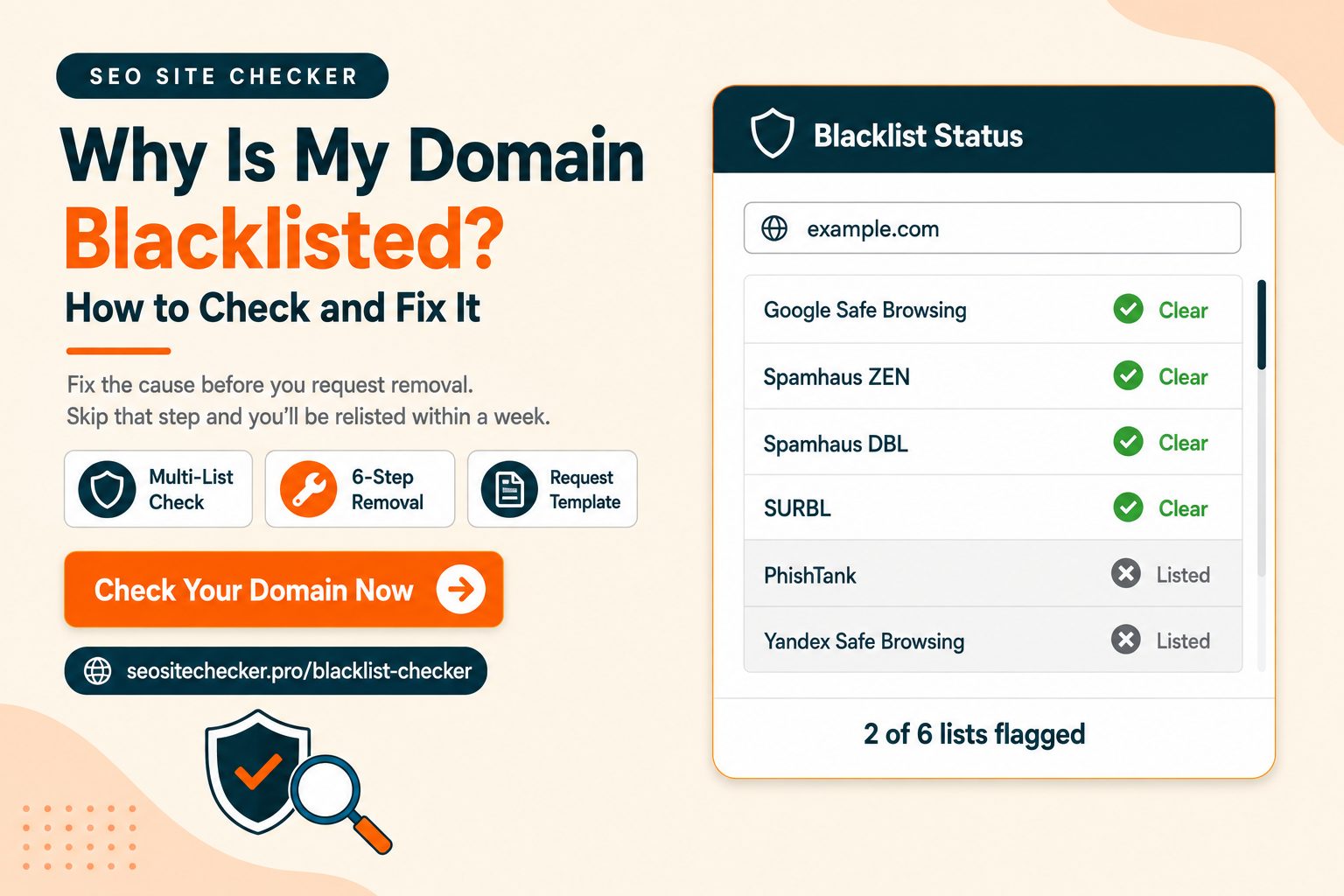
Most people arrive at this problem one of two ways. Either your emails suddenly stopped landing, replies dried up, and a test message went straight to spam. Or someone told you their browser threw a red warning before your site would load.
Both point at the same thing. Your domain is on a blacklist somewhere.
The good news is that this is fixable, and usually within days rather than weeks. The bad news is that most people fix it in the wrong order. They find the removal form, submit a request, get delisted, and land right back on the list a week later. This guide covers what these lists actually are, how to find out which ones you are on, why it happened, and how to get off in a way that holds.
What Is a Domain Blacklist and How to Fix It
A domain blacklist is a database of domain names flagged for spam, phishing, malware, or other abusive behavior. Mail servers, browsers, and security tools query these databases in real time and act on what they find, usually before any human sees your message or your site.
There are two families of list, and they do different jobs.
Email blacklists. These include DNS-based blackhole lists (DNSBLs) and URI blocklists. Names you will run into are Spamhaus, SURBL, URIBL, and Barracuda. They decide whether your email reaches an inbox at all.
Security and safe browsing lists. Google Safe Browsing is the main one. These decide whether a browser shows a full-page warning before your site loads.
Almost every article on this topic covers only the first family, because most of them are written by email deliverability companies for cold outreach teams. If you own a website, the second family matters just as much and often more. A safe browsing flag puts a red interstitial in front of every visitor you have.
If you want the technical foundation, RFC 5782, the technical specification for DNS blacklists defines how these lists are queried and structured.
The fix comes down to four steps, and the order is not negotiable:
- Confirm which lists you are actually on
- Find and fix the cause
- Request removal from each list separately
- Rebuild your reputation slowly
The rest of this guide expands each one. Step two is the one people skip, and skipping it is why delistings fail.
Domain Blacklist vs IP Blacklist
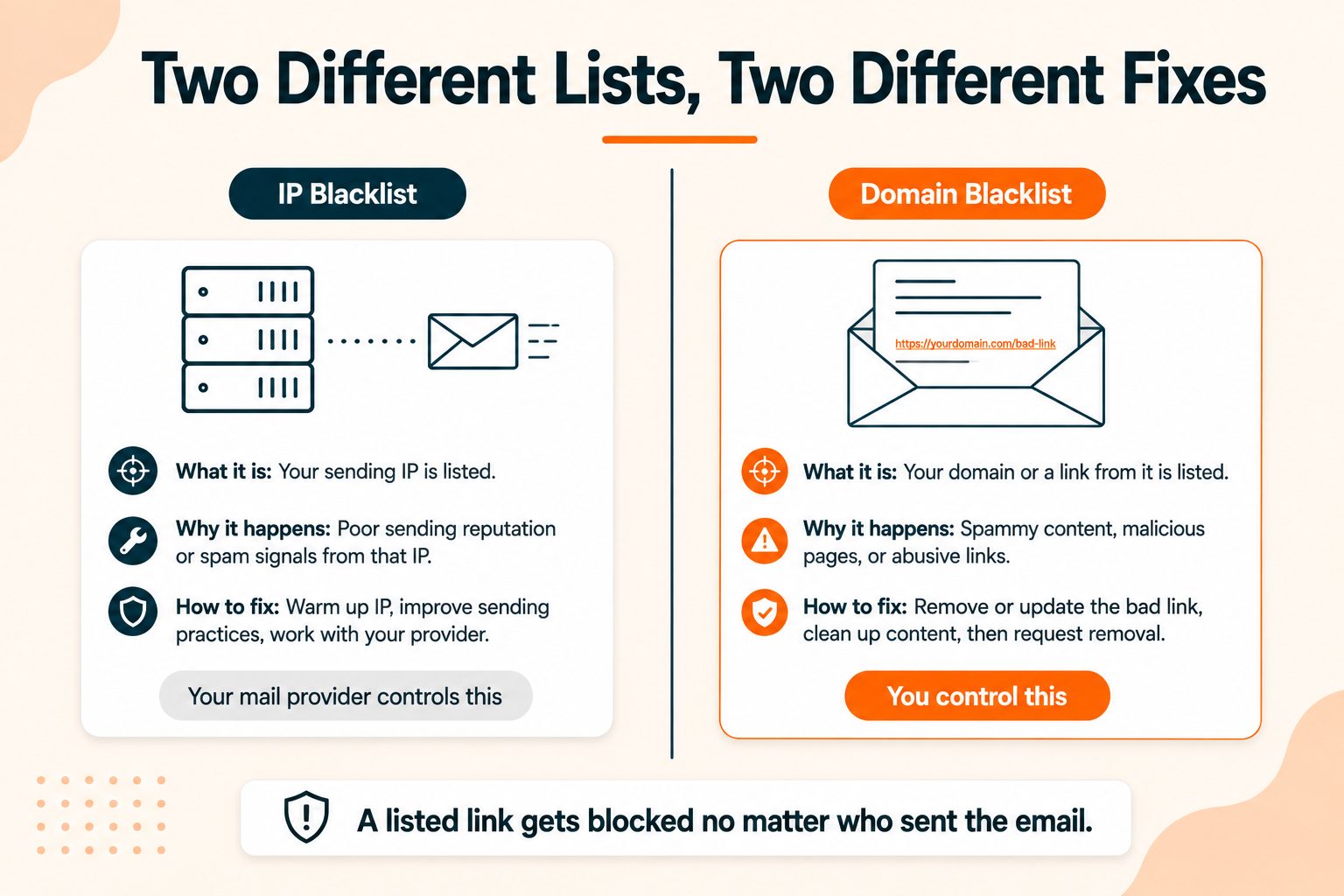
This distinction trips up nearly everyone, and getting it wrong sends you chasing the wrong fix.
An IP blacklist judges the server. It lists the IP address that sent the mail. If you send through Google Workspace or Microsoft 365, that sending IP belongs to Google or Microsoft and is maintained at their level. You will rarely have an IP problem you can do anything about.
A domain blacklist judges the domain name itself. That includes your sending domain and any domains appearing in links inside a message body. This is the one that targets you directly, and it is the one you can actually fix.
Here is the practical consequence, and it is worth sitting with. If your domain is on a URI blocklist, an email sent from any server, from any platform, with perfect SPF and DKIM, can still be rejected simply because it contains a link to your site. The sender does not matter. The link does.
| IP blacklist | Domain blacklist | |
|---|---|---|
| What it judges | The sending server's IP | The domain name |
| Where it looks | Message envelope and headers | Sender domain and links in the body |
| Who controls the fix | Often your mail provider | You |
| Examples | Spamhaus SBL, Barracuda, SORBS | Spamhaus DBL, SURBL, URIBL |
| Common for website owners | Less common | More common |
When a checker returns results, read the label on each hit. Some entries check your domain and others check the IP your domain resolves to. Those are separate problems with separate fixes. If you need to know which IP your domain points at, you can find the IP your domain resolves to in a few seconds, or use What Is My IP to check the address you are connecting from.
How to Check If Your Domain Is Blacklisted
Do not guess based on symptoms. Check properly, because the specific list determines the fix.
The process:
- Run your domain through a checker that queries multiple databases at once. A single-list lookup tells you almost nothing.
- Note every list you appear on. Each one has its own removal process, and clearing one does nothing for the others.
- Read the label on each hit. Domain listing and IP listing are different problems.
- Check Google Search Console separately. Safe browsing flags do not appear in email blacklist tools. This is the step most people miss entirely.
- Re-check after every fix. Never assume something cleared.
The free Blacklist Checker runs your domain against multiple blacklist databases and returns which lists have flagged it, with no account needed.
For the safe browsing side, log into Search Console and open the Security Issues report. Google's guide to the Security Issues report explains what each warning type means and how to request a review once you have cleaned up.
One more thing worth understanding before you panic. Not all lists carry equal weight. A Spamhaus listing affects deliverability across a huge share of mail providers. A listing on a small regional list may affect almost nothing. Knowing which list you are on tells you how urgently to act.
The Blacklists That Actually Matter
There are hundreds of lists. These are the ones worth your attention.
| List | What it targets | Impact | Removal process |
|---|---|---|---|
| Spamhaus SBL | Sending IPs | Very high | Manual review, evidence required |
| Spamhaus DBL | Domain names | Very high | Manual review, evidence required |
| Spamhaus CSS | Snowshoe spam IPs | High | Automated with conditions |
| Spamhaus PBL | Residential IP ranges | Medium | Self-service |
| SURBL | Domains in message bodies | High | Self-service form |
| URIBL | Domains in message bodies | High | Self-service form |
| Barracuda Central | IPs and domains | High | Removal portal |
| SpamCop | IPs, complaint-driven | Medium | Expires automatically in 24 hours |
| SORBS | IPs, several sub-lists | Medium | Per-list forms |
| Google Safe Browsing | Sites serving malware or phishing | Very high for a website | Search Console review request |
If you are triaging, two matter more than the rest combined.
Spamhaus is the most influential email blacklist. A listing there filters you across a very large share of providers, and their sub-lists each have different rules and recovery paths.
Google Safe Browsing is the one that matters most if you run a website rather than an outbound email operation. It does not affect email at all. It puts a warning screen in front of your visitors, and your traffic falls off a cliff.
Everything else on that table is cleanup work. Clear the two above first.
Why Domains Get Blacklisted
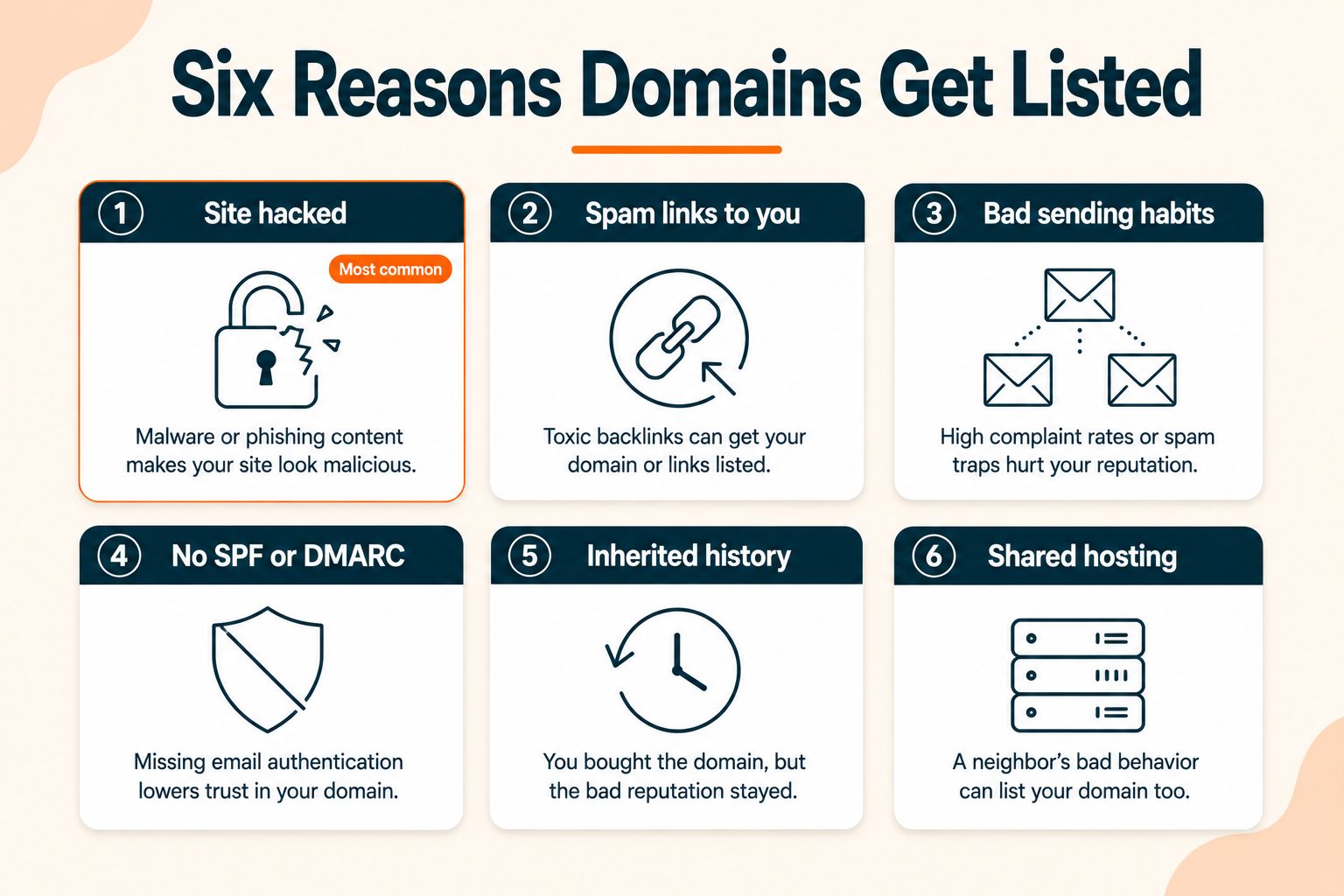
Diagnosis determines the fix, so work out which of these applies before you touch a removal form.
Your site was hacked
The most common cause for website owners by a wide margin. An attacker injects a script, adds hidden spam pages, or installs a redirect that sends visitors somewhere malicious. The site looks normal to you because the injected content often only serves to search engine crawlers or to visitors arriving from specific sources.
Spammers linked to your domain
You did nothing wrong at all. Someone else put a link to your site in their spam campaign, filters saw the association, and you got listed. Frustrating, common, and fixable, though it requires the abusive campaign to stop before a removal request will hold.
Poor email sending practices
Purchased or scraped lists, high bounce rates, repeated spam complaints, or a sudden jump in sending volume. Spam traps are the quiet killer here, since old abandoned addresses get recycled into trap networks, and mailing a list you have not cleaned in two years will eventually hit one.
Missing or weak email authentication
If you have no SPF, DKIM, or DMARC, your domain is trivially easy to spoof. Attackers send mail as you, that mail hits traps and generates complaints, and your domain gets listed for messages you never sent. A domain sitting at p=none is an open door.
Inherited reputation
You bought a domain that someone else used for spam before you. The history came with it. This also applies to recycled IP space on budget hosting.
Shared hosting neighbors
On shared IP space, another site's behavior can drag your reputation down. If you got flagged unusually early on a new domain with clean sending, check what else lives on your IP. The Domain Hosting Checker will show you who hosts a site and which network it sits on.
What Blacklisting Does to Your SEO and Your Email
Two separate consequences, and most people only think about one of them.
Email impact. Messages get rejected outright or filed straight to spam. Depending on the list and the receiving provider, this can be close to total. You will see it as a sudden collapse in replies, or as bounce messages referencing a blocklist by name.
Website and SEO impact. A Google Safe Browsing flag produces a full-page red warning before your site loads. Visitors have to click through a screen telling them your site may harm their computer, and most of them do not. Traffic drops immediately, and rankings follow, because engagement signals collapse when nobody completes a visit.
Worth being accurate here, since a lot of tool pages overstate it. A DNSBL listing on its own is not a direct Google ranking factor. Google does not consult Spamhaus when ranking your pages. The SEO damage comes from the safe browsing side and from the traffic and engagement loss that follows, not from the email blacklist itself.
Trust impact. Payment processors, ad networks, and partners run reputation checks. A listing can cost you accounts, and those conversations are harder to unwind than a delisting request.
If a hack was the cause, run a full site audit after cleanup to catch anything the attacker left behind, including pages you did not create and technical issues introduced during the compromise.
How to Remove Your Domain From a Blacklist
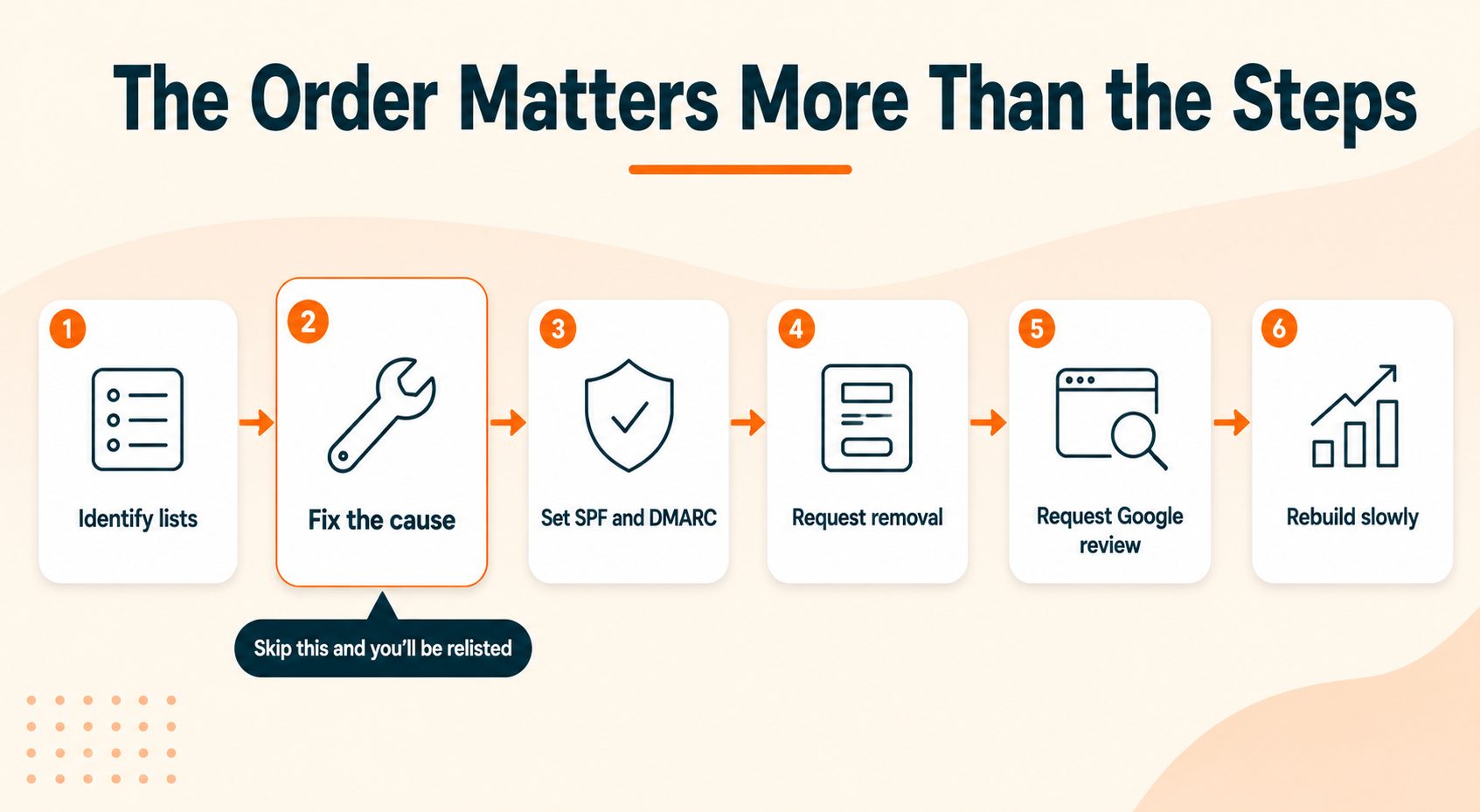
Six steps, in this order. The order is the whole point.
Step 1: Identify every list you are on
Run a multi-database check and write down every hit. Do not fix one list and assume the rest cleared. They are independent systems and none of them talk to each other.
Step 2: Find and fix the root cause
This is the step people skip, and skipping it is why most delisting attempts fail.
If your site was compromised, scan for malware, remove injected pages and scripts, patch whatever vulnerability let them in, change every password including hosting and database credentials, and check for unauthorized mail forwarders, admin users, and scheduled tasks. Attackers frequently leave a second way back in.
If the cause is sending practice, stop sending before you do anything else. Clean the list, remove unengaged subscribers, and fix whatever process let bad addresses in.
Say it plainly to yourself before moving on: delisting without fixing the cause gets you relisted within days, and repeat listings are harder to clear than first ones. Some operators treat a second listing far less generously.
Step 3: Tighten your email authentication
Set SPF, DKIM, and DMARC properly. If they already exist, verify they are correct rather than assuming.
Move your DMARC policy from p=none toward p=reject once you have confirmed every legitimate sender is passing. This closes the spoofing door that let someone else damage your domain. You can check your SPF and DMARC records directly to see what is currently published.
Step 4: Submit a removal request to each list
Every list runs its own form and its own process. Submitting to one does nothing for the others.
For Spamhaus, use the Spamhaus Blocklist Removal Center, look up your specific listing, and follow the path for that sub-list. Spamhaus DBL removals are reviewed manually and want evidence of cleanup.
SURBL and URIBL both run self-service removal pages that ask for a short description of what you fixed. Barracuda has its own portal. SpamCop clears automatically within 24 hours if no new complaints arrive, so often you do nothing there beyond stopping the cause.
Be specific about what you changed. "Removed injected redirect script, patched the plugin vulnerability, rotated all credentials" gets a faster result than a generic request to be removed.
Step 5: Request a Google review if you were flagged
If Search Console shows a security issue, clean the site completely, verify the fix, then request a review from inside the Security Issues report. Reviews take a few days and a failed review costs you more time, so do not submit until you are certain the site is clean.
Step 6: Verify and rebuild
Re-check every list you were on. Then resume sending at low volume and ramp up over weeks rather than returning to normal volume immediately.
What to Write in a Delisting Request
Removal teams want evidence, not apology. A good request has four parts.
What was listed. The specific domain or IP, and the list you are writing about.
What happened. The actual cause, stated plainly. "Our WordPress install was compromised through an outdated plugin and served hidden spam pages" beats "we may have had a technical issue."
What you fixed. Concrete actions with enough detail to be verifiable.
What prevents it recurring. The change you made so this does not happen again.
A short template you can adapt:
Domain: example.com
                Listing: [list name]
                Cause: Our site was compromised on [date] through an outdated
                [plugin/theme/component]. The attacker injected hidden pages
                serving spam links.
                Remediation completed on [date]:
                - Removed all injected files and database entries
                - Updated [component] to the current version
                - Rotated all hosting, CMS, and database credentials
                - Removed two unauthorized admin accounts
                - Confirmed clean via a full malware scan
                Prevention: Automatic updates enabled, two-factor authentication
                added on hosting and CMS, weekly malware scanning in place.
                The site has been clean and verified since [date]. Requesting
                removal.
Two cautions. Do not submit while the abusive activity is still happening, because a failed request wastes the goodwill you need. And do not fire off repeat requests in quick succession, since some operators treat that as a reason to extend a listing rather than shorten it.
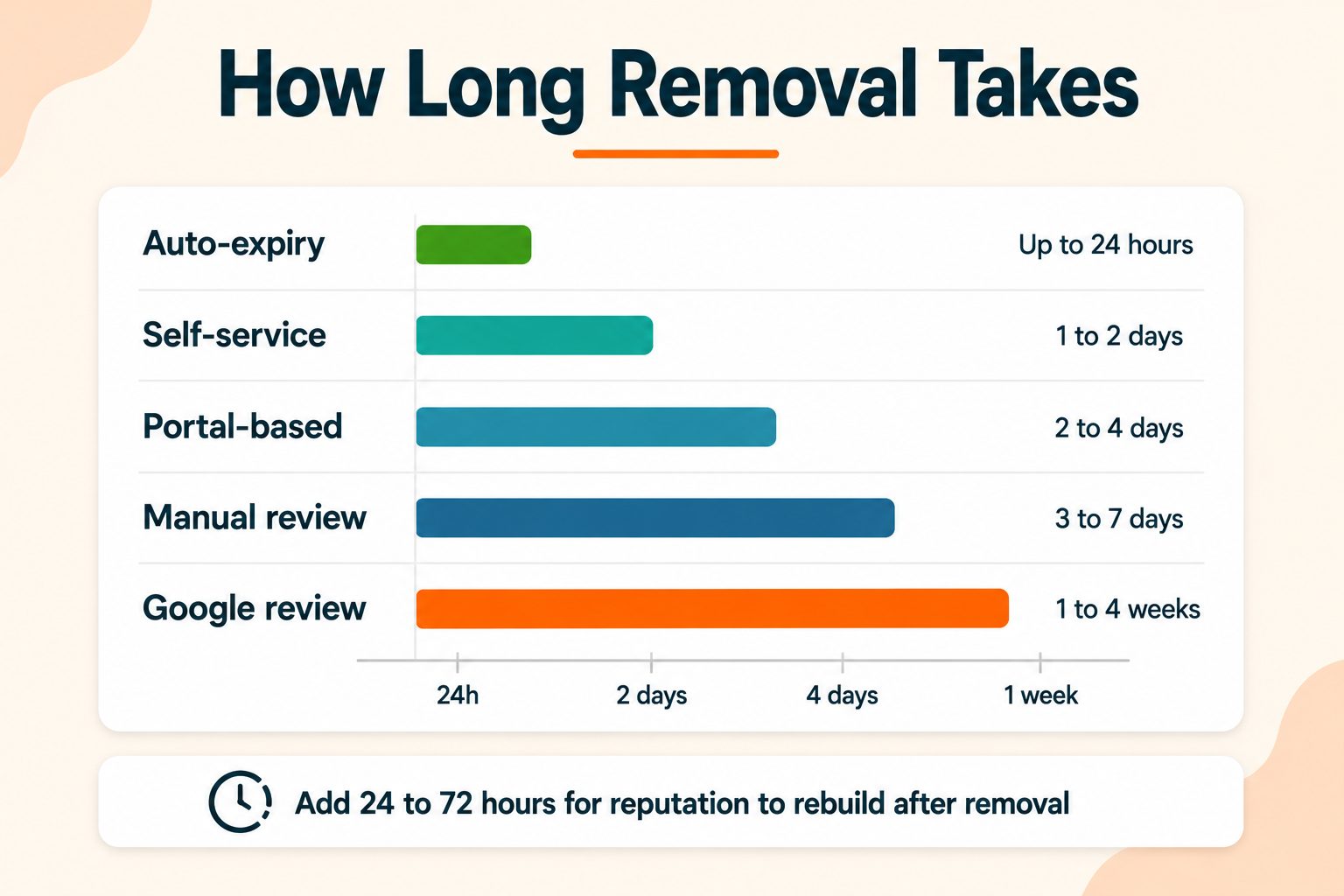
How Long Delisting Takes
It depends entirely on which list you are dealing with.
| List type | Typical timeframe |
|---|---|
| Automatic expiry (SpamCop) | 24 hours if activity has stopped |
| Self-service (SURBL, URIBL, PBL) | Hours to one day |
| Portal-based (Barracuda, SORBS) | One to three days |
| Manually reviewed (Spamhaus SBL, DBL) | One to several days |
| Google Safe Browsing review | Typically a few days |
Now the part most articles leave out. Delisting is not the finish line.
After removal, your reputation rebuilds over roughly 24 to 72 hours before deliverability normalizes, and longer if the listing ran for weeks. Mail providers do not flip a switch the moment a list clears. They observe your behavior over the following days.
Plan for that. Resume at low volume, watch inbox placement, and ramp back over two to three weeks. Going straight back to full volume the hour you clear is a reliable way to end up listed again.
How to Keep Your Domain Off Blacklists
Prevention is a routine, not a one-time setup.
Keep everything updated. CMS core, plugins, themes, and server software. Hacked sites are the leading cause of blacklisting for website owners, and outdated components are the leading cause of hacked sites.
Lock down access. Strong unique passwords and two-factor authentication on hosting, CMS, and your domain registrar. Registrar access is the one people forget and the one with the worst consequences.
Publish and maintain SPF, DKIM, and DMARC. Update them whenever you add a new sending service, because a forgotten sender failing authentication creates its own problems.
Audit third-party send permissions. Review which apps have permission to send on your behalf through your mail account, and remove the ones you no longer use.
Never buy email lists. Purchased lists are full of dead addresses and spam traps, and there is no cleaning process that makes them safe.
Sunset unengaged subscribers. If someone has not opened anything in 12 to 24 months, stop mailing them. Those addresses are the ones most likely to have become traps.
Warm new domains slowly. A brand new domain sending at volume looks exactly like a spam operation, because that is what spam operations do.
Check on a schedule. Run a blacklist check monthly rather than discovering a problem through a customer complaint. Early listings are far easier to clear than ones that have been active for weeks.
Check a domain's history before you buy it. Age and registration history are useful signals that a domain carries baggage. Run a WHOIS lookup to see registration details, and check the domain's age to spot a name that has been registered, dropped, and re-registered.
When to Stop Fighting and Move On
Not every listing is worth the effort, and it helps to be honest about which situation you are in.
Fight for your main domain. If this is your brand, with years of history, existing rankings, and links pointing at it, delisting is worth whatever it takes. Abandoning it costs far more than the cleanup ever will, and the equity is not transferable.
Consider retiring a throwaway. If it is a secondary outreach domain with no organic equity and no brand attachment, and it has been listed repeatedly, rebuilding correctly is often faster and cheaper than another delisting cycle.
One important caveat on that second option. Registering a new domain to escape a listing usually backfires if the underlying behavior has not changed. New domains face heavier scrutiny from major providers regardless of intent, and the same practices produce the same listing again, just more slowly. Fix the behavior first. The domain is rarely the actual problem.
Wrapping Up
The whole thing comes down to sequence. Check every list, find and fix the cause, then request removal. In that order.
Reversing steps two and three is the single most common reason delisting attempts fail, and it turns a problem you could have solved in three days into one that drags on for weeks. Removal teams are looking for evidence that something changed. If nothing changed, the listing comes back, and the second one is harder to clear than the first.
Check your status monthly and you will usually catch problems while they are still small.
Frequently Asked Questions
Frequently Asked Questions (FAQs) is a list of common questions and answers provided to quickly address common concerns or inquiries.
How do I know if my domain is blacklisted?
Run your domain through a checker that queries multiple blacklist databases at once, then check Google Search Console separately for safe browsing warnings. The two systems are unrelated.
What does it mean when a domain is blacklisted?
It means a security or anti-spam organization has flagged your domain for spam, phishing, or malware. Mail servers and browsers consult those lists and may block your messages or warn your visitors.
How do I remove my domain from a blacklist?
Identify every list you are on, fix the underlying cause, then submit a removal request to each list separately. Removing before fixing the cause almost always results in relisting.
How long does it take to get delisted?
Anywhere from 24 hours to several days depending on the list. Automated lists clear fastest. Manually reviewed lists like Spamhaus take longer and require evidence of cleanup.
Does being blacklisted hurt my SEO?
A Google Safe Browsing flag does, because visitors see a warning before your site loads. Email blacklists like Spamhaus are not a direct ranking factor, though traffic loss can affect rankings indirectly.
What is the difference between a domain blacklist and an IP blacklist?
A domain blacklist flags the domain name, including links inside emails. An IP blacklist flags the sending server. If you use Google Workspace or Microsoft 365, domain listings are the ones you control.
Can I check if my domain is blacklisted for free?
Yes. Free tools query multiple blacklist databases in seconds without an account. Google Search Console is also free and covers the safe browsing side.
Why is my domain blacklisted when I never send spam?
Usually because your site was hacked and served spam without your knowledge, spammers linked to your domain in their campaigns, or someone spoofed your domain because it lacked DMARC protection.
Will buying a new domain fix a blacklist problem?
Rarely. New domains face heavier scrutiny from mail providers, and if the underlying behavior has not changed, the new domain gets flagged too. Fix the cause instead.
How often should I check my blacklist status?
Monthly is reasonable for most sites, and weekly if you send email at volume. Catching a listing early makes it far easier to clear than one that has been active for weeks.