Upload a photo, wait a few seconds, download a cutout. The process is genuinely that simple now, and it works well most of the time.
What follows is the part nobody covers: the file format mistake that undoes the whole job, why certain images fail no matter which tool you use, what to check before you rely on a "free" tool, and what happens to the photo you uploaded.
How to Remove Background from Image Free (AI)
Three steps:
- Upload your image
- Wait for the tool to detect the subject
- Download the result
There is no selecting, masking or tracing involved. A trained model identifies what it thinks is the subject and cuts everything else away.
Two things to check before you upload, because they save a second attempt:
Resolution and file size. Every tool has some limit on what it accepts, and a downscaled input produces a softer edge, so check the limit before you upload. Here the limit that is checked is file size: 20 MB for guests and 60 MB with a free account. The tool does not shrink your picture. The model itself reads a 320 by 320 pixel copy of the photo and scales its mask back up to full size, so a very large original does not make the cut edge any finer.
Subject clarity. These models work by recognizing a foreground subject. One clear subject against a distinguishable background works reliably. A crowd, a flat lay with six objects, or a subject the same color as what sits behind it will produce a worse cutout regardless of which tool you pick.
Using it on this site. The AI Background Remover follows the same three steps. Drop a PNG, JPG or WebP file on the upload box or choose it with Select a File, press Remove Background, and the cutout appears on a checkerboard preview so you can see which areas are transparent. Download PNG saves it. The tool takes one image per upload, and the result is always a PNG with a transparent background, at the same pixel dimensions as the photo you sent. HEIC, GIF, BMP and TIFF files are not accepted, so convert those to JPG or PNG first.
Under the hood it runs U2Net, a general-purpose segmentation model, through the open-source rembg library. That suits a single, clear subject. It also explains the limits covered below: the model produces one automatic mask for the whole picture, and there is no brush for fixing the edges afterwards.
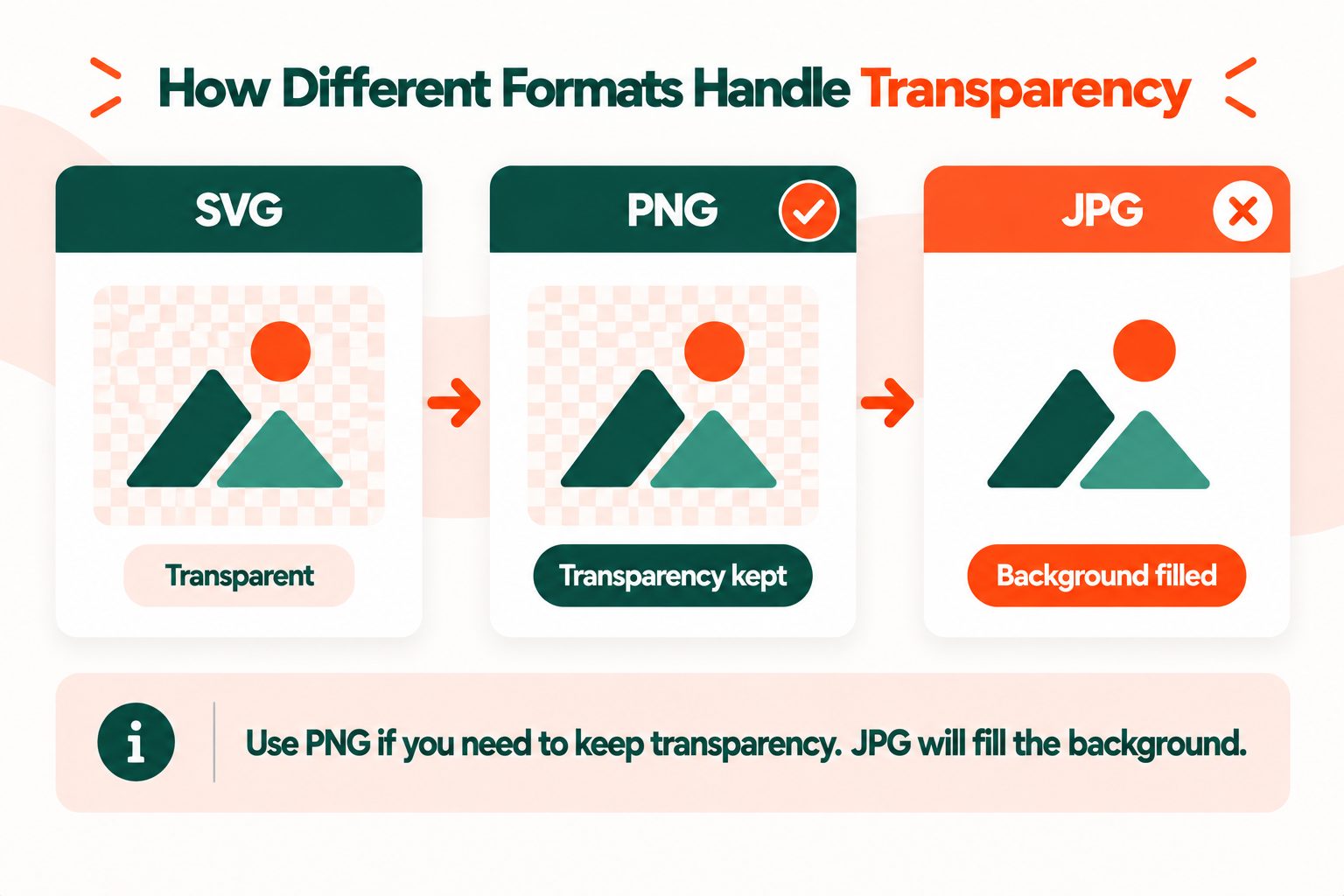
Download It as PNG, Not JPG
This is the single most common way people undo the work they just did.
JPG cannot store transparency. The format has no alpha channel, so there is no way for it to record which pixels are meant to be see-through. Save a cutout as JPG and every transparent pixel gets filled, usually with white or black. You will have removed the background and immediately replaced it with a different one.
PNG has an alpha channel. Each pixel carries a transparency value alongside its color, which is what makes a cutout possible. MDN's guide to image file types covers which formats support what, and the W3C PNG specification is the standard behind it.
WebP also supports transparency and produces smaller files, which matters if the image is going on a website. All current major browsers display it.
So the rule: download as PNG or WebP. If a tool offers JPG as an output option for a cutout, it is offering you a way to lose your own work.
The AI Background Remover only ever outputs PNG, so there is no format to get wrong at that step. If you want a WebP for a web page, run the PNG through the WebP converter, which keeps the transparent areas.
And if you have already saved one as JPG, converting it back with a JPG to PNG converter will not restore the transparency. That data is gone. You have to redo the removal.
Why Some Images Fail
Every background remover uses a similar approach and they all struggle with the same things. Knowing which category your image falls into tells you whether to try another tool or accept that this one needs manual work.
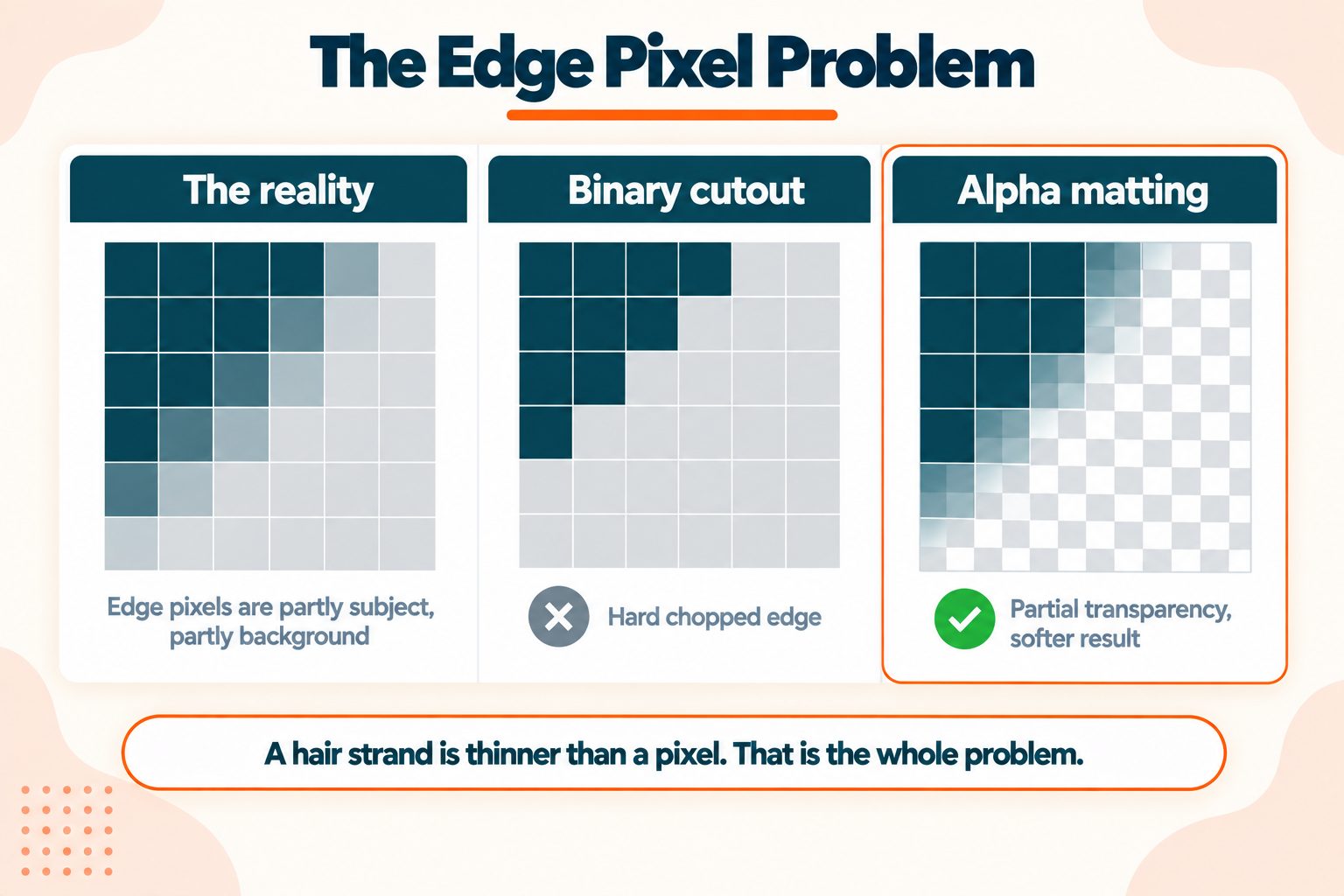
Hair and fur. The hardest case, and the one that exposes a weak edge fastest. Individual strands are thinner than a pixel in places, so an edge pixel is partly hair and partly background. A binary keep-or-cut decision produces a hard, chopped edge. An alpha matting pass can assign partial transparency to those edge pixels, but even that struggles with fine flyaway strands against a busy background. This tool does not run a matting pass. The model's soft mask is used as the transparency as it is, so expect the finest strands to be lost.
Glass and transparency. A wine glass has background visible through it. Should that be kept or removed? There is no correct answer without knowing your intent, and no model can infer it. Expect to do this manually.
Low contrast. A gray jacket against a gray wall. The model is looking for a boundary and there barely is one. Better lighting or a different backdrop at capture time solves this. No tool does.
Motion blur. Blurred edges have no clean boundary, which makes it the hair problem all over again.
Multiple subjects. The model decides for itself what counts as the subject, and you cannot point at the one you want. If you want two people kept and a third removed, you are outside what automatic removal does. One workaround is to paint the extra person out first with the AI Object Remover, then remove the background from that result.
Shadows. A cutout keeps only the subject, so the shadow it cast usually leaves with the background and a product can look like it is floating. This tool does not add a shadow back, so if you need one, add a soft shadow under the subject in an editor afterwards.
The practical takeaway: a photo taken with the cutout in mind, meaning one clear subject, good light, and contrast against the background, usually cuts out cleanly. A difficult photo gives a poor result whichever tool you use.
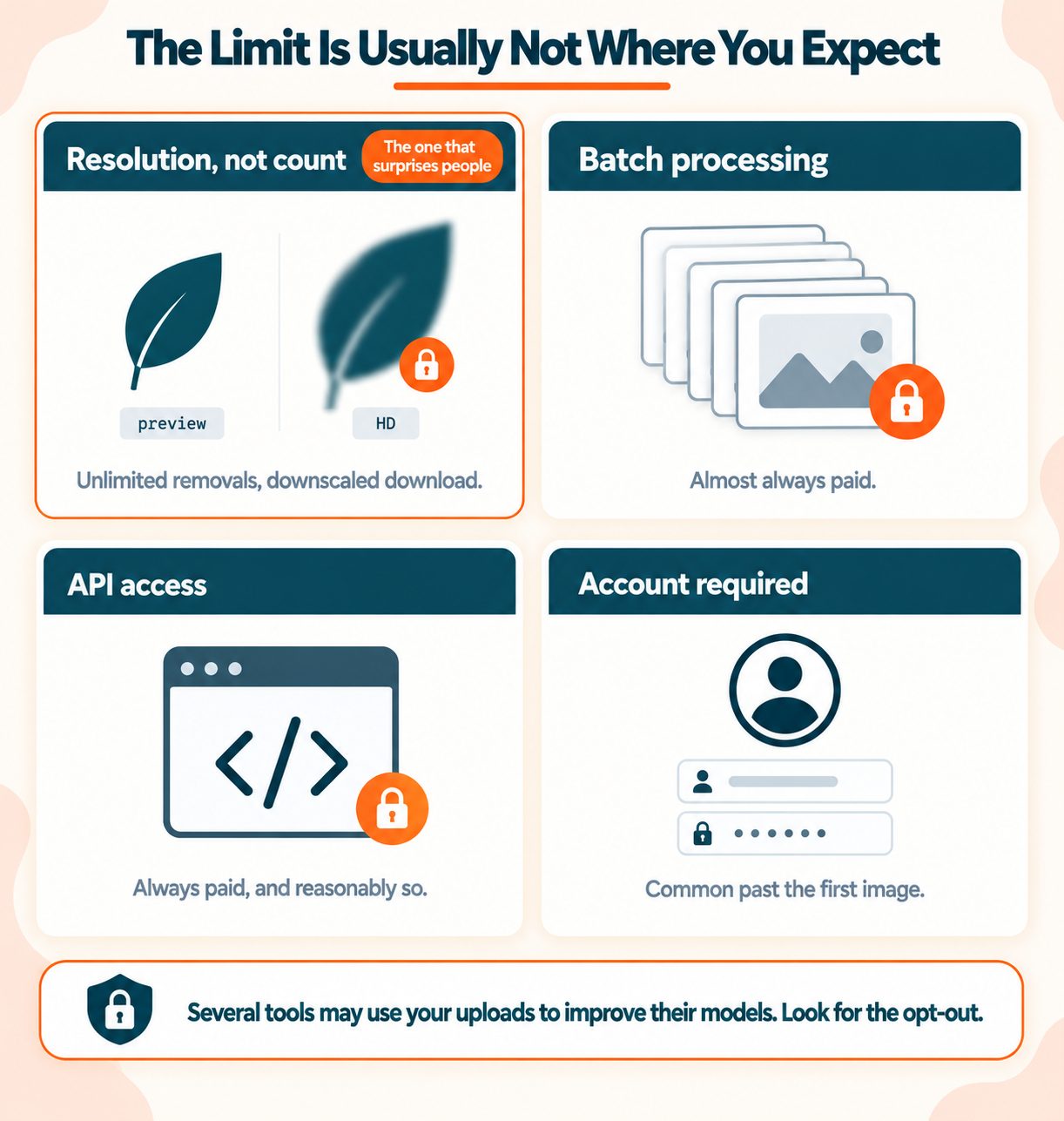
What "Free" Actually Means
Worth knowing before you are three steps into a workflow, because the limits are not where most people expect.
Check the size of the file you get back. If a cutout looks soft when you open it, compare its pixel dimensions with the original: a downscaled download is one possible cause. Here, the PNG comes back at the same pixel dimensions as the photo you uploaded.
Look for a watermark. Open the result at full size and check the subject and the corners. This tool adds none.
Find out whether an account is required. The AI Background Remover works without one. Guests can upload a file up to 20 MB, and a free account raises the limit to 60 MB.
Count the files per upload. This tool takes one image at a time, so forty product photos mean forty uploads. Know that before you build a workflow around it.
A segmentation model does real work on every image, so limits on file size, file count and account are normal for this kind of tool. What matters is knowing them before you commit a workflow to one.
What Happens to the Photo You Upload
The part almost nobody reads. Whatever service you use, an upload puts a copy of your photo on someone else's server, and what happens to that copy is worth a moment's attention.
Two questions decide it: whether the service can use your image to improve a model, and how long it keeps the copy. The answers sit in the terms and on the upload page, and they are easy to skip past.
For a photo of a chair, the answers hardly matter. It is a different question for:
- A photo containing other people who did not agree to it
- Product images before launch
- Anything with a document, screen or whiteboard in the background
- Client work covered by a confidentiality agreement
- Photos of children
Three things worth doing before uploading anything sensitive. Look for an opt-out at the point of upload, and in the terms of service. Check the retention period, meaning how long your copy stays on the server. And for genuinely confidential images, use desktop software, since local cutout quality has improved considerably and the photo is processed on your own computer.
On this site. The AI Background Remover processes your photo on our server, in a container that runs a fixed, pre-trained model on it and does not retrain that model with your image. The uploaded copy is deleted as soon as processing ends, and the finished PNG is removed about two hours later.
When AI Removal Is Not the Right Tool
Marketplace listings with strict specs. Amazon, eBay and similar have specific requirements for main product images covering background color, subject fill percentage and borders. An automatic cutout gives you a transparent PNG. It does not give you a compliant listing image. Check the platform's own requirements first.
Anything going to print. Automatic edges look fine at screen resolution and considerably less fine at 300 dpi. Print work usually needs a manual path.
Complex compositing. If the subject is going onto a new background with matched lighting and a realistic shadow, the cutout is step one of several.
Legal or evidential images. Altering a photograph someone may rely on is its own problem and has nothing to do with tool quality.
After Removal: Size and Weight
Two things worth doing to the cutout before you use it.
Resize the photo to the dimensions you will actually display before you remove the background, not after. A cutout 4000 pixels wide sitting in a 600 pixel space wastes most of the file. Run the original photo through the Image Resizer first and cut out the smaller copy. The Image Resizer does not keep transparency, so resizing a finished cutout would fill the see-through areas back in. Resizing before compressing also gives a better result than the reverse.
Compress it. PNG files are considerably larger than JPGs at the same dimensions, because PNG compression is lossless and a cutout also stores a transparency value for every pixel. A cutout is often the heaviest image on a page. The Image Compressor keeps the transparent areas and usually cuts the weight substantially, so compare the result with the original before you publish it. Leave its optional "Convert my images automatically" switch off, or choose PNG or WebP, because the JPEG choice fills the transparent areas with white.
That matters more than it sounds if the image is going on a website. Images are typically the largest single contributor to a slow page, and a transparent PNG is a heavy image by default. Page speed and Core Web Vitals cover why that weight shows up in your rankings.
Wrapping Up
Three things worth carrying away.
Save as PNG. JPG has no transparency and saving to it silently undoes the removal.
A difficult photo struggles everywhere. Hair against a busy background, glass, and low contrast are limitations of the approach rather than of any one tool. Better lighting and a cleaner background at capture time beats switching tools.
Know where your upload goes. Check how long a service keeps your copy and whether it can use your image to improve a model. For photos containing other people or confidential material, that is worth a moment's attention.
Frequently Asked Questions
Frequently Asked Questions (FAQs) is a list of common questions and answers provided to quickly address common concerns or inquiries.
How do I remove a background from an image for free?
Upload it to an AI background remover, wait a few seconds, and download the result as a PNG to preserve the transparency. On this site, open the AI Background Remover, choose a PNG, JPG or WebP file, press Remove Background and then Download PNG.
Why does my transparent background turn white?
You saved it as JPG. That format has no alpha channel, so transparent pixels get filled. Save as PNG or WebP instead.
What is the best format for a transparent image?
PNG for compatibility, WebP for smaller files. Both support transparency. JPG does not.
Why does the tool struggle with hair?
Individual strands are thinner than a pixel, so edge pixels are partly hair and partly background. A hard keep-or-cut decision produces a chopped edge.
Can I remove backgrounds from multiple images at once?
Not with this tool. The AI Background Remover takes one image per upload, so a batch means one upload per photo.
What happens to the photo I upload to a background remover?
Check the terms for how long the service keeps your copy and whether it can use your image to improve a model, and look for an opt-out before uploading anything sensitive. On this site the AI Background Remover processes the photo on our server, deletes the uploaded copy when processing ends, and removes the finished PNG about two hours later.
Why is my download lower quality than the preview?
The file you saved may have been downscaled, so compare its pixel dimensions with your original. The AI Background Remover on this site returns the PNG at the same pixel dimensions as the upload, so softness at the edges comes from the model mask, which is calculated on a small copy of the picture and scaled up, rather than from shrinking.
Can I remove a background without uploading the photo?
Not with this tool, which uploads the photo to our server for processing. Desktop software does it locally, which is the better option for confidential images or anything containing other people.
How do I put a new background behind the cutout?
Save the cutout as PNG, then layer it over a new image in any editor. The transparency is what lets the new background show through.
Why does my product look like it is floating?
The shadow was removed along with the background, and this tool does not add one back. Add a soft shadow under the subject in an editor.
What files can I use with the AI Background Remover?
PNG, JPG and WebP files, one image per upload. The size limit is 20 MB for guests and 60 MB with a free account. The result is always a PNG with a transparent background. HEIC, GIF, BMP and TIFF files are not accepted, so convert those to JPG or PNG first.