
Free AI Background Remover
Upload a photo and download the cutout as a transparent PNG. Free, no account needed.
What Is an AI Background Remover?
Quick answer: An AI background remover finds the main subject in a photo and makes everything behind it transparent. Try it on your own photo: add a JPG, PNG or WEBP in the box above, press Remove Background and download a PNG.
Artificial intelligence does the work here: U2-Net, a machine learning neural network for image segmentation, picks out the most prominent object, meaning whatever draws the eye first. Instead of tracing outlines with edge detection, it scores each pixel for belonging to the object, and those scores become the PNG's alpha channel, its per-pixel transparency.
We run it through the open-source rembg library on our own server. The U2-Net paper calls the task salient object detection.
How to Remove the Background From an Image
- Add your photo. Drop the file on the box headed Drop your image here, or press Select a File.
- Press Remove Background. Expect roughly 6 to 12 seconds, or 12 to 18 seconds at 24 megapixels in our tests. The button changes to Working... but there is no progress bar, so keep the tab open.
- Check the result. Scroll down. The Result card, with the cutout on a checkerboard, sits below the form.
- Download the PNG. Download PNG saves it under your file name, lowercased with hyphens, plus -no-bg.png, and Remove another starts over.
Tip: With no settings to tweak, a rough edge usually calls for a different photo.
Which Photos Cut Out Cleanly and Which Do Not
We ran 22 real photos through this AI background remover, many picked for being hard. Eight of them:
| Photo | What came back |
|---|---|
| Sneakers on a wood floor | Both shoes kept, floor and shadows gone. |
| Mug against a blurred wall | Clean edge. |
| Golden retriever against leaves | Good, wispy fur partly kept, thin dark fringe. |
| Three friends outdoors | All kept, faint ghost smears beside an arm. |
| White cup on a white background | Shape kept, soft edges, haze inside the handle. |
| Dark curly hair on a dark background | Top of the hair cut away. |
| Pouring glass bottle at sunset | Body and hand mostly erased, neck and water kept. |
| Landscape with no clear subject | Almost empty file, no warning. |
Soft edges and ghosts share one cause: the mask keeps all 256 alpha levels instead of cutting hard, so weak detections turn partly transparent. A clear subject with contrast usually cuts out well, yet a bike frame vanished with all its spokes.
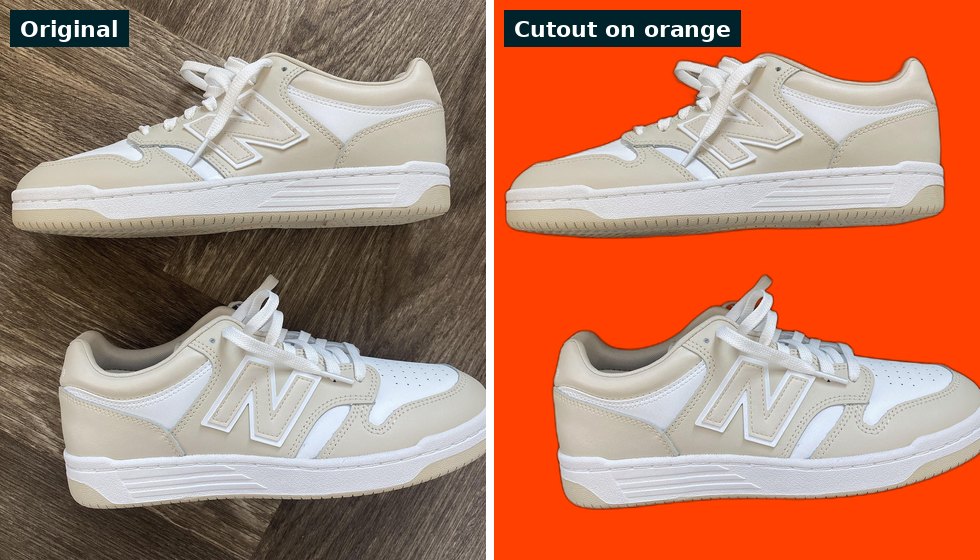
Unretouched run on orange; a faint dark rim remains.
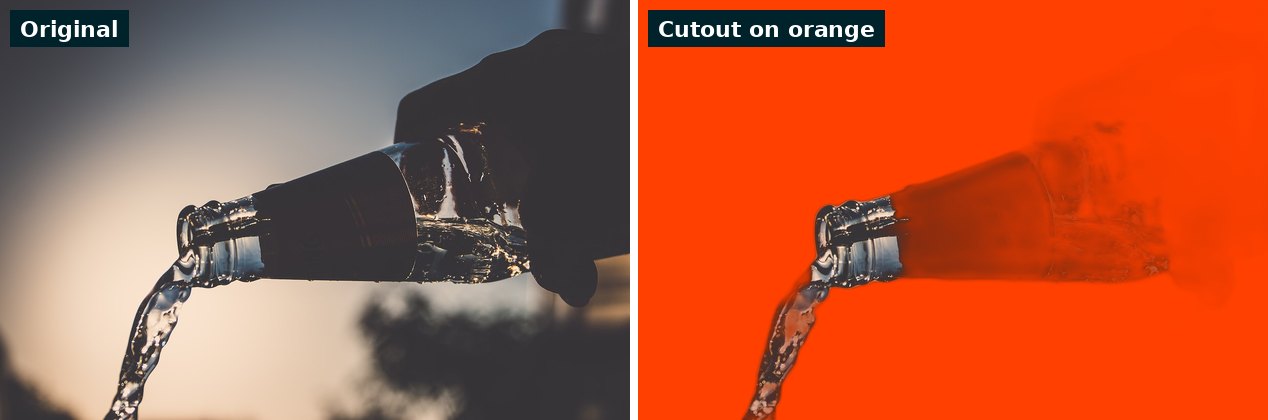
Also unretouched: the dark body and hand faded.
Transparent Background PNG: Size, Format and File Limits
- Format. You get a PNG the same size as the photo looks when you open it, not cropped to the subject. Sideways phone photos come back upright, pixel dimensions swapped.
- File size. PNG is lossless, so the cutout often outweighs the JPG: a 1.3 MB sneaker photo became a 3.4 MB PNG, and 24 megapixel photos reached roughly 7 to 14 MB in our tests. You can compress the file afterward.
- Upload limit. 20 MB per file, or 60 MB with a free account. Pictures over 36 megapixels are refused with a message that names their pixel size.
- Not a JPG. A JPG has no transparency, so saving the cutout as one fills the clear area with solid color. The image file type guide shows which formats keep transparency.
Tips for a Cleaner Background Removal
- Pick contrast. Low contrast and similar colors blur the mask: dark curly hair on a dark background lost its top.
- Keep one subject. Subject detection keeps the most prominent foreground object: a laptop survived, but the hands, phone and cup vanished.
- Leave room. A bottle close-up that filled the frame lost part of its lower third.
- Preview on your final color. Edge pixels come back darkened in step with their transparency, so expect a thin dark fringe on a light backdrop. Hair showed a faint gray halo on a dark one.
What This Free Background Remover Does Not Do
- One image per run. No batch.
- PNG only. This background removal tool has no color picker or new background, so add a backdrop in your own editor.
- No touch-up. No background eraser, so you cannot restore a lost patch or choose which object stays.
- Stills only. No video or GIF, and an animated WebP gives one frame.
- No warning. A lake landscape came back about 96 percent see-through, yet Download PNG still appeared.
After the Cutout: Related Free Tools
Cutout PNGs run large, so shrink them first.
- Image Compressor: switch on Convert my images automatically, then pick WEBP or AVIF to keep transparency; our 3.4 MB cutout became a 375 KB WebP.
- AI Watermark Remover: removes text or logos you paint over.
- AI Object Remover: erases a person or object.
- Guide to removing a background: PNG versus JPG, and why hair and glass fail.
- Ecommerce SEO checklist: image alt text, file names and compression for product photos.
- All free AI tools: text and image tools.
Frequently Asked Questions
Frequently Asked Questions (FAQs) is a list of common questions and answers provided to quickly address common concerns or inquiries.
How do I remove the background from an image for free?
Is this AI background remover really free, and do I need an account?
Which image formats and sizes does it accept?
Will the cutout keep its quality, and why is the PNG so large?
How accurate is it with hair, fur and glass?
How do I remove a white background from an image?
Can I change the background color or add a new background?
Can I remove backgrounds from many images at once?
