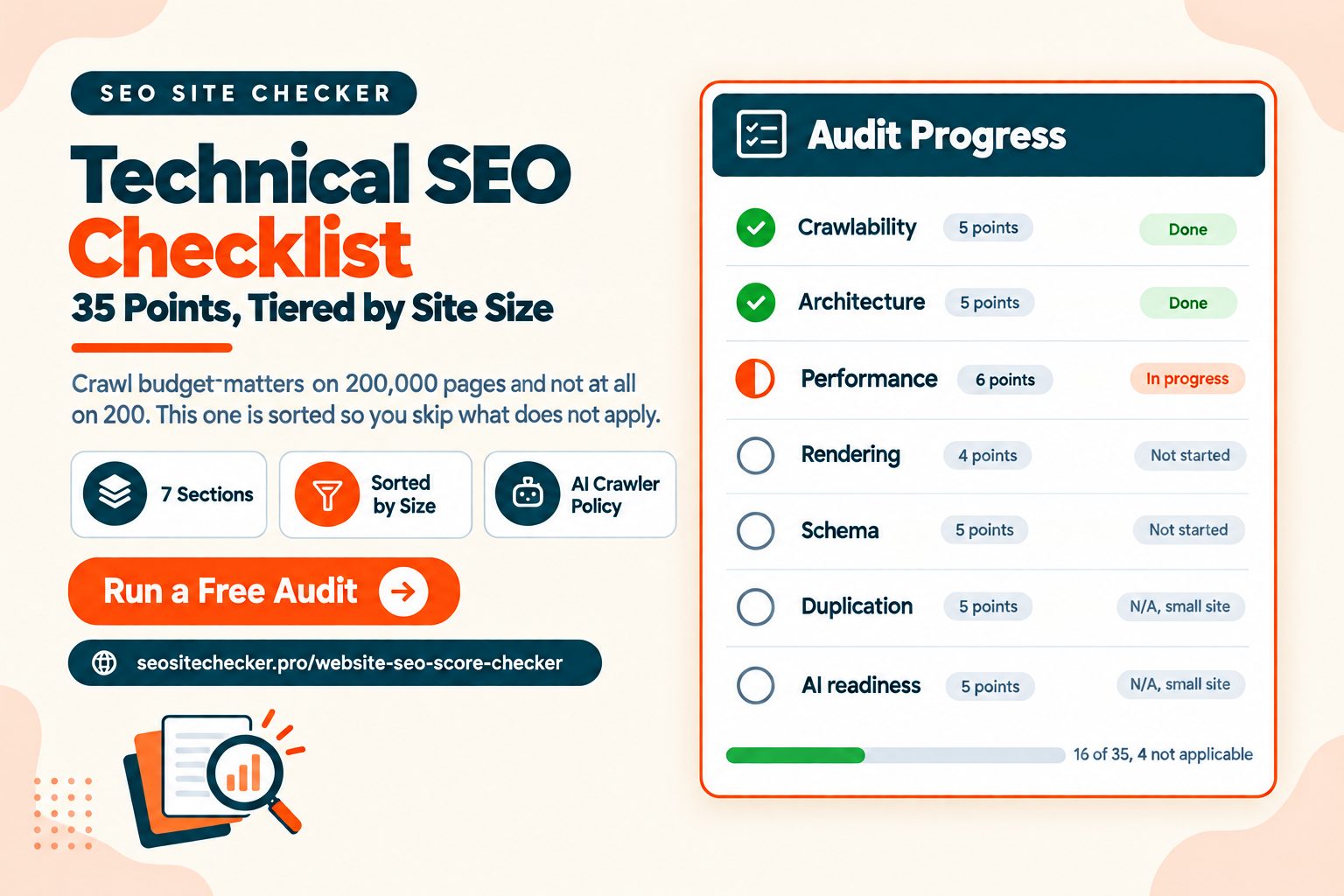
You can find twenty technical SEO checklists in about a minute. Nearly all of them hand you thirty items in a flat list with no indication of which ones matter for a site your size.
Crawl budget is irrelevant on a 200-page site and decisive on a 200,000-page one. Hreflang matters to almost nobody and enormously to a few. A flat list treats those the same, which is why most people work through half of one and stop.
This checklist is grouped by system, flags which items apply at which site size, and separates one-time setup from things that need watching. It also covers AI search readiness, because the same technical foundations now serve two retrieval systems rather than one.
How to Use This Checklist
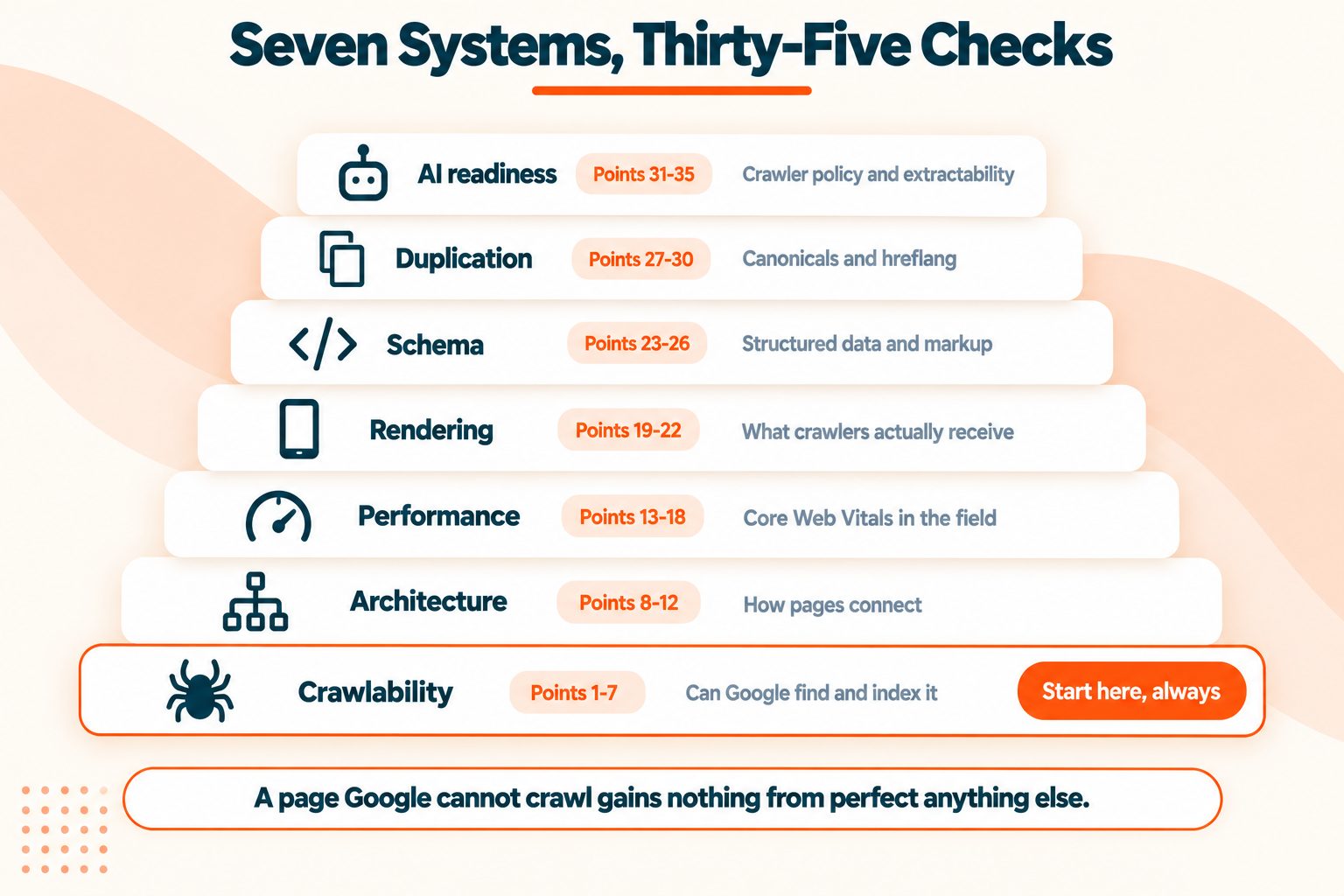
Seven sections, grouped by system. Crawlability, architecture, performance, rendering, structured data, duplication, and AI readiness. Not by priority, since priority depends on your site.
Three size tiers. Small is under 500 pages, medium is 500 to 50,000, large is anything above. Several items only matter past a threshold and are marked accordingly.
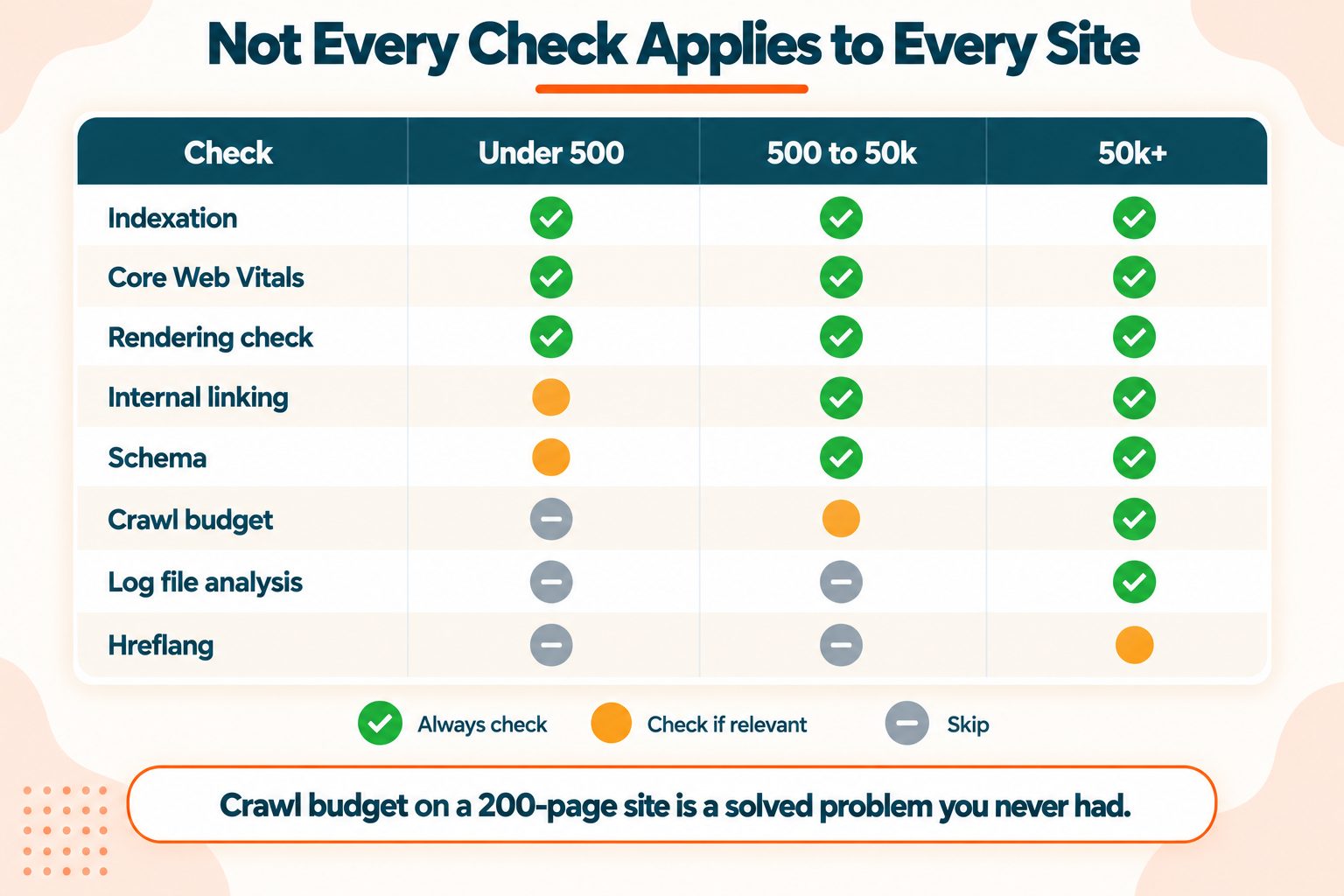
One-time versus ongoing. Some points are setup you do once and forget. Others need a monthly look. Marked throughout.
This assumes you are comfortable in Search Console and can read HTML. If you want the broader version that covers content and keywords alongside the technical side, the SEO checklist for beginners is the one to start with.
Section 1: Crawlability and Indexation
Nothing else on this list matters if Google cannot crawl and index your pages. Start here every time.
1. Confirm your pages are actually indexed
Open the Pages report in Search Console. It splits your URLs into indexed and not indexed, and groups the exclusions by reason.
The reasons matter far more than the count. "Excluded by noindex" is intentional. "Discovered, currently not indexed" means Google found the URL and chose not to crawl it, which usually points at quality or crawl budget. "Crawled, currently not indexed" means it looked and declined.
Run site:yourdomain.com as a sanity check, but treat the Pages report as the real answer.
Ongoing, all sites.
2. Audit your robots.txt
Load yourdomain.com/robots.txt and read it properly rather than assuming it is fine.
Three things to check: nothing important is disallowed, the sitemap line is present and absolute, and no leftover staging rules survived a deployment. A Disallow: / copied from staging removes an entire site from search, and it happens more often than it should.
The robots.txt guide covers the syntax in full, and the Robots.txt Generator builds a clean file if yours has accumulated cruft.
One-time, then check after any deployment.
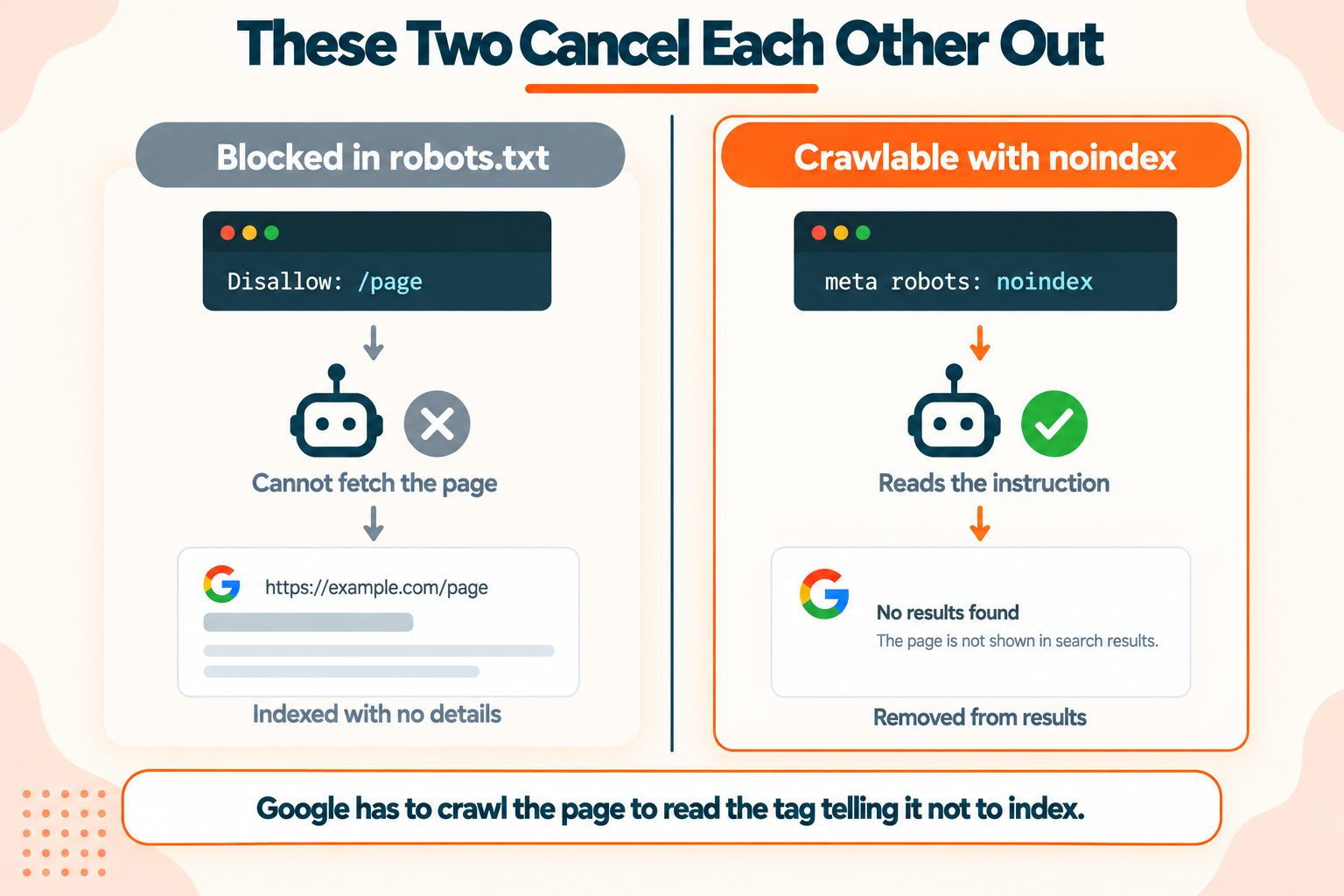
3. Check for the noindex and robots.txt conflict
This one causes more accidental indexing than anything else on the list.
A page blocked in robots.txt cannot have its noindex tag read. Google has to crawl the page to see the instruction, and you blocked the crawl. The URL can then appear in results with no title and no description, which is worse than either outcome you wanted.
To remove a page from search: allow the crawl, let Google read the noindex, wait for it to drop, then block it if you still want to.
One-time audit, then whenever you add exclusions.
4. Submit and validate your XML sitemap
Limits are 50,000 URLs and 50MB uncompressed per file. Above that, use a sitemap index pointing at multiple files.
Only canonical, indexable URLs belong in it. A sitemap containing redirects, 404s, noindexed pages or non-canonical variants sends a confused signal and wastes crawl budget. Submit it in Search Console and check the report for errors rather than assuming acceptance means correctness.
If your CMS does not generate one, the XML Sitemap Generator will.
One-time setup, monthly check.
5. Review your crawl stats
Settings, then Crawl stats in Search Console. Most people never open this and it answers questions nothing else does.
Look at average response time, which should be well under a second. Look at what Googlebot is fetching, since a high proportion of images or JavaScript relative to HTML tells you something. And look at the crawl trend, where a sudden drop usually means a server problem and a spike often means a crawl trap.
Monthly, medium and large sites.
6. Fix crawl errors and soft 404s
Genuine 404s are normal and fine. Two things are not.
Soft 404s return a 200 status for a page with no real content. Google treats them as errors, and because the status says success, nothing surfaces the problem to you. Common on empty search results pages and out-of-stock product pages.
5xx errors are server failures. Even a handful reduce Google's willingness to crawl aggressively.
Ongoing, all sites.
7. Audit crawl budget allocation
Large sites only. Skip this entirely under about 10,000 pages.
Crawl budget is not a problem until it is. On a large site, Googlebot has a finite allocation and you want it spent on pages that matter.
The usual drains: faceted navigation generating millions of parameter combinations, internal search result pages, session IDs in URLs, and calendar pages extending infinitely into the future. Each of these can generate more URLs than your entire real site.
Check crawl stats against your actual page count. If Googlebot is fetching ten times your URL count, something is generating them.
Section 2: Site Architecture and URLs
8. Map your click depth
Every page that matters should sit within three clicks of your homepage. Deeper pages get crawled less often and carry less internal authority.
Run a crawl and sort by depth. Anything important at depth five or more needs a link from somewhere shallower, which usually means a navigation or hub page change rather than a one-off link.
One-time, revisit after structural changes.
9. Audit internal linking
Three things to find:
Orphan pages with no internal links at all. They exist in your sitemap and nowhere else, and they get crawled rarely.
Pages with a single inbound link, which are nearly orphans.
Whether your most important pages receive the most links. Frequently they do not, because navigation and footers distribute links evenly regardless of importance.
One-time audit, quarterly review.
10. Standardise your URL structure
Lowercase, hyphens between words, readable, and no parameters that do not need to be there.
Fix these before pages earn links. Changing a URL later means a redirect and a small permanent loss of whatever the old one accumulated. It is far cheaper to get right early than to correct.
One-time, then enforce on new pages.
11. Resolve your canonical domain version
Your site can technically respond at four addresses: with and without www, over http and https. Pick one, redirect the other three, and verify all four actually resolve where you think.
Test each variant by hand. A surprising number of sites redirect three of the four correctly and leave one serving a duplicate.
One-time, verify after any hosting change.
12. Eliminate redirect chains
Every hop is an extra round trip before anything renders, and chains dilute the signals passing through them.
Nothing should need more than one redirect. If A points to B which points to C, repoint A directly at C. Redirect loops are worse and will remove a page from the index entirely.
One-time audit, check after migrations.
Section 3: Performance and Core Web Vitals
Performance is a confirmed ranking signal and a large enough topic to have its own guide. Page speed and SEO covers the strategy; these are the audit points.
13. Check field data, not lab scores
Open the Core Web Vitals report in Search Console. That is field data from real Chrome users at the 75th percentile over 28 days, and it is what feeds the ranking signal.
A PageSpeed Insights score is lab data. Useful for diagnosis, not for assessment. A page can score 94 in the lab and fail in the field, and both numbers are accurate.
Mobile and desktop are assessed separately. Mobile is where nearly everyone fails.
Monthly, all sites.
14. Identify your LCP element per template
Not per page. Search Console groups similar URLs when individual pages lack data, so you are usually fixing a template rather than a URL.
Run PageSpeed Insights on one representative URL from each failing group. It names the LCP element explicitly, and it is frequently not the element you assumed.
Then split the LCP into its four sub-parts to find out where the time goes. The Core Web Vitals guide covers that breakdown in detail.
Quarterly, or after template changes.
15. Audit INP on interactive pages
Interaction to Next Paint replaced First Input Delay in March 2024, and it is harder because it measures every interaction rather than just the first.
It is also harder to diagnose, because the metric gives you a number without telling you which interaction caused it. Attribution is the only practical route.
Focus on pages with real interactivity: filters, forms, search, carousels. Static content pages rarely fail this.
Quarterly, interactive templates only.
16. Resolve cumulative layout shift
Usually the cheapest of the three to fix and the right place to start if you are failing more than one.
Width and height attributes on every image and video resolves most of it. Then reserved space for ads and embeds, then font loading behaviour, then never injecting content above existing content after load.
One-time per template, verify in the field after.
17. Optimise your images
Almost always the largest single performance win available.
Four checks: images sized to the dimensions they actually display, compressed, served in a modern format, and lazy-loaded below the fold but never above it.
Resize them to the displayed dimensions first, then compress. Doing it in that order gives a better result than the reverse.
One-time sweep, then enforce on upload.
18. Enable compression and minification
Check the Content-Encoding response header in your Network tab. br is Brotli, gzip is gzip, and nothing at all means compression is not configured, which is a bigger problem than unminified files.
Then minify. The minification guide explains why you want both, since they work on different kinds of redundancy. The HTML, CSS and JavaScript minifiers handle one-off files; a build step handles it permanently.
One-time server config, then automatic.
Section 4: Mobile and Rendering
19. Verify mobile and desktop parity
Google indexes the mobile version. If your mobile site has less content, fewer internal links, or missing structured data, that reduced version is what gets indexed.
Compare the two directly: body content, internal links, headings, meta tags, structured data. Anything present on desktop and absent on mobile is effectively invisible.
One-time, verify after redesigns.
20. Test on an actual device
Not a resized browser window. A real phone on a real connection.
Check tap target spacing, text readability without zooming, horizontal overflow, and whether any interstitial covers the content. Emulators miss most of these.
One-time per template.
21. Check how your page renders without JavaScript
The most consequential rendering check on this list, and the one most often skipped.
View the raw HTML your server returns, before any JavaScript executes. The Online HTML Viewer shows exactly that.
What to look for: is your main content there? Are your internal links there as real anchor tags? Are your title, meta description and canonical present? If any of those appear only after scripts run, you are relying on Google's rendering queue, which is slower and less reliable than the initial crawl.
One-time per template, recheck after framework changes.
22. Audit your client-side rendering exposure
Following on from point 21, quantify how much of your site depends on JavaScript execution.
Googlebot renders JavaScript, but it does so on a delay and not always completely. AI crawlers are considerably worse at it than Googlebot, which makes this point matter twice over now. More on that in section 7.
Server-side render anything that matters for discovery: content, links, and meta tags.
One-time assessment, then an architectural decision.
Section 5: Structured Data and Markup
23. Validate your schema
Two tools, and they answer different questions. The Rich Results Test tells you whether Google can use your markup for a rich result. The Schema Markup Validator tells you whether the markup is valid at all.
Fix errors. Warnings are usually optional properties and can wait.
Schema.org is the vocabulary itself, maintained collaboratively by the major search engines.
One-time per template, revalidate after changes.
24. Match schema type to page type
Article for posts, Product for products, FAQPage for genuine FAQs, HowTo for processes, BreadcrumbList for navigation, Organization sitewide.
Wrong markup is worse than none. FAQPage on a page with no FAQ, or Product on a category listing, misrepresents the page and risks losing rich results entirely.
One-time per template.
25. Check your schema is honest
Markup must describe what is visibly on the page. Review markup without visible reviews, or a price in schema that differs from the price displayed, is a manual action risk rather than a clever shortcut.
One-time audit, spot check quarterly.
26. Audit your meta tags at scale
Crawl the site and pull every title, meta description, canonical and Open Graph tag into one view. Sort for duplicates, missing values, and anything over or under length.
Duplicates are the most common finding and the most common cause of Google rewriting your titles. The meta title guide and meta description guide cover what good looks like, and the Meta Tag Analyzer checks individual pages.
Quarterly.
Section 6: Duplication and International
27. Find your duplicate content
The usual sources: URL parameters creating variants of the same page, print versions, pagination, HTTP and HTTPS both resolving, trailing slash inconsistency, and staging environments leaking into the index.
Search site:yourdomain.com for a distinctive phrase from a key page. More than one result means you have variants competing with each other.
One-time audit, quarterly check.
28. Verify canonical tags resolve correctly
Four rules, and sites break at least one of them regularly.
Canonical pages should point at themselves. Duplicates should point at the canonical. A canonical should never point at a redirect, and never at a noindexed page.
Check a sample by hand rather than trusting the CMS.
One-time audit, spot check after changes.
29. Audit your pagination handling
rel="next" and rel="prev" were retired as an indexing signal years ago and plenty of sites still implement them.
What works now: each paginated page canonical to itself rather than to page one, with clear internal links between pages. Canonicalising everything to page one hides the deeper content entirely.
One-time, paginated sections only.
30. Check hreflang implementation
Multi-region and multi-language sites only. Skip otherwise.
Three failure modes: missing return tags, where page A references B but B does not reference A; wrong language or region codes; and no x-default for unmatched visitors.
Hreflang is unusually unforgiving. A one-directional reference is simply ignored.
Section 7: AI Search Readiness
The same content Google crawls now also feeds AI systems generating answers. This is not a separate discipline, and most of what serves one serves the other. Where they diverge, it is mostly about rendering and structure.
31. Decide your AI crawler policy
GPTBot, ClaudeBot, CCBot, PerplexityBot, Bytespider and others crawl for training and for answering questions.
Blocking them is a business decision, not a technical one. Training crawlers collect content to improve models. Search crawlers surface your content in AI answers, sometimes with attribution and a link, which is a traffic source rather than only a cost.
A reasonable middle position for most publishers: block the pure training crawlers, allow the ones that surface content with a link. The robots.txt guide has the full user-agent table and the copy-paste rules.
One-time decision, revisit quarterly as new crawlers appear.
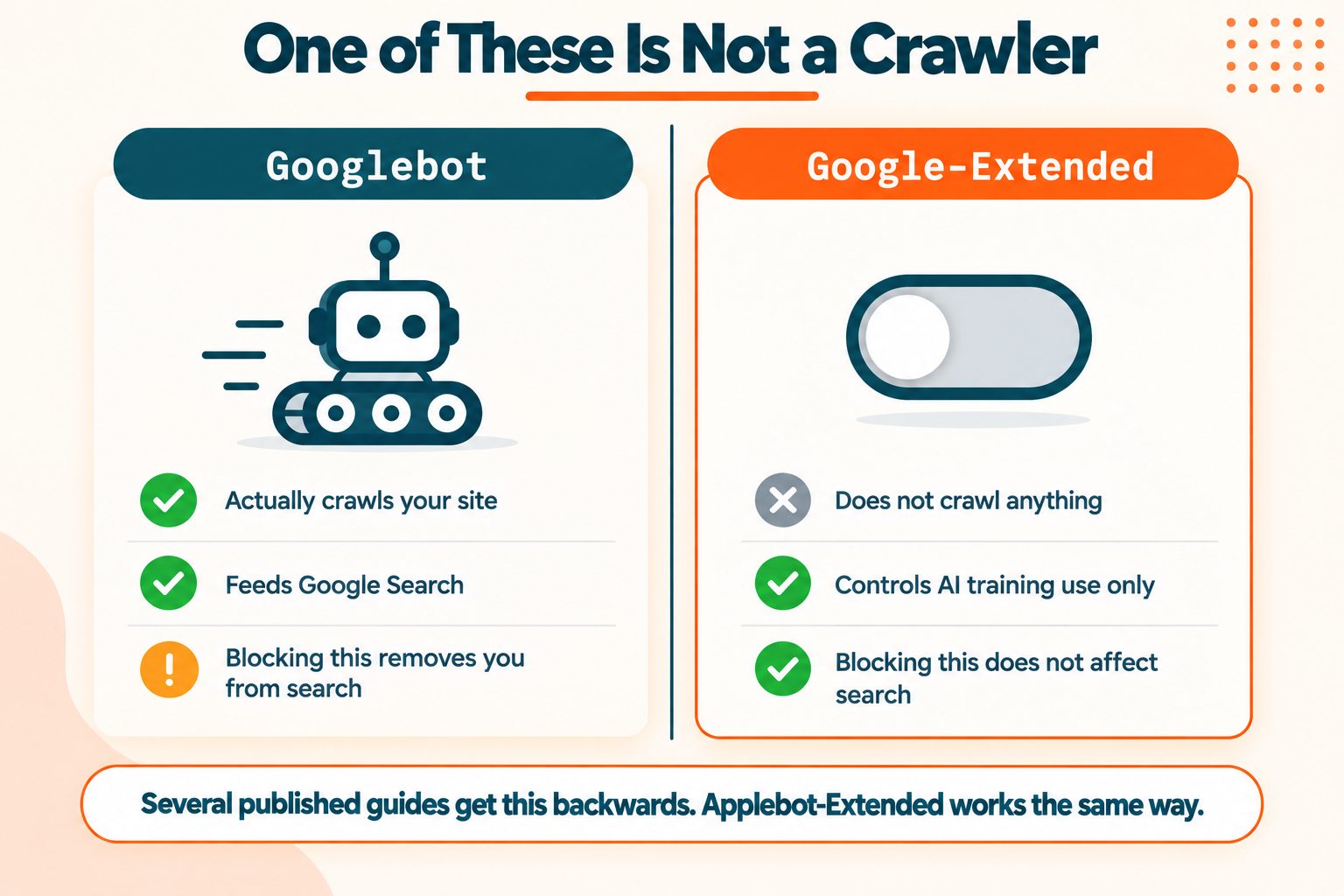
32. Understand the control tokens
Google-Extended and Applebot-Extended are not crawlers. They are control tokens.
Blocking them opts your content out of AI training without affecting how Googlebot or Applebot crawl for search. Several published guides state or imply that blocking Google-Extended harms search visibility. It does not, and that distinction is the difference between an informed policy and an expensive mistake.
One-time, part of point 31.
33. Serve clean, server-rendered HTML
Point 21 again, and it matters more here.
AI retrieval systems are generally less capable at executing JavaScript than Googlebot. Content that appears only after hydration may be invisible to them entirely. If AI visibility matters to you, server-side rendering stops being a performance preference and becomes a requirement.
Architectural.
34. Make your content extractable
AI systems parse structure, so structure is worth getting right.
Clear heading hierarchy with no skipped levels. Answers placed immediately after the question rather than three paragraphs later. Real tables marked up as tables rather than as styled divs. Lists as lists. Definitions stated plainly near the top of a section.
Good structure has always helped readers. It now also determines whether a system can lift an accurate answer from your page.
Ongoing, content practice.
35. Check your entity and brand signals
This is how AI systems work out what your site is and whether to trust it.
Organization schema sitewide with consistent naming. An About page that states plainly what you do. Consistent business name, address and details across the web. Author information on content where expertise matters.
Google Search Essentials sets out what Google expects, and those expectations largely carry across.
One-time setup, annual review.
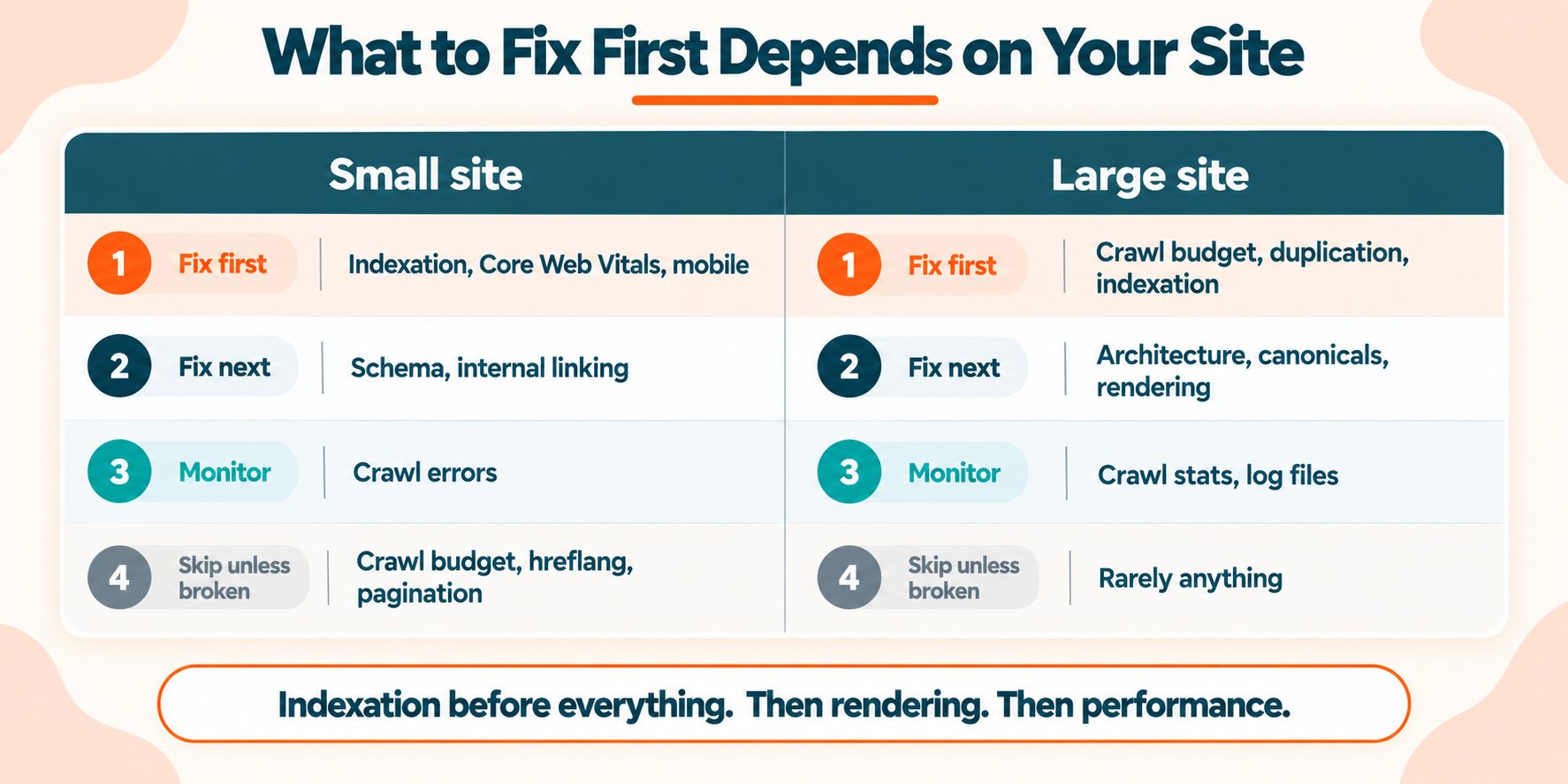
How to Prioritise What You Find
A completed audit produces a long list, and the list is not the hard part. Deciding what to do first is. If the list has to reach a client or a developer, the free SEO report generator can produce an audit you download as a PDF, a client-ready SEO report to send along with your list.
| Small site | Large site | |
|---|---|---|
| Fix first | Indexation, Core Web Vitals, mobile | Crawl budget, duplication, indexation |
| Fix next | Schema, internal linking | Architecture, canonicals, rendering |
| Monitor | Crawl errors | Crawl stats, log files |
| Skip unless broken | Crawl budget, hreflang, pagination | Rarely anything |
One rule sits above the table: indexation before everything else.
A page Google cannot crawl gains nothing from perfect Core Web Vitals. A page excluded by a stray noindex gains nothing from flawless schema. Work in the order things break, which means discovery first, rendering second, performance third, and refinement after that.
The Tools You Need
Search Console and Bing Webmaster Tools, both free, cover most of this list between them. Bing's webmaster guidelines are worth a read, since a second search engine's perspective catches things Google's documentation does not emphasise.
A crawler for architecture, duplication and meta tags at scale. This is the one place a paid tool saves real time on a large site.
Browser dev tools for rendering and performance diagnosis.
A free site audit for the first pass, to surface the obvious before you go looking for the subtle. Run one here and work down what it finds.
Paid crawlers are worth it at scale. Nothing on this list requires one.
Wrapping Up
The sequence matters more than the list.
Indexation first. Confirm Google can crawl and index what you want indexed, and is not indexing what you do not.
Rendering second. Check what your server actually returns before JavaScript runs. This one point affects both search and AI visibility.
Performance third. Field data, at the template level, mobile first.
Everything else after that. Schema, duplication, hreflang and the rest are refinements on a foundation that has to be sound first.
Run the full list once or twice a year. Check indexation, Core Web Vitals and crawl errors monthly. And run the whole thing again after any migration, because migrations break more technical SEO than anything else.
Frequently Asked Questions
Frequently Asked Questions (FAQs) is a list of common questions and answers provided to quickly address common concerns or inquiries.
What is technical SEO?
The work of making a site crawlable, indexable, fast and correctly structured, so search engines can find, understand and rank the content on it.
What should a technical SEO audit include?
Crawlability and indexation, site architecture, performance, mobile and rendering, structured data, duplication handling, and increasingly AI crawler policy.
How often should I run a technical SEO audit?
A full audit once or twice a year. Monthly checks on indexation, Core Web Vitals and crawl errors. Immediately after any migration or redesign.
What is the difference between technical and on-page SEO?
Technical SEO makes pages accessible and understandable to crawlers. On-page SEO makes individual pages relevant to queries. They overlap on meta tags and structure.
What are the most important technical SEO factors?
Indexation first, then rendering, then Core Web Vitals. A page that cannot be crawled or indexed gains nothing from any other improvement.
Can I do technical SEO myself?
Most of this list, yes. Search Console and browser dev tools cover the majority. Rendering architecture and crawl budget on large sites usually need a developer.
What is crawl budget and does it affect my site?
The crawling resource Google allocates to your site. It rarely matters under about 10,000 pages and becomes decisive on very large sites.
How long does a technical SEO audit take?
A small site takes a day. A large site takes a week or more, and the remediation always takes longer than the audit.
What tools do I need?
Search Console, Bing Webmaster Tools and browser dev tools cover most of it free. A crawler helps at scale but is not required to start.